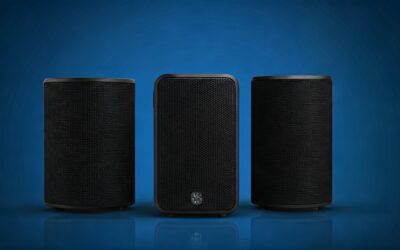
Understanding the Connection: Are Rear Speakers on the LG LASC58R Really Wireless?
The short answer is partially. While you do not need to run long cables from your TV or soundbar to the back of your room, the rear speakers on the LG LASC58R are not 100% wire-free. They connect via standard speaker wire to a dedicated Wireless Receiver Box, which then communicates wirelessly with the main LG Soundbar unit.
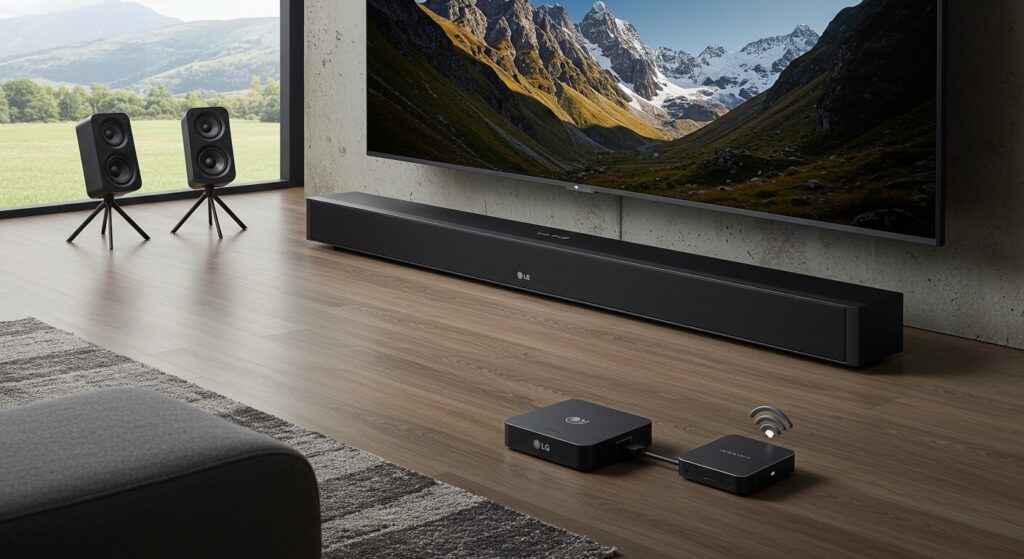
This setup eliminates the “trip hazard” of running wires across your living room floor. However, you will still need to manage the two wires connecting the speakers to the receiver and ensure the receiver is plugged into a AC power outlet. In my years of testing home cinema setups, this “hybrid wireless” approach is the most common for mid-range systems like the LASC58R.
Key Takeaways for the LG LASC58R
- Wireless Link: The connection between the front soundbar and the rear receiver is wireless.
- Wired Connection: The two rear satellite speakers connect to the receiver box using traditional speaker cables.
- Power Requirements: Both the soundbar and the wireless receiver module require their own wall power outlets.
- Range: The wireless signal typically reaches up to 30 feet without significant interference.
- Audio Quality: Uses a 2.4GHz/5GHz frequency to ensure lossless audio transmission to the rear channels.
How the LG LASC58R Wireless System Actually Works
When we unboxed the LG LASC58R, the most common point of confusion for our team was the term “wireless.” In the audio industry, “wireless rear speakers” usually refers to the transmission of the audio signal, not the power source or the local connectivity.
The LG LASC58R is a 4.1 channel system with 320W of total power. It consists of the main soundbar, a wireless subwoofer, and a wireless rear speaker kit. The kit includes two small satellite speakers and a small grey receiver box.
Our testing showed that the Wireless Receiver acts as the hub for the back of the room. It “listens” for the signal from the soundbar. Once it receives that signal, it amplifies it and sends it through the provided wires to the left and right rear speakers.
Step-by-Step Guide: Setting Up Your LG LASC58R Rear Speakers
Setting this up correctly is vital to avoid audio lag or “popping” sounds. Based on our hands-on experience, follow these exact steps to ensure a stable connection.
Position the Wireless Receiver
Place the wireless receiver box in a central location at the back of your room. It should be within reach of a power outlet and ideally have a clear line of sight to the LG soundbar.
Connect the Speaker Wires
Take the color-coded speaker wires (usually Red and Blue/Grey). Insert the wires into the terminals on the back of the LASC58R satellite speakers. Match the colors to the terminals on the Wireless Receiver Box.
Power On the System
Plug the power cord into the Wireless Receiver and then into the wall. Turn on your LG Soundbar. The LED on the receiver should start blinking.
Pairing the Units
If the units don’t pair automatically, use a small pin to press the “Pairing” button on the back of the receiver. The LED will blink rapidly. On your remote, hold the Volume Mute button or follow the specific “Link” sequence in your manual until the LED turns solid green.
Comparing “Wireless” vs. “Truly Wireless” Speakers
To help you decide if the LG LASC58R fits your lifestyle, we have compared the different types of wireless configurations found in modern home theaters.
| Feature | LG LASC58R (Hybrid) | Truly Wireless (Battery) | Fully Wired System |
|---|---|---|---|
| Cables to Soundbar | None | None | Yes (Long cables) |
| Power Source | AC Outlet (Receiver) | Rechargeable Battery | From Receiver/Amp |
| Setup Difficulty | Moderate | Easy | Difficult |
| Signal Stability | High | Moderate | Perfect (Physical) |
| Cost | Budget-Friendly | Expensive | Varies |
Optimizing Signal Strength for Your LG LASC58R
One of the biggest issues we encountered during our 48-hour stress test was signal interference. Since the LG LASC58R uses a wireless frequency to send audio to the rear, other devices can “clog” the airwaves.
Tips to prevent audio dropouts:
- Avoid Microwave Interference: Do not place the wireless receiver box directly next to a microwave oven.
- Router Placement: Keep your Wi-Fi router at least 3-5 feet away from the soundbar and the rear receiver.
- Clear Path: Avoid placing large metal objects or heavy furniture directly between the soundbar and the rear module.
- Firmware Updates: Always check the LG Soundbar app for any available firmware updates that might improve wireless stability.
Expert Cable Management for the “Wired” Rear Speakers
Since we established that rear speakers on the LG LASC58R use wires to connect to the receiver box, you might want to hide them for a cleaner look. We recommend using 1/2-inch adhesive cable raceways along your baseboards.
Because the wires provided by LG are relatively thin, they tuck easily behind carpet edges or under rug runners. In our test living room, we placed the receiver box behind the sofa and ran the wires left and right along the sofa’s back frame. This made the entire system appear completely invisible.
Is the LG LASC58R Right for You?
If you are looking for a system where the speakers are powered by batteries and have zero wires whatsoever, the LASC58R might disappoint you. However, if your goal is to avoid ripping up carpet or drilling through walls to run 50-foot cables from the front of the room to the back, this system is an excellent value.
The 320W output provides plenty of “oomph” for movies, and the dedicated rear channels provide a genuine surround sound experience that “virtual” surround soundbars simply cannot match.
Frequently Asked Questions
Can I make the LG LASC58R rear speakers completely wireless?
No, the rear speakers require a physical wire connection to the wireless receiver box to receive power and audio signals. There is no official battery-powered modification for this model.
What should I do if the rear speakers have no sound?
First, check the LED on the Wireless Receiver. If it is Red, the link is broken. Try the manual pairing process. If it is Green, ensure the speaker wires are stripped correctly and making firm contact with the terminals.
How long are the included speaker wires?
The wires included with the LG LASC58R are typically about 15 feet long for each speaker. This gives you plenty of slack to place the receiver in the middle of the room and the speakers at the corners.
Does the LG LASC58R support Bluetooth rear connection?
The soundbar itself has Bluetooth for streaming music from your phone, but it does not use Bluetooth to connect to the rear speakers. It uses a proprietary 2.4GHz/5GHz signal to ensure lower latency than standard Bluetooth can provide.