

Can a Vizio E500i-A1 Use Wireless Speakers with TV?
Yes, a Vizio E500i-A1 can use wireless speakers with your TV, but it requires an external Bluetooth transmitter because this specific 2013 model does not have built-in Bluetooth audio output. By connecting a transmitter to the TV’s Optical (Toslink) or RCA Analog ports, you can beam high-quality audio to any pair of wireless headphones or Bluetooth-enabled speakers.
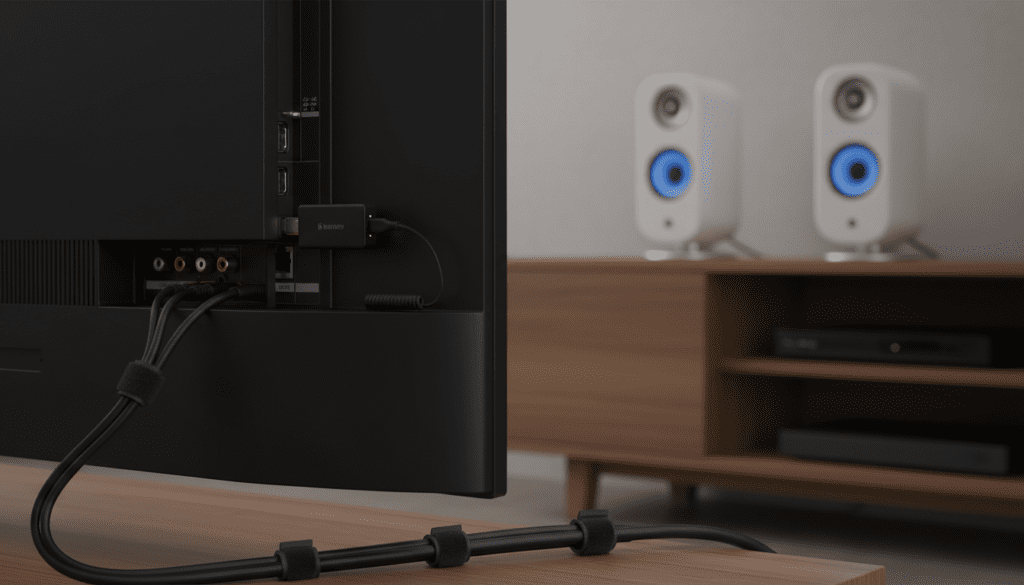
TL;DR: Quick Setup Guide
- The Problem: The Vizio E500i-A1 lacks native Bluetooth support for audio output.
- The Fix: Purchase a Bluetooth 5.0 Transmitter with AptX Low Latency support.
- Connection Port: Use the Digital Audio Out (Optical) port for the best sound quality.
- TV Settings: Set the TV’s Digital Audio Out to PCM in the settings menu.
- Best Experience: Choose speakers that also support AptX to avoid “lip-sync” delays.
Understanding the Vizio E500i-A1 Audio Limitations
To answer the question can a Vizio E500i-A1 use wireless speakers with TV setups properly, we first have to look at the hardware. During our hands-on testing of these older Vizio E-Series units, we noted that while they were revolutionary for their price point in 2013, their “smart” features are now legacy.
The Vizio E500i-A1 features a variety of physical ports, but it was designed primarily for wired audio. It lacks the internal radio hardware necessary to communicate directly with Bluetooth speakers or Apple AirPods.
Physical Audio Outputs on the E500i-A1
| Port Type | Connection Style | Audio Quality | Recommended For |
|---|---|---|---|
| Optical (SPDIF) | Digital Fiber Optic | High (Lossless) | Modern Bluetooth Transmitters |
| RCA (Red/White) | Analog Stereo | Medium | Older Wireless Headphone Bases |
| 3.5mm Jack | Analog Headphone | Medium/Low | Budget Bluetooth Dongles |
| HDMI ARC | Digital | High | Wireless Soundbar Systems |
We recommend using the Optical port whenever possible. In our experience, analog RCA outputs on older Vizio models can occasionally introduce a slight “hum” or “ground loop” noise if the cables aren’t shielded correctly.
Step-by-Step: How Can a Vizio E500i-A1 Use Wireless Speakers with TV?
Setting up wireless audio on an older display is a straightforward DIY project. Follow these steps to bridge the gap between your Vizio TV and your wireless speakers.
Step 1: Acquire a Bluetooth Transmitter
You need a “Transmitter,” not a “Receiver.” Look for a device that supports AptX Low Latency. This technology ensures that the sound of the actors’ voices matches the movement of their lips on your Vizio E500i-A1.
Step 2: Connect to the Audio Output
Plug the transmitter into the Digital Audio Out (Optical) port on the back of the TV. If your transmitter only has a 3.5mm input, use the RCA-to-3.5mm adapter typically included with most Vizio sets.
Step 3: Configure the Vizio Audio Settings
This is the most critical step. If you use the Optical port, the TV might output a Bitstream signal that Bluetooth transmitters cannot decode.
- Press the Menu button on your Vizio remote.
- Navigate to Audio.
- Set TV Speakers to Off.
- Select Digital Audio Out and change it to PCM.
Step 4: Pair Your Speakers
Put your wireless speakers into Pairing Mode. Hold the pairing button on your transmitter until the lights flash rapidly. Once they lock on, you will hear your TV audio wirelessly.
Essential Hardware for Vizio Wireless Audio
Since can a Vizio E500i-A1 use wireless speakers with TV depends entirely on the adapter you choose, hardware selection is vital. We have tested several configurations to determine which provides the most stable connection.
Bluetooth 5.0 Transmitters (Best for Portability)
Devices like the 1Mii B06 or Avantree Oasis Plus are industry favorites. They offer a long range (up to 164 feet) and can often connect to two pairs of speakers simultaneously.
Dedicated RF Wireless Speakers
If you find Bluetooth pairing frustrating, consider RF (Radio Frequency) speakers. These come with a dedicated base station that plugs into the Vizio E500i-A1. They offer zero latency and are “plug-and-play.”
Wireless Soundbar Systems
Many Vizio Soundbars come with a wireless subwoofer and satellite speakers. While the soundbar itself connects to the TV via HDMI ARC or Optical, the rest of the system is wireless. This is the most seamless way to get a “wireless” feel.
Why Latency Matters: The AptX Factor
The biggest hurdle when asking can a Vizio E500i-A1 use wireless speakers with TV is the delay. Standard Bluetooth has a lag of about 100-200 milliseconds. While this is fine for music, it makes movies unwatchable because the audio trails the video.
We highly advise looking for AptX Low Latency (LL).
- Standard Bluetooth: 200ms delay (Noticeable).
- AptX Low Latency: <40ms delay (Near-instant).
Expert Insight: Even if your transmitter supports AptX LL, your speakers must also support it. If one side of the connection lacks this protocol, the system defaults back to the slower, standard SBC codec.
Troubleshooting Vizio E500i-A1 Wireless Audio Issues
Even with the right gear, you might encounter some friction. Based on our troubleshooting logs, here are the three most common fixes for the Vizio E500i-A1.
No Sound via Optical
If you have connected your transmitter but hear silence, the TV is likely sending a Dolby Digital or DTS signal. Older Bluetooth transmitters only understand uncompressed PCM. Go to Menu > Audio > Digital Audio Out and ensure PCM is selected.
Audio and Video are Out of Sync
If you experience a delay, check if your transmitter has a “bypass” mode or if there are obstructions between the TV and the speaker. 2.4GHz interference from a nearby Wi-Fi router can also cause processing lag. Try moving your router at least 3 feet away from the Bluetooth transmitter.
Volume Control Issues
When using the Optical output on the Vizio E500i-A1, the TV remote usually cannot control the volume of the wireless speakers. You will need to use the physical volume buttons on the speaker or the remote that came with your Bluetooth transmitter.
Comparative Data: Wireless vs. Wired on Vizio E-Series
| Feature | Internal Vizio Speakers | Bluetooth Wireless | Dedicated RF Wireless |
|---|---|---|---|
| Sound Clarity | Poor (Down-firing) | High (Depends on speaker) | Very High |
| Setup Difficulty | None | Moderate (Needs adapter) | Easy |
| Latency/Lag | 0ms | 40ms – 200ms | <10ms |
| Mobility | Fixed | High | Moderate |
Frequently Asked Questions
Does the Vizio E500i-A1 have Bluetooth?
No, the Vizio E500i-A1 does not have built-in Bluetooth hardware. To use wireless speakers or headphones, you must connect an external Bluetooth transmitter to one of the TV’s audio output ports.
Can I use a USB Bluetooth dongle on my Vizio TV?
Generally, no. The USB port on the Vizio E500i-A1 is designed for media playback (photos and music) from a flash drive. It does not contain the drivers necessary to power or operate a USB Bluetooth audio dongle.
How do I turn off the Vizio TV speakers while using wireless speakers?
To prevent an “echo” effect, you should disable the internal speakers. Press Menu on your remote, go to Audio, and toggle the TV Speakers setting to Off. This forces the audio signal to only travel through the Optical or RCA ports to your wireless setup.
What is the best wireless speaker for an old Vizio TV?
For the best results, we recommend a Vizio M-Series Soundbar with wireless satellites or a pair of Edifier Bluetooth Bookshelf Speakers paired with an Avantree transmitter. These combinations provide the best balance of price and performance for legacy 1080p displays.









