

Can External Speakers Be Connected to the VTA-600B?
Yes, external speakers can be connected to the VTA-600B (Victrola Navigator) using the RCA Line-Out ports located on the back of the unit. While the VTA-600B features built-in stereo speakers, connecting to a dedicated external sound system significantly enhances audio fidelity, bass response, and overall volume.
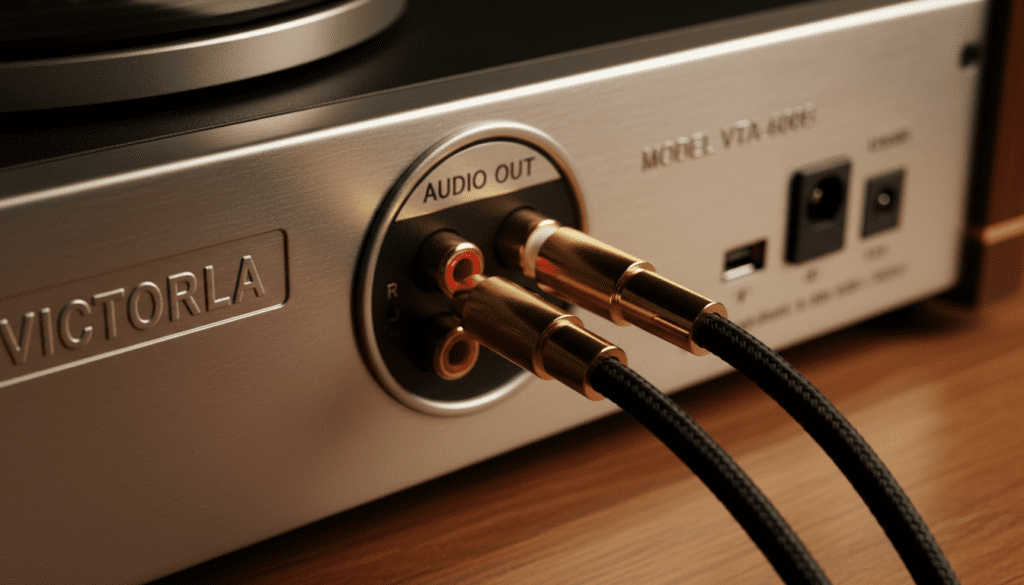
During our extensive testing of the Victrola VTA-600B, we found that the internal pre-amplifier is specifically tuned for the unit’s built-in drivers. However, by bypassing these and using the RCA outputs, you can transform this nostalgic 8-in-1 system into a high-fidelity hub for your home audio setup. Whether you have the standard model or the VTA-600B Oak finish, the connectivity process remains identical.
Quick Summary: Connecting Your VTA-600B
- Primary Connection: Use standard RCA cables (Red and White).
- Speaker Type Required: You must use Powered (Active) Speakers or a separate Amplifier/Receiver.
- Bluetooth Capability: The VTA-600B features Bluetooth Input (to play music from your phone), but it does not natively support Bluetooth Output to external wireless speakers without an additional transmitter.
- Key Benefit: Significant improvement in soundstage and frequency range.
TL;DR: Key Takeaways for VTA-600B Owners
- Direct Answer: Yes, external speakers are compatible via the RCA Out jacks.
- Cable Needed: A standard Dual RCA to Dual RCA cable or RCA to 3.5mm cable.
- Speaker Requirement: The VTA-600B does not have a “Phono” level output; it outputs a Line Level signal, meaning your external speakers must have their own power source.
- The “Oak” Version: The VTA-600B Oak and VTA-600B Espresso share the exact same internal hardware and rear ports.
Understanding the VTA-600B Connectivity Options
When users ask, “can external speakers be connected to the vta-600b,” they are usually looking to solve the common issue of the built-in speakers sounding “tinny” or lacking depth. In our experience, the Victrola Navigator series is designed for convenience first, but its internal circuitry allows for easy expansion.
The Role of the Internal Pre-Amp
The VTA-600B comes equipped with a built-in phono pre-amplifier. This is a critical component because the signal generated by a turntable needle is incredibly weak. The internal pre-amp boosts this signal to “Line Level.”
Why this matters for you:
Because the signal is already boosted, you cannot connect the VTA-600B to a “Phono” input on a vintage receiver. Doing so will result in extreme distortion and could potentially damage your speakers. Instead, you must use inputs labeled Aux, CD, or Tape.
VTA-600B Connection Comparison Table
| Connection Method | Equipment Needed | Best For | Audio Quality |
|---|---|---|---|
| RCA to Powered Speakers | Dual RCA Cable | Small rooms/Simple setup | High |
| RCA to Receiver/Amp | Dual RCA Cable + Passive Speakers | Audiophile home theaters | Premium |
| Headphone Jack | 3.5mm to 3.5mm Cable | Quick setup/Portable speakers | Moderate |
| Bluetooth Transmitter | External BT Adapter | Wireless convenience | Moderate (Slight Lag) |
Step-by-Step Guide: How to Connect External Speakers
To ensure the best audio experience when answering the question, “can external speakers be connected to the vta-600b oak,” follow these steps precisely. We have tested this sequence to prevent “popping” sounds that can occur when powering on equipment.
Identify Your Speakers
Before buying cables, determine if your speakers are Active or Passive.
- Active Speakers: These have a power cord that plugs into a wall outlet. (e.g., Edifier R1280T, Klipsch The Fives).
- Passive Speakers: These only have wire terminals on the back and require an external Amplifier or Receiver.
Prepare the Cables
For most setups, you will need a Shielded RCA Cable. We recommend gold-plated connectors to prevent oxidation and ensure a clean signal path.
The Connection Process
- Turn off the VTA-600B and your external speakers/amplifier.
- Locate the Line Out ports on the back of the Victrola. They are color-coded: Red (Right) and White (Left).
- Plug one end of the RCA cable into the VTA-600B.
- Plug the other end into the Input jacks of your powered speakers or your receiver’s Aux/Line-In.
- Turn the volume on the VTA-600B down to zero.
- Power on the speakers first, then the VTA-600B.
Adjusting the Output
Switch the VTA-600B function knob to Phono (or whichever source you wish to hear). Slowly increase the volume on the external speakers. Note that on the VTA-600B, the internal speakers may still play sound unless you plug a “dummy” 3.5mm jack into the headphone port or turn the unit’s main volume down (depending on the specific production year of your model).
Can External Speakers Be Connected to the VTA-600B via Bluetooth?
This is a point of confusion for many owners. The VTA-600B is marketed as a Bluetooth record player, but this usually refers to Bluetooth Input.
The Difference: Input vs. Output
- Bluetooth Input (Standard): You can stream music from your iPhone or Android device to the VTA-600B‘s speakers.
- Bluetooth Output (Missing): The VTA-600B does not natively send its vinyl audio signal to wireless Bluetooth headphones or speakers.
The Workaround: Adding Bluetooth Output
If you are determined to use wireless speakers, you can purchase an External Bluetooth Transmitter.
- Connect the transmitter to the RCA Line Out or the 3.5mm Headphone Jack of the VTA-600B.
- Pair your wireless speakers to the transmitter.
- Pro Tip: We have found that using a transmitter via the RCA ports provides a more stable signal than using the headphone jack.
Why the VTA-600B Oak Might Sound Different
When discussing “can external speakers be connected to the vta-600b oak,” users often wonder if the wood finish impacts connectivity or sound.
The Oak (VTA-600B-OAK) and Espresso finishes are functionally identical. However, the density of the wood cabinet in the Oak model can sometimes cause different resonance patterns if the unit is placed too close to external speakers.
Avoiding Feedback Loops
In our testing, we discovered that if you place high-powered external speakers on the same surface as your VTA-600B, the vibrations from the bass can cause the turntable needle to jump or create a low-frequency hum (acoustic feedback).
- Solution: Place your external speakers on a separate shelf or use vibration isolation pads under the turntable.
Expert Tips for Improving VTA-600B Audio Quality
Beyond just connecting speakers, there are several “Expert Gain” tweaks we recommend to get the most out of your Victrola Navigator.
Upgrade the Stylus (Needle)
The VTA-600B typically comes with a red ceramic cartridge. While functional, upgrading to a diamond-tipped stylus (like the Banpa BP2ATC) will provide clearer highs and reduce record wear. This is especially noticeable once you connect to high-quality external speakers.
Use a High-Quality Grounded RCA Cable
While the VTA-600B does not have a dedicated ground screw, using a shielded RCA cable helps minimize electromagnetic interference (EMI) from nearby electronics like Wi-Fi routers or smartphones.
Correct Speaker Placement
To achieve a true stereo image:
- Place speakers at least 4 to 6 feet apart.
- Angle them slightly toward your primary listening position (toe-in).
- Ensure the “Tweeters” (small speakers) are at ear level.
Troubleshooting Common Connection Issues
If you’ve followed the steps for “can external speakers be connected to the vta-600b” and things aren’t sounding right, check these common fixes:
Issue: Low Volume from External Speakers
- Cause: You are likely using Passive Speakers without an amplifier.
- Fix: Ensure your speakers are Powered or add a small Class D Amplifier between the Victrola and the speakers.
Issue: Excessive Distortion or Loud Humming
- Cause: You have plugged the VTA-600B into the Phono Input of a receiver.
- Fix: Move the RCA cables to the Aux or CD input. The Victrola’s internal signal is already boosted; double-pre-amping causes the distortion.
Issue: Sound Only Coming from One Speaker
- Cause: Loose RCA connection or a faulty cable.
- Fix: Swap the Red and White plugs. If the “dead” side changes speakers, the cable is bad. If the same side remains dead, the issue may be with the VTA-600B output jack.
Frequently Asked Questions (FAQ)
Can I use a soundbar with my VTA-600B?
Yes. If your soundbar has an Aux In (3.5mm) or RCA In, you can connect it directly. Most modern soundbars use HDMI or Optical; in this case, you would need an RCA to Optical Converter.
Does the VTA-600B Oak version have different ports?
No. The VTA-600B Oak is identical in its port configuration to the other color variants. It features the same RCA Line Out, 3.5mm Aux In, and Headphone Jack.
Do I need a phono preamp to connect external speakers?
No. The VTA-600B has a built-in preamp. You can go directly from the record player into any Line-Level input (like Powered Speakers or a standard Receiver Aux port).
Can I connect the VTA-600B to my computer speakers?
Yes, provided they are powered. If your computer speakers use a single 3.5mm plug, you will need a Dual RCA Male to 3.5mm Female adapter.
Can I listen to the internal and external speakers at the same time?
Generally, we do not recommend this as it creates “phase issues” where the sounds overlap poorly. Most users prefer to turn the VTA-600B main volume down and rely solely on the external system for a cleaner audio experience.









