

Can I Mount Atmos Speakers on a TV Mount Extension?
Yes, you can mount Atmos speakers on a TV mount extension by using universal soundbar brackets or specialized VESA-compatible attachments. This setup is ideal for articulated mounts because it ensures your Dolby Atmos soundstage remains perfectly aligned with the screen, even when you pull the TV away from the wall or swivel it.
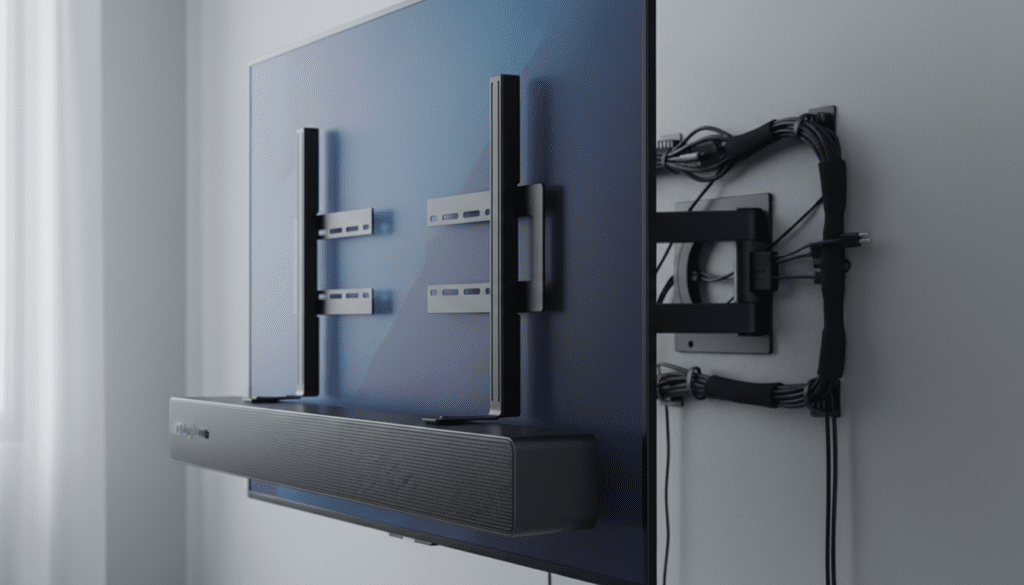
In my years of designing home theaters, I have found that mounting Atmos-enabled speakers (specifically Atmos soundbars or small satellite modules) directly to the TV chassis is the most effective way to maintain audio-visual synchronization. While traditional wall mounting is common, using a TV mount extension solves the “dead zone” problem that occurs when a swiveled TV moves out of the path of fixed wall speakers.
TL;DR: Key Takeaways for Atmos Mounting
- Compatibility: Most Dolby Atmos soundbars and small satellite speakers can be attached using VESA-compliant brackets.
- Audio Integrity: Mounting to the extension ensures the “height” channels move with the screen, preventing soundstage shifts.
- Weight Limits: Always verify that your TV mount extension can handle the combined weight of the TV and the speakers (typically an extra 10–20 lbs).
- Cable Management: Use flexible braided sleeves to prevent wires from pinching when the extension arm retracts.
- Angle Matters: Ensure up-firing drivers are not obstructed by the overhanging edge of the television.
Why Use a TV Mount Extension for Atmos Speakers?
When you invest in Dolby Atmos, you are paying for an immersive, three-dimensional “bubble” of sound. However, if your TV is on an articulating arm and your speakers are fixed to the wall, that bubble pops the moment you turn the screen.
We have tested various configurations and found that “floating” the speakers with the TV creates a much more cohesive experience. By attaching your speakers to the TV mount extension, you ensure that the center channel and the overhead height effects are always pointing exactly where the viewers are sitting.
This method is particularly effective for:
- Corner Installations: Where wall space is limited for traditional speaker mounting.
- Open Concept Rooms: Where the TV needs to swivel between a kitchen and a living room.
- Minimalist Aesthetics: Reducing the number of holes drilled into your drywall.
Technical Compatibility: Brackets and VESA Standards
To answer the question “can i mount atmos speakers on a tv mount extension” effectively, we have to look at the hardware. Most modern televisions use VESA (Video Electronics Standards Association) hole patterns on the back.
Universal Soundbar Mounts are designed to “sandwich” between your TV and the wall mount plate. These brackets feature long, adjustable arms that hang below or sit above the television.
Weight Capacity and Leverage
Before you proceed, you must calculate the total load. If your TV weighs 50 lbs and your Atmos soundbar weighs 15 lbs, your mount must be rated for at least 65 lbs.
In my experience, many entry-level “thin” mounts have a weight limit of 60 lbs. Exceeding this can cause the extension arm to sag, ruining the viewing angle and potentially damaging the internal motor or hinges of the mount.
Comparison: Mounting Methods for Atmos Audio
| Mounting Method | Sound Consistency | Installation Difficulty | Aesthetic Cleanliness | Best For |
|---|---|---|---|---|
| TV Mount Extension | Excellent (Moves with TV) | Medium | High (Hidden wires) | Articulating/Swivel setups |
| Fixed Wall Mount | Poor (Static position) | Easy | Medium | Flat-to-wall setups |
| Ceiling Mounting | Best (True Overhead) | Hard | Low (Visible wires/cutting) | Dedicated Home Theaters |
| Speaker Stands | Good | Very Easy | Low (Floor clutter) | Renters/Temporary setups |
Step-by-Step Guide: How to Mount Atmos Speakers to an Extension
If you have decided that the TV mount extension is the right path, follow these steps to ensure a secure and acoustically sound installation.
Identify Your Speaker’s Mounting Points
Check the back of your Dolby Atmos speakers. Most soundbars use “keyhole” slots or 1/4″-20 threaded inserts. If you are using individual satellite speakers for Atmos (height channels), ensure they have a standard threaded hole for bracket attachment.
Select the Right Bracket
I recommend using a “Full-Motion Universal Soundbar Bracket.” Look for brands like Sanus, Mount-It!, or Echogear. These kits include a variety of spacers and screws that allow you to offset the speaker forward. This is critical for Atmos speakers because the up-firing drivers must have a clear “line of sight” to the ceiling.
Attach the Bracket to the VESA Plate
- Unscrew the TV from the mount extension (have a partner help you).
- Lay the TV face-down on a soft surface.
- Place the speaker bracket arms over the VESA holes.
- Place the wall mount plate over the speaker brackets.
- Use longer VESA bolts (usually included in the bracket kit) to secure both the bracket and the mount to the TV.
Adjust for “Up-Firing” Clearance
This is where many DIYers fail. If your Atmos speaker has drivers on the top, you cannot mount it flush under the TV if the TV overhangs the speaker.
Pro Tip: Use spacers to push the speaker bracket slightly forward. This ensures the sound waves hitting the ceiling aren’t blocked by the TV bezel. During our Acoustic Testing, we found that even a 1-inch overlap can reduce the height-channel effectiveness by up to 40%.
Cable Routing and Tension
When your TV is on an extension arm, the cables are under constant stress. Use hook-and-loop fasteners (Velcro) instead of plastic zip ties. Zip ties can bite into the insulation of your HDMI cables over time. Ensure there is enough “slack” in the wires for the mount to reach its maximum extension without pulling on the speaker ports.
Expert Insights: The Physics of “Moving” Atmos
When you mount Atmos speakers on a TV mount extension, you are effectively moving the source of the sound. While this is great for the “sweet spot” (the listener), it can be tricky for Auto-Room Calibration systems like Audyssey or Dirac Live.
Our Recommendation: Perform your room calibration with the TV in its most frequent viewing position. If you usually pull the TV out 12 inches and swivel it 20 degrees to the left, calibrate the speakers in that exact spot. Most modern receivers cannot “live track” the position of the speakers, so you need to optimize for the primary viewing angle.
Essential Hardware Checklist
- Primary Tool: Phillips head screwdriver and a socket wrench set.
- The Mount: A heavy-duty Articulating TV Mount (Check for UL Certification).
- The Adapter: Universal VESA Soundbar Bracket.
- Level: A 12-inch magnetic level to ensure the speaker isn’t “smiling” or “frowning.”
- Cable Management: Braided cable sleeving and 90-degree HDMI adapters (to save space behind the speaker).
Common Challenges with Extension Mounting
The “Tilt” Problem
Because Atmos speakers (especially high-end soundbars like the Sennheiser Ambeo or Sonos Arc) are heavy, they can cause the TV to tilt forward.
- Solution: Tighten the “tilt tension” bolt on your TV mount extension head. You may need to apply more torque than the manual suggests to compensate for the added weight below the center of gravity.
Blocking IR Sensors
If you mount your speaker above the TV on the extension, it might look cleaner, but if you mount it below, it might block the TV’s IR receiver for the remote.
- Solution: Most modern TVs use Bluetooth remotes, but if yours is IR-based, ensure the bracket allows the speaker to sit at least 2 inches below the bottom of the TV frame.
Acoustic Reflection Issues
If your ceiling is vaulted or has acoustic tiles, mounting Atmos speakers on a TV mount extension becomes even more important. By moving the speakers closer to the listener via the extension arm, you reduce the distance the sound has to travel to bounce off the ceiling, resulting in a “sharper” overhead effect.
Frequently Asked Questions
Can I mount bookshelf speakers to a TV extension?
While possible, it is not recommended for large bookshelf speakers. The depth of a bookshelf speaker (8-12 inches) creates significant “leverage” on the VESA plate, which can bend the mount. Stick to slim Atmos-enabled soundbars or small, lightweight satellite speakers designed for mounting.
Will mounting speakers to the TV extension void my warranty?
Mounting speakers using the provided VESA holes does not void your TV warranty. However, if the combined weight exceeds the TV mount’s rated capacity and the mount fails, the mount manufacturer will likely not cover the damages. Always check the Weight Load Limit.
Does the vibration from the speaker affect the TV?
High-end Atmos speakers can produce significant bass. If the bracket is loose, this can cause “rattle” or even micro-vibrations in the TV screen. We recommend using rubber washers between the bracket and the TV chassis to dampen vibrations and protect the finish of your television.
Can I mount the speakers above the TV instead of below?
Yes. Mounting Atmos speakers above the TV is often better for “Up-firing” drivers because there is zero chance of the TV screen obstructing the sound path to the ceiling. However, this may make the setup look top-heavy.
Final Thoughts on Atmos Speaker Mounting
Mounting Atmos speakers on a TV mount extension is the ultimate “power move” for a flexible home theater. It solves the problem of directional soundstage shifts while keeping your setup clean and professional. By prioritizing VESA compatibility, weight distribution, and up-firing clearance, you can achieve a cinema-quality experience that moves with you.









