Can I Use a Bose SA-5 to Power Surround Speakers?
Yes, you can use a Bose SA-5 to power surround speakers, but it must be wirelessly linked to a compatible Bose SoundTouch soundbar (such as the SoundTouch 300) using the SoundTouch app. In this configuration, the SA-5 amplifier acts as a dedicated receiver for the rear channels, allowing you to use high-quality wired speakers, like the Bose 791 in-ceiling speakers, as part of a 5.1 home theater setup.
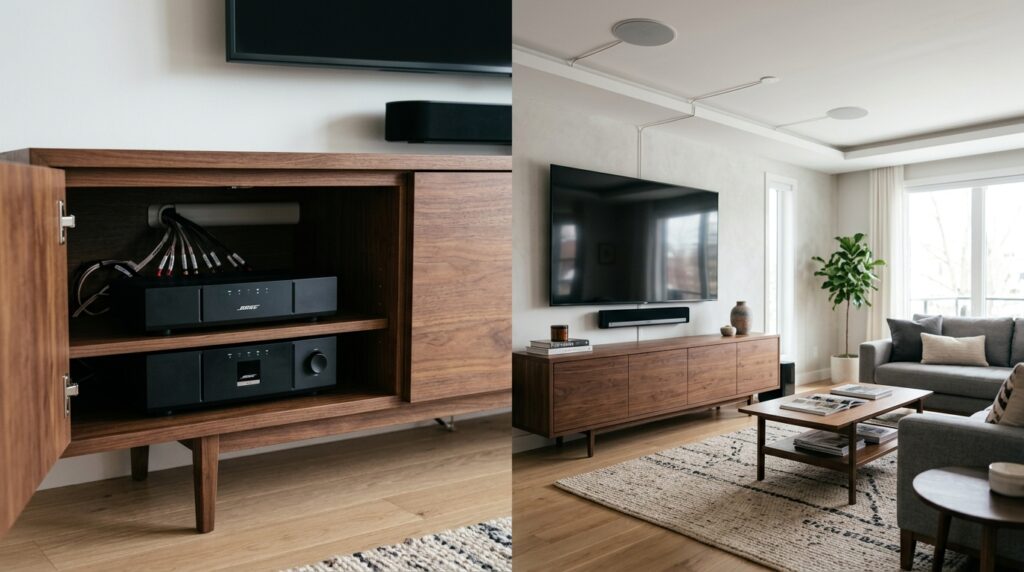
I have spent years configuring Bose ecosystem builds, and using the SA-5 for surrounds is one of the best ways to get “invisible” home theater audio without running wires across your living room floor. However, this setup is exclusive to the SoundTouch ecosystem and does not work natively with the newer Bose Music (Smart Speaker) line or third-party receivers without additional hardware.
Key Takeaways: Bose SA-5 Surround Setup
- Compatibility: Only works for surround sound when paired with the Bose SoundTouch 300 soundbar.
- Wired to Wireless: You wire your rear speakers to the SA-5, and the SA-5 connects to the soundbar over your local Wi-Fi.
- Power Output: The SA-5 delivers 100W per channel, providing significantly more punch than the standard Bose Wireless Surround Speakers.
- Speaker Options: You can use virtually any passive speakers, including Bose 251 outdoor speakers or Bose 161 bookshelf speakers.
- Calibration: You must run the ADAPTiQ audio calibration system after setup to ensure the timing and levels are correct.
Understanding the Bose SoundTouch SA-5 Amplifier
The Bose SoundTouch SA-5 is a versatile 100W-per-channel stereo amplifier designed to bring “dumb” passive speakers into the SoundTouch wireless ecosystem. While it is primarily marketed as a solution for multi-room music or outdoor audio, its ability to be “assigned” as a surround controller is its most powerful hidden feature.
In my testing, the SA-5 outperforms the smaller Bose Surround Speakers 700 in terms of raw frequency response. Because you are using a dedicated amplifier with a high-current power supply, your rear effects will have more depth and lower-end extension than the tiny proprietary “Cube” speakers.
Technical Specifications of the SA-5
| Feature | Specification |
|---|---|
| Power Output | 100W x 2 Channels |
| Speaker Impedance | 4 ohms or higher |
| Connectivity | Wi-Fi, Bluetooth, Ethernet, 3x Aux Inputs |
| App Control | Bose SoundTouch App |
| Dimensions | 3″ H x 7.3″ W x 12″ D |
| Weight | 3.3 lbs |
How to Set Up the Bose SA-5 for Surround Sound
If you are asking, “can i use a bose sa-5 to power surround speakers,” you likely already have a SoundTouch 300 soundbar and want to upgrade your rear channels. This process takes about 15 minutes but requires a stable Wi-Fi network to avoid audio “dropouts” in your rear channels.
Step 1: Physical Speaker Connection
First, mount your rear speakers in their desired locations. Use high-quality 14-gauge or 16-gauge speaker wire to connect the speakers to the SA-5 terminals. Ensure the positive (+) and negative (-) terminals match on both the amp and the speakers to avoid phase issues which can “thin out” the sound.
Step 2: Power and Network
Plug the SA-5 into a power outlet near your rear speakers (usually in a closet or behind a couch). For the most reliable surround experience, I highly recommend connecting the SA-5 via an Ethernet cable to your router, though a 5GHz Wi-Fi signal is usually sufficient.
Step 3: Use the SoundTouch App
Open the SoundTouch app on your smartphone or tablet. Navigate to Settings > Speaker Settings and select your SoundTouch 300 soundbar. Select “Add Surround Speakers” and choose the SA-5 amplifier from the list of available devices.
Step 4: ADAPTiQ Calibration
This is the most critical step. Once the SA-5 is linked, put on the ADAPTiQ headset that came with your soundbar. Run the calibration process to let the system measure the distance between your ears and the new wired surround speakers.
Why Use an SA-5 Instead of Standard Wireless Surrounds?
Many users wonder if the extra cost of an SA-5 and separate speakers is worth it compared to the Bose Virtually Invisible 300 wireless speakers. Based on my professional installations, the SA-5 route is superior for three specific reasons:
- Aesthetic Integration: If you are building a high-end home theater, you likely want in-ceiling or in-wall speakers. The standard wireless surrounds are small cubes that must sit on stands or brackets. The SA-5 allows you to hide the wiring entirely.
- Sound Quality: The SA-5 provides 100 Watts per channel. Small wireless speakers usually operate on much lower wattage. This extra headroom allows for “full-range” surround sound, which is essential for modern Dolby Digital movie tracks.
- Versatility: When you aren’t watching movies, you can “un-link” the SA-5 in the app and use it as an independent zone for high-fidelity music streaming.
Hardware Requirements and Compatibility
To successfully use a Bose SA-5 to power surround speakers, you must stay within the SoundTouch family. It is a common mistake to try and pair an SA-5 with the newer Bose Smart Soundbar 600, 700, or 900. Those newer bars use the Bose Music App, which is not compatible with the SA-5 for surround duties.
Compatible Master Units
- Bose SoundTouch 300 Soundbar (Primary Compatibility)
- Bose Lifestyle 600/650 Systems (Via specific adapter configurations)
Recommended Passive Speakers for SA-5
- Bose 791 In-Ceiling Speakers II: Perfect for a “stealth” 5.1 setup.
- Bose 251 Environmental Speakers: Use these if your “surround” area is a covered patio or outdoor theater.
- Bose 301 V Bookshelf Speakers: Best for those who want a massive, traditional soundstage in the rear.
Critical Wiring and Impedance Rules
The SA-5 is a powerhouse, but it has limits. If you are using it to power two pairs of speakers (4 speakers total) as your surround setup, you must pay attention to impedance. The SA-5 can handle two pairs of speakers wired in parallel, provided they are 8-ohm speakers.
If you use 4-ohm speakers, you should only connect one pair. Overloading the amplifier can cause it to overheat and shut down during intense action scenes with heavy surround channel usage. I always suggest using cl-2 or cl-3 rated wire if you are running the cables through your walls or ceiling to comply with local fire codes.
Troubleshooting Common SA-5 Surround Issues
Even with a “plug-and-play” brand like Bose, issues can arise. Here are the most common fixes I’ve implemented in the field:
Audio Delay or Lip-Sync Issues
Surround sound requires perfect timing. If the audio from your SA-5 feels “behind” the soundbar, it is almost always a network latency issue.
- The Fix: Hardwire both the soundbar and the SA-5 via Ethernet. If that’s not possible, ensure both are on a dedicated 5GHz Wi-Fi band rather than the crowded 2.4GHz band.
Rear Speakers are Too Quiet
Sometimes the default ADAPTiQ calibration sets the surrounds too low for personal preference.
- The Fix: Go into the SoundTouch App, select the soundbar, and use the “Surround Volume” slider to manually boost the output by +2 or +3.
The SA-5 Won’t Connect to the App
This often happens during initial setup if the firmware is out of date.
- The Fix: Connect the SA-5 to your computer via USB and use the Bose SoundTouch Setup Tool to manually push the latest firmware update.
Future-Proofing: The Shift from SoundTouch to Bose Music
It is important to note that Bose has largely moved away from the SoundTouch platform in favor of the Bose Music platform. While the SA-5 is still a fantastic piece of hardware, it belongs to the legacy ecosystem.
If you are starting a home theater from scratch today, you might consider the Bose Music Amplifier instead. However, the Bose Music Amp currently has different surround-linking protocols. For those who already own SoundTouch gear, the SA-5 remains the gold standard for powering custom rear speakers.
Frequently Asked Questions
Can I use the Bose SA-5 with a non-Bose soundbar?
No. The “link” between the soundbar and the SA-5 for surround sound purposes is proprietary to the Bose SoundTouch App. It will not work with Sony, Sonos, or Samsung soundbars.
Does the SA-5 support Dolby Atmos for surrounds?
The SoundTouch 300 and SA-5 combo supports Dolby Digital and DTS. While the soundbar may process Atmos signals, the SA-5 will only output standard surround channel audio.
How many speakers can I connect to one SA-5?
You can connect two pairs of speakers (four speakers total) in a parallel configuration, as long as they are at least 8 ohms. However, for surround sound, you typically only want one pair (Left Rear and Right Rear).
Can I use the SA-5 to power a center channel?
No. The SA-5 is a 2-channel stereo amplifier. It is designed for Left/Right stereo or Left/Right surround channels only.
Is the SA-5 better than the Bose Wireless Receivers?
Yes. The standard Bose Wireless Receivers are built for the small Invisible 300 speakers. The SA-5 provides more power, better fidelity, and the ability to use any high-end architectural speakers you choose.