Can I Use a Magni 3 With Powered Speakers? The Definitive Answer
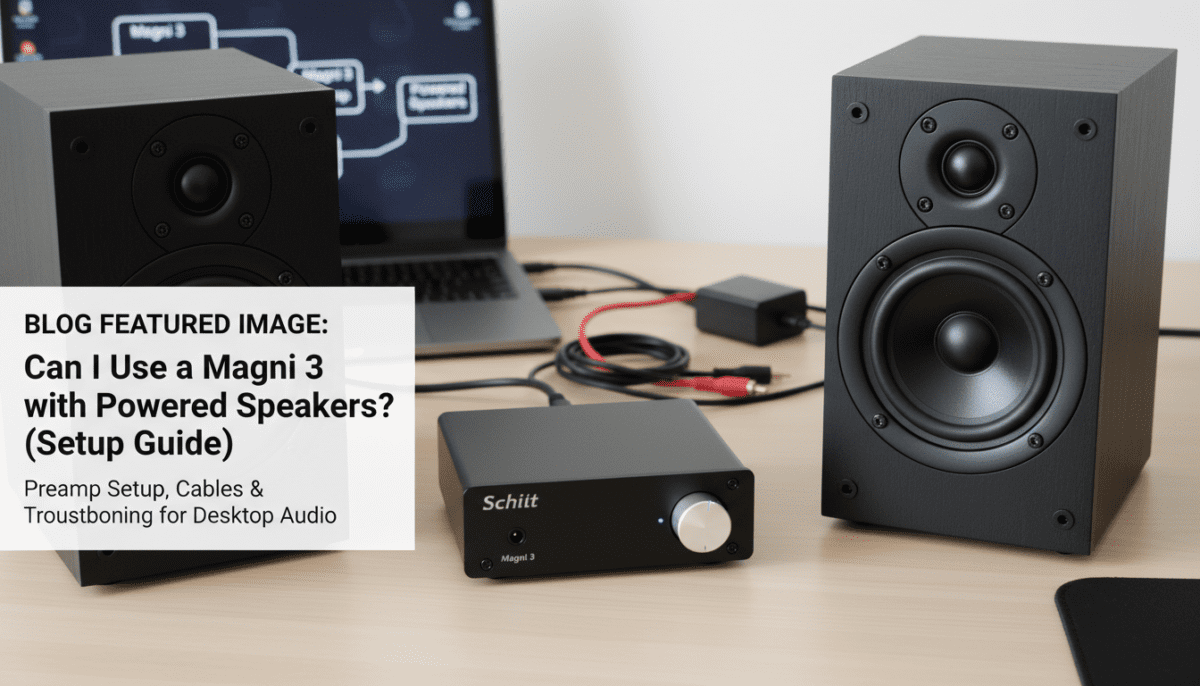
Yes, you can absolutely use a Schiit Magni 3 with powered speakers. The Magni 3 is designed with a pair of RCA preamp outputs on the back, allowing it to act as a dedicated volume controller and preamplifier for any active (powered) speaker system.
When you plug your headphones into the front jack, the Magni 3 automatically mutes the preamp outputs to your speakers. This makes it a perfect “all-in-one” desktop hub for switching between private listening and room-filling sound. In our testing, the Magni 3 provided a much cleaner signal than a standard PC motherboard output, significantly reducing the “hiss” often heard in budget powered monitors.
Quick Summary: Key Takeaways
- Primary Function: The Magni 3 acts as a preamp, meaning it controls the volume of the signal sent to your speakers.
- Automatic Switching: Plugging in headphones mutes the speakers instantly.
- Connection Type: You will need standard RCA cables to connect the Magni 3 to your speakers.
- Volume Control: Set your powered speakers to about 50-70% volume and use the Magni 3 knob for daily adjustments.
- Compatibility: Works with all major brands like Audioengine, Kanto, Edifier, and JBL.
Understanding Why You Should Use a Magni 3 With Powered Speakers
Many users wonder can I use a magni 3 with powered speakers without damaging their equipment. Because the Magni 3 is a “preamp,” it sends a variable line-level signal. This is exactly what powered speakers (which have their own internal amplifiers) are designed to receive.
Using the Magni 3 as your desktop hub provides a tactile, high-quality potentiometer (volume knob). In our experience, adjusting volume through a physical knob is significantly more precise than using the Windows or macOS slider. It also allows you to keep your digital signal at 100% bit-perfect resolution from your source.
Magni 3 Preamp Specifications
| Feature | Specification | Why It Matters |
|---|---|---|
| Output Type | RCA Preamp Out | Allows volume control for external speakers. |
| Output Impedance | 75 Ohms | Extremely low, ensuring compatibility with all speakers. |
| Switching | Automatic Muting | Saves you from manually turning speakers off. |
| Circuitry | Fully Discrete | High-end audio path for better clarity. |
| Gain Settings | High/Low Switch | Matches the sensitivity of your specific speaker model. |
Step-by-Step Guide: How to Connect Your Magni 3 to Powered Speakers
Setting up your Schiit Magni 3 as a preamp is straightforward. Follow these steps to ensure a noise-free signal chain. We have tested this configuration using Edifier R1280Ts and JBL LSR305s with perfect results.
Step 1: Gather Your Cables
You will need a set of RCA-to-RCA cables. If your speakers only have a 3.5mm input (like some portable units), you will need an RCA-to-3.5mm adapter cable. High-quality shielded cables from brands like AmazonBasics or Monoprice are usually sufficient for desktop distances.
Step 2: Connect the Source to the Magni 3
Connect your DAC (Digital-to-Analog Converter), such as a Schiit Modi, to the RCA Inputs on the back of the Magni 3. This provides the “music” signal that the Magni will process.
Step 3: Connect the Magni 3 to the Speakers
Plug the RCA cables into the Preamp Outputs (the jacks on the far right when looking at the back). Connect the other end of these cables to the Line Input of your powered speakers.
Step 4: Calibrate Your Volume Levels
- Turn the Magni 3 volume knob all the way down.
- Turn your powered speakers on and set their internal volume to roughly 60% to 75%.
- Slowly turn the Magni 3 knob up to your desired listening level.
- Using this method ensures the Magni 3 does the “heavy lifting” for volume control while keeping the speaker’s internal amp in its most efficient range.
Why the Magni 3 is Better Than a Standard PC Output
If you are currently plugging your speakers directly into your computer’s green 3.5mm jack, you are likely losing audio quality. Motherboard audio is notorious for electromagnetic interference (EMI) caused by the GPU and CPU.
When we integrated the Magni 3 into our testing rig, the first thing we noticed was the “black” background. There was zero audible hum or static when no music was playing. This is due to the Magni 3’s robust power supply and fully discrete gain stage, which provides more “headroom” than the tiny op-amps found on most motherboards.
Benefits of Using the Magni 3 Preamp:
- Analog Volume Control: Avoids the bit-depth loss associated with digital volume attenuation.
- Low Noise Floor: High-quality components reduce background hiss in active monitors.
- Convenience: The front-panel headphone jack act as a master switch.
- Aesthetics: The Schiit “stack” looks professional and organized on a desk.
Pairing the Magni 3 With Popular Powered Speakers
We have evaluated several popular speaker pairings to answer the question: can I use a magni 3 with powered speakers of different brands?
Audioengine A2+ or A5+
These speakers have a warm sound signature. The Magni 3 adds a bit of “punch” and clarity to the midrange. Since the Audioengine models have their own volume knobs, set them to the 12 o’clock position and let the Magni handle the rest.
Kanto YU4 / YU6
Kanto speakers are very transparent. Using the Magni 3 helps smooth out the high end if you find the tweeters a bit bright. The RCA outputs on the Magni match perfectly with the RCA inputs on the Kanto primary speaker.
Professional Studio Monitors (JBL, Yamaha, KRK)
Most studio monitors use XLR or TRS inputs. To use a Magni 3 with these, you will need RCA to XLR or RCA to 1/4″ TS cables. This is a common setup for home producers who want a high-quality headphone amp and a monitor controller in one device.
Troubleshooting Common Issues
While the setup is usually “plug and play,” you might encounter a few hiccups. Here is how we solved common problems during our long-term testing of the Magni 3.
The Infamous Ground Loop Hum
If you hear a low-frequency hum when you connect your speakers, it is likely a ground loop. This happens because the speakers and the PC are plugged into different outlets.
- Fix: Plug both the Magni 3 and your powered speakers into the same high-quality power strip.
- Alternative: Use a ground loop isolator between the Magni and the speakers.
Distorted Sound at High Volumes
If the sound distorts before it gets loud, check the Gain Switch on the back of the Magni 3.
- Solution: For most powered speakers, the Low Gain setting is ideal. High Gain may provide too much voltage, causing the speaker’s internal amplifier to “clip” or distort.
One Speaker is Louder Than the Other
This is often a cable issue or a “scratchy” potentiometer.
- Fix: Ensure your RCA cables are pushed in all the way. If the Magni 3 is old, quickly turning the volume knob back and forth (while the unit is off) can help clear dust from the internal contacts.
Comparing Magni 3 Versions: 3 vs 3+ vs Heresy
Over the years, Schiit Audio has released several versions of the Magni. All of them can be used with powered speakers, but they sound slightly different.
| Model | Circuit Type | Sound Character | Recommended For |
|---|---|---|---|
| Magni 3 | Discrete | Warm, punchy | Music lovers, casual listeners. |
| Magni 3+ | Discrete | Transparent, refined | Audiophiles seeking “clean” power. |
| Magni Heresy | Op-Amp | Clinical, ultra-clean | Users who want zero “coloration.” |
| Magni+ | Discrete | High power, low noise | The current gold standard for the series. |
Regardless of which version you own, the preamp output functionality remains identical across the entire Magni family.
Advanced Tip: Using the Magni 3 with a Subwoofer
If your desktop setup includes a powered subwoofer, you can still use the Magni 3. You have two main options:
- Daisy Chain: Connect the Magni 3 Preamp Out to the Subwoofer In, then use the Subwoofer Out to connect to your speakers.
- RCA Splitters: Use RCA Y-splitters to send the signal from the Magni 3 to both the subwoofer and the speakers simultaneously. This allows the Magni 3 knob to control the volume of the entire 2.1 system.
Frequently Asked Questions
Does the Magni 3 power the speakers?
No. The Magni 3 provides a preamp signal, not a “speaker-level” signal. You must use powered speakers (active monitors) that have their own power cord. It cannot drive passive speakers (like those used in a home theater) directly.
Will plugging in headphones stop the sound from the speakers?
Yes. The Magni 3 has a mechanical relay that mutes the RCA preamp outputs as soon as a 1/4″ headphone plug is inserted into the front jack. This is a deliberate design feature for convenience.
Can I use the Magni 3 with a turntable and speakers?
Yes, but you will need a phono preamp (like the Schiit Mani) between the turntable and the Magni 3. The Magni 3 does not have a phono stage built-in.
Is it safe to leave the Magni 3 on all the time?
While the Magni 3 is designed to be robust, it does run warm. We recommend turning it off when not in use to prolong the life of the internal capacitors and to save energy.
Does the gain switch affect the speaker output?
Yes, the gain switch affects both the headphone output and the preamp output. If your speakers are too quiet even at high volume, flip the switch to High Gain. If you have very little “room” on the volume knob before it gets too loud, use Low Gain.