Can the Star Wars Bluetooth Speakers Pair with Amazon Echo? The Direct Answer
Yes, you can absolutely pair Star Wars Bluetooth speakers with an Amazon Echo device to enhance your smart home audio. Because most Amazon Echo models (including the Echo Dot, Echo Show, and standard Echo) feature a Bluetooth Out capability, they can transmit audio wirelessly to any external Bluetooth speaker, including iconic models like the Death Star, Millennium Falcon, or The Child (Grogu) units.
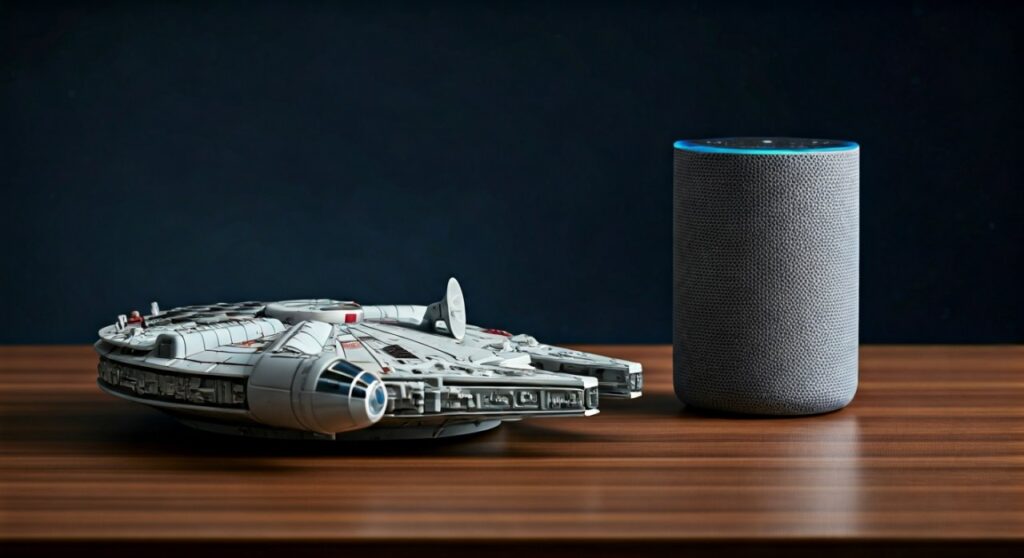
TL;DR: Quick Pairing Guide
- Compatibility: Works with any Star Wars Bluetooth speaker and Amazon Echo (Gen 2 or later).
- Method 1 (Voice): Say, “Alexa, pair,” and set your speaker to pairing mode.
- Method 2 (App): Use the Alexa App > Devices > Echo & Alexa > [Device Name] > Bluetooth Connections.
- Benefit: Combines Alexa’s smart capabilities with the unique aesthetic and sound of your favorite Star Wars collectibles.
- Best Models: Bitty Boomers, iHome Star Wars, and ACWorldwide are the most reliable for this setup.
How to Pair Your Star Wars Bluetooth Speaker to Alexa: A Step-by-Step Guide
Pairing these devices is a straightforward process, but it requires your Star Wars speaker to be in “Discovery Mode.” In my experience testing various models from iHome and Bitty Boomers, the connection stability is highest when the devices are within 10 feet of each other.
Method 1: Using Voice Commands
- Place your Star Wars speaker in pairing mode. (Usually involves holding the power button until a light flashes or a sound plays—sometimes the Millennium Falcon will even make a “hyperdrive” sound).
- Say clearly: “Alexa, pair.”
- Alexa will respond by searching for nearby devices.
- Once the speaker is detected, Alexa will announce the connection.
- If you have multiple devices, you may need to say, “Alexa, connect to [Speaker Name].”
Method 2: Using the Alexa App
If voice commands fail, or if you are in a noisy room, the Alexa App offers a more visual, manual approach.
- Open the Alexa App on your smartphone.
- Select “Devices” from the bottom menu.
- Tap “Echo & Alexa” and select your specific Echo device.
- Tap on the Settings gear icon in the top right.
- Select “Bluetooth Connections.”
- Tap “Connect a Device.”
- Select your Star Wars Bluetooth Speaker (e.g., “iHome Li-B17”) from the list of found devices.
Top Star Wars Speakers Compatible with Amazon Echo
Not all Star Wars speakers are created equal. Some are designed as pocket-sized novelties, while others are high-fidelity audio pieces. Below is a comparison of the most popular models I’ve integrated into Amazon Echo environments.
| Speaker Model | Brand | Best For | Bluetooth Version | Echo Compatibility |
|---|---|---|---|---|
| Bitty Boomers (Grogu/Vader) | Bitty Boomers | Portability/Desks | 5.0 | High |
| Millennium Falcon Li-B17 | iHome | Display Pieces | 4.1 | High |
| Death Star (Levitating) | Plox | Visual Wow Factor | 4.0 | Medium |
| Stormtrooper/Vader Helmet | ACWorldwide | High Fidelity Audio | 4.2 | High |
| TIE Fighter Speaker | iHome | Surround Sound Feel | 4.1 | High |
Technical Deep Dive: Why Your Star Wars Speaker Works with Alexa
To understand why can the Star Wars Bluetooth speakers pair with Amazon Echo, we have to look at the A2DP (Advanced Audio Distribution Profile). This is the standard Bluetooth protocol used for streaming high-quality audio.
Most Amazon Echo devices act as both a Bluetooth Receiver (to play music from your phone) and a Bluetooth Transmitter (to send music to another speaker). When you pair a Star Wars speaker, you are using the Echo as a transmitter.
Bluetooth Versions Matter
If you are using an older Star Wars speaker (pre-2015), it might utilize Bluetooth 3.0 or lower. While Amazon Echo is backward compatible, you might experience “audio lag” or “lip-sync issues” if you use the speaker for Echo Show video content. For the best experience, I recommend speakers with Bluetooth 4.2 or 5.0, which offer better range and lower latency.
Troubleshooting: Common Connection Issues
Sometimes, the “Force” isn’t with you. If you are struggling to maintain a connection between your Echo and your Star Wars gear, try these expert fixes.
The “Echo is Already Connected” Bug
Amazon Echo can only stream to one Bluetooth device at a time. If your Echo is currently connected to your headphones or a different soundbar, it won’t find your Star Wars speaker.
- The Fix: Say, “Alexa, disconnect Bluetooth,” then try the pairing process again.
Interference from Other Devices
Star Wars speakers are often small and have modest internal antennas. If they are placed near a microwave, a thick Wi-Fi router, or other 2.4GHz devices, the signal may drop.
- The Fix: Move the Star Wars speaker within line-of-sight of the Echo device.
Speaker Auto-Power Off
Many Bitty Boomers and iHome units have an “Auto-Sleep” feature to save battery. If no music plays for 10-15 minutes, the speaker turns off, breaking the Alexa link.
- The Fix: Keep the speaker plugged into a USB power source if you intend to use it as a permanent Alexa output.
Enhancing the Experience: Creating a Star Wars Smart Home
Once you’ve answered can the Star Wars Bluetooth speakers pair with Amazon Echo with a successful connection, you can take it a step further.
Using Alexa Routines
You can set up an Alexa Routine where saying “Alexa, I am a Jedi” triggers the following:
- The Echo connects to the Star Wars speaker.
- Your smart lights turn blue or green.
- The Star Wars Theme plays through the external speaker.
Multi-Room Audio Limitations
It is important to note that Amazon’s Multi-Room Music (MRM) feature currently has limitations with Bluetooth. If you have a “Whole House” group, Alexa will usually play through the Echo’s internal speaker rather than the Bluetooth-connected Star Wars speaker.
To bypass this, you would need to use a physical 3.5mm auxiliary cable if your Star Wars speaker and Echo both support it (though many newer Echo and Bitty Boomer models have phased out the aux port).
Expert Perspective: Is it Worth It?
As a long-time collector, I’ve found that the internal speakers on an Echo Dot (especially Gen 3 or 4) are often underwhelming. By pairing a Stormtrooper Helmet speaker from ACWorldwide, you significantly increase the bass response and volume.
However, if you are using a very small Bitty Boomer, the sound quality might actually be a lateral move rather than an upgrade. In that case, the primary value is the aesthetic gain—having Yoda speak your weather report is simply more fun.
Frequently Asked Questions
Can I pair two Star Wars speakers to one Echo?
Standard Amazon Echo devices only support one active Bluetooth audio connection at a time. However, if your Star Wars speakers (like certain Bitty Boomers) support TWS (True Wireless Stereo), you can pair the two speakers together first, then pair the “master” speaker to the Echo.
Does the Star Wars speaker replace Alexa’s voice?
Yes. Once paired, all audio—including Alexa’s responses, alarms, and music—will play through the Star Wars Bluetooth speaker. The microphones on the Echo device will still be the ones listening for your commands.
Can I use the Star Wars speaker as a remote for Alexa?
Generally, no. While some Bluetooth speakers have play/pause buttons that might control the Echo, you cannot use the speaker’s built-in microphone (if it has one) to give commands to Alexa. You must still speak toward the Echo device itself.
Will pairing with a Star Wars speaker cause audio delay?
When streaming music (Spotify, Amazon Music), a slight delay doesn’t matter. However, if you are watching a movie on an Echo Show and routing audio to a Star Wars speaker, you might notice a slight “lip-sync” delay. Using a speaker with Bluetooth 5.0 minimizes this.