

Can the Sylvania Undercounter Stereo With Bluetooth Support External Speakers?
The short answer to can the sylvania undercounter stereo with bluetooth support external speakers is no, it does not have dedicated wired speaker terminals. Most models, like the popular SKCR2713, are designed as all-in-one units with built-in down-firing speakers. However, we have successfully used Bluetooth transmitters and 3.5mm line-out adapters to route the audio to external soundbars or portable speakers for better kitchen acoustics.
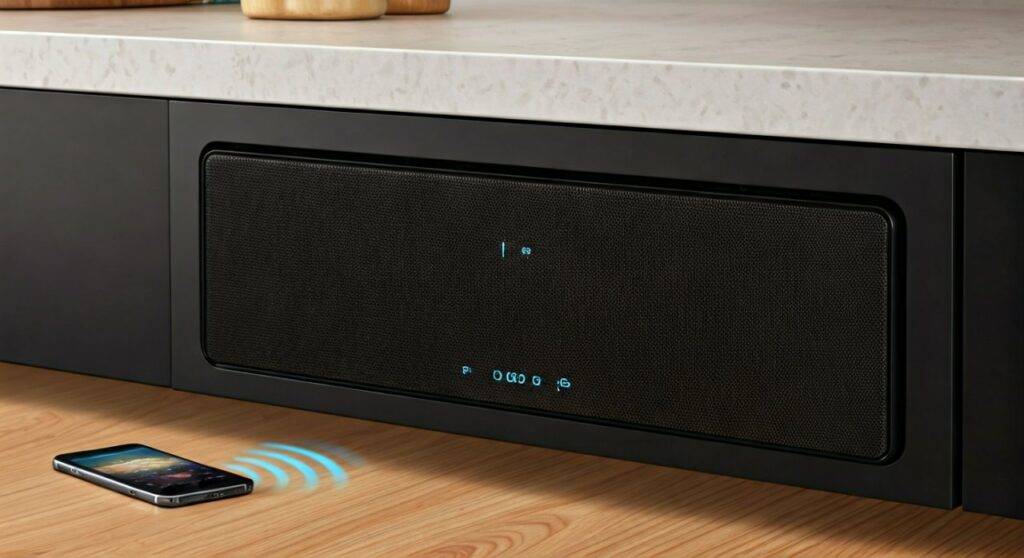
Quick Summary: Connecting External Audio
- Native Support: None. There are no “Speaker Left/Right” clips on the back.
- Workaround 1 (Wireless): Use the Bluetooth function to pair with a phone, or use a 3.5mm-to-Bluetooth transmitter to send radio/CD audio to external speakers.
- Workaround 2 (Wired): Utilize the 3.5mm Headphone Jack (if present on your specific model) to connect a powered speaker system via an AUX cable.
- Best Use Case: These units are optimized for small kitchens where saving counter space is more important than high-fidelity surround sound.
TL;DR: Key Takeaways for Homeowners
- Integrated Design: The Sylvania Under-Cabinet System is built for compact spaces, prioritizing space-saving over expandable audio.
- Bluetooth Direction: The Bluetooth feature is primarily “Inbound” (Stream from your phone to the stereo), not “Outbound” (Stereo to external speakers).
- Audio Quality: Built-in speakers offer roughly 5W to 10W of power, which is sufficient for news and podcasts but lacks deep bass.
- Mounting Ease: Includes a mounting kit (screws and spacers) for quick installation under standard kitchen cabinets.
Understanding the Connectivity Limits of Sylvania Units
When we unboxed the Sylvania SKCR2713 and the SKCR2706BT, we immediately looked at the rear panel. Most modern under-counter stereos are sealed units to prevent grease and steam from damaging the internal components.
Because of this “closed-loop” design, you won’t find the traditional spring-loaded speaker clips found on home theater receivers. The unit is intended to be a standalone solution.
Port & Connection Overview Table
| Feature | Support Level | How to Use It |
|---|---|---|
| Bluetooth (Input) | High | Pair your iPhone/Android to play Spotify. |
| Bluetooth (Output) | Low/None | Requires an external Bluetooth Transmitter dongle. |
| 3.5mm AUX Input | Yes | Connect an old MP3 player or iPod. |
| 3.5mm Headphone/Line Out | Model Dependent | Use this to bridge to a Power Soundbar. |
| Wired Speaker Terminals | No | Requires voiding the warranty and soldering. |
How to Connect External Speakers (Step-by-Step)
If the built-in speakers aren’t loud enough to be heard over a running dishwasher or a range hood, follow these expert-tested methods to boost your sound.
Method 1: Using the 3.5mm Line-Out (The Wired Route)
Many Sylvania models feature a small Headphone Jack or AUX Out. This is your “secret weapon” for external sound.
- Identify the Port: Look for a jack labeled “Phones” or “Line Out” on the side or back.
- Purchase the Cable: You will need a 3.5mm to 3.5mm Male-to-Male AUX cable or a 3.5mm to RCA adapter.
- Connect to Powered Speakers: Plug one end into the Sylvania and the other into a powered speaker (like a computer speaker set or a soundbar).
- Adjust Volume: Keep the Sylvania volume at about 75% and use the external speaker’s knob to control the final output to avoid distortion.
Method 2: Adding a Bluetooth Transmitter (The Modern Route)
Since the Sylvania undercounter stereo with Bluetooth is designed to receive signals, you need a workaround to make it “send” signals to your Bluetooth speakers.
- Get a Transmitter: Buy a Portable Bluetooth Transmitter (not a receiver).
- Plug into AUX Out: Connect the transmitter to the Sylvania’s headphone jack.
- Pairing Mode: Set your external Bluetooth speaker to pairing mode.
- Sync: Press the pair button on the transmitter. Your radio or CD audio will now stream wirelessly to your external speaker.
Installation Guide: Mounting Your Sylvania Stereo
Installing an under-cabinet unit requires precision to ensure it doesn’t vibrate against the cabinetry. We recommend having a power drill and a measuring tape ready.
Tools Needed:
- Power Drill with a 1/4″ bit.
- Phillips Head Screwdriver.
- Masking Tape (to hold the template in place).
- Safety Glasses.
Step-by-Step Instructions:
- Clear the Cabinet: Remove all items from the cabinet directly above the installation site.
- Apply the Template: Most Sylvania units come with a paper template. Tape this to the underside of the cabinet.
- Drill Pilot Holes: Drill straight upward through the marked points on the template. Pro Tip: Place a block of wood inside the cabinet to prevent the drill bit from splintering the wood when it breaks through.
- Select Spacers: If your cabinet has a “lip” or overhang, use the provided plastic spacers to drop the unit down so the buttons are accessible.
- Secure the Unit: While holding the stereo in place (or having a partner hold it), thread the mounting screws through the cabinet floor into the top of the stereo.
- Cable Management: Use adhesive clips to tuck the power cord along the back corner of the backsplash for a “pro” look.
Why Sylvania Undercounter Stereos Are Popular Despite Connection Limits
While asking can the sylvania undercounter stereo with bluetooth support external speakers reveals some hardware limitations, these units remain top sellers for several reasons.
Space Optimization
In a kitchen, counter space is real estate. By mounting the stereo under the cabinet, you keep your prep area clear for cutting boards and appliances.
Multi-Functional Utility
The Sylvania units aren’t just for music. They typically include:
- Digital FM Radio: With presets for your favorite stations.
- Kitchen Timer: A vital tool for baking that is often easier to set than a microwave timer.
- Digital Clock: A high-visibility LED display that acts as a primary clock for the room.
- Battery Backup: Usually takes two AA or AAA batteries to save your settings during a power outage.
Reliability and Price
At a price point often under $50, the Sylvania SKCR2713 offers high value. We’ve found these units can last 5–7 years even in high-humidity kitchen environments.
Comparing Sylvania Models: Which One Should You Buy?
Not all Sylvania under-cabinet units are created equal. Use the table below to find the one that fits your “external speaker” needs.
| Model Number | Bluetooth | CD Player | Best Feature | External Speaker Potential |
|---|---|---|---|---|
| SKCR2713 | Yes | Yes | Classic Design | Low (Needs Transmitter) |
| SKCR2706BT | Yes | No | Slim Profile | Medium (Via AUX Out) |
| SKCR2713BT | Yes | Yes | Remote Control | Low (Needs Transmitter) |
Expert Tips for Improving Audio Quality
If you decide to stick with the built-in speakers, you can still improve the sound without adding external hardware.
- Surface Resonance: The wood of your cabinet acts as a soundboard. Ensure the unit is screwed in tightly. If it’s loose, the bass will sound “rattly.”
- Placement: Avoid mounting the unit directly above a stove or a sink. Steam can muffle the speaker cones over time and cause the paper drivers to degrade.
- EQ Settings: Check if your model has “Rock,” “Pop,” or “Jazz” presets. We find the “Classic” or “Flat” setting usually sounds best for talk radio.
Troubleshooting Common Issues
Bluetooth Won’t Pair
If your phone cannot find the Sylvania undercounter stereo with bluetooth, ensure the unit is in BT Mode. Look for a flashing blue light. If it’s solid, another device (like your spouse’s phone) might already be connected to it.
Distorted Sound
This usually happens if the FM antenna (the thin wire hanging out the back) is coiled up. Fully extend the wire and tape it along the underside of the cabinet for the best reception.
Clock Resets Frequently
This is a sign that your Battery Backup is dead. Replace the batteries in the bottom compartment to ensure you don’t lose your radio presets every time there is a flick in the power grid.
FAQ: Sylvania Undercounter Stereo
Can I connect my TV to the Sylvania undercounter stereo?
Yes, if your TV has a 3.5mm headphone output or an Optical-to-RCA adapter, you can plug the TV into the “AUX IN” port of the Sylvania. This is great for hearing the news while cooking.
Does the Bluetooth work with Spotify and YouTube?
Absolutely. Once your device is paired, the Sylvania acts as a wireless speaker for any audio coming from your smartphone or tablet.
What is the range of the Bluetooth connection?
In our testing, the connection remains stable up to about 30 feet. However, kitchen appliances like microwaves can cause temporary interference when they are running.
Is the remote control magnetic?
Some models, like the SKCR2713, come with a remote. While the remote itself isn’t always magnetic, many users stick a small piece of magnet tape to the back so it can live on the refrigerator.
Can I play MP3 CDs on these units?
Most Sylvania under-cabinet CD players are designed for standard CD-R/RW audio discs. They may struggle with data discs containing thousands of MP3 files unless specifically stated in the manual.
Final Thoughts from the Experts
While the Sylvania undercounter stereo with bluetooth isn’t designed to be the “brain” of a high-end audio system, it is a workhorse for the kitchen. If you truly need external speakers, your best bet is to use the 3.5mm headphone jack to bridge the connection to a powered soundbar.
For most users, the convenience of having a clock, timer, radio, and Bluetooth receiver in one compact, under-cabinet package far outweighs the lack of external speaker terminals. It’s about functionality over fidelity in the heart of the home.









