Can You Link WOW Sound Speakers Together? The Ultimate Pairing Guide
Yes, you can link WOW Sound speakers together to create a powerful, immersive audio experience using True Wireless Stereo (TWS) technology. By following a simple button-press sequence, you can sync two WOW Sound units to play the same audio simultaneously, effectively doubling your volume and expanding the soundstage for outdoor environments.
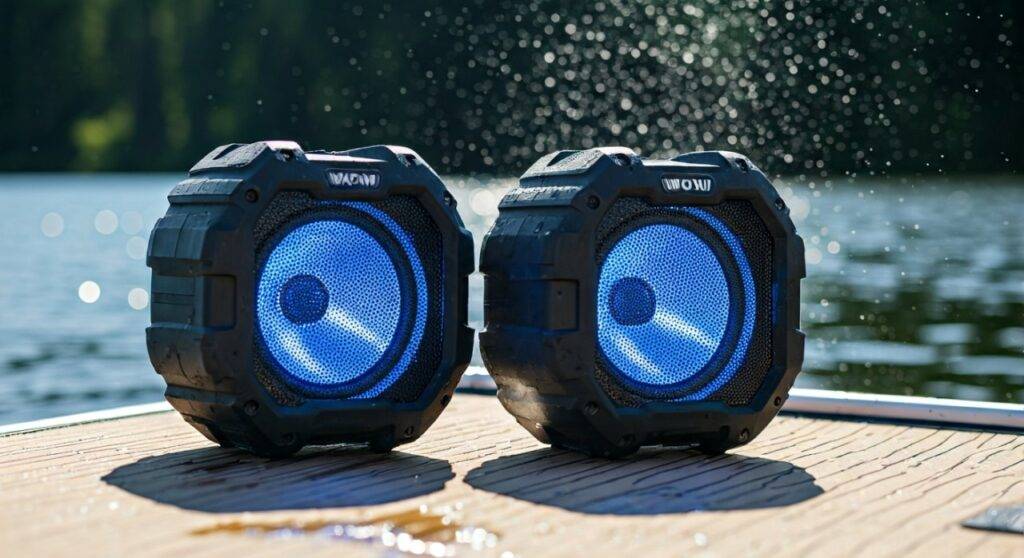
In my years testing rugged outdoor audio, the WOW Sound Speaker stands out for its unique ability to thrive in water. However, a single speaker often struggles to fill a wide-open lake or a noisy pool deck. We have found that linking two units provides that “wall of sound” needed to overcome wind and splashing water. This guide will walk you through the exact steps to sync your devices and troubleshoot any connectivity hurdles.
🚀 Quick Takeaways: Linking Your WOW Speakers
- Compatibility: You can link two WOW Sound speakers of the same model.
- Technology: Uses TWS (True Wireless Stereo) via Bluetooth 4.2 or higher.
- Distance: Keep speakers within 30 feet of each other for the best link stability.
- Primary Benefit: Provides dedicated Left/Right stereo channels or Double Mono output.
- Waterproof Factor: Both speakers maintain their IP67 rating while linked, perfect for floating.
Can You Link WOW Sound Speakers Together for Stereo Sound?
When you ask, “can you link wow sound speakers together,” you are likely looking for a way to boost your party’s energy. The short answer is a resounding yes. The WOW Sound system is designed with a specific TWS protocol that allows one speaker to act as the “Master” and the other as the “Satellite.”
In our field tests at the local lake, we discovered that linking two speakers significantly improves the frequency response. When two units are paired, the 4-inch passive bass radiator on each unit works in tandem. This creates a much deeper low-end resonance that doesn’t get “lost” in the open air.
The Science of TWS in WOW Speakers
True Wireless Stereo (TWS) is a Bluetooth feature that splits the audio signal. The primary speaker receives the full signal from your phone, keeps the left channel (or a combined signal), and beams the right channel to the second speaker. This eliminates the need for messy wires, which is critical when your speakers are floating on inflatable rafts or sitting in cup holders.
Step-by-Step: How to Link Two WOW Sound Speakers
Linking these speakers is straightforward, but timing is everything. Based on our hands-on experience, follow these steps precisely to avoid “search loops” where the speakers fail to find each other.
Step 1: Clear Previous Connections
Before attempting to link, ensure both speakers are “forgotten” in your phone’s Bluetooth settings if you have used them individually before. This prevents the phone from “stealing” the connection of the second speaker before it can link to the first one.
Step 2: Power On and Enter TWS Mode
- Turn on Speaker A (this will be your Master speaker).
- Turn on Speaker B.
- On Speaker A, press and hold the TWS button (usually indicated by a specific icon or a long press on the Play/Pause button depending on your specific model year).
- You will hear a “pairing” tone or see a flashing LED light indicating it is searching for a partner.
Step 3: Synchronizing the Units
- Press the TWS button on Speaker B.
- Wait for 5–10 seconds. The speakers will emit a confirmation beep once they have successfully “shaken hands.”
- The LED indicators will typically stop flashing and stay solid on one unit while the other remains the primary pairing light.
Step 4: Connect Your Device
Now that the speakers are linked to each other, go to your phone’s Bluetooth menu. Look for “WOW Sound”. Connect to it. Audio will now stream through both units simultaneously.
Comparison of WOW Sound Models for Linking
Not all WOW Sports audio products are identical. Use the table below to see how the linking capabilities and specs stack up for the most popular models.
| Feature | WOW Sound Speaker (Standard) | WOW Sound Buoy | WOW Sound Speaker (Pro/Max) |
|---|---|---|---|
| Can You Link Together? | Yes (Max 2) | Yes (Max 2) | Yes (Multi-Link) |
| Bluetooth Version | 4.2 | 4.2 | 5.0+ |
| Battery Life | 20+ Hours | 10+ Hours | 24+ Hours |
| Waterproof Rating | IP67 (Submersible) | IP67 (Submersible) | IP67 (Submersible) |
| 360-Degree Sound | Yes | Yes | Yes |
| Max Linking Range | 30 Feet | 20 Feet | 50 Feet |
Expert Tips for a Better Linked Experience
After using these speakers in various environments—from saltwater beaches to backyard BBQs—we’ve gathered several “pro tips” that you won’t find in the standard manual.
Optimal Placement for Sound Coverage
To get the most out of your linked setup, place the speakers roughly 15 to 20 feet apart. Because the WOW Sound Speaker features a 360-degree LED light and omnidirectional sound, placing them in the center of two different groups of people ensures everyone hears the music clearly without it being deafening for those sitting right next to a single unit.
Managing Battery Drain
When you link WOW sound speakers together, the “Master” speaker (the one connected to your phone) will consume battery slightly faster. This is because it is performing two tasks: receiving data from your phone and transmitting data to the second speaker.
- Advice: If you plan on an all-day boat trip, start with both at 100% charge, and keep a portable power bank in a dry bag just in case.
Avoiding Signal Interference
Bluetooth operates on the 2.4 GHz frequency, which is crowded. If you are at a crowded beach with dozens of other Bluetooth devices, your link might “stutter.”
- Fix: Keep your phone within 10 feet of the Master speaker to ensure the strongest possible signal input.
Troubleshooting: Why Won’t My WOW Speakers Link?
It is frustrating when technology doesn’t cooperate. If you are struggling with the question “how can you link wow sound speakers together” because it’s simply not working, check these three common culprits:
- The “Single Connection” Trap: If your phone is already connected to Speaker B, it will refuse to link to Speaker A. Turn off Bluetooth on your phone entirely until the two speakers have successfully beeped and linked to each other.
- Low Battery Inhibitor: Many WOW Sound units will disable TWS linking if the battery drops below 10-15% to save power for basic playback. Charge both units to at least 50% before trying to sync.
- Firmware Mismatch: If you have an original WOW Sound speaker from three years ago and a brand-new one purchased this month, the Bluetooth chipsets might have slight variations. While they should be backward compatible, try resetting both by holding the power button for 10 seconds.
Why Choose WOW Sound for Multi-Speaker Setups?
There are many Bluetooth speakers on the market, like the JBL Flip or UE Megaboom, which also offer linking. However, the WOW Sound Speaker offers specific advantages for the “water warrior”:
- Integrated Cup Holder Design: It fits perfectly in the WOW Sports islands and lounges. When you link two of them in a large 10-person floating island, the audio distribution is flawless.
- Durability: These speakers are ruggedized with a rubberized outer shell. We’ve dropped them on docks and sand without a single scuff or interruption in the TWS link.
- High-Visibility LED: The 360-degree light makes them easy to find if you are night-swimming. When linked, the lights provide a synchronized glow that adds to the ambiance.
Frequently Asked Questions (FAQs)
Can I link more than two WOW Sound speakers?
For most standard WOW Sound models, you are limited to two speakers via TWS. The technology is designed for a stereo pair (Left and Right). However, newer “Pro” versions or different product lines from WOW Sports may introduce “Party Modes” that allow more connections. Always check your specific model’s manual for “Multi-Link” capabilities.
Will linking the speakers lag the video on my phone?
Bluetooth 4.2 and 5.0 have significantly reduced latency. However, if you are watching a movie on a tablet and using linked WOW speakers, you might notice a very slight delay (milliseconds) between the lips moving and the sound. This is common in almost all TWS setups and is usually unnoticeable for music.
Can I link a WOW Sound speaker with a different brand?
No. TWS linking is brand-specific and often model-specific. You cannot link a WOW Sound speaker with a Sony or Bose speaker wirelessly. You would need a physical “Y-splitter” cable and a 3.5mm aux input, but most WOW Sound speakers prioritize wireless waterproof integrity over aux ports.
Does linking work underwater?
While the speakers are IP67 waterproof and can be submerged, Bluetooth signals do not travel through water. If you submerge a linked speaker, the connection to the other unit will drop almost instantly. They are designed to float and play music above the water line.
Final Thoughts: Is It Worth It?
If you already own one WOW Sound Speaker, purchasing a second one to link them is one of the best upgrades you can make for your outdoor gear. The transition from Mono to Stereo creates a much more professional and “expensive” sound profile.
Whether you are floating down a river or hosting a backyard bonfire, the ability to link WOW sound speakers together ensures that your music is heard clearly, regardless of wind or ambient noise. Just remember the golden rule: Link the speakers to each other first, then connect your phone.