In today’s fast-paced digital world, cord clutter has become the bane of modern productivity and home entertainment. Whether you are trying to deliver a high-stakes business presentation in a crowded boardroom, set up a clean home theater system without drilling through drywall, or share a video in a classroom, cables present physical limitations. Traditional HDMI cords tie you down to a single spot, limit your mobility, and create tripping hazards.
Fortunately, wireless technology has advanced to the point where high-definition video and audio can be cast across rooms with zero noticeable delay. Enter the TPUFO Wireless HDMI Transmitter and Receiver Kit. Priced at $159, this dual-band wireless extender promises to eliminate cord clutter entirely. Boasting over 1,122 customer reviews on Amazon, it has emerged as a popular and accessible solution for professionals, educators, and tech-savvy homeowners looking for a reliable, cable-free connection. In this comprehensive, honest review, we will dive deep into its design, setup process, overall performance, and minor shortcomings to help you decide if it is the right fit for your tech setup.
Below is an in-depth breakdown of how the TPUFO Wireless HDMI kit fares in real-world scenarios.
—
Product Overview
The TPUFO Wireless HDMI Transmitter and Receiver Kit is designed to stream high-definition video and audio wirelessly from a source device (such as a laptop, PC, gaming console, or cable TV box) to a display device (like a TV, monitor, or projector). Unlike traditional streaming dongles that rely on your home’s local Wi-Fi router or require complex companion apps, the TPUFO system functions via a direct, closed-loop wireless connection.
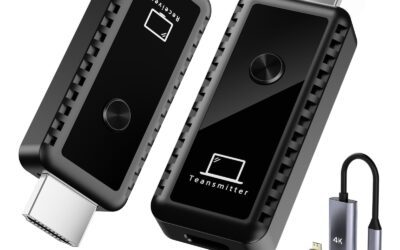
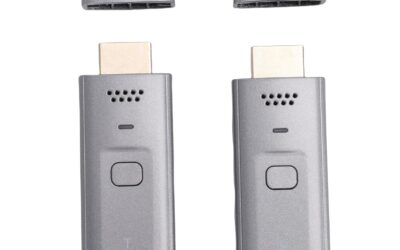
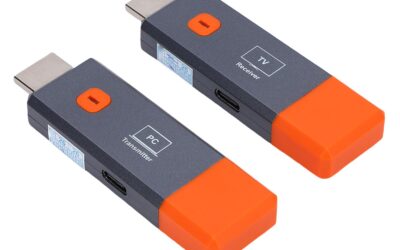
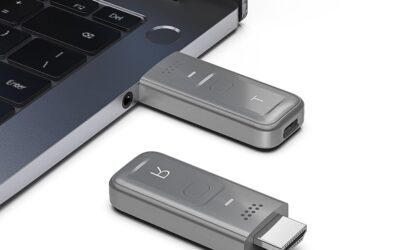
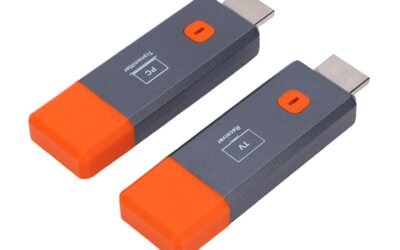
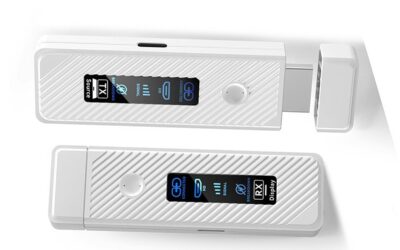
The kit consists of two main units: a transmitter (labeled TX) and a receiver (labeled RX). It utilizes dual-band 2.4GHz and 5GHz frequencies to establish a robust link, reaching up to 98 feet (30 meters) in optimal line-of-sight conditions. Visually, the units have a premium look and feel, incorporating high-quality materials and a braided cable neck that prevents fraying and allows for flexible positioning.
To accommodate various hardware setups, TPUFO includes three highly useful physical adapters in the box: a USB-C to HDMI adapter, a Micro HDMI adapter, and a Mini HDMI adapter. While the system supports 4K decoding at the source, it is important to note that the output to your target display is scaled to a stable 1080P at 60Hz—perfectly fine for presentations, standard video streaming, and casual gaming, though not a native 4K output system.
—
The Setup Experience: True Plug-and-Play
For many users, the most intimidating part of wireless video transmitters is the setup phase. Nobody wants to spend their valuable presentation prep time troubleshooting Wi-Fi configurations, pairing passwords, or driver installations. This is where the TPUFO kit shines. It is completely independent of external Wi-Fi networks and does not require Bluetooth or app installations.
Setting up the device takes less than 30 seconds:
- Connect the Receiver (RX): Plug the receiver unit into the HDMI port of your display (TV, projector, or monitor). Connect its included Type-C power cable to a USB port on the display or a standard 5V/2A wall outlet block to power it up.
- Connect the Transmitter (TX): Plug the transmitter unit into the HDMI port of your laptop, PC, or media player. If your device’s HDMI port does not provide sufficient output power, you can plug the transmitter’s power cord into a nearby USB port or adapter.
- Automatic Pairing: Once both units are plugged in, they automatically detect each other and pair. Within 10 to 15 seconds, your screen is cast to the display.
This hassle-free process makes it exceptionally accessible for non-technical users. It operates just like a physical HDMI cable, except the cable is completely invisible.
—
Pros: Why the TPUFO Kit Stands Out
After testing and reviewing the capabilities of the TPUFO Wireless HDMI Kit, we have identified several standout benefits that make this system worth the investment.
True Plug-and-Play Simplicity
Perhaps the biggest selling point of this kit is its complete lack of software friction. You don’t have to download an app, create an account, scan a QR code, or connect to a local Wi-Fi router. It operates entirely on its own direct wireless signal. If you work in a corporate environment or a school with strict IT policies that block software installations, this device bypasses those issues entirely. You plug it in, and it just works.
Impressively Low Latency (Lag-Free Video)
Wireless transmission systems are often plagued by lag, which can ruin gaming sessions or make mouse movements feel sluggish. Thanks to its dual-band 2.4G/5G architecture and an integrated LDS antenna, the TPUFO kit boasts sub-0.01-second latency. During video playback and presentation navigation, the synchronization between the host device and the display is nearly instantaneous. Video streams at 1080P/60Hz smoothly, without dropped frames, audio desync, or pixelation.
Generous Transmission Range
The kit is rated for up to 98 feet (30 meters) of wireless transmission. While physical walls, concrete, and heavy electronic interference can degrade wireless signals, the dual-band 5G protocol is highly resilient. In typical configurations—such as sending a signal from one side of a large conference room to a wall-mounted display, or streaming from a PC in an office to a TV in an adjacent living room—the signal remains stable and clear.
Support for Both Mirror and Extend Modes
Many wireless casters only duplicate your laptop’s screen (Mirror Mode). However, professionals often need to use their secondary screen to display slides while keeping notes or other files open on their laptop. The TPUFO kit fully supports both Mirror and Screen Extension modes, allowing you to use your display as a genuine second monitor. Switching between the two is easy and handled directly through your computer’s operating system display settings.
Innovative Privacy Mode Button
A highly thoughtful addition to the transmitter unit is a physical “Privacy” button. If you are giving a presentation and suddenly need to check private notes, log into an account, or search for a document without showing it to the entire audience, you can click this button to instantly pause the transmission. The display will freeze or go blank, and a second click will immediately resume the cast. It is a fantastic feature for corporate professionals and educators.
Premium, Travel-Friendly Build Quality
Weighing around 0.2 pounds, both dongles are incredibly lightweight and compact. Instead of stiff, cheap plastic connectors, TPUFO uses high-quality materials and a flexible, braided mesh cable neck. This mesh neck allows the dongle to hang naturally from your device’s ports, preventing stress on the host HDMI slot. The overall aesthetic is clean, professional, and built to survive being tossed into a travel bag.
Packed with Helpful Adapters
Not every laptop or source device has a standard HDMI port anymore. TPUFO resolves this issue by bundling a collection of high-quality adapters directly in the box, including USB-C to HDMI, Mini HDMI, and Micro HDMI. This eliminates the need to buy extra adapters separately and ensures compatibility with modern thin-and-light laptops, action cameras, digital cameras, and newer tablets.
—
Cons: Areas for Improvement
While the TPUFO Wireless HDMI Kit performs excellently in most circumstances, it is not without its limitations. To provide a balanced view, we have outlined the drawbacks you should keep in mind.
No Native Support for Phones or Tablets
If you are looking for a device to cast content directly from your iPhone, iPad, or Android smartphone to a TV, this is not the right tool. The manufacturer explicitly notes that this product is not suitable for connecting directly to mobile phones or tablets. While you can technically make it work using specific, powered USB-C-to-HDMI adapters, the device is fundamentally designed for laptops, PCs, TV boxes, game consoles, and cameras.
Max Output Resolution is 1080P (No Native 4K Output)
The marketing materials highlight “4K Decoding,” which might lead some buyers to believe they will get a native 4K display output on their high-end Ultra HD TVs. In reality, the transmitter is capable of *processing* a 4K input signal from your laptop without crashing, but the actual wireless transmission and final output on the screen are limited to 1080P at 60Hz. While 1080P looks crisp and perfectly fine for the vast majority of applications, home theater enthusiasts looking for a native 4K streaming link may find this a bit disappointing.
Frequent Need for External Power Supplies
While the product is advertised as a sleek, wireless cable replacement, both the receiver and the transmitter contain advanced wireless chips that require a consistent power supply. While some modern laptops and media players have HDMI ports that supply enough power to drive the transmitter, many do not. If your source device lacks power, you must plug the transmitter’s micro/Type-C power port into a USB port or a wall block. This means you will still have a thin wire running from the transmitter to a USB port, which slightly compromises the “completely cable-free” aesthetic.
Wide Physical Profile Can Block Adjacent Ports
The transmitter and receiver dongles are slightly wider than a standard HDMI cable connector. On modern laptops where USB, HDMI, and headphone jacks are clustered tightly together, plugging the TPUFO transmitter directly into the HDMI port may physically overlap and block access to adjacent ports. Using a short, flexible HDMI extension cable can easily resolve this, but it is a minor design oversight worth noting.
—
Customer Reviews Analysis
With an active pool of 1,122 reviews, customer sentiment around the TPUFO Wireless HDMI Extender Kit is overwhelmingly positive, pointing to a highly reliable product that delivers on its core promises. Let’s break down what real-world users are saying:
The Positives
- Instant Connection: Dozens of reviewers praise the absolute simplicity of the setup. Many highlight that it took them longer to unbox the device than it did to get their laptop screen projected onto their TV.
- No Latency for Presentations: Business professionals and teachers frequently comment on the seamless performance during slideshows, spreadsheets, and video playback, noting that mouse tracking feels completely natural and lag-free.
- Clean Office Desks: Users love the neat aesthetic. Offices and conference rooms that used to have a long, ugly HDMI cable snaking across the floor are now clean and hazard-free.
- Robust Build Quality: Multiple reviewers have commended the sturdy, premium feel of the braided cables and the inclusion of the adapters, which saved them from having to make additional purchases.
The Critiques
- Power Supply Struggles: A common point of confusion among a small subset of buyers relates to powering the transmitter. Some users plugged the transmitter into their laptop, received no signal, and assumed the device was broken, only to realize later that they needed to attach the external USB power cable.
- Occasional Signal Drops Through Heavy Obstacles: While the 98-foot range works wonderfully in open spaces, a few users noted that attempting to stream through multiple thick drywall or concrete walls led to occasional stutters or signal drops. It works best with a relatively clear line of sight.
- Adjacent Port Blocking: As mentioned in our cons, several users pointed out that the physical width of the transmitter blocked their laptop’s USB port, forcing them to use adapters or USB hubs.
—
Who Should Buy This Product?
The TPUFO Wireless HDMI Kit is a versatile tool, but it is highly optimized for specific user bases. You will get the absolute most value out of this product if you fit into one of the following categories:
Corporate Professionals & Meeting Facilitators
If you regularly give presentations in conference rooms, this device is a game-changer. You can plug the receiver behind the wall-mounted TV or projector and keep the transmitter at the table. When it is your turn to speak, simply plug the transmitter into your laptop, and you are ready to present without having to pass a long cable around or sit awkwardly close to the screen.
Teachers, Professors & Academic Instructors
In a classroom setting, being anchored to a podium limits your ability to engage with students. By using the TPUFO kit, you can carry your laptop around the room, interact with students, and cast your lesson plan or educational videos to the main whiteboard display effortlessly from up to 98 feet away.
Home Theater Minimalists
If you have a ceiling-mounted projector or a wall-mounted TV but do not want cables dangling down your walls, this kit provides a clean, clutter-free solution. You can place your cable box, gaming console, or Blu-ray player neatly inside an entertainment cabinet on the other side of the room and stream video wirelessly to your display.
Casual Gamers & Video Streamers
While hardcore competitive gamers may still prefer a physical cable to ensure zero-millisecond latency, casual gamers and movie buffs will find the TPUFO kit more than capable. Thanks to the ultra-low latency and dual-band connection, you can play couch co-op games or stream movies from your PC to your TV without any distracting audio-visual lag.
—
Final Verdict
The TPUFO Wireless HDMI Transmitter and Receiver Kit is a highly polished, reliable, and user-friendly solution to the age-old headache of cable management. At $159, it is positioned as a mid-tier wireless extender. While you can find cheaper wireless casting sticks on the market, they almost always require local Wi-Fi, suffer from painful video lag, or force you to install proprietary apps. TPUFO bypasses all of those pain points by offering true, hardware-based plug-and-play simplicity with sub-0.01-second latency.
It is not entirely perfect—the lack of native smartphone compatibility and the 1080P maximum output limit might deter those looking for a true 4K streaming setup or a mobile-casting hub. Furthermore, depending on your source device, you may still need to use a USB power cable to keep the transmitter running.
However, for professionals, educators, and home users who want to transmit clean, lag-free 1080p video from a laptop, PC, or media box to a display up to 98 feet away, the TPUFO kit is outstanding. It is built well, performs beautifully, and is incredibly simple to operate. If you want to declutter your desk, clean up your living room, or make your presentations stress-free, the TPUFO Wireless HDMI Kit is a highly recommended purchase.