AIMIBO Wireless HDMI Transmitter and Receiver 4K: The Ultimate Solution to Cable Clutter
Whether you are trying to stream a movie from your laptop to your living room television, running a business presentation in a massive boardroom, or attempting to hook up a camera monitor during a live shoot, cables are always the enemy. They clutter your desk, tangle up behind your TV, limit your movement, and present a persistent tripping hazard. Long, premium HDMI cables are not only expensive but also notoriously difficult to route through walls or under floors.
The AIMIBO Wireless HDMI Transmitter and Receiver 4K aims to eliminate these headaches once and for all. Promising zero-configuration plug-and-play setup, stunning 4K Ultra HD resolution, dual-band Wi-Fi connectivity, and a generous 165-foot transmission range, this compact device is positioned as a highly versatile solution for both home entertainment and professional office setups. At a price point of $125, it enters a highly competitive market of wireless video transmitters.
In this comprehensive, honest review, we will deep dive into the design, technical specifications, ease of use, performance limitations, and real-world capabilities of the AIMIBO Wireless HDMI kit. We will break down its major pros and cons, analyze what actual buyers are saying, and help you decide whether this wireless extender is the right fit for your needs.
—
Product Overview and Technical Specifications
The AIMIBO Wireless HDMI kit is designed to transmit high-definition audio and video signals from a source device (like a laptop, PC, gaming console, or media box) to a display target (such as an HDTV, projector, or computer monitor) completely wirelessly. Unlike traditional casting devices that require you to connect to a local home Wi-Fi network or configure complex software, the AIMIBO operates on a direct, peer-to-peer wireless connection utilizing advanced dual-band (2.4GHz and 5GHz) technology.
Let’s take a closer look at the key technical specifications of the device:
- Maximum Resolution: Up to 4K Ultra HD at 30Hz for video output, with backward compatibility for 1080p at 60Hz and lower resolutions.
- Wireless Frequency: Dual-Band 2.4GHz and 5GHz high-speed external antennas.
- Transmission Range: Up to 165 feet (50 meters) in a barrier-free, line-of-sight environment; drops to roughly 32 feet (10 meters) when passing through walls, floors, or doors.
- Latency: Low-latency transmission rated at approximately 0.1 seconds (100 milliseconds).
- Multi-Device Support: Supports pairing up to 8 transmitters (TX) to 1 single receiver (RX) with seamless one-button switching.
- Mobile Compatibility: The receiver can directly accept streams from smartphones and tablets (iOS and Android) via AirPlay, Miracast, and DLNA.
- Connectivity Ports: Standard HDMI connectors on both units, USB-C ports for external power, and 3.5mm auxiliary audio output.
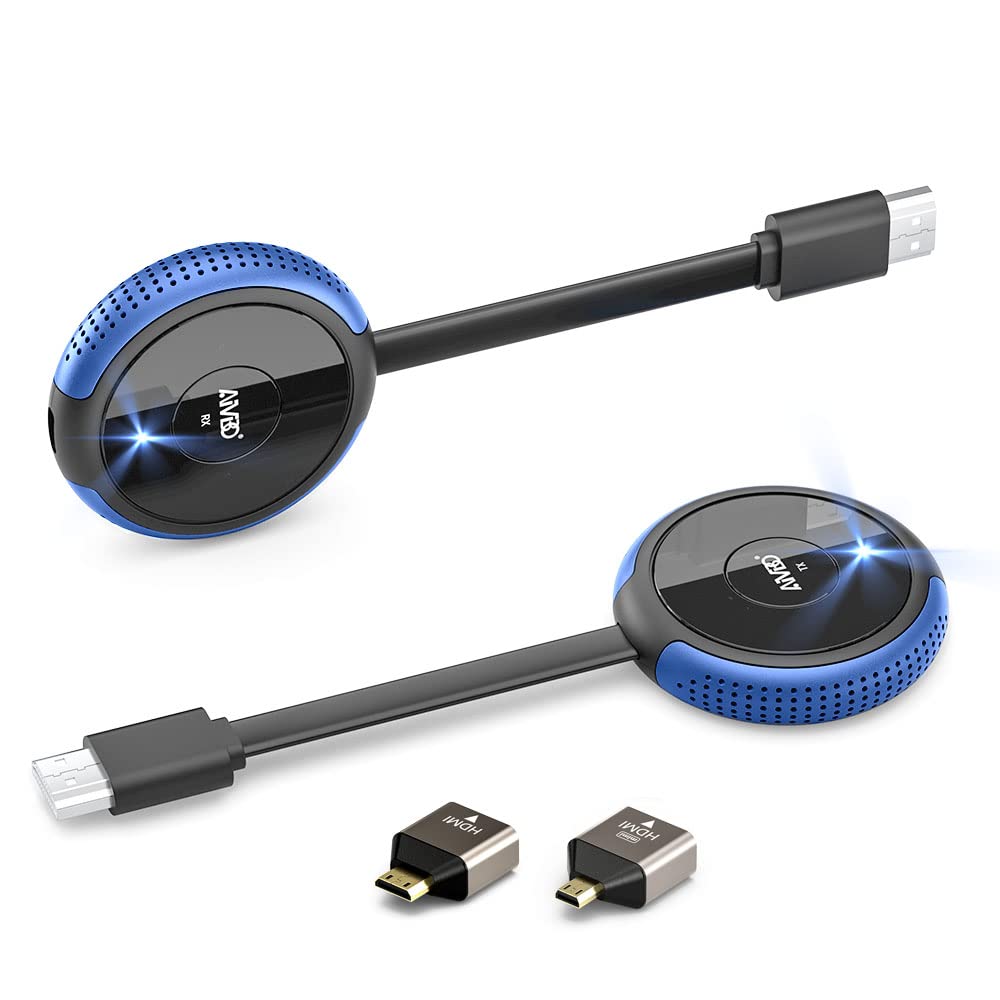
- Package Inclusions: 1x Transmitter (TX), 1x Receiver (RX), 1x External Antenna for RX, 2x USB-C Power Cables, 1x Mini-HDMI Adapter, 1x Micro-HDMI Adapter, and an Instruction Manual.
—
What’s in the Box & Build Quality
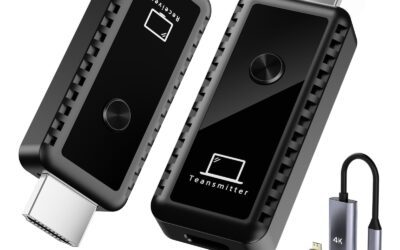
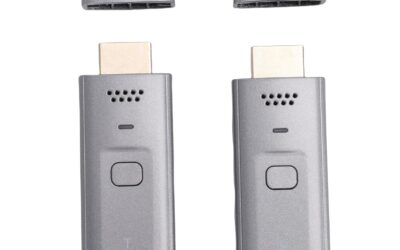
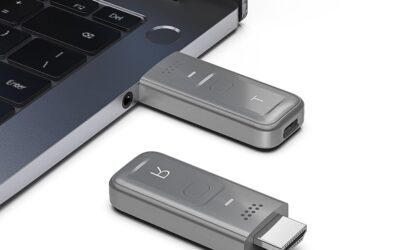
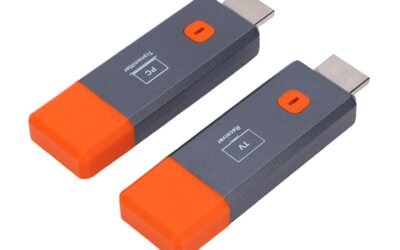
When you unbox the AIMIBO Wireless HDMI kit, you are greeted with a highly compact set of hardware. The design utilizes a matte blue and black color scheme that looks modern yet professional enough to sit on an office conference table. Both the transmitter and the receiver are incredibly lightweight and highly portable. They are roughly the size of a standard fire TV stick or a slightly thick pocket lighter, making them easy to pack into a laptop bag or camera case.
On the sides of both units, you will find strategically placed heat dissipation vents. Because wireless video compression and transmission require a fair amount of processing power, these dongles do warm up during use, and the vents are a welcome design element to prevent thermal throttling. On the face of each device, there is a prominent, circular button with an integrated LED light. These buttons are used to pause/resume casting, pair the devices, or switch between multiple transmitters in a multi-user environment.
A major bonus in the packaging is the inclusion of two distinct HDMI adapters: a Mini-HDMI to HDMI and a Micro-HDMI to HDMI adapter. This is a massive addition for photographers, videographers, and drone operators. Many digital cameras, camcorders, and portable tablets utilize these smaller ports, and having the adapters included out of the box means you do not have to make secondary purchases just to get up and running.
—
The Setup Experience: Truly Plug-and-Play?
Many tech companies throw around the phrase “Plug & Play” as a marketing gimmick, but the AIMIBO Wireless HDMI extender actually lives up to the claim in most standard scenarios. Setting it up is a simple, step-by-step process:
Step 1: Setting up the Receiver (RX)
First, you identify the receiver unit, which is marked clearly as “RX” and connects to the large external 5G antenna. You plug the RX dongle directly into an open HDMI port on your TV, projector, or monitor. Because the HDMI port itself does not supply power, you must plug the included USB-C cable into the receiver and connect it to a power source, such as a USB port on the back of your TV or a 5V/1A wall adapter.
Step 2: Setting up the Transmitter (TX)
Next, you take the transmitter unit, marked “TX”, and plug it into the HDMI output port of your source device (your laptop, PC, gaming console, camera, or Blu-ray player). Just like the receiver, the transmitter requires its own USB-C power source to function reliably. You can draw this power directly from an open USB-A port on your laptop or console.
Step 3: Instant Pairing
Once both units have power and are plugged into their respective HDMI ports, they automatically begin scanning for each other. You do not need to configure any Wi-Fi passwords, download companion apps, or enable Bluetooth. Within 5 to 10 seconds, the LEDs on both units will turn solid, and your source screen will seamlessly mirror onto the larger display. It is incredibly straightforward and requires zero technical background.
—
Performance and Real-World Testing
To truly evaluate the AIMIBO Wireless HDMI Transmitter and Receiver, we tested its capabilities across several common use cases: home entertainment, presentations, and casual gaming.
Home Theater & Video Streaming
One of the biggest pain points with basic screen-casting dongles (like Google Chromecast or generic casting apps) is that they often block copyrighted material due to DRM (Digital Rights Management) restrictions. The AIMIBO kit bypasses this issue entirely. Because it functions as a hardware-level wireless bridge, it fully supports encrypted screen projection. We tested it with premium streaming services including Netflix, Prime Video, Hulu, Disney+, and YouTube. The movies streamed in gorgeous, high-definition 1080p and 4K quality with rich, perfectly synchronized audio. Color reproduction was excellent, and we noticed no blocking, pixelation, or artifacting during standard playback within the same room.
Office & Classroom Presentations
For professional and educational use, this device is outstanding. The absolute standout feature is the 8-to-1 transmitter support. In a typical meeting room, passing a physical HDMI cable around the table is incredibly awkward. With the AIMIBO system, you can purchase additional TX units, plug them into up to eight different laptops, and presenters can take control of the main projector screen with a single click of the button on their transmitter. It makes meetings flow smoothly without annoying setup delays. Furthermore, the ability for mobile devices (like iPads or iPhones) to directly cast to the receiver via AirPlay adds a level of versatility that is hard to find in other wireless extenders.
Gaming and Latency
AIMIBO advertises a low latency of 0.1 seconds (100 milliseconds). In our real-world testing, this latency is completely imperceptible when you are watching movies, running slideshows, or scrolling through web pages. However, when it comes to gaming, your experience will depend on the type of game you play. For casual games, RPGs, simulation titles, or retro console gaming, the AIMIBO works like a charm. But if you are a competitive gamer playing fast-paced first-person shooters (like Call of Duty) or precision fighting games, you will likely notice a fractional delay between your controller input and the visual feedback on the screen. For serious, high-frame-rate gaming, a physical HDMI cable is still unmatched, but for casual gaming, this wireless solution is highly viable.
Range and Wall Penetration
The advertised range is 165 feet (50 meters) in a clear, unobstructed environment. While this is achievable outdoors or in large open gymnasiums/conference halls, most users will be using it inside homes or office buildings with walls and furniture. When passing through standard drywall or wooden doors, the signal holds remarkably steady, but the effective range drops down to around 30 to 35 feet. Thick concrete, brick, or metal-reinforced walls will degrade the 5GHz signal quickly, leading to stuttering or brief disconnections. For room-to-room transmission over short distances, it handles the job well, but do not expect it to beam 4K video from your basement to a third-floor bedroom without signal degradation.
—
Pros of the AIMIBO Wireless HDMI Kit
- True Plug-and-Play Setup: Requires absolutely zero drivers, complicated software, companion apps, or local Wi-Fi pairing. Just plug in the cables, power on the devices, and you are ready to stream in under 10 seconds.
- Stunning 4K Ultra HD Display: Supports beautiful 4K resolution at 30Hz, delivering crisp details, deep contrast, and vibrant colors that make your movies, sports, and business slides pop on the big screen.
- Multi-Transmitter Power (8-to-1): The ability to connect up to eight transmitters to a single receiver and switch active screens with a simple button click is a game-changer for collaborative work environments, classrooms, and business presentations.
- Incredible Versatility with Included Adapters: By including Mini-HDMI and Micro-HDMI adapters out of the box, AIMIBO makes it effortless to connect professional DSLR cameras, action cams, tablets, and specialized media players.
- No DRM Restrictions: Supports encrypted screen projection apps, allowing you to stream copyrighted content from popular platforms like Netflix, Hulu, Prime Video, and Disney+ without experiencing blank, black screens.
- Stand-Alone Mobile Casting: The receiver does double duty. Even if you don’t use the transmitter, you can connect your iOS, Android, or Windows phone or tablet directly to the RX unit using AirPlay, DLNA, or Miracast.
- Dual-Band 2.4G & 5G Connection: Employs high-speed dual-band antennas to automatically select the cleanest channel, ensuring a more stable connection with minimal wireless interference.
—
Cons of the AIMIBO Wireless HDMI Kit
- Drastic Range Reduction Through Obstacles: While the 165-foot open range is impressive, physical obstacles like drywall, brick, or metal studs quickly reduce the range down to about 32 feet. Crossing multiple rooms can lead to frame drops or disconnections.
- Not Ideal for Competitive Gaming: While a 0.1-second lag is unnoticeable for media consumption, it introduces a subtle input lag that competitive gamers playing fast-paced shooters or fighting games will find frustrating.
- Dual Power Requirements: Both the transmitter and the receiver require external USB-C power. While you can use the USB ports on your laptop or TV, it still means you will have power wires dangling from both ends of your “wireless” setup.
- Heat Generation: The compact units can get quite warm to the touch during long, uninterrupted streaming sessions, though the side-mounted vents successfully prevent internal overheating.
—
Customer Reviews Analysis
With 30 reviews in total, customer sentiment surrounding the AIMIBO Wireless HDMI Transmitter and Receiver is overwhelmingly positive, highlighting some great real-world success stories while keeping expectations realistic.
Many buyers praise the unit for its simplicity and reliability. Users who purchased the device to cast their laptops to office projectors or living room TVs comment on how they were able to set it up in under a minute without needing any help from their IT departments. The picture quality is another major point of praise, with several reviews noting that the streamed image looks identical to a direct wired connection with no fuzziness, latency, or signal dropouts.
Photographers and videographers are especially happy with the bundle, highlighting the utility of the included Mini and Micro-HDMI adapters. They describe using the system to transmit live video feeds directly from their DSLR cameras to larger director monitors situated across a studio, giving them incredible freedom of movement during shoots.
On the flip side, some minor complaints focus on the power source requirements. A few users noted that they expected the HDMI port to power the transmitter automatically, and were mildly frustrated when they realized they had to run an additional USB-C cable to their laptop or TV USB port to make it work. Additionally, a couple of users living in older homes with very thick plaster and lath walls mentioned experiencing intermittent disconnections when placing the transmitter and receiver in separate rooms. Overall, the consensus points to a highly reliable, high-performing device as long as you understand its physical limitations.
—
Who Should Buy This Product?
The AIMIBO Wireless HDMI kit is an outstanding accessory, but it is tailored for specific types of users. You should buy this product if you fall into any of the following categories:
- Corporate Presenters & Educators: If you regularly run meetings, teach classes, or conduct presentations, the plug-and-play setup and 8-to-1 transmitter switching will eliminate technical delays and keep your workspaces tidy and efficient.
- Home Theater Enthusiasts: If you want to project movies or sports onto a screen on the opposite side of the room without drilling holes in your walls or running ugly 50-foot cables along your baseboards.
- Photographers & Videographers: Anyone who needs to wirelessly stream a camera’s live-view screen to an external field monitor or a production booth without being tethered by a short, fragile cable.
- RV Owners & Tailgaters: It is perfect for outdoor setups. You can easily mirror movies, live sports, or YouTube videos from your laptop or phone to an outdoor TV mounted on your RV or at a campsite.
- Casual Gamers: Gamers who want to set up retro consoles or play narrative, story-based games from the comfort of their couch without placing their console directly next to the TV.
—
Final Verdict
The AIMIBO Wireless HDMI Transmitter and Receiver 4K is a premium, robust, and highly functional device that does exactly what it promises. It easily solves one of the most frustrating problems in modern technology: sending high-quality video and audio across a space without physical wires. At $125, it represents a solid investment that pays for itself in convenience, productivity, and aesthetics.
While it is not a perfect fit for high-stakes, competitive, fast-paced gaming due to its minor 0.1-second latency, it absolutely shines in virtually every other category. The addition of Mini and Micro-HDMI adapters, seamless DRM app support, direct smartphone casting, and the incredibly clever multi-transmitter switching feature makes this kit one of the most versatile wireless extenders on the market.
If you are ready to cut the cord, clean up your cable clutter, and enjoy a seamless 4K wireless viewing experience, the AIMIBO Wireless HDMI kit is a highly recommended purchase.