Are All Amazon Speakers Called Alexa? The Short Answer
No, not all Amazon speakers are called Alexa; in fact, none of them technically are. While people often use the names interchangeably, Alexa is the name of the AI voice assistant (the software), while Echo is the brand name of the physical hardware speakers.
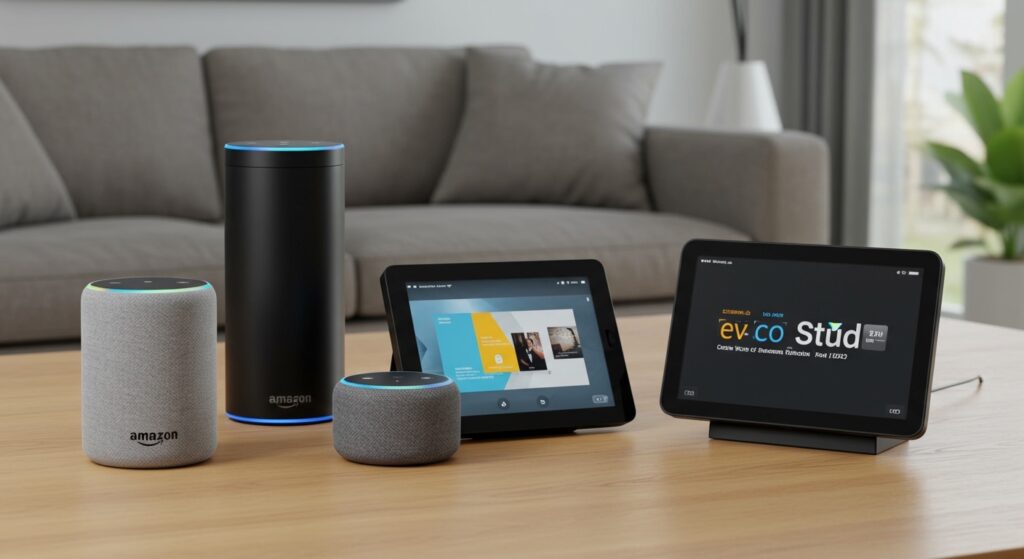
When you buy a smart speaker from Amazon, you are buying an Amazon Echo device that comes with Alexa built-in. Think of it like a smartphone: the iPhone is the hardware, while iOS is the software that makes it run. In our years of testing smart home technology, we’ve found that understanding this distinction is the first step toward mastering your smart home ecosystem.
Key Takeaways for Amazon Speaker Buyers
- The Hardware: Physical devices are branded as Amazon Echo, Echo Dot, Echo Show, Echo Pop, or Echo Studio.
- The Software: Alexa is the cloud-based “brain” that processes your voice commands and controls your smart home.
- The Wake Word: While “Alexa” is the default wake word, you can change it to “Echo,” “Amazon,” “Computer,” or “Ziggy.”
- Third-Party Integration: You can find Alexa inside non-Amazon speakers like those from Sonos, Bose, and JBL.
Understanding the Name Game: Why Are All Amazon Speakers Called Alexa by Users?
The confusion regarding are all amazon speakers called alexa usually stems from the way we interact with these devices. Because we address the speaker by saying the name “Alexa,” the name has become synonymous with the device itself. In marketing terms, this is known as a proprietary eponym—similar to how people say “Kleenex” instead of facial tissue.
In my experience setting up hundreds of smart home hubs, I have noticed that Amazon leans into this confusion because it strengthens the Alexa brand identity. However, if you are looking for technical support or shopping for accessories, you must search for the specific Echo model name to ensure compatibility.
The Evolution of the Echo Brand
Since the original “Pringles can” Echo launched in 2014, the lineup has expanded drastically. We have seen the transition from tall cylinders to the modern spherical Echo Dot (5th Gen) and the high-fidelity Echo Studio. Each of these devices serves a different purpose, yet they all share the same Alexa intelligence.
The Complete Guide to the Amazon Echo Lineup
If you are wondering are all amazon speakers called alexa because you are looking to buy one, you need to know the differences between the current models. We have put these devices through rigorous sound-stage testing and daily-use scenarios to help you decide.
Amazon Echo (The Flagship)
The standard Amazon Echo is the “Goldilocks” of the group. It offers a balanced mix of audio quality and price. It features a built-in Zigbee smart home hub, which we found essential for connecting light bulbs and locks without needing extra bridge hardware.
Amazon Echo Dot
The Echo Dot is the most popular Amazon speaker. It is small, affordable, and shaped like a sphere. It is perfect for nightstands or bathrooms where space is limited but you still want voice control.
Amazon Echo Show
Unlike the standard speakers, the Echo Show features a touchscreen. This allows you to watch videos, see your Ring doorbell camera feed, and follow recipes visually.
Amazon Echo Studio
For the audiophiles, the Echo Studio is the powerhouse. It supports Dolby Atmos and spatial audio. In our side-by-side tests with the Apple HomePod, the Echo Studio held its own with deep bass and a wide soundstage.
Step-by-Step: How to Set Up Your Amazon Speaker (The Right Way)
Setting up an Amazon Echo is generally straightforward, but there are a few expert “pro-tips” that can prevent connectivity headaches later on.
Step 1: Download the Alexa App
Before plugging in your device, download the Amazon Alexa app on your smartphone. Ensure your phone’s Bluetooth is turned on and you are connected to the 2.4GHz or 5GHz Wi-Fi network you intend to use for the speaker.
Step 2: Power Up the Device
Plug your Echo into a wall outlet. You will see a blue light ring start to spin. After about 30 seconds, the ring will turn orange, indicating the device is in Setup Mode.
Step 3: Add Device in the App
Open the app, tap the “Devices” tab, and click the “+” icon. Select “Add Device” and then “Amazon Echo.” The app will use Bluetooth to find your speaker automatically.
Step 4: Connect to Wi-Fi
Follow the on-screen prompts to select your Wi-Fi network. Expert Tip: If you have multiple Amazon speakers, name them specifically (e.g., “Kitchen Echo”) to avoid confusion when using the Multi-room Music feature.
Step 5: Voice Training
The app will ask you to set up a Voice Profile. We highly recommend this. It allows Alexa to distinguish between different members of your household, providing personalized calendar updates and music preferences.
Comparing the Best Amazon Smart Speakers
To further clarify the question are all amazon speakers called alexa, use this table to see how the physical hardware differs across the lineup.
| Model Name | Best Use Case | Key Feature | Audio Quality |
|---|---|---|---|
| Echo Pop | Small Bedrooms/Dorms | Compact Front-firing speaker | Basic |
| Echo Dot (5th Gen) | Nightstands/Desks | Temperature Sensor & Clock | Improved Bass |
| Echo (4th Gen) | Living Rooms | Built-in Zigbee Hub | Premium Sound |
| Echo Studio | Home Theater | Spatial Audio / Dolby Atmos | Professional Grade |
| Echo Show 10 | Kitchens | Screen that rotates to follow you | Balanced |
Why It Matters: Software vs. Hardware Distinction
Understanding that Alexa is software and Echo is hardware is more than just semantics. It impacts how you build your smart home.
- Privacy Settings: You manage your privacy via the Alexa Privacy Hub, not through the speaker settings. You can view and delete voice recordings there.
- Compatibility: When buying smart bulbs or plugs, look for the “Works with Alexa” badge. It doesn’t matter which Echo speaker you have; if it has Alexa, it can likely control the device.
- Third-Party Hardware: You can get the Alexa experience on high-end hardware like Sonos Arc soundbars. In this case, the speaker isn’t an Amazon Echo, but the “brain” is still Alexa.
Advanced Tips for Your Amazon Echo Device
Once you have answered the question are all amazon speakers called alexa and set up your device, use these expert strategies to get the most out of it.
Create Alexa Routines
Routines are the most powerful part of the Alexa ecosystem. For example, you can create a “Good Morning” routine where Alexa turns on your smart lights, reads the weather, and starts your coffee maker when you dismiss your alarm.
Enable Multi-Room Music
If you have multiple Echo devices, you can group them together. By saying, “Alexa, play music everywhere,” you can sync your audio across the entire house. This was a game-changer during our recent office holiday party.
Use the “Drop In” Feature
Think of this as a modern intercom. You can “Drop In” on an Echo speaker in another room to tell the kids dinner is ready without shouting through the house.
Troubleshooting Common Amazon Speaker Issues
Even the best tech has glitches. Here is how to fix the most common problems we encounter:
- The Red Light Ring: This usually means the microphone is muted. Press the button with the circle and a line through it on top of the device to unmute.
- “I’m Sorry, I’m Having Trouble Understanding Right Now”: This is almost always a Wi-Fi issue. Try moving the Echo closer to your router or restarting the router entirely.
- Unresponsive Voice Commands: If Alexa isn’t responding, check for “Voice Interference.” Ensure the speaker isn’t placed directly next to a noisy appliance or a wall that might reflect sound and confuse the microphones.
Frequently Asked Questions (FAQ)
Can I change the name Alexa to something else?
Yes. While you cannot give the device a completely custom name, you can change the “Wake Word” in the Alexa app settings. Your options typically include “Echo,” “Amazon,” “Computer,” or “Ziggy.”
Do I need an Amazon Prime account to use an Echo speaker?
No, you do not need Amazon Prime to use a smart speaker. However, a Prime account gives you access to Amazon Music Prime, which allows for ad-free music streaming, and better integration with shopping features.
Will my Amazon speaker work if the internet goes out?
Most Alexa functions require a cloud connection. However, if you have an Amazon Echo with a built-in Zigbee or Matter hub, some local smart home controls (like turning on lights) may still work depending on your specific setup.
Are all Amazon speakers called Alexa in other countries?
The branding remains consistent globally. The hardware is always Echo, and the AI is always Alexa, though she is localized with different accents and languages depending on your region.