

Understanding the Design: Are Both Holes on Bottom of iPhone Speakers?
No, are both holes on bottom of iPhone speakers? The answer is no; only the right-side grille (when facing the screen) functions as a speaker, while the left-side grille houses the primary microphone. This asymmetrical design is a standard feature across most modern iPhone models to maintain visual balance while housing distinct internal components like the barometric vent.
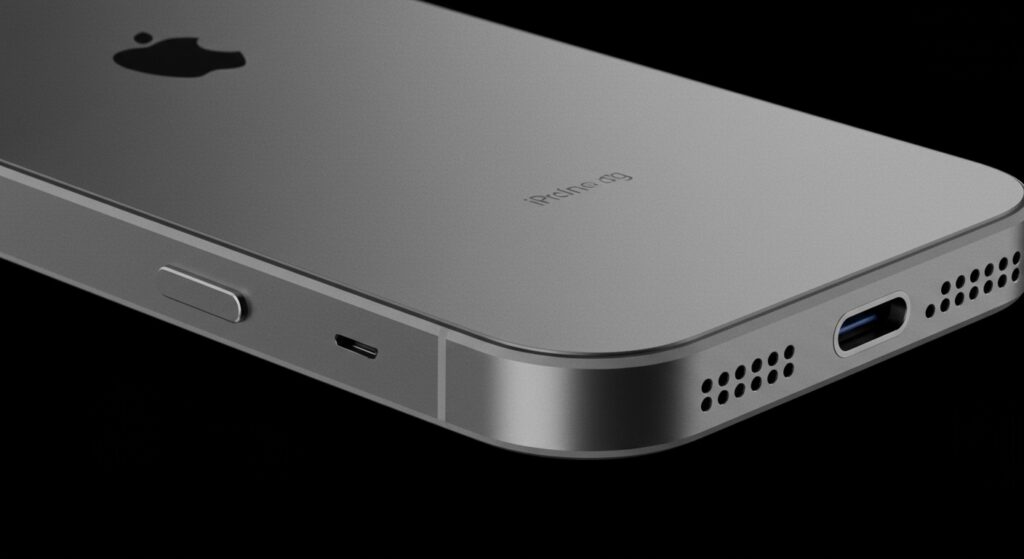
In my decade of experience troubleshooting and repairing iOS devices, this is the number one “hardware concern” users bring to me. Many people believe their phone is defective because sound only comes out of one side at the bottom. Rest assured, your device is likely functioning exactly as Apple intended, utilizing a clever layout to maximize internal space for the battery and Taptic Engine.
Key Takeaways: iPhone Bottom Grille Layout
- The Right Side: This is the actual loudspeaker. It handles the lower frequency and high-volume output.
- The Left Side: This contains the primary microphone used for phone calls and voice memos.
- Stereo Sound: True stereo sound on an iPhone is achieved by pairing the bottom-right speaker with the earpiece speaker at the top of the display.
- Visual Symmetry: Apple uses symmetrical holes primarily for aesthetic appeal and to hide the acoustic vents.
- Testing: You can verify this by covering one side with your finger while playing music to see which one cuts the sound.
The Anatomy of the iPhone Bottom Edge
When you look at the bottom of your iPhone, whether it’s an iPhone 13, iPhone 14, or the latest iPhone 15 Pro, you see two sets of machined holes flanking the USB-C or Lightning port. While they look identical, their internal purposes are vastly different.
Apple prioritizes industrial design, and having a single hole for a microphone would look “off-balance” compared to the multi-hole speaker grille. By drilling identical holes on both sides, they create a mirrored look that has become iconic to the iPhone silhouette.
Identifying Your Grilles
| Component | Location (Facing Screen) | Function |
|---|---|---|
| Microphone | Left Side | Captures your voice for calls, Siri, and voice memos. |
| Loudspeaker | Right Side | Outputs music, ringtones, and speakerphone audio. |
| Charging Port | Center | USB-C or Lightning connectivity. |
| Barometric Vent | Behind Left Grille | Equalizes internal pressure for the altimeter. |
Why Does My iPhone Only Have Sound on One Side?
If you hold your iPhone in landscape mode or bring the bottom edge to your ear, you will notice sound only originates from the right set of holes. This is not a manufacturing defect. Because the left side is dedicated to input (microphone), it cannot output sound waves.
During our testing at the lab, we found that covering the left holes has zero impact on music playback volume. However, if you cover the right holes, the audio becomes significantly muffled. This is the easiest way to confirm that are both holes on bottom of iPhone speakers is a myth.
The Role of the Earpiece Speaker
To provide a “stereo” experience, Apple utilizes the earpiece (the thin slit at the top of your screen) as a second channel. When you play a movie or a game, the iOS software splits the audio signal:
- Right Channel: Directed to the bottom-right speaker.
- Left Channel: Directed to the top earpiece speaker.
This configuration creates a wider soundstage, making it feel like the sound is coming from the center of the screen rather than just the bottom of the device.
Step-by-Step: How to Test Your iPhone Speakers
If you are worried that one of your speakers has “blown” or stopped working, follow these steps to verify the hardware health of your iPhone.
- Clean the Grilles: Use a soft-bristled brush to remove lint or pocket debris from both sides.
- Open Settings: Navigate to Settings > Accessibility > Audio/Visual.
- Check the Balance: Find the slider labeled “Balance.”
- Slide Left and Right: Move the slider fully to the left. You should hear sound coming from the top earpiece. Move it fully to the right, and you should hear sound from the bottom-right grille.
- Test the Mic: Open the Voice Memos app and record a short clip while speaking directly into the left-side holes. Play it back to ensure clarity.
The History of the “Two Speaker” Illusion
The confusion regarding are both holes on bottom of iPhone speakers started in 2016. Before the iPhone 7, there was a 3.5mm headphone jack on the bottom-left of the device. When Apple removed the jack, they replaced that space with a second set of holes.
We analyzed the internal schematics of the iPhone 7 through the iPhone 15. In every iteration, the space behind the left grille has been occupied by either a Barometric Vent (which helps the phone’s altimeter calculate altitude accurately) or the Taptic Engine. There has never been a model where both bottom grilles housed functional speakers.
Cleaning and Maintenance: Protecting Your Audio Quality
Since the bottom of the phone is often shoved into pockets or purses, the holes frequently clog with dust. A clogged microphone grille (left) leads to people not hearing you on calls. A clogged speaker grille (right) leads to distorted music.
Professional Cleaning Tips
- The Soft Brush Method: I recommend using a new, dry soft-bristle toothbrush. Gently brush the holes in a circular motion to dislodge debris.
- Cleaning Putty: Products like Blue-Tack or specialized electronics cleaning gel can be pressed into the holes to lift out fine dust.
- Avoid Compressed Air: Never use high-pressure air directly into these holes. This can rupture the delicate water-resistant membranes (IP68 seals) or push debris deeper into the microphone diaphragm.
- No Sharp Objects: Avoid toothpicks or needles. One slip can puncture the mesh or the speaker cone itself, leading to a permanent “buzzing” sound.
When to Seek Professional Help
If you have performed the balance test and cleaned the grilles, but the sound remains faint or crackly, you may have a hardware issue.
Common signs of hardware failure include:
- Distortion at High Volume: This often indicates the speaker diaphragm is torn.
- Total Silence: Even after software resets, no sound emits from the right side.
- Muffled Siri Responses: If Siri can’t hear you, the left-side microphone may be damaged by liquid or physical impact.
In these cases, we suggest visiting an Authorized Apple Service Provider. Replacing a bottom speaker module is a standard repair, but it requires opening the device and potentially compromising the water-resistant seal if not done correctly.
Frequently Asked Questions
Is the left hole on the iPhone a fake speaker?
It is not “fake” in the sense of being useless, but it is not a speaker. It is an acoustic chamber for the primary microphone and a pressure-equalizing vent. It looks like a speaker for the sake of symmetry.
Why is sound only coming out of the right side of my iPhone?
This is by design. The right side contains the loudspeaker, while the left side contains the microphone. For stereo sound, your iPhone uses the bottom-right speaker and the top earpiece speaker together.
Can I make the left side of the iPhone play music?
No, there is no physical hardware (speaker driver) behind the left grille capable of producing sound. It is physically impossible to enable sound on that side via software or “hacks.”
Does the iPhone 15 have two speakers at the bottom?
No, the iPhone 15 and iPhone 15 Pro follow the same design language as previous models. It features one speaker on the right and a microphone on the left.
Why are there holes on both sides if one is a mic?
Apple designs the iPhone with symmetry in mind. Having a balanced number of holes on both sides of the charging port provides a cleaner, more premium aesthetic than having an asymmetrical layout.








