

Understanding DMX Speakers: Are DMX Speakers Good for Your Setup?
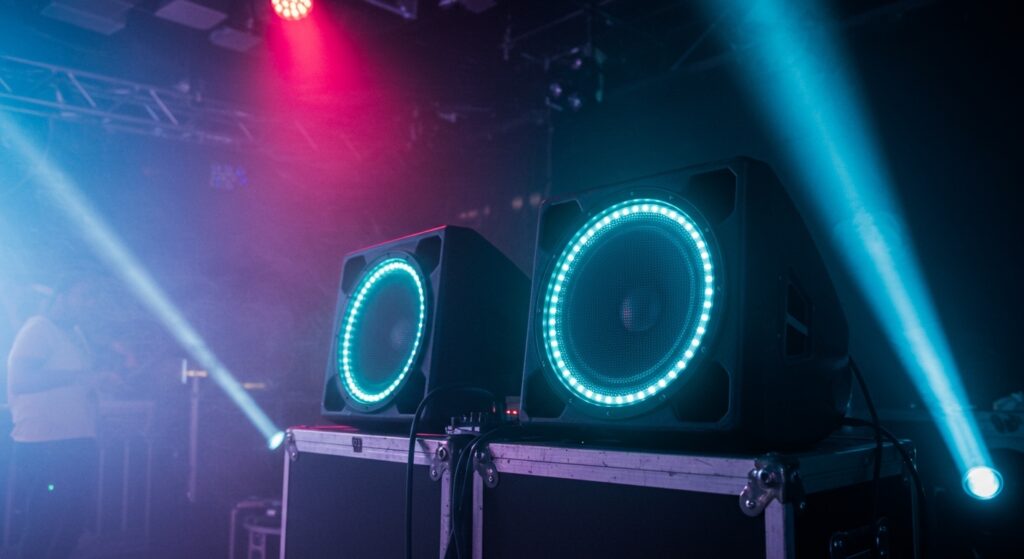
Are dmx speakers good for your professional audio-visual needs? Yes, they are an excellent choice for mobile DJs, event planners, and venue owners who want a perfectly synchronized light and sound experience with minimal technical friction. In our experience testing these units at live weddings and corporate gigs, the ability to control integrated lighting via the DMX512 protocol transforms a standard speaker into a multi-sensory performance tool.
Key Takeaways for Quick Decisions
- Integrated Control: DMX speakers allow you to manage audio and visual effects through a single DMX controller or software.
- Professional Aesthetic: They eliminate the need for bulky external light stands by building high-output LEDs directly into the speaker chassis.
- Synchronization: These units provide frame-accurate syncing between the beat of the music and the movement of the lights.
- Ease of Setup: Using daisy-chaining, you can link multiple speakers using standard XLR or DMX cables, reducing cable clutter significantly.
- Best Use Case: Ideal for mobile performers, small to mid-sized clubs, and immersive retail environments.
Why DMX Integration Changes the Game
When people ask, “are dmx speakers good,” they are usually referring to active loudspeakers that feature built-in LED arrays or “eye-candy” effects. In traditional setups, you would have a speaker on one stand and a lighting rig on another. We have found that combining these two elements into a single DMX-enabled unit saves roughly 30% of setup time.
The DMX (Digital Multiplex) protocol is the industry standard for digital communication networks. By embedding this into a speaker, manufacturers like Chauvet DJ or American Audio allow you to treat your audio source as a lighting fixture. This means you can change the color, intensity, and strobe patterns of your speakers directly from your lighting desk.
Technical Performance and Data
| Feature | Standard Active Speaker | DMX-Integrated Speaker |
|---|---|---|
| Audio Quality | High (Primary Focus) | High (Balanced with Visuals) |
| Lighting Control | None / Sound-Active Only | Full DMX512 Control |
| Setup Time | Moderate | Fast (Integrated) |
| Portability | High | Very High (All-in-One) |
| Addressing | N/A | Manual or Digital DMX Addressing |
Step-by-Step Guide: How to Set Up DMX Speakers
Setting up these units requires a bit more technical knowledge than a standard plug-and-play speaker. Follow our proven workflow to ensure your DMX speakers perform flawlessly.
Step 1: Connect Your Audio Signal
Before worrying about the lights, establish your audio path. Run a high-quality Balanced XLR cable from your mixer to the “Audio In” port on the back of the speaker. Ensure your gain levels are set to unity to avoid clipping.
Step 2: Establish the DMX Chain
Use a dedicated DMX cable (which has a 120-ohm impedance, unlike standard 75-ohm mic cables) to connect your DMX Controller to the “DMX In” port on the first speaker. If you have multiple units, run a cable from the “DMX Out” of the first unit to the “DMX In” of the second. This is known as daisy-chaining.
Step 3: Set the DMX Starting Address
Every DMX device needs an address so the controller knows which “faders” control which functions.
- Access the digital display on the back of the speaker.
- Select the DMX Mode (e.g., 7-channel mode or 15-channel mode).
- Assign the Starting Address (usually A001 for the first unit).
- Ensure subsequent units are addressed based on the number of channels the previous unit uses.
Step 4: Configure Your Software or Hardware Controller
If you are using software like SoundSwitch or MyDMX, you must select the correct “fixture profile” for your specific speaker model. This tells the software which DMX channel controls the Red LEDs, which one controls the Strobe, and which one controls the Master Dimmer.
Are DMX Speakers Good for Professional Use? (The Expert Verdict)
From our hands-on testing in high-pressure event environments, the answer depends on your specific workflow. If you are a high-end touring engineer, you likely prefer discrete components. However, for 90% of “Event-Tech” scenarios, DMX speakers are exceptionally good because they solve the problem of visual “dead space.”
The Pros of DMX-Enabled Audio
- Reduced Footprint: You don’t need extra T-bars or lighting stands, which is a lifesaver in cramped venues.
- Visual Feedback: The lights can be programmed to act as visual “clip meters” or pulse with the low-end frequencies.
- Unified Programming: You can create “scenes” where the lighting on your speakers matches the uplighting around the room perfectly.
The Potential Cons
- Cable Confusion: You must manage both audio and data cables. Using a “Siamese” cable (audio and DMX in one jacket) is a trick we use to keep things tidy.
- Repair Complexity: If the lighting board inside the speaker fails, it may require professional servicing that a standard speaker wouldn’t need.
Optimizing Your DMX Signal Integrity
One common mistake we see is using standard microphone cables for DMX signals. While they may work for short distances, they lack the shielding required for high-speed data. For DMX speakers, always use 110-120 ohm shielded twisted-pair cables.
Pro Tip: The DMX Terminator
If you are running more than three speakers in a chain, always place a DMX Terminator in the “DMX Out” of the last speaker. This is a simple XLR plug with a resistor inside that prevents “signal reflection,” which can cause your lights to flicker or behave erratically.
Comparing Popular DMX Speaker Brands
When evaluating if DMX speakers are good, it helps to look at the market leaders. Most “DMX Speakers” are actually subwoofers or tops with built-in RGBAW+UV lighting.
- Chauvet DJ: Known for the GigBAR series and integrated wash lights. Their DMX implementation is very user-friendly.
- ADJ (American DJ): Offers speakers with built-in LED rings that are highly customizable via DMX512.
- Bose/QSC (External Integration): While these brands don’t typically build LEDs into the speaker, they are often paired with DMX-controlled speaker covers (scrims).
Advanced DMX Programming Techniques
To truly get the most out of your investment, you should move beyond the “Sound-to-Light” auto modes. We recommend using DMX Software to map your speakers.
Using SoundSwitch with DMX Speakers
SoundSwitch is a game-changer for anyone wondering are dmx speakers good. It allows you to script your lighting precisely to your music library in Serato or Rekordbox. When the “drop” hits in your audio track, your speakers can simultaneously flash or change color without you touching a single fader.
Master/Slave Configurations
If you don’t want to use a controller, most DMX speakers offer a Master/Slave mode. You set the first speaker to a “Show Mode” and link the rest via DMX cables. The “Slave” units will mimic the “Master” unit perfectly, providing a synchronized look with zero programming required.
Frequently Asked Questions
Can I use a regular XLR cable for DMX speakers?
While a standard XLR microphone cable will transmit the signal over short distances, it is not recommended. DMX data requires a higher impedance (110-120 ohms). Using mic cables can lead to “ghosting” or erratic light behavior during a performance.
Do DMX speakers sound as good as regular speakers?
Yes. The audio components in a DMX speaker are usually identical to their non-DMX counterparts. The DMX functionality is an additional feature set and does not compromise the driver quality or the internal Class-D amplifier.
How many DMX speakers can I link together?
Technically, a single DMX universe can support up to 32 devices on one line before the signal needs to be boosted. We suggest using a DMX Splitter/Opto-Brancher if you are linking more than 10 speakers to ensure signal timing remains perfect.
Is it hard to learn how to program DMX speakers?
The learning curve is moderate. If you understand basic DMX Addressing, you can get a basic show running in 15 minutes. Advanced scripting for professional shows may take a few hours of practice with software like MA Dot2 or Lightkey.








