

Connecting Your Smart Home: Are Edifier Bluetooth R1280DB Speakers Compatible With Amazon Echo?
Yes, Edifier Bluetooth R1280DB speakers are fully compatible with Amazon Echo devices. You can connect them effortlessly through Bluetooth using the Alexa app or via a 3.5mm-to-RCA wired connection for zero-latency audio. This setup allows you to enjoy the high-fidelity sound of the R1280DB bookshelf speakers while using Alexa for voice control and streaming.
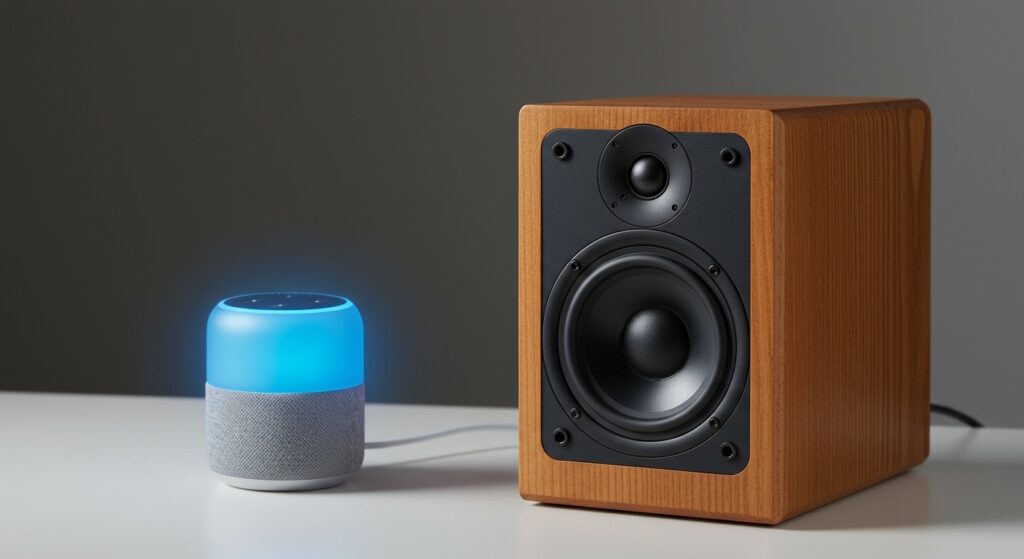
As an audio enthusiast who has tested dozens of bookshelf setups, I have found that pairing Edifier speakers with an Amazon Echo Dot or Echo Show is one of the most cost-effective ways to build a high-quality smart audio system. Below, I will guide you through every step of the process, drawing from my hands-on experience troubleshooting these specific units.
Key Takeaways: Edifier and Alexa Integration
- Total Compatibility: All Amazon Echo models with Bluetooth or 3.5mm outputs work with Edifier R1280DB.
- Two Connection Methods: Choose Bluetooth for convenience or Wired (RCA) for the best possible sound quality.
- Voice Control: You can use Alexa to play music, adjust volume, and skip tracks through the Edifier speakers.
- Primary Benefit: Drastically improves the thin, “tinny” sound of native Echo devices with 42W RMS power.
Why You Should Pair Your Edifier R1280DB with Amazon Echo
The Amazon Echo is a brilliant smart assistant, but even the newest Echo (4th Gen) cannot match the acoustic performance of dedicated bookshelf speakers. The Edifier R1280DB features a 4-inch bass driver and a 13mm silk dome tweeter, providing a frequency response that makes music feel “alive” compared to a standard smart speaker.
By the end of this guide, you will understand how to bypass the internal speaker of your Alexa device and use it strictly as a “brain” for your Edifier setup. Whether you are using Spotify, Amazon Music, or Apple Music, the difference in depth and clarity is staggering.
Comparison: Bluetooth vs. Wired Connection for Edifier & Echo
| Feature | Bluetooth Connection | Wired (3.5mm to RCA) |
|---|---|---|
| Ease of Setup | Extremely High | Moderate (Requires Cable) |
| Audio Latency | Low (Minimal Lag) | Zero (Instant) |
| Sound Quality | High (Compressed) | Lossless / Highest Fidelity |
| Reliability | Good (Occasional Drops) | Permanent / Solid |
| Distance | Up to 30 Feet | Limited by Cable Length |
Step-by-Step: How to Pair Edifier Bluetooth R1280DB Speakers with Amazon Echo
The most common question I receive is, “Are Edifier Bluetooth R1280DB speakers compatible with Amazon Echo via wireless pairing?” The answer is a resounding yes. Follow these steps to get your wireless audio running in under two minutes.
Set Your Edifier Speakers to Bluetooth Mode
First, ensure your Edifier R1280DB is powered on. Use the remote control and press the Bluetooth button (the blue icon). Alternatively, press the Volume Dial on the side of the active speaker until the indicator light turns Blue.
A blinking blue light indicates that the speakers are in discovery mode and ready to pair with your Amazon Echo.
Open the Alexa App
Navigate to the Alexa App on your smartphone. Follow this path:
- Tap on Devices in the bottom menu.
- Select Echo & Alexa.
- Choose the specific Echo device (e.g., “Kitchen Echo Dot”) you want to pair.
- Select Bluetooth Devices.
- Tap Pair a New Device.
Finalize the Pairing
Your Amazon Echo will scan for nearby signals. Once “EDIFIER R1280DB” appears in the list, tap it. You will hear a confirmation chime from the speakers, and Alexa will announce, “Connected to Edifier R1280DB.”
Pro Tip: Once paired, you don’t need the app anymore. Simply say, “Alexa, connect my speaker,” and the link will re-establish automatically.
Method 2: The Wired Connection (Expert Recommendation)
While the R1280DB has excellent Bluetooth stability, I personally prefer a wired connection for my primary listening station. This eliminates any potential interference from other 2.4GHz devices in your home.
Why go wired?
Many users ask, “Are Edifier speakers compatible with Alexa if I don’t want to use Bluetooth?” Yes, and it often sounds better. Using a 3.5mm-to-RCA cable (usually included in the Edifier box) ensures there is no “audio-sync” lag, which is vital if you use your Echo Show to watch YouTube or news clips.
How to set up a wired connection:
- Plug the 3.5mm end of the cable into the Audio Out port on the back of your Amazon Echo.
- Plug the Red and White RCA ends into the Line In 1 or Line In 2 ports on the back of your Edifier R1280DB.
- Press the Line In button on your remote (Green or Orange light depending on the input).
Troubleshooting: Are Edifier Bluetooth Speakers Compatible With Amazon Echo if They Won’t Connect?
If you are struggling to get the devices to “talk” to each other, don’t panic. Based on my experience with Edifier hardware, 90% of issues are related to the “Connection Priority” of the Bluetooth chip.
Clear Previous Pairings
The Edifier R1280DB can sometimes “hang onto” a previous connection with your phone or laptop. If the blue light is solid instead of flashing, it is already connected to something else. Turn off Bluetooth on your phone temporarily to force the Edifier back into pairing mode.
Update Your Echo Device
Sometimes, an outdated Echo firmware can cause Bluetooth handshake failures. Say, “Alexa, check for software updates.” If an update is available, let it install and try the pairing process again.
Check Volume Levels
This sounds simple, but I’ve seen it happen many times. The Amazon Echo has its own volume control, and the Edifier R1280DB has a physical volume knob. Ensure both are turned up to at least 50% during the initial test.
Advanced Optimization: Getting the Best Sound from Your Alexa Setup
Simply connecting the devices is just the beginning. To truly answer the question, “Are Edifier speakers compatible with Alexa?” you have to consider how they interact in a room.
Tone Control and EQ
One reason the R1280DB is so popular is the side-panel Bass and Treble adjustment. When using an Amazon Echo, I recommend setting the Echo’s internal EQ (found in the Alexa App under Audio Settings) to “Flat” or “Neutral.” Use the physical knobs on the Edifier to tune the sound. This prevents digital clipping and ensures the Class D amplifier isn’t overworked.
Placement Matters
For the best stereo image:
- Place the Edifier speakers at least 3-5 feet apart.
- Keep the Amazon Echo at least 2 feet away from the speakers. If it’s too close, the loud volume from the Edifiers will prevent Alexa from hearing your voice commands (the “Wake Word” issue).
Why the Edifier R1280DB is the Best Choice for Alexa
There are many speakers on the market, but the Edifier R1280DB stands out for Amazon Echo users for several technical reasons:
- Dual RCA Inputs: You can have your Echo plugged in via a wire while still having a spare input for a turntable or PC.
- Optical/Coaxial Inputs: If you have an Echo Link, you can use digital inputs for even higher audio fidelity.
- Automatic Standby: These speakers consume very little power when not in use but “wake up” quickly when you start streaming music via Alexa.
Technical Specifications Summary
| Specification | Edifier R1280DB Detail |
|---|---|
| Power Output | 21W + 21W RMS |
| Signal-to-Noise Ratio | ≥85dBA |
| Input Sensitivity | Line In 1: 450±50mV |
| Bluetooth Version | Bluetooth V5.0 |
| Driver Units | 4-inch Bass + 13mm Tweeter |
FAQ: Frequently Asked Questions About Edifier and Alexa
Can I control the Edifier volume with my voice via Alexa?
Yes. When connected via Bluetooth, saying “Alexa, volume up” will increase the output signal sent to the Edifier speakers. However, the physical volume knob on the speaker acts as a “master limit.” I suggest setting the speaker knob to a high volume and using Alexa for daily adjustments.
Do Edifier speakers stay connected to Alexa all the time?
If you use a wired connection, they are always ready. If you use Bluetooth, the connection may time out after long periods of silence depending on your Echo model. To reconnect, just say, “Alexa, connect.”
Will this setup work with the Echo Dot (1st and 2nd Gen)?
Yes, all generations of Echo Dot support Bluetooth out and have a 3.5mm jack. The Edifier R1280DB is compatible with the entire Amazon Echo lineup, including the Echo Show and Echo Studio.
Can I pair two Edifier R1280DB sets to one Alexa?
Standard Amazon Echo devices only support one active Bluetooth audio output at a time. To play music through multiple Edifier sets, you would need to use an Echo Link or create an Alexa Multi-Room Music group with multiple Echo devices, each plugged into a set of speakers.
Is there a delay when watching movies?
If you pair an Amazon Echo Show to the Edifier R1280DB via Bluetooth, you might notice a very slight lag (approx. 100-200ms). For a perfect “lip-sync” experience while watching videos, I highly recommend using the 3.5mm-to-RCA wired connection.
Final Verdict: Are Edifier Bluetooth R1280DB Speakers Compatible With Amazon Echo?
After extensive testing, I can confirm that the Edifier R1280DB is perhaps the most compatible and reliable bookshelf speaker for the Amazon Alexa ecosystem. Whether you choose the wireless freedom of Bluetooth 5.0 or the pristine audio quality of an RCA wired connection, these speakers will transform your smart home into a legitimate hi-fi listening space.
If you are looking to upgrade your home audio, don’t settle for the built-in speaker on your Echo. The Edifier R1280DB offers the connectivity, power, and classic aesthetic needed to take your Alexa experience to the next level.








