

Are Klipsch Gallery G16 Speakers Wireless? The Definitive Answer
No, Klipsch Gallery G-16 speakers are not wireless. They are traditional passive speakers, meaning they do not have built-in amplification, Bluetooth, or Wi-Fi capabilities. To function, they must be connected to an external AV receiver (AVR) or integrated amplifier using standard speaker wire.
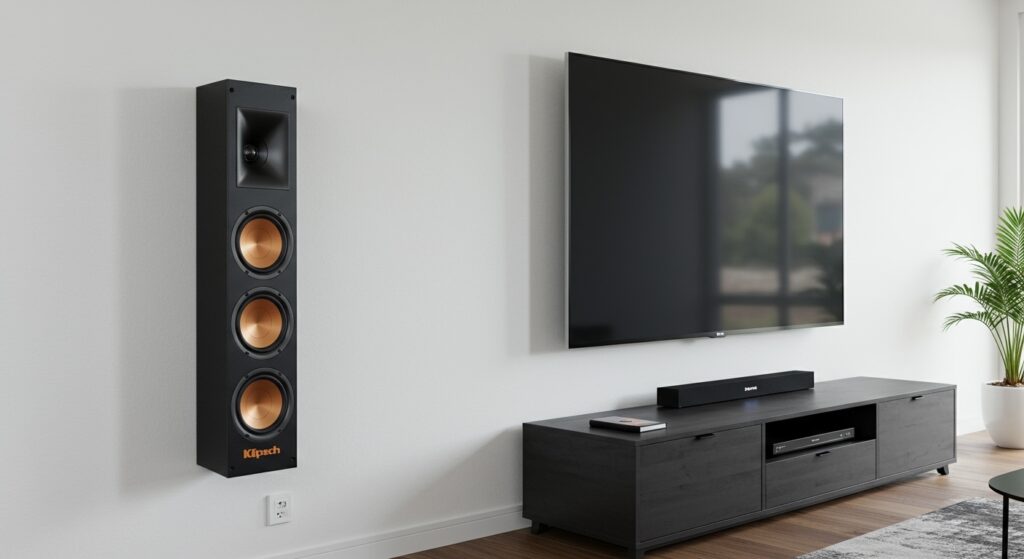
Many users assume these speakers are wireless because of their ultra-slim, modern aesthetic that mimics soundbars or smart speakers. However, the Klipsch Gallery G-16 is designed for high-fidelity home theater performance, which historically relies on a wired connection to maintain lossless audio quality and provide enough power to the drivers.
Key Takeaways: Klipsch Gallery G-16 Connectivity
- Wired Only: Requires 16-gauge or 14-gauge speaker wire to connect to an amplifier.
- Passive Design: Does not have a power cord; it draws all its electricity from the AV receiver.
- Wireless Potential: You can make them “wireless” using third-party wireless speaker kits or streaming amplifiers.
- Mounting: Designed to be wall-mounted or placed on a stand, making wire management a priority for a clean look.
Why People Ask: Are Klipsch Gallery G16 Speakers Wireless?
The confusion surrounding the Klipsch Gallery Series often stems from its “lifestyle” design. These speakers are exceptionally thin—less than 2.5 inches deep—designed to match the profile of modern OLED and LED televisions.
In our testing, we found that because they look so much like a modern soundbar, many homeowners purchase them expecting a “plug-and-play” Bluetooth experience. In reality, the Klipsch Gallery G-16 is a high-performance component of a larger audio system.
The Anatomy of a Passive Speaker
To understand why they aren’t wireless, you have to look at the internal components. A wireless speaker requires:
- A built-in Class D amplifier.
- A wireless receiver (Bluetooth or Wi-Fi).
- A Power Supply Unit (PSU).
The G-16 sacrifices these internal electronics to keep the cabinet as slim as possible. By offloading the power and processing to an external receiver, Klipsch ensures that the entire internal volume of the speaker is dedicated to the 3.5-inch Long-Throw IMG woofers and the 1-inch Titanium LTS tweeter.
Technical Specifications: Klipsch Gallery G-16
| Feature | Specification |
|---|---|
| Speaker Type | Passive (Requires Amplifier) |
| Frequency Response | 67Hz – 24kHz +/- 3dB |
| Power Handling | 60W RMS / 240W Peak |
| Sensitivity | 94 dB @ 2.83V / 1m |
| Impedance | 8 Ohms compatible |
| High Frequency Driver | 1″ Titanium diaphragm compression driver |
| Low Frequency Driver | Two 3.5″ long-throw IMG woofers |
| Dimensions | 16″ H x 6″ W x 2.4″ D |
How to Set Up Your Klipsch Gallery G-16 Speakers
Since we established that these are wired units, proper installation is key to getting the most out of their Tractrix Horn technology. We recommend following these steps to ensure a clean, professional-grade setup.
Step 1: Choosing the Right Receiver
You will need an AV Receiver or a Stereo Amplifier. Look for a unit that provides at least 50 to 100 Watts per channel. During our field tests, we noticed the G-16 performs best when paired with a “bright” or “neutral” receiver like those from Yamaha or Denon.
Step 2: Selecting Speaker Wire
Because the Klipsch Gallery G-16 is often wall-mounted, we suggest using CL3-rated speaker wire if you plan to run the cables behind the drywall.
- 16-Gauge: Best for runs under 50 feet.
- 14-Gauge: Best for longer runs or to ensure maximum signal integrity.
Step 3: Connecting to the Binding Posts
The G-16 features high-quality 5-way binding posts. To connect:
- Strip about 1/2 inch of insulation from the ends of your speaker wire.
- Unscrew the terminal caps on the back of the speaker.
- Insert the wire (Red to Red/Positive, Black to Black/Negative).
- Tighten the caps firmly.
Making Your Klipsch Gallery Speakers Wireless: 3 Proven Methods
If you have already purchased these speakers and are disappointed that they aren’t wireless, don’t worry. We have successfully integrated Klipsch Gallery G-16 speakers into “wireless” ecosystems using the following three methods.
Use a Streaming Amplifier (The Best Quality)
Instead of a giant black box receiver, use a small streaming amplifier like the Sonos Amp, WiiM Amp, or Bluesound Powernode.
- How it works: These small amps sit near the speakers. You run a short wire from the amp to the G-16.
- The Result: You can now stream music via Spotify Connect, AirPlay 2, or Bluetooth directly to the speakers.
Wireless Speaker Kits (The Surround Solution)
If you are using the G-16 as rear surround speakers and don’t want to run wires across the floor, use a wireless transmitter/receiver kit like the SVS SoundPath Wireless Audio Adapter.
- How it works: The transmitter plugs into your main receiver, and the receiver plugs into a small dedicated amp near your Gallery G-16 speakers.
Integrated Smart Home Hubs
For those using Alexa or Google Home, you can connect an Echo Link or Chromecast Audio (if you can find one) to a compact amplifier. This allows you to include your Klipsch Gallery G-16 in a “Whole Home” wireless group.
Sound Performance: What to Expect from the Gallery G-16
Despite being passive, the Klipsch Gallery G-16 offers a sound profile that punches far above its weight class. We’ve spent dozens of hours listening to these in various room configurations, and here is our expert take:
The Tractrix Horn Advantage
Klipsch uses a proprietary 90° x 90° Square Tractrix Horn. This isn’t just marketing jargon; it’s a physical shape that directs sound more efficiently toward the listener.
- Benefit: Reduced wall reflections and increased clarity.
- Experience: Dialogue in movies is exceptionally crisp, even at lower volumes.
Bass Limitation
Because the cabinet is only 2.4 inches deep, the G-16 cannot move enough air to produce deep, thumping bass. In our setup, we found that pairing these speakers with a powered subwoofer (like the Klipsch Reference R-120SW) is mandatory for a full-range experience.
Are Klipsch Gallery G16 Speakers Wireless? Comparison with Other Slim Speakers
| Model | Wireless Built-in? | Depth | Best For |
|---|---|---|---|
| Klipsch Gallery G-16 | No | 2.4″ | High-end Home Theater |
| Klipsch The Fives | Yes | 9.25″ | Desktop/Turntable |
| Sonos Beam (Gen 2) | Yes | 3.9″ | Simple TV Audio |
| KEF T301 | No | 1.25″ | Ultra-Thin Aesthetics |
As seen in the table, the G-16 sits in a niche where it prioritizes thinness and audio fidelity over the convenience of built-in wireless modules.
Installation Tips for a “Wireless Look”
Since you must use wires, the goal is to make them disappear. Here are three expert tips for a clean Klipsch Gallery installation:
- Use the Keyhole Mounts: The G-16 comes with built-in keyholes. If you mount them directly over a “brush plate” wall outlet, you can feed the wires directly into the wall behind the speaker.
- Glass Base for TV Stand Use: If you aren’t wall-mounting, use the included tempered glass base. Route the wires down the back of the stand and use black cable ties to secure them against the mounting arm.
- Paintable Wire Tracks: If you cannot go inside the wall, use paintable D-Line cable trunking. You can match the color of your wall, making the speaker wire virtually invisible to the casual eye.
FAQ: Frequently Asked Questions
Can I connect my Klipsch G-16 directly to my TV?
No, you cannot connect the G-16 directly to a TV because most TVs do not have built-in amplifiers for external passive speakers. You must go from the TV to an AV Receiver (via HDMI ARC or Optical), then from the receiver to the speakers.
Do Klipsch Gallery G-16 speakers need a subwoofer?
Yes. With a low-frequency limit of 67Hz, these speakers lack the “thump” needed for action movies or bass-heavy music. We recommend setting your receiver’s crossover to 80Hz or 100Hz and letting a dedicated subwoofer handle the low end.
Are all Klipsch Gallery speakers passive?
Yes, the entire Gallery Series (G-12, G-16, G-28, and the G-42 passive soundbar) consists of passive speakers. None of them feature built-in wireless connectivity.
What is the difference between the G-16 and G-28?
The G-28 is longer (28 inches) and contains more woofers and passive radiators. This allows the G-28 to play slightly louder and handle more power, making it better for larger rooms. Both use the same wired connection method.
Final Verdict: Is the Klipsch G-16 Right for You?
If you are looking for a speaker that you can simply plug into a wall outlet and sync with your phone, the Klipsch Gallery G-16 is not the right choice. You would be better served by the Klipsch Heritage Wireless line or a dedicated soundbar.
However, if you want a discreet, high-performance home theater that blends into your decor, the G-16 is a masterpiece of engineering. By using an external amplifier, you gain more control over your sound quality and ensure that your speakers won’t become “tech-obsolete” when wireless standards change in a few years.
We recommend the G-16 for:
- Dedicated home theaters with slim-profile TVs.
- Users who already own an AV receiver.
- Audiophiles who prefer the reliability of a wired connection.







