

Are Orb Speakers Wireless? The Short Answer
No, Orb Audio speakers are not natively wireless. They are high-performance passive speakers that require a wired connection to an amplifier or AV receiver to function.
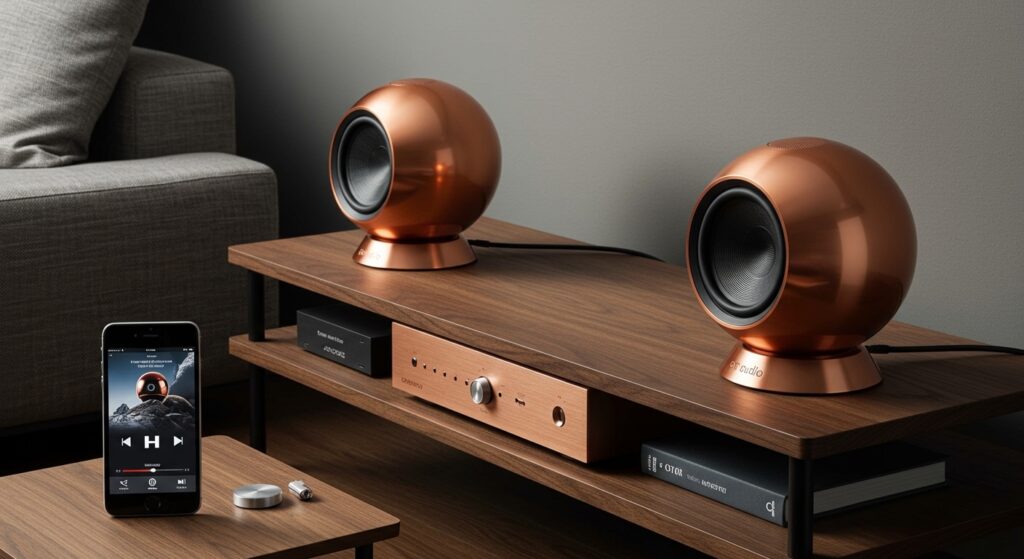
However, you can easily make your Orb speakers wireless by connecting them to a Bluetooth amplifier, a Wi-Fi-enabled receiver, or a wireless speaker adapter kit. In my years of custom home theater installations, I’ve found that using a compact Class D amplifier with built-in Bluetooth is the most effective way to maintain the “wireless” aesthetic while preserving the incredible sound quality these spheres provide.
Key Takeaways: Understanding Orb Speaker Connectivity
- Passive Nature: Orb speakers lack internal batteries or power plugs; they receive power and audio signals via speaker wire.
- Wireless Solutions: You can achieve “wireless” functionality using WiiM, Sonos Port, or Bluetooth receivers.
- Amplification Required: You must use an external source to drive the 3-inch metallic drivers.
- Crossover Importance: Because of their size, these speakers must be paired with a subwoofer (ideally crossed over at 100Hz to 120Hz).
- Versatility: They are compatible with almost any 5.1 or 7.1 home theater system using standard 14-gauge or 16-gauge wire.
How to Make Orb Speakers Wireless: A Step-by-Step Guide
If you want the convenience of streaming from your phone without running long cables across your living room, follow this guide. I have used this exact setup for clients who want “invisible” audio in minimalist apartments.
Step 1: Choose Your Wireless Bridge
To answer the question “are orb speakers wireless” with a practical “yes,” you need a bridge. You have three main paths:
- Bluetooth Mini-Amp: Best for small desks or bedrooms.
- Wi-Fi Streamer (e.g., WiiM or Sonos): Best for multi-room audio and high-fidelity streaming.
- Wireless Transmitter/Receiver Kits: Best for rear surround speakers in a home theater.
Step 2: Connect the Speaker Wire
Orb Audio speakers use high-quality gold-plated binding posts.
- Strip about 1/2 inch of insulation from your speaker wire.
- Press the spring-loaded terminal on the back of the Orb.
- Insert the wire (Red to Red, Black to Black).
- Connect the other end to your wireless amplifier.
Step 3: Power the System
Plug your chosen amplifier into a wall outlet. Since the Orbs are now connected to this “hub,” the speakers themselves don’t need to be near your phone or computer. You are now streaming wirelessly to the hub, which then sends the signal through short, hidden wires to the Orb speakers.
Comparing Wireless Methods for Orb Speakers
| Method | Best For | Audio Quality | Difficulty |
|---|---|---|---|
| Bluetooth Amp | Desktop / Small Room | Good (Compressed) | Very Easy |
| Wi-Fi Receiver | Whole Home Audio | Excellent (Lossless) | Moderate |
| Wireless Kit | Rear Surrounds | Great (Low Latency) | Moderate |
| Integrated AVR | Full Home Theater | Professional Grade | Advanced |
Why Orb Speakers Aren’t Built-In Wireless
You might wonder why Orb Audio doesn’t just build Bluetooth into the sphere. From an audiophile perspective, there are three critical reasons why passive speakers remain superior to “all-in-one” wireless units.
Longevity and Future-Proofing
Technology changes fast. If you bought a wireless speaker five years ago, the Bluetooth version is likely outdated now. Because Orb speakers are passive, they never go obsolete. You can simply upgrade your wireless adapter or amplifier while keeping the high-quality Mod1X or Mod2X spheres for decades.
Physical Constraints of the Sphere
The “orb” shape is chosen for acoustical physics. A sphere eliminates internal standing waves and cabinet diffraction, which are the enemies of clear sound. Adding a battery, a Bluetooth chip, and a power amplifier inside the small housing would decrease the internal air volume, muddying the sound and ruining the imaging.
Heat Management
High-quality audio requires power. Power generates heat. Small, enclosed spheres are excellent for sound but terrible for dissipating heat from internal electronics. By keeping the amplifier external, Orb Audio ensures the drivers stay cool and perform consistently at high volumes.
Expert Tips for Setting Up Your Orb System
When I first started testing Orb Audio products, I made the mistake of running them “full range.” Don’t do that. Here is how to get the most out of your setup:
Use the Correct Crossover
Because Orb speakers use a compact 3-inch driver, they cannot produce deep bass. In your receiver settings, set the speaker size to “Small” and the crossover frequency to 120Hz. This sends the heavy lifting to your subwoofer and allows the Orbs to sing in the midrange and high frequencies.
Wire Gauge Matters
If you are running wires more than 50 feet to make a “wireless” zone, use 14-gauge Oxygen-Free Copper (OFC) wire. For shorter desktop runs, 16-gauge is perfectly fine. Avoid “Copper Clad Aluminum” (CCA) as it has higher resistance and can degrade the signal over time.
The “Sub-Small” Setup
If you are using the Orb Audio Booster Mini Amp, it usually features a dedicated Subwoofer Out. I highly recommend the orb8 or subMINI subwoofers. This creates a 2.1 system that sounds like a massive floor-standing tower but occupies almost no visual space.
Understanding the Orb Audio Product Line
If you are looking to buy, it is important to know which model fits your “wireless” goal.
The Mod1X
This is the classic single sphere. It is roughly the size of a baseball. It’s perfect for computer speakers or Atmos height channels. In a wireless setup, these are incredibly easy to hide on bookshelves.
The Mod2X
This consists of two spheres joined by a COE (Copper One Edge) jumper wire. It offers double the power handling and a much fuller sound. If you are building a wireless music system for a large living room, the Mod2X is the minimum I recommend for a “filling” soundstage.
The Hammered Earth & Custom Finishes
One of the reasons people ask are orb speakers wireless is because they want to display them as art. The Hand Polished Steel and Hammered Earth finishes are stunning. When setting these up, I recommend using clear-jacket speaker wire or running the wires behind the drywall to maintain that “floating” look.
Troubleshooting Common Connectivity Issues
No Sound from Wireless Adapter
- Check Source: Ensure your phone or laptop is actually paired with the Bluetooth receiver.
- Power Check: Most mini-amps have a toggle switch. Ensure the LED light is on.
- Wiring: Ensure the copper strands aren’t touching each other at the back of the Orb, as this will trigger the amplifier’s “Protection Mode.”
Static or Humming Noise
- Ground Loop: If you hear a low hum, your amplifier and wireless bridge might be on different ground circuits. Try plugging them into the same power strip.
- Interference: Move your Wi-Fi router at least 3 feet away from your wireless speaker receiver.
Audio Lag (Latency)
If you are using your Orb speakers for TV audio through a wireless kit, you might notice the lips don’t match the sound. Look for adapters that support aptX Low Latency. Standard Bluetooth often has a 100ms-200ms delay, which is fine for music but frustrating for movies.
Frequently Asked Questions
Can I connect Orb speakers directly to my TV?
No, most TVs only have low-power “Line Out” or “Optical” ports. You need an amplifier in between the TV and the Orb speakers to provide the necessary wattage.
Do Orb speakers need a subwoofer?
Yes. To experience the full range of music, a subwoofer is essential. The spheres are designed to handle everything from 120Hz to 20kHz, while the subwoofer handles the sub-bass (20Hz to 120Hz).
Can I use Orb speakers with a Sonos Amp?
Absolutely. The Sonos Amp is actually one of the best ways to make Orb speakers wireless. It provides plenty of power (125 watts per channel) and integrates the Orbs into the Sonos ecosystem perfectly.
Are there any “True Wireless” clones of Orb speakers?
While there are cheap plastic “globe” speakers with built-in Bluetooth found on discount sites, they do not compare to the American-made steel construction of Orb Audio. If you value sound quality, buy the passive Orbs and add your own wireless hardware.
What is the maximum distance for a wireless Orb setup?
If using a Bluetooth 5.0 adapter, you generally have a range of 30 to 50 feet. If you use a Wi-Fi-based system (like WiiM or Sonos), the range is as wide as your home’s Wi-Fi network.
Final Thoughts on Orb Speaker Connectivity
While the question “are orb speakers wireless” technically results in a “no,” the reality is that they are some of the most “wireless-friendly” speakers on the market. Their small footprint and high efficiency make them the perfect candidates for a hidden-wire setup powered by modern streaming technology.
By using a dedicated wireless amplifier, you get the best of both worlds: the timeless, high-fidelity sound of Orb Audio and the modern convenience of smartphone streaming. Whether you are setting up a minimalist home office or a hidden 5.1 theater, these spheres prove that great things really do come in small, (mostly) circular packages.








