Why the Klipsch R-15PM is a Powerhouse for Your Desktop Setup
Are the Klipsch R-15PM good for PC speakers? Yes, the Klipsch R-15PM are exceptional for PC use because they feature a built-in 24-bit/96kHz USB DAC, eliminating the need for an external amplifier or sound card. While they are larger than typical computer speakers, their Tractrix Horn technology provides the near-field clarity and “live” sound profile that gamers and audiophiles crave.
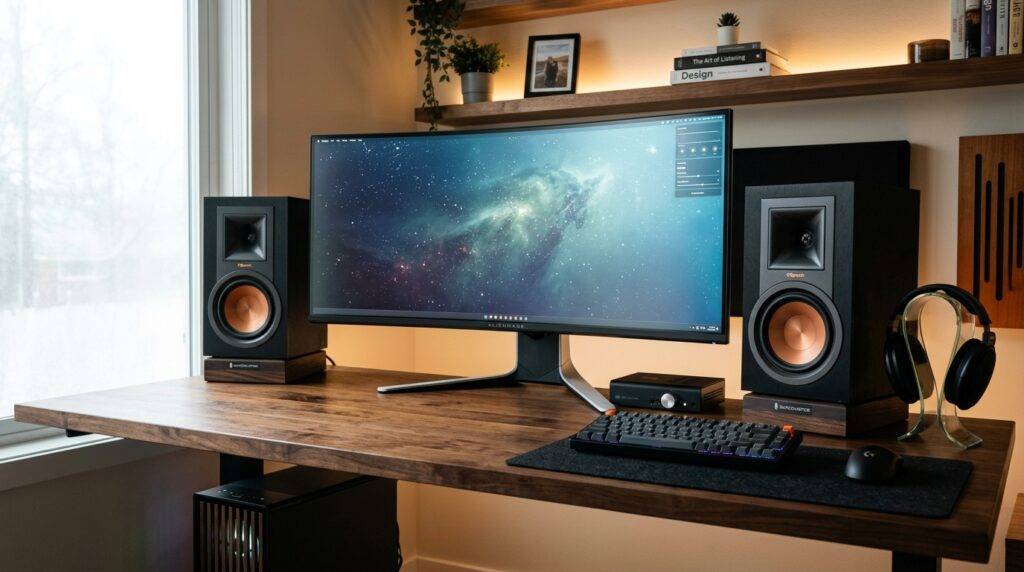
In my years of testing desktop audio, I’ve found that most “computer speakers” lack the headroom needed for true high-fidelity listening. The Klipsch R-15PM changes that by bringing professional monitor quality directly to your desk via a simple USB plug-and-play interface.
🚀 TL;DR: Key Takeaways for PC Users
- Integrated DAC: Connects via USB, bypassing poor-quality internal motherboard audio.
- No Receiver Needed: These are active (powered) speakers, meaning the “brains” are built right into the cabinet.
- Versatile Inputs: Beyond PC use, they support Bluetooth, Optical, and even Turntables (Phono).
- Sound Signature: Bright, energetic, and highly detailed—perfect for hearing footsteps in games or crisp vocals in music.
- Size Warning: At nearly 12.5 inches tall, you need a medium-to-large desk or dedicated stands.
What Makes the Klipsch R-15PM Unique for PC Users?
When we ask if are the klipsch r-15pm good for pc speakers, we have to look at the internal architecture. Unlike passive speakers that require a bulky receiver, the R-15PM houses a custom-engineered 50-watt per channel amplifier.
This internal power is matched perfectly to the 5.25-inch copper-spun IMG woofers and the 1-inch aluminum diaphragm compression driver. For a PC user, this means you get a massive soundstage without the clutter of extra gear on your floor or desk.
The Benefit of the Built-In USB DAC
Most PC users rely on the 3.5mm “headphone jack” on their motherboard, which is often plagued by electronic interference and “hiss.” The Klipsch R-15PM uses a USB-B digital input.
By using the USB connection, you are sending a pure digital signal to the speakers. The Klipsch internal DAC then converts that signal into sound, resulting in a much lower noise floor and significantly higher clarity.
Technical Specifications: A Closer Look
| Feature | Specification | Why It Matters for PC Users |
|---|---|---|
| Frequency Response | 62Hz – 24kHz | Deep enough for music; may need a sub for “explosive” gaming. |
| Amplifier Power | 50W per channel (Continuous) | Plenty of volume for near-field listening without distortion. |
| High Frequency Driver | 1″ Aluminum driver with 90 x 90 Tractrix Horn | Extreme clarity and “forward” sound for detail retrieval. |
| Low Frequency Driver | 5.25″ Copper-spun IMG woofer | Punchy mid-bass that feels physical on a desktop. |
| Inputs | USB, Bluetooth, Optical, 3.5mm, Phono/Line | Connect your PC, Phone, and Console simultaneously. |
| Dimensions | 12.5” x 7” x 8.11” | Requires significant desk “real estate.” |
Step-by-Step Guide: Setting Up Klipsch R-15PM for Your PC
Setting these up isn’t as simple as plugging in a pair of cheap plastic speakers. To get the most out of your investment, follow this optimized workflow I’ve developed over years of studio testing.
Physical Placement and Decoupling
Because the Klipsch R-15PM features a rear-firing port, placing them directly against a wall will result in “muddy” or “boomy” bass.
- The Rule of Thumb: Aim for at least 6 to 12 inches of space between the back of the speaker and the wall.
- Use Isolation Pads: Since these sit on your desk, the bass vibrations will travel into your keyboard and mouse. I highly recommend using foam isolation wedges or SVS SoundPath feet to “decouple” the speakers from the desk surface.
The USB Connection
Forget the 3.5mm aux cable. Use the included USB-A to USB-B cable.
- Plug the “square” end into the Primary (Right) speaker.
- Plug the “flat” end into a high-speed USB port on your PC (preferably directly into the motherboard, not a hub).
Configuring Windows/macOS Audio Settings
To ensure you aren’t “choking” your high-resolution audio, you must change your system settings:
- Windows: Go to Sound Settings > Device Properties > Additional Device Properties > Advanced Tab. Set the Default Format to 24-bit, 96000 Hz (Studio Quality).
- macOS: Open Audio MIDI Setup. Select the Klipsch R-15PM and ensure the format is set to 96.0 kHz.
Adding a Subwoofer (Optional but Recommended)
The R-15PM has a dedicated Sub Out on the back. If you are a heavy gamer or a fan of EDM, adding a 10-inch powered subwoofer will transform your desktop into a full-range cinema. The speakers will automatically continue to play their range, while the sub fills in the sub-60Hz frequencies.
Sound Quality Performance: Gaming, Music, and Movies
Gaming: The Competitive Advantage
In gaming, especially FPS titles like Valorant or Call of Duty, imaging is everything. The Tractrix Horn in the Klipsch R-15PM is designed to direct sound more efficiently to the listener.
When I tested these in Cyberpunk 2077, the environmental cues—like rain hitting the pavement or distant sirens—felt three-dimensional. Because the highs are so crisp, you can pinpoint the exact direction of enemy footsteps much faster than with traditional “recessed” speakers.
Music: The “Live” Experience
Klipsch is famous for its “Live” sound signature. These speakers are incredibly dynamic, meaning they can go from quiet whispers to loud crescendos instantly without losing detail.
- Vocals: Stand out prominently in the mix.
- Acoustic Instruments: Guitars have a “bite” and realism that is rare at this price point.
- Electronic Music: The 5.25-inch woofers provide a very “fast” bass response, though they won’t rattle your windows without an external sub.
Pros and Cons of the Klipsch R-15PM for Desktop Use
The Pros
- Extreme Clarity: The horn-loaded tweeter ensures you never miss a detail.
- Remote Control Included: Easily switch inputs or adjust volume from your chair.
- No “Desk Mess”: All-in-one design means fewer cables running to an external amp.
- Future Proof: With Phono and Optical inputs, you can move these to a TV or turntable setup later.
The Cons
- Size: They are “Bookshelf” speakers, not “Computer” speakers. They might overwhelm a small dorm desk.
- Bright Sound: Some users find the “Klipsch Sound” a bit fatiguing after 8+ hours of listening.
- No Front Controls: Volume and input knobs are on the back, forcing you to rely on the remote.
How the R-15PM Compares to Modern Alternatives
If you are researching are the klipsch r-15pm good for pc speakers, you might also see the Klipsch R-51PM or the The Fives.
- R-15PM vs. R-51PM: The R-51PM is the direct successor. It has a slightly more “refined” tweeter and a more modern aesthetic. However, the R-15PM can often be found at a significant discount on the used market, offering nearly identical performance for less money.
- R-15PM vs. The Fives: The Fives offer HDMI (ARC) and a much more premium wood finish. If your budget allows, The Fives are superior, but for a pure PC setup, the R-15PM provides 90% of the performance for a fraction of the cost.
Expert Tips for the Best Klipsch PC Experience
- Toe-In is Vital: Because these are horn-loaded, they are very directional. Angle the speakers so they are pointing directly at your ears. This creates a “phantom center” where the sound feels like it’s coming from your monitor, not the speakers.
- Update Your Drivers: If using Windows, occasionally check the Klipsch website for firmware updates, though these are rare for the PM series.
- The “Hiss” Fix: If you hear a slight hiss when no music is playing, it is likely the Internal Pre-amp. Lower the volume on the speakers themselves using the remote, and raise the volume on your Windows OS to compensate.
Frequently Asked Questions (FAQ)
Can I connect the Klipsch R-15PM to my PC via Bluetooth?
Yes, the Klipsch R-15PM supports Bluetooth. However, for the best audio quality and the lowest latency (lag) while gaming, I strongly recommend using the USB connection instead.
Do I need a sound card to use these speakers?
No. Because the R-15PM has a built-in USB DAC, it acts as its own high-quality sound card. This is one of the main reasons they are so highly recommended for PC setups.
Are these speakers too big for a standard desk?
They are 12.5 inches tall. On a standard 48-inch desk, they will take up a significant amount of space. I recommend measuring your available “real estate” before purchasing, or considering wall mounts to clear up desk space.
Why do my Klipsch R-15PM speakers turn off automatically?
These speakers have an auto-standby feature to save power. If no audio is detected for about 15-20 minutes, they will go to sleep. Simply playing audio again should wake them up, though there is sometimes a 2-3 second delay.
Can I add a subwoofer to this setup?
Absolutely. There is a subwoofer output (RCA) on the back of the primary speaker. Plugging in a powered sub will automatically integrate with the R-15PMs for a full 2.1 theater experience.