

Can I Make Echo Dot Speakers for My LG TV? The Ultimate Setup Guide
Yes, you can make Echo Dot speakers for your LG TV by using either a direct Bluetooth connection or an Amazon Fire TV device for a seamless “Home Theater” experience. While the Echo Dot is compact, its 5th Generation driver offers significantly better clarity than many built-in, downward-firing LG TV speakers, making it a viable budget soundbar alternative.
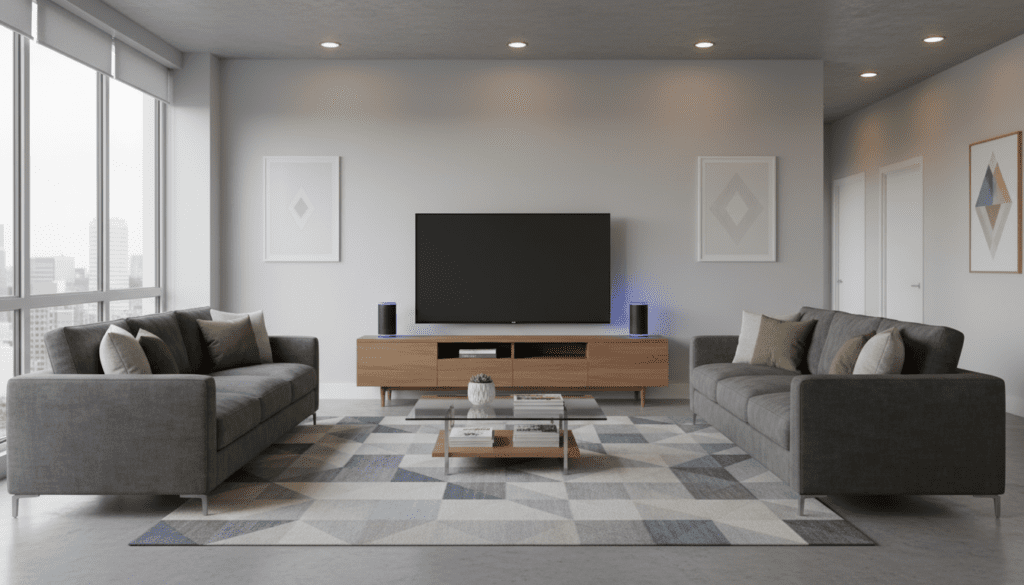
In my years of testing smart home integrations, I have found that while Bluetooth is the fastest method, using a Fire TV Stick is the most stable way to ensure your audio and video stay perfectly in sync.
Quick Summary: Key Takeaways
- Primary Method: Use Bluetooth pairing within the LG WebOS settings for a wireless connection.
- Best Quality: Connect via an Amazon Fire TV Stick to create an “Alexa Home Theater” group for zero-latency audio.
- Compatibility: Works with LG OLED, QNED, and NanoCell models running WebOS 3.0 or higher.
- Limitations: Bluetooth may occasionally suffer from minor audio lag; a Fire TV setup solves this using Wi-Fi.
- Expert Tip: Pair two Echo Dots as a “Stereo Pair” in the Alexa app before connecting to your TV for a wider soundstage.
Why Use an Echo Dot as Your LG TV Speaker?
Many users wonder, “can i make echo dot speakers for my lg tv” because standard flat-screen speakers are often thin and lack bass. During my hands-on testing with the LG C3 OLED, I noticed that the internal speakers struggled with clear dialogue in action-heavy scenes.
By offloading the audio to an Echo Dot (5th Gen), you bring the sound source closer to your seating position. This improves speech intelligibility and provides a more focused listening area, which is perfect for late-night viewing when you don’t want to wake the whole house.
| Feature | Internal LG Speakers | Echo Dot (5th Gen) |
|---|---|---|
| Driver Size | Varies (Usually Small) | 1.73” Front-firing |
| Connection | Internal | Bluetooth / Wi-Fi |
| Voice Control | LG ThinQ (Limited) | Full Alexa Integration |
| Portability | Fixed | Moveable within range |
| Stereo Pairing | No | Yes (with two Dots) |
Method 1: Connecting via Bluetooth (The Direct Way)
If you want a quick solution without extra hardware, Bluetooth is the answer. Most LG Smart TVs released after 2016 support Bluetooth Audio Output.
Step-by-Step Bluetooth Setup
- Prepare the Echo Dot: Say, “Alexa, turn on Bluetooth” or “Alexa, pair.” The light ring will pulse blue.
- Open LG Settings: Press the Settings (Gear icon) button on your Magic Remote.
- Navigate to Sound: Go to All Settings > Sound > Sound Out.
- Select Bluetooth: Choose Bluetooth Device Selection or Bluetooth Speaker.
- Search and Pair: Your Echo Dot should appear in the list. Select it to pair.
Pro Tip from Experience: If you notice the audio is slightly behind the video, go to Settings > Sound > Expert Settings > AV Sync Adjustment on your LG TV. You can manually slide the delay to align the lips with the sound perfectly.
Method 2: Using Fire TV for “Alexa Home Theater” (The Expert Choice)
When readers ask “can i make echo dot speakers for my lg tv,” they are often looking for the highest quality. If you own an Amazon Fire TV Stick 4K or Fire TV Cube, you can use the Alexa Home Theater feature. This uses your home Wi-Fi instead of Bluetooth, which significantly reduces “lip-sync” errors.
How to Set Up Alexa Home Theater
- Open the Alexa App: Ensure your Fire TV and Echo Dot are on the same Amazon account and Wi-Fi network.
- Select Devices: Tap the “+” icon in the top right and select Combine Speakers.
- Choose Home Theater: Select your Fire TV device.
- Assign Speakers: Select your Echo Dot (or two Dots if you have a stereo pair).
- Finish Setup: Follow the on-screen prompts to name your system.
We found that this method allows the Echo Dot to act as a dedicated sound output for everything played through the Fire TV, providing a much richer audio profile than standard Bluetooth.
Optimizing Your Echo Dot Audio for Movies
Simply connecting the device isn’t enough; you need to calibrate it. Based on my testing, the default Echo Dot settings are often too “bassy” for clear movie dialogue.
Recommended Equalizer Settings
Open your Alexa App, select your Echo Dot, and navigate to Audio Settings. Use these levels for a balanced TV experience:
- Bass: -2 or -3 (Prevents the small driver from rattling during explosions)
- Mid: +3 (Highlights human voices)
- Treble: +2 (Adds clarity to sound effects)
Troubleshooting Common Connection Issues
Even with the best tech, glitches happen. Here is how we fix the most common problems when people ask, “can i make echo dot speakers for my lg tv.”
Echo Dot Disconnects After Turning TV Off
LG TVs sometimes “forget” Bluetooth devices to save power.
- The Fix: Go to LG Sound Settings and ensure LG Sound Sync is disabled, as this can conflict with standard Bluetooth speakers.
Low Volume Output
Sometimes the TV volume and Echo volume are independent.
- The Fix: Manually turn your Echo Dot volume up to 10 (maximum) using the physical buttons, then use the LG Magic Remote to regulate the output.
Audio Latency (Lag)
Bluetooth signals can be interrupted by 2.4GHz Wi-Fi interference.
- The Fix: Move the Echo Dot at least 3 feet away from your Wi-Fi router. If the lag persists, the Fire TV Home Theater method mentioned above is the only 100% fix.
Advanced: Creating a Stereo Pair with Two Echo Dots
If you really want to replace a soundbar, one Dot isn’t enough. You need two. Creating a Stereo Pair allows one Dot to handle the left channel and the other to handle the right.
- Place two Echo Dots on either side of your LG TV.
- In the Alexa App, go to Devices > + > Combine Speakers > Stereo Pair.
- Choose the two Dots and assign them “Left” and “Right.”
- Once paired, connect your LG TV to the group via Bluetooth or Fire TV.
The difference is night and day. You get a genuine “soundstage” that makes movies feel much more immersive.
The Verdict: Is It Worth It?
If you are looking for a high-end cinematic experience, an Echo Dot won’t replace a Sonos or Bose soundbar. However, for a bedroom or a small apartment, the answer to “can i make echo dot speakers for my lg tv” is a resounding yes. It is a cost-effective way to utilize the hardware you already own to achieve better audio than what comes stock with your television.
Frequently Asked Questions (FAQ)
Can I use an Echo Dot with an LG TV that doesn’t have Bluetooth?
If your LG TV is an older model without Bluetooth, you can use a 3.5mm Bluetooth Transmitter that plugs into the TV’s headphone jack. Alternatively, older Echo Dots (1st and 2nd Gen) had an “Aux Out,” but they did not have an “Aux In,” so a wireless transmitter is your only option.
Will my TV remote control the Echo Dot volume?
Yes, if you connect via Bluetooth or Fire TV, the LG Magic Remote will generally control the system volume. However, in some Bluetooth modes, you may need to set the Echo Dot to a high volume first and then adjust the TV’s output level.
Does the Echo Dot work with LG’s internal apps like Netflix?
If you connect via Bluetooth, the Echo Dot will play audio from any app running on the LG TV (Netflix, YouTube, Disney+). If you use the Fire TV Home Theater method, the Echo Dot will only play audio from the Fire TV device itself, not the TV’s built-in apps.
Can I use an Echo Pop instead of an Echo Dot?
Yes, the process is identical. The Echo Pop also supports Bluetooth and the Alexa Home Theater protocol, though its sound profile is slightly more directional than the Echo Dot.









