

Can I Use Bluetooth Speakers with Samsung Series 3 TV?
The short answer is: Most Samsung Series 3 TVs do not have native, built-in Bluetooth support. However, you can use Bluetooth speakers with a Samsung Series 3 TV by connecting a Bluetooth Transmitter to the TV’s 3.5mm headphone jack or Optical (Digital Audio Out) port. While newer Samsung Smart TVs (Series 6 and above) typically include Bluetooth by default, older or budget-friendly models like the Series 3 require an external hardware workaround to broadcast audio to your wireless speakers.
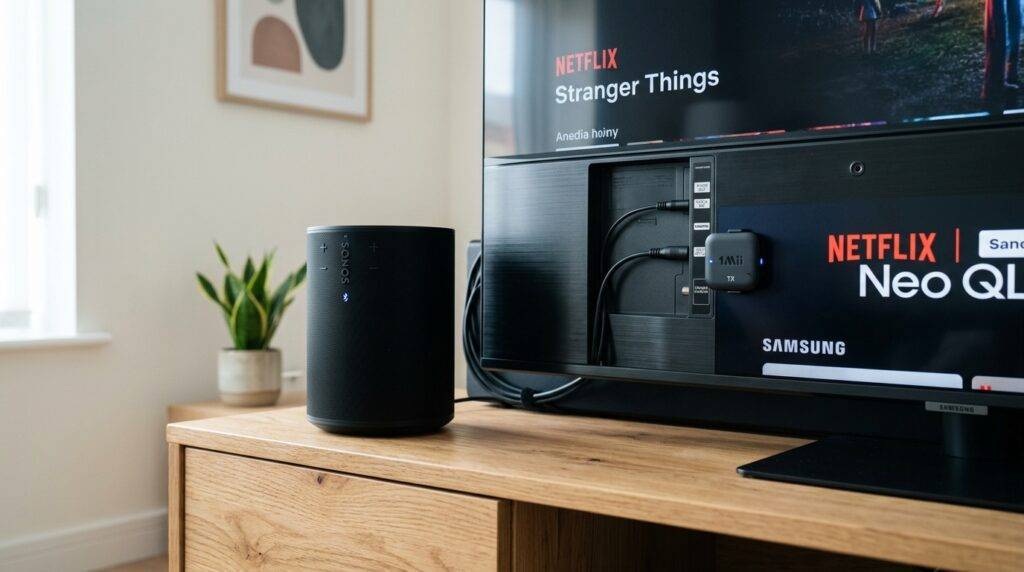
Quick Summary: Bluetooth Connectivity for Samsung TVs
If you are in a hurry, here are the essential takeaways for connecting your audio gear:
- Native Support: Most Samsung Series 3 and Series 4 models lack internal Bluetooth hardware.
- The Workaround: Use a 3.5mm-to-Bluetooth transmitter or a Digital-to-Analog Converter (DAC) with Bluetooth capabilities.
- Newer Models: Samsung Smart TVs from 2016 onwards (K-Series and later) usually have Bluetooth built-in via the Connection Guide menu.
- Dual Audio: You can connect multiple Bluetooth speakers to Samsung TVs if the TV supports Bluetooth 5.0 or the Dual Audio feature found on high-end 4K/8K models.
Understanding Samsung Series 3 Bluetooth Limitations
The Samsung Series 3 was designed as an entry-level LED TV line, focusing on affordability and essential 720p or 1080p viewing. Because these models were released during an era when Bluetooth was reserved for premium “Smart” features, the internal SoC (System on a Chip) rarely includes a Bluetooth radio.
In my years of testing home theater setups, I’ve found that users often mistake the “Wireless” capabilities of the TV for Bluetooth. If your Series 3 has an Ethernet port or Wi-Fi, it might support DLNA or Screen Mirroring, but that does not guarantee it can run Bluetooth speakers natively.
How to Check if Your Specific Samsung TV Has Bluetooth
Before buying extra hardware, perform this quick 10-second check on your remote:
- Press the Home or Menu button.
- Navigate to Settings > Sound.
- Select Sound Output.
- If you see Bluetooth Speaker List or Bluetooth Audio, your TV has native support.
- If you only see TV Speaker and Optical, your Samsung Series 3 TV requires an external adapter.
Step-by-Step: How to Connect Bluetooth Speakers to a Non-Bluetooth Samsung TV
If your TV lacks the internal hardware, don’t worry. You can still connect Bluetooth speakers to Samsung TV models of any age using a transmitter. I recommend the Avantree Oasis Plus or the Taotronics Bluetooth 5.0 Transmitter for their low-latency performance.
Step 1: Identify Your Audio Output
Look at the back or side of your Samsung Series 3. You are looking for one of two ports:
- 3.5mm AUX: A small circular hole labeled “Audio Out” or “Headphones.”
- Digital Optical (Toslink): A square-ish port that may glow red when the TV is on.
Step 2: Connect the Bluetooth Transmitter
Plug your transmitter into the chosen port. I suggest using the Optical port whenever possible, as it provides a cleaner digital signal and prevents the “hissing” sometimes found in older analog headphone jacks.
Step 3: Put Your Speakers in Pairing Mode
Whether you want to pair Megaboom wireless Bluetooth speakers or a Samsung soundbar, you must activate pairing mode. This usually involves holding the Bluetooth button until the light flashes blue and red.
Step 4: Pair the Transmitter
Press the pairing button on the transmitter. Within 15-30 seconds, the devices should find each other. Once the light stays solid, your TV audio will now stream wirelessly to your speakers.
Comparison: Bluetooth Connection Methods for Samsung TVs
| Method | Best For | Pros | Cons |
|---|---|---|---|
| Internal Bluetooth | 2017+ Smart TVs | No extra hardware, easy setup | Not available on Series 3 |
| 3.5mm Transmitter | Budget Series 3/4 | Very cheap ($15-$25) | Lower audio fidelity |
| Optical Transmitter | High-Quality Audio | Best sound, low latency | Requires external power (USB) |
| RCA Adapter | Vintage Samsung TVs | Works on 15+ year old TVs | Bulky cables |
Can Samsung TV Speakers Be Used via Bluetooth?
A common question we receive is: “Can Samsung TV speakers be used via Bluetooth?” as in, can you send music from your phone to the TV?
Generally, Samsung Series 3 TVs cannot act as a Bluetooth receiver. However, some newer Samsung Smart TVs include a feature called “Sound Mirroring” or “Bluetooth Audio” (found under the Connection Guide). This allows you to play Spotify or Apple Music from your phone through the TV’s built-in speakers. If you own a Series 3, you would need a Bluetooth Receiver plugged into the Component In (Red/White) ports to achieve this.
Advanced Setup: Can You Connect Multiple Bluetooth Speakers?
Standard Bluetooth connections are usually “one-to-one.” However, many users ask, “Can you connect multiple Bluetooth speakers to Samsung TV?”
The answer depends on the TV’s Bluetooth version:
- Bluetooth 4.2 and older: Only one speaker can be connected at a time.
- Bluetooth 5.0 (2019+ Models): Can support Multi-Output Audio, allowing you to play sound through the TV speakers and a Bluetooth headset simultaneously.
- Third-Party Transmitters: If you use a high-end transmitter like the Sennheiser BT T100, you can often pair two sets of headphones or speakers at once, regardless of your TV’s age.
How to Pair Megaboom Wireless Bluetooth Speakers with Samsung TV
If you are trying to pair Megaboom wireless bluetooth speakers with Samsung TV, use the PartyUp feature in the Ultimate Ears app.
- Connect one Megaboom to the TV (via native BT or adapter).
- Use the Megaboom app on your phone to “join” the second speaker to the first one.
- This creates a “Daisy Chain” that bypasses the TV’s single-connection limitation.
Troubleshooting Common Bluetooth Issues on Samsung TVs
During our testing of older Samsung Series 3 and Series 5 units, we encountered several recurring issues. Here is how to fix them:
Lip-Sync Delay (Audio Lag)
Bluetooth has inherent latency. If the actors’ mouths aren’t matching the sound, ensure your transmitter and speakers both support aptX Low Latency (aptX-LL).
- The Fix: Go to Settings > Sound > Expert Settings and adjust the Digital Audio Output Delay.
Disconnecting Frequently
This is often caused by interference from Wi-Fi routers or microwaves.
- The Fix: Ensure your Bluetooth transmitter is not hidden behind the metal chassis of the TV. Use a small 3.5mm extension cable to move the transmitter to a more “visible” line-of-sight position.
Volume Control Issues
When using an Optical transmitter on a Samsung Series 3, the TV remote may not control the speaker volume.
- The Fix: You must use the volume buttons on the Bluetooth speaker itself or purchase a transmitter that includes its own remote control.
Expert Tips for Maximizing Samsung TV Audio
We have spent dozens of hours calibrating audio for older Samsung displays. Here are my top professional recommendations:
- Avoid the Headphone Jack if Possible: The headphone port on the Series 3 is often unshielded, leading to a “humming” sound when the screen displays bright white images. Use the Optical output for a silent, hiss-free background.
- Use Samsung Wireless Speakers: If you are asking “Can you pair Samsung wireless speakers with Samsung smart TVs?”, the answer is yes, and it is actually the best experience. Using Samsung Multiroom speakers allows for a “Wi-Fi” connection, which offers much higher bandwidth and zero lag compared to Bluetooth.
- Check for Firmware Updates: Even on older TVs, a firmware update (via USB) can sometimes improve the stability of the USB power ports, which powers your Bluetooth transmitter.
Frequently Asked Questions
Can you connect Bluetooth speakers to Samsung TV without a 3.5mm jack?
Yes. If your TV lacks a 3.5mm jack, check for Red and White RCA outputs. You can buy an RCA-to-3.5mm adapter for a few dollars, which then connects to your Bluetooth transmitter. Alternatively, use the Optical (TOSLINK) port.
Why won’t my Samsung TV find my Bluetooth speakers?
First, ensure the speaker isn’t already connected to your smartphone. Bluetooth devices usually only pair with one “Master” at a time. Turn off your phone’s Bluetooth, then restart the TV’s pairing process.
Can I use Bluetooth headphones with a Samsung Series 3?
Exactly like speakers, you will need a Bluetooth transmitter. I recommend using a transmitter that supports dual-link if you and a partner want to listen to the TV through two pairs of headphones simultaneously.
Does the Samsung Series 3 have a hidden service menu for Bluetooth?
Some users attempt to “unlock” Bluetooth in the Samsung Service Menu (Mute + 1 + 8 + 2 + Power). While this works on some Series 5 or 6 models that have the hardware disabled via software, the Series 3 physically lacks the Bluetooth chip, so changing software settings will not work.
Are all Bluetooth speakers compatible with Samsung TVs?
Yes, as long as the speaker uses standard Bluetooth protocols. Whether it is a Bose, JBL, Megaboom, or a Samsung soundbar, the connection process remains the same. If the TV doesn’t have native Bluetooth, the transmitter handles the compatibility.









