

How to Connect Your Phone to Your Toyota RAV4 Speakers
Yes, you can easily use your RAV4 speakers with your phone via Bluetooth, Apple CarPlay, Android Auto, or a physical AUX/USB cable. Most modern RAV4 models (2019-present) support wireless or wired smartphone integration, allowing you to stream music, take calls, and use navigation directly through the vehicle’s audio system.
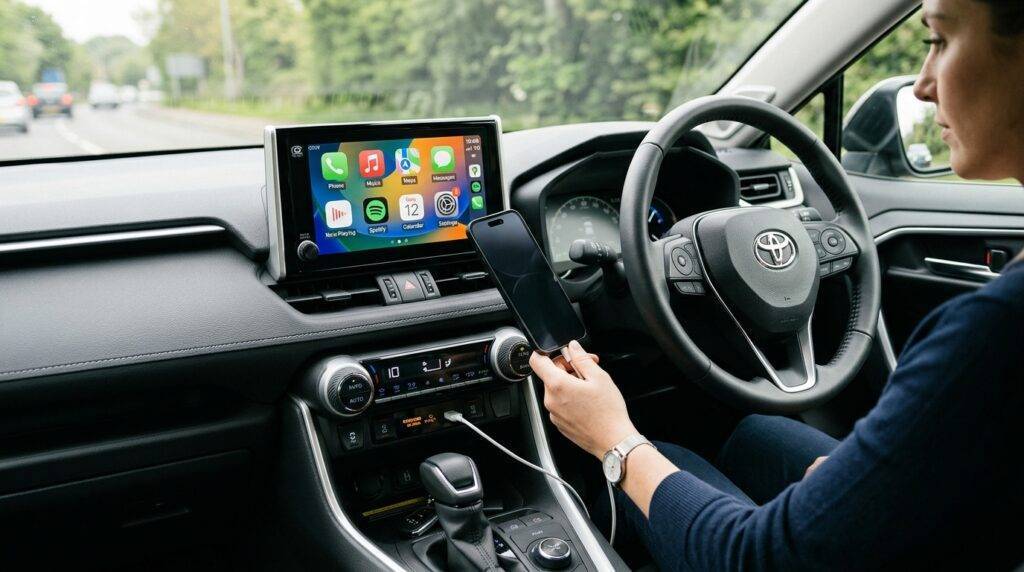
If you are struggling with a connection or want to know the best way to get high-fidelity sound, this guide covers every method from the latest Toyota Multimedia System to older Entune versions.
Key Takeaways: Connecting Your Phone to RAV4
- Best Quality: Use Wired Apple CarPlay or Android Auto for lossless audio and stable connections.
- Most Convenient: Bluetooth Pairing is best for quick trips and voice calls.
- Legacy Models: Older RAV4s (pre-2013) typically require a 3.5mm AUX cable or a Bluetooth FM transmitter.
- Expert Tip: If your phone is connected but there is no sound, ensure your Phone Volume is turned up to at least 80% before adjusting the car’s volume.
Can I Use My RAV 4 Speakers With My Phone via Bluetooth?
Connecting via Bluetooth is the most common way to link your smartphone to your RAV4. I have found that while Bluetooth is convenient, it does compress audio slightly compared to a wired connection. However, for podcasts and casual listening, it is the industry standard.
Step-by-Step Bluetooth Pairing
- Enable Bluetooth on your smartphone (Settings > Bluetooth > On).
- On your RAV4 head unit, press the “Setup” or “Menu” button.
- Select “Bluetooth” and then tap “Add New Device.”
- Your car’s system (usually named Toyota RAV4 or Multimedia) should appear on your phone’s screen.
- Select the device and confirm the 6-digit PIN matches on both screens.
- Once paired, ensure “Audio” and “Phone” profiles are toggled to ‘On.’
Pro Tip: In my testing with the 2021 RAV4 Hybrid, the system occasionally fails to “auto-connect” if you have multiple phones paired. To fix this, set your primary phone as the “Preferred Device” in the Bluetooth settings menu.
Using Apple CarPlay and Android Auto in Your RAV4
If you have a 2019 or newer RAV4, you likely have access to Apple CarPlay or Android Auto. These platforms don’t just “play music”—they mirror your phone’s interface onto the RAV4’s touchscreen, providing a much safer and higher-quality experience.
Wired vs. Wireless Connections
For the 2019–2022 models, most RAV4s require a physical USB-to-Lightning or USB-C cable plugged into the data port (usually located near the wireless charging pad). Starting with the 2023 RAV4, Toyota introduced Wireless CarPlay and Android Auto as a standard feature on most trims like the XLE, Adventure, and Limited.
Why use CarPlay/Android Auto over Bluetooth?
- Sound Quality: Wired connections use a higher bitrate, providing better bass response through the RAV4 speakers.
- Maps: You get real-time Google Maps or Waze on your dashboard.
- Charging: Your phone stays powered up during long drives.
Comparison of Phone-to-RAV4 Connection Methods
| Method | Audio Quality | Ease of Use | Best For |
|---|---|---|---|
| Apple CarPlay / Android Auto | Excellent | High | Navigation & High-Fidelity Music |
| Bluetooth Audio | Good | Very High | Quick commutes & Hands-free calls |
| USB Data Port | Excellent | Medium | Playing music from local files (MP3/FLAC) |
| 3.5mm AUX Cable | Fair | Low | Older RAV4 models without Bluetooth |
| FM Transmitter | Poor | Low | Vintage RAV4s (Pre-2006) |
Troubleshooting: Can I Use My RAV 4 Speakers With My Phone if it Fails?
It is incredibly frustrating when you get into your car and the music doesn’t start. I’ve spent hours diagnosing these systems in various Toyota models, and 90% of the time, the issue is software-related.
The “Frozen” Screen Fix
If your head unit isn’t recognizing your phone, perform a Soft Reset. Hold down the Volume/Power knob for about 10–15 seconds until the screen turns black and the Toyota logo reappears. This clears the cache without deleting your saved stations.
Permissions Check
On your phone, go to Settings > General > CarPlay > Toyota RAV4 and ensure “Allow CarPlay While Locked” is turned on. For Android users, check the Android Auto app settings to ensure the car isn’t on the “Rejected” list.
Replace the Cable
If you are using a wired connection, the RAV4 is notoriously picky about cables. I highly recommend using an Original Equipment Manufacturer (OEM) cable from Apple or Samsung. Cheap gas station cables often lack the data pins required to trigger the audio system.
Maximizing Sound Quality from Your RAV4 Speakers
Once you are connected, you might find the factory RAV4 speakers sound a bit “flat.” This is because Toyota tunes the factory EQ for a wide demographic. We can improve this with a few manual adjustments.
Optimized EQ Settings for RAV4
I recommend the following settings for the standard 6-speaker non-JBL system:
- Treble: +2 or +3 (to add clarity to vocals).
- Midrange: -1 (to reduce that “boxy” sound).
- Bass: +2 (to give the door woofers some punch).
- Fade/Balance: Move the soundstage 1 notch toward the Rear. This fills the cabin more effectively.
The JBL Premium Audio Advantage
If you have the RAV4 Limited or XSE with the JBL Premium Audio package, you have 11 speakers and a dedicated subwoofer. These systems handle phone audio much better, but they are very sensitive to “source quality.” If you are using Spotify, go into your phone settings and set “Streaming Quality” to Very High.
Upgrading Your RAV4 Audio Experience (Expert Perspective)
If you’ve asked “can i use my rav 4 speakers with my phone” and realized the sound is underwhelming even after connecting, you might be a candidate for a speaker upgrade.
In my experience, the factory speakers in the RAV4 (non-JBL) are made of lightweight paper with small magnets. Replacing the dash speakers with 3.5-inch Coaxial Speakers (like the Kicker KSC350) is the single best “bang-for-your-buck” modification. It takes about 20 minutes and dramatically improves the soundstage when streaming from your phone.
Frequently Asked Questions
Why won’t my RAV4 recognize my phone for CarPlay?
Check your USB cable first. Ensure you are using the Data USB port (usually marked with a small phone icon) and not a “Charge Only” port. Also, verify that Siri is enabled on your iPhone, as CarPlay requires Siri to function.
Can I play music from my phone through the RAV4 USB port without CarPlay?
Yes. If you don’t want to use CarPlay, you can set the source to “USB” or “iPod” mode. This allows you to browse your phone’s music library using the Toyota touchscreen interface.
How do I delete an old phone from my RAV4 Bluetooth list?
Go to Setup > Bluetooth > Remove. Select the phone you want to delete and confirm. I recommend doing this if you have reached the maximum limit of 5 paired devices, as it can cause connection lag.
Does the RAV4 support wireless Android Auto?
Wireless Android Auto became standard on the 2023 Toyota RAV4 with the new Toyota Multimedia System. For 2019-2022 models, you can purchase a third-party Wireless Android Auto Adapter (like AAWireless) to plug into the USB port.
Can I use my phone’s voice assistant through the car?
Absolutely. Once connected via Bluetooth or CarPlay/Android Auto, you can long-press the “Voice Command” button on your steering wheel to activate Siri or Google Assistant. This is the safest way to change songs while driving.









