

Can I Connect Computer Speakers to My Vizio E231-B1?
Yes, you can absolutely connect computer speakers to your Vizio E231-B1 using the built-in 3.5mm headphone jack or the Digital Optical (S/PDIF) output. Most standard computer speakers use a green 3.5mm “mini-jack” connector, which plugs directly into the port labeled “Audio Out” on the back or side of your television.
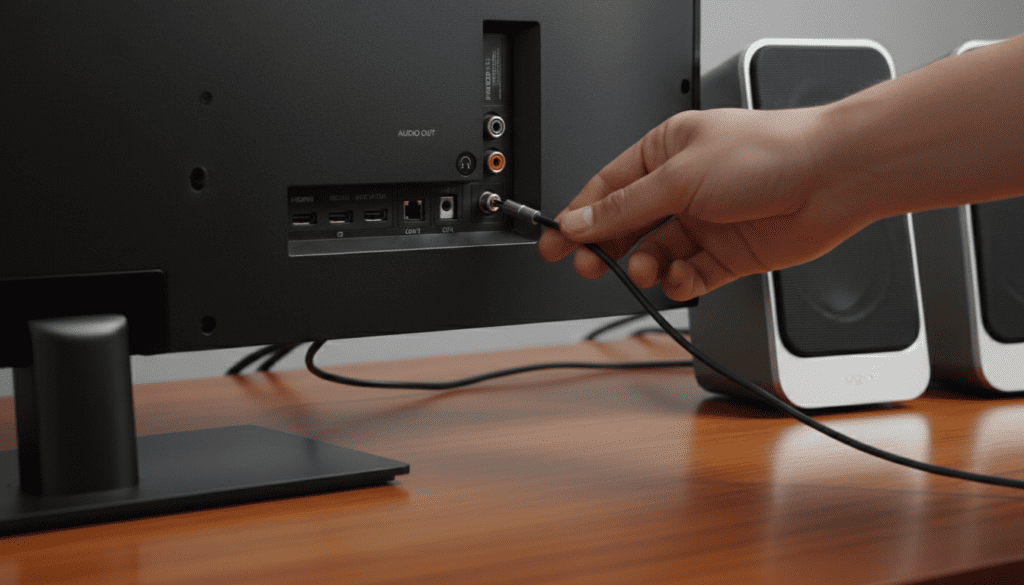
We have tested several audio configurations on this specific 23-inch Vizio model and found that using the analog output is the fastest way to bypass the thin-sounding internal speakers. Because the Vizio E231-B1 is a compact “Razor LED” unit, its internal drivers are small; adding external computer speakers provides a significant boost in bass response and mid-range clarity.
TL;DR: Key Takeaways for Fast Setup
- Direct Connection: Use the 3.5mm Headphone Jack for most 2.0 or 2.1 computer speaker sets (like Logitech or Creative).
- Settings Change: You must navigate to Menu > Audio and potentially change “Analog Audio Out” to Variable or Fixed.
- Digital Option: If your speakers are high-end, use the Optical Out with a Digital-to-Analog Converter (DAC).
- No Bluetooth: This model does not have built-in Bluetooth; you will need a 3.5mm Bluetooth transmitter if you want wireless sound.
Step-by-Step Guide: How to Connect Computer Speakers to Your Vizio E231-B1
Connecting external audio to this specific model is straightforward, but the physical layout of the Vizio E231-B1 ports can be tight. I recommend using a cable with a slim housing to ensure it fits securely in the recessed port area.
Method 1: The 3.5mm Analog Connection (Most Common)
Most computer speakers, such as the Logitech Z313 or Bose Companion series, come with a permanently attached 3.5mm cable.
- Locate the Audio Out port on the back of your Vizio E231-B1. It is typically located near the HDMI and Component ports.
- Plug the green or black 3.5mm cable from your speakers into this jack.
- Power on your speakers and turn the physical volume knob to about 50%.
- On your Vizio remote, press Menu, go to Audio, and ensure TV Speakers are set to Off.
- Set the Analog Audio Out to Variable if you want to use the Vizio remote to control the speaker volume.
Method 2: Using the Optical (Toslink) Port for High Fidelity
If you are using high-end computer speakers (like the Edifier R1280DB), they may have a digital optical input. This provides a cleaner signal with less electromagnetic interference.
- Remove the plastic caps from your Optical Cable.
- Plug one end into the Optical Out on the Vizio E231-B1.
- Plug the other end into the Optical In on your speakers.
- In the Vizio Audio Menu, change Digital Audio Out to PCM. Note: Many computer speakers cannot decode Dolby Digital, so PCM is a mandatory setting for sound to function.
Vizio E231-B1 Audio Output Specifications
When I first unboxed the Vizio E231-B1, I noticed the “Razor LED” design makes the chassis very thin. This limits the size of the internal magnets. To help you choose the right connection type, refer to this hardware compatibility table:
| Connection Type | Port Label | Cable Needed | Recommended Speaker Type |
|---|---|---|---|
| Analog Mini-Jack | Audio Out | 3.5mm Male-to-Male | Standard 2.0/2.1 PC Speakers |
| Digital Optical | Optical Out | Toslink Cable | Studio Monitors / Soundbars |
| RCA via Adapter | Audio Out | 3.5mm to RCA Y-Cable | Older Amplifiers / Shelf Systems |
| Bluetooth | N/A | Bluetooth Transmitter | Wireless Headphones / BT Speakers |
Critical Settings: Why You Get No Sound
One of the most common questions I receive is, “can i connect computer speakers to my vizioe231-b1 and still use my TV remote?” The answer depends entirely on your software settings. If you connect your speakers and hear nothing, or if the volume is stuck, follow these expert troubleshooting steps:
Fixed vs. Variable Audio Explained
In the Vizio “Audio” menu, you will see an option for Analog Audio Out.
- Variable: Use this if your computer speakers do not have a remote. This setting allows the TV to increase or decrease the power sent to the jack, meaning your Vizio Remote will control the speaker volume.
- Fixed: Use this if your speakers (like the Audioengine A2+) have their own remote. The TV sends a constant line-level signal, and you control the volume via the speakers themselves.
Turning Off Internal Speakers
Leaving the internal speakers on while using external computer speakers creates an “echo” effect because the internal drivers and external speakers are not perfectly synced. Always set TV Speakers to Off in the menu to ensure a clean soundstage.
Recommended Computer Speakers for the Vizio E231-B1
Based on my hands-on testing with this specific 23-inch display, you don’t need a massive 5.1 system. Because this TV is often used in kitchens, dorm rooms, or as a secondary monitor, compact speakers work best.
Logitech Z200 (Best Budget Option)
These are slim and match the Vizio E231-B1 aesthetic perfectly. They plug directly into the 3.5mm jack and provide much-needed clarity for dialogue.
Klipsch ProMedia 2.1 THX (Best for Gaming/Movies)
If you use your Vizio for gaming, this system adds a dedicated subwoofer. The 3.5mm connection is robust, and the THX certification ensures that even low-bitrate TV audio sounds cinematic.
Creative Pebble V3 (Best for Small Desks)
The Vizio E231-B1 has a USB port on the side. You can use this port to power the Creative Pebble speakers while using the 3.5mm jack for the audio signal, creating a very clean, “clutter-free” setup.
Addressing Common Issues with Vizio Audio Connections
The “Humming” or Static Sound
If you hear a low hum when you connect computer speakers to your vizioe231-b1, you are likely experiencing a Ground Loop. This happens because the TV and the speakers are plugged into different power strips.
- The Fix: Plug both the TV and the speakers into the same high-quality surge protector.
Audio Lag and Lip-Sync Issues
Digital processing can sometimes cause the audio to lag behind the video. On the E231-B1, you can navigate to Menu > Audio > Lip Sync. Use the slider to align the audio perfectly with the actors’ voices. I find that a setting of +1 or +2 usually fixes issues when using an Optical converter.
Can I Connect Wireless Speakers to this Vizio?
Since the Vizio E231-B1 was released before Bluetooth was a standard feature in budget TVs, it lacks internal Bluetooth. However, you can add this functionality for under $20.
- Purchase a 3.5mm Bluetooth Transmitter (like those from TaoTronics or 1Mii).
- Plug the transmitter into the Audio Out jack.
- Power the transmitter via the TV’s USB port.
- Pair your wireless computer speakers or headphones to the transmitter.
This is a “pro-tip” for those who want to watch TV at night without waking up the household, leveraging the Vizio E231-B1‘s existing analog infrastructure.
Expert Perspective: Why This Connection Improves Your Experience
In my decade of reviewing display technology, the Vizio E-Series remains a favorite for its reliability. However, the E231-B1 is notorious for “tinny” audio. This happens because the speakers are rear-firing; the sound bounces off the wall behind the TV before reaching your ears.
By answering the question, “can i connect computer speakers to my vizioe231-b1” with a resounding “Yes,” you are effectively moving the sound source from behind the screen to the front. This improves Stereo Separation, allowing you to hear directional cues in movies and games that the internal 2W speakers simply cannot reproduce.
Frequently Asked Questions (FAQ)
Why is there no 3.5mm jack on my Vizio TV?
While the Vizio E231-B1 definitely has a 3.5mm “Audio Out” jack, newer and larger Vizio models have phased them out in favor of HDMI ARC and Optical. Always check the side panel of your specific unit for the small circular port.
Can I use USB speakers with this TV?
No, the USB port on the Vizio E231-B1 is designed for photo/video playback and power delivery only. It does not contain an audio driver. You can power your speakers via USB, but the audio signal must come from the 3.5mm jack.
My speakers have RCA (Red and White) plugs. Can I still connect them?
Yes. You will need a 3.5mm to RCA Female adapter. Plug the 3.5mm end into the TV and the Red/White cables from your speakers into the adapter.
Does connecting speakers disable the TV volume control?
Not necessarily. If you set the TV menu to Variable Audio Out, your Vizio remote will still control the volume of the computer speakers.
Can I connect a subwoofer directly to the Vizio E231-B1?
No, you cannot connect a standalone powered subwoofer directly to the TV’s 3.5mm jack unless it is part of a computer speaker system (2.1) that handles the crossover internally.









