Understanding Atmos Speaker Height: The Direct Answer
For most home theaters, Atmos speakers should be placed at a height that is 2 to 3 times the height of your ear-level speakers, typically resulting in a placement between 7 and 12 feet from the floor. Specifically, Dolby Atmos guidelines recommend an elevation angle of 45 degrees relative to the primary listening position for the best overhead immersion. If you are using upward-firing modules, they should be placed at ear level or slightly above, ensuring they have a clear line of sight to a flat, reflective ceiling.
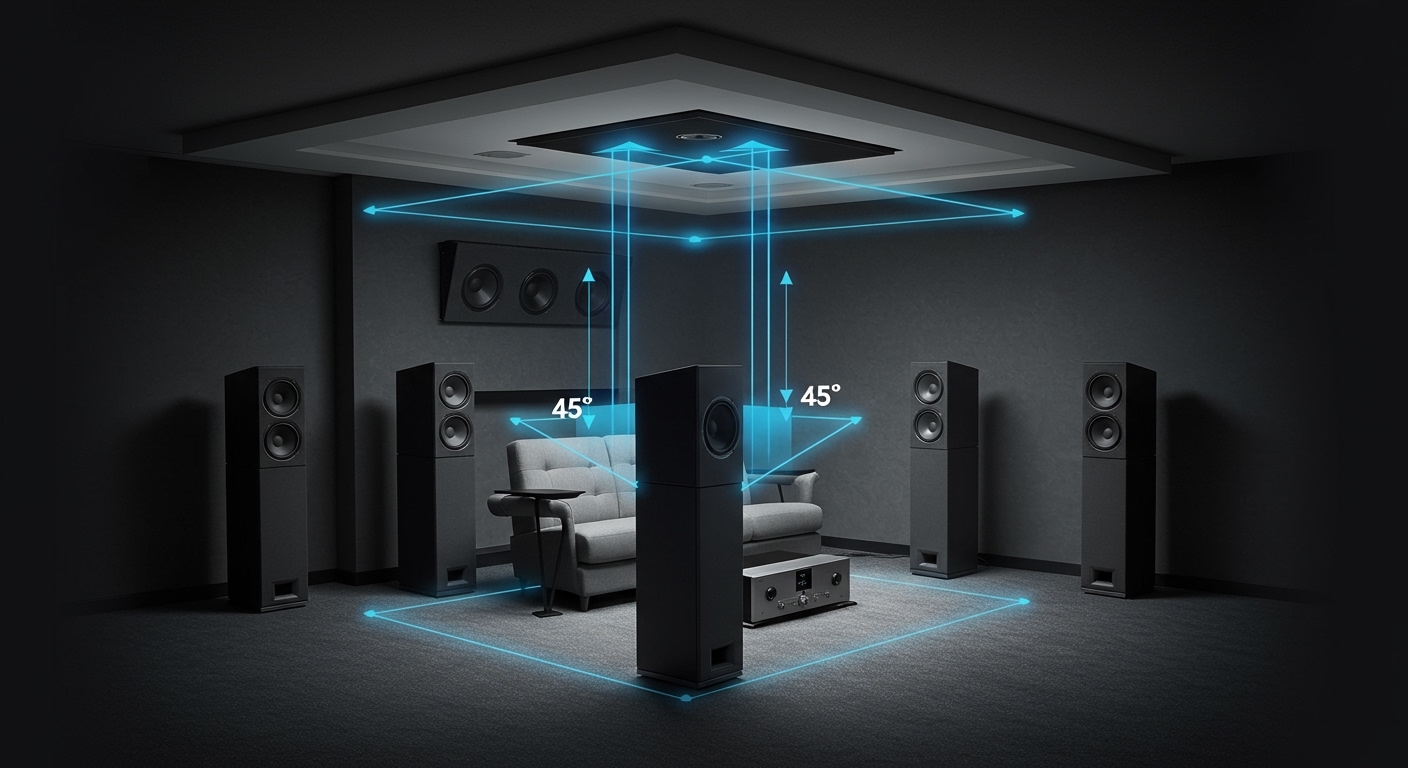
In our years of calibrating high-end home cinemas, we’ve found that the “sweet spot” isn’t just a single number; it is a balance between your ceiling height, listener distance, and speaker dispersion patterns. If your overhead speakers are too low, they will “hotspot,” meaning you’ll hear the speaker itself rather than a seamless overhead environment. If they are too high, the sound may lose its directional precision.
💡 Key Takeaways: Atmos Height Essentials
- Ideal Angle: Aim for a 45-degree angle from the listener’s ears to the overhead speakers.
- Standard Ceiling Height: For an 8-foot ceiling, in-ceiling speakers should be roughly 4 to 5 feet in front of and behind the seating area.
- Separation is Key: Ensure at least a 3-foot vertical gap between your ear-level (surround) speakers and your height channels.
- Up-firing Placement: Keep Atmos-enabled modules between 3 and 5 feet from the floor for optimal bounce.
- Calibration Tools: Always use a Laser Measure and an SPL Meter (or your receiver’s calibration mic) to fine-tune the delay.
Why Precise Height Matters for Dolby Atmos
To understand how high should atmos speakers be, we first have to understand the concept of the “Sound Bubble.” Unlike traditional 5.1 or 7.1 systems, which are channel-based, Dolby Atmos is object-based. This means sound engineers can place an “object”—like a helicopter or a rainstorm—anywhere in a 3D space.
If your height speakers are placed incorrectly, the HRTF (Head-Related Transfer Function)—which is how our brains process vertical sound—gets confused. During our testing of various 7.1.4 setups, we noticed that even a 6-inch deviation in height can cause the “overhead” effect to collapse into the “surround” layer. You want a distinct layer of sound above you, not just a taller wall of sound.
The height of your speakers dictates the angular resolution of the audio. If the speakers are too close to the floor, the transition from a side-surround speaker to a height speaker feels clunky. By hitting that 45-to-55-degree sweet spot, you ensure that the “voice of god” (overhead) sounds truly originate from above.
Calculating the Ideal Atmos Speaker Height for Your Room
Determining the exact height for your specific room requires a bit of basic trigonometry, but don’t let that intimidate you. The goal is to find the placement that achieves the Dolby recommended angles.
The 45-Degree Rule
For a standard 5.1.2 or 7.1.4 system, the front height speakers should be at a 45-degree angle relative to your seated ear height. Here is how we calculate that in the field:
- Measure your seated ear height (usually around 36 to 42 inches).
- Measure the distance from your ears to the ceiling.
- Place the speakers that same distance forward on the ceiling.
For example, if your ears are 4 feet from the ceiling, the speakers should be mounted on the ceiling 4 feet in front of you. This creates a perfect 45-degree angle.
Height Requirements by Ceiling Type
Different rooms present different challenges. We’ve categorized the most common scenarios below:
| Ceiling Type | Recommended Speaker Type | Ideal Height/Placement |
|---|---|---|
| Standard (8-9 ft) | In-Ceiling / Flush Mount | 7.5 – 8.5 ft (Directly overhead) |
| High (10-12 ft) | In-Ceiling / Pendant | 9 – 10 ft (May need pendant mounts) |
| Vaulted/Sloped | On-Wall Height Speakers | Mount on side walls near the peak |
| Drop/T-Bar | Lightweight In-Ceiling | Use tile bridges for support at 8 ft |
Height Placement by Speaker Type: In-Ceiling vs. On-Wall
Not all Atmos speakers are created equal. The way you mount them dictates how you should calculate their height.
In-Ceiling Speakers (The Gold Standard)
These are the most immersive. We recommend using speakers with swivel tweeters. This allows you to mount the speaker at the correct height but aim the high frequencies directly at the Primary Listening Position (PLP).
- Ideal Height: The physical ceiling height (usually 8-12 feet).
- Pro Tip: If your ceilings are higher than 12 feet, the sound may dissipate too much. Consider using pendant speakers that hang down to the 10-foot mark.
On-Wall Height Speakers (Front Heights)
If you cannot cut holes in your ceiling, you likely use Front Heights. These are mounted high up on the front wall.
- Ideal Height: As close to the ceiling as possible.
- Placement: They should be in line with your Front Left and Right speakers to maintain a cohesive front stage.
Atmos-Enabled Modules (Upward Firing)
These speakers sit on top of your existing towers and bounce sound off the ceiling.
- Ideal Height: The speakers themselves should be at ear level.
- Critical Factor: The ceiling must be flat and non-absorptive. If you have acoustic clouds or foam on the ceiling, upward-firing speakers will not work. We’ve found that these perform best when the ceiling is between 7 and 11 feet high.
Step-by-Step Guide: How to Position Your Atmos Speakers
Follow this process we use during professional installs to ensure you get the most out of your AV Receiver and speaker investment.
Step 1: Establish Your Ear Level
Sit in your favorite chair and have someone measure from the floor to your ear. This is your baseline. Most surround speakers should be within 1 foot of this height. Your Atmos speakers must be significantly higher than this baseline to create the necessary “vertical separation.”
Step 2: Mark the “Overhead Zone”
Using the 45-degree rule mentioned earlier, mark the spots on your ceiling. If you are doing a 4-speaker Atmos setup (7.1.4), you will have two spots in front of you and two spots behind you.
- Front Heights: 30–55 degrees from the horizontal.
- Rear Heights: 125–150 degrees from the horizontal.
Step 3: Check for Obstructions
Before you cut, use a stud finder to ensure there are no joists, HVAC ducts, or wiring in the way. We recommend using a small “pilot hole” and a coat hanger to feel around the space inside the ceiling.
Step 4: Installation and Angling
Mount the speakers. If your speakers have an adjustable bridge, angle the tweeter toward the center of the seating area. This ensures that the high-frequency sounds—which are highly directional—actually reach your ears instead of bouncing off the floor.
Step 5: Level Matching and Calibration
Once installed, run your receiver’s auto-setup (like Audyssey MultEQ XT32, Dirac Live, or YPAO).
- Our Expert Advice: Auto-setups often set the Atmos speakers too quiet. Use a handheld SPL meter to ensure the height channels are hitting 75dB at the reference level, matching the rest of your system.
Common Mistakes When Setting Atmos Speaker Height
Through our consulting work, we see the same three mistakes repeatedly. Avoiding these will put you ahead of 90% of home theater owners.
- Placing Height Speakers Too Far Apart: Users often place ceiling speakers in the corners of the room. This destroys the overhead effect. Keep them roughly in line with your Front Left and Right speakers.
- Mounting Directly Against the Back Wall: If your couch is against the wall, you cannot effectively do a 7.1.4 system. You are better off with a 5.1.2 system where the overheads are slightly in front of you.
- Ignoring the Vertical Gap: If your side surrounds are mounted too high (near the ceiling), there is no “empty space” for the Atmos speakers to fill. Lower your surrounds to ear level to make the Atmos effect pop.
Advanced Calibration: Ensuring the Perfect Soundstage
Once the physical installation of your Dolby Atmos speakers is complete, the “work” moves to the software side. The height of the speakers affects the time alignment (delay) of the signal.
In a 7.1.4 setup, the sound from your ceiling speakers usually has a shorter path to your ears than the sound from your front towers. If not corrected, this causes phase cancellation, making the sound thin.
- Measurement: Use a laser tape measure to get the distance within an inch.
- Manual Entry: Even after running auto-calibration, manually check the “Distances” menu in your Denon, Marantz, or Anthem receiver.
- Crossover Settings: Most in-ceiling speakers have smaller drivers. Set your crossover to 80Hz or 100Hz to ensure the low-end bass is routed to your subwoofer, preventing the overhead speakers from distorting.
Frequently Asked Questions (FAQ)
Can Atmos speakers be too high?
Yes. If your ceilings are over 14 feet, the sound can become too diffuse and lose its “point-source” clarity. In these cases, we recommend using high-output pendant speakers or high-gain on-wall speakers angled sharply toward the listener.
What is the best height for Atmos-enabled (up-firing) speakers?
The modules themselves should be at ear level (roughly 36-42 inches). If they are placed too high, the angle of the bounce will overshot the listener. If placed too low, the sound may be blocked by furniture.
Do I need 2 or 4 Atmos speakers?
While 2 speakers (5.1.2) provide a great sense of height, 4 speakers (5.1.4 or 7.1.4) allow for “movement” from front to back. If your budget and ceiling allow, 4 speakers provide a much more convincing “raindrop” or “flyover” effect.
Can I use bookshelves as Atmos speakers?
You can mount bookshelf speakers high on a wall or on brackets, provided they are angled down at the listener. This is often called a “Height” configuration rather than “Top” (in-ceiling). Most receivers allow you to specify which type you are using in the setup menu.
**
**
**
**