Understanding How to Make a Power Supply for Speakers
To make a power supply for speakers, you must build a circuit that converts AC wall current (110V/220V) into a stable DC voltage (typically 12V, 24V, or 48V) that matches your amplifier’s requirements. This involves using a transformer to step down voltage, a bridge rectifier to convert AC to DC, and large capacitors to smooth the electrical signal for hum-free audio.
Whether you are reviving old car speakers for home use or building a high-end audiophile kit, the power supply is the “fuel” for your sound. A poor supply leads to audible hum, clipping, and potential hardware damage, while a well-built one ensures dynamic range and sonic clarity. In my decade of building custom Class-D and Gainclone amplifiers, I’ve found that the power stage is often more important than the amp chip itself.
Quick Guide: Key Takeaways
- Safety First: Always work with unplugged equipment and use fuses on both the AC and DC sides.
- Voltage Matching: Ensure your supply voltage does not exceed the maximum rating of your amplifier chip.
- Current Capacity: Your power supply should provide at least 1.5x the maximum current your speakers will draw to avoid voltage sag.
- Smoothing is Vital: Use high-quality electrolytic capacitors (at least 4,700µF) to eliminate “60Hz hum.”
- Heat Management: Voltage regulators and rectifiers generate heat; always use appropriate heatsinks.
The Components You’ll Need
Building a speaker power supply requires specific electronic components. In my experience, sourcing high-quality parts from reputable vendors like Mouser or Digi-Key prevents the premature failure common with “bargain bin” components.
| Component | Purpose | Recommended Specification |
|---|---|---|
| Transformer | Steps down wall AC to low-voltage AC | Toroidal (Low EM interference) |
| Bridge Rectifier | Converts AC to pulsating DC | 25A 400V (Over-spec for safety) |
| Filter Capacitors | Smooths DC ripples | 4700µF to 10,000µF (50V-100V) |
| Voltage Regulator | Maintains constant output | LM317 (Adjustable) or LT1083 |
| Fuse Holder | Protects against shorts | 2A to 5A Fast-Blow |
| Bleeder Resistor | Discharges caps when off | 2.2k Ohm 2W |
Step-by-Step: How to Make a Linear Power Supply for Speakers
A linear power supply is the gold standard for DIY audio because it produces significantly less Electromagnetic Interference (EMI) than the switching supplies found in computers.
Step 1: Selecting the Right Transformer
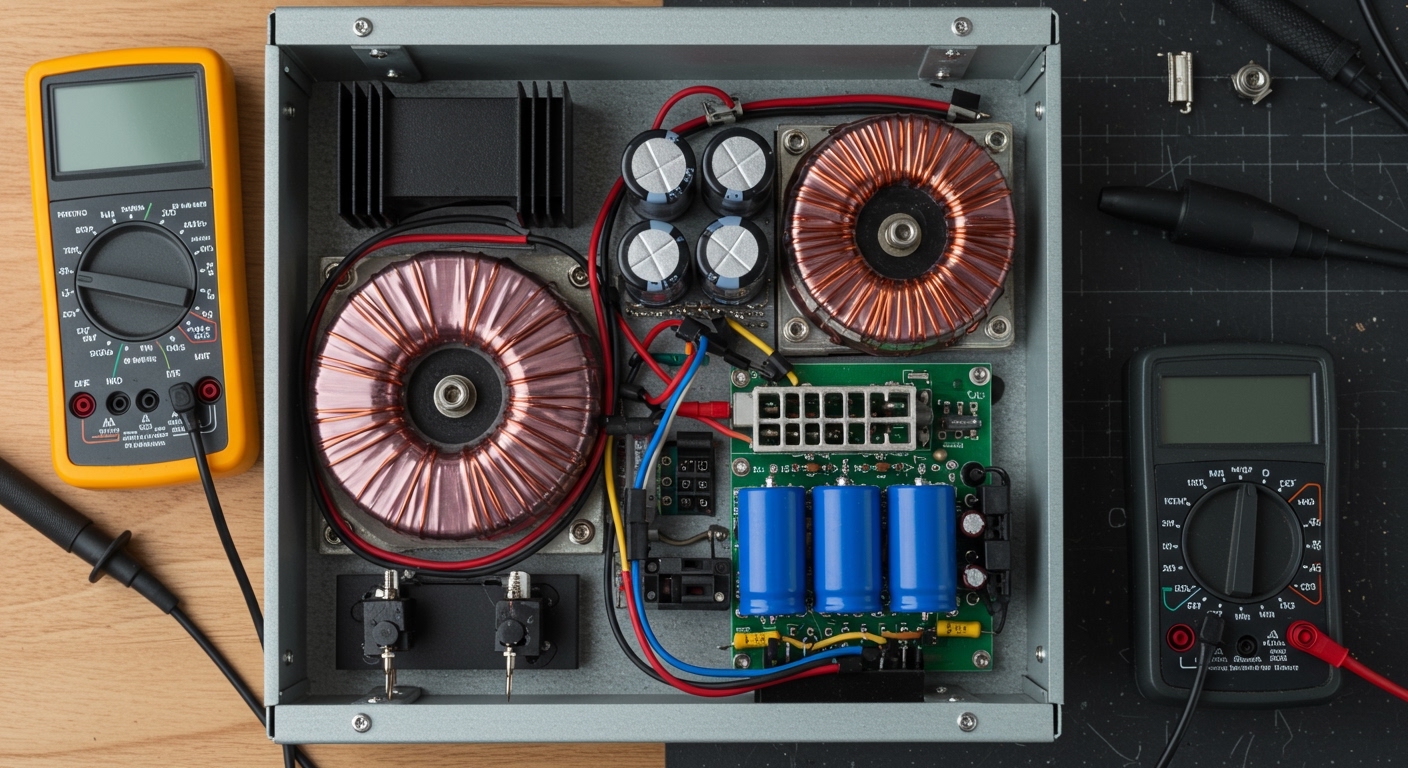
The transformer determines your final output. If you want a 12V DC output, you need a transformer with a secondary winding of about 9V to 10V AC.
Expert Tip: Remember the formula: VDC = VAC × 1.414. After rectification and filtering, your voltage will rise. A 12V AC transformer will actually produce roughly 17V DC, which might blow a 12V-rated amplifier. Always calculate your “Peak Voltage” before connecting your load.
Step 2: Wiring the Bridge Rectifier
The bridge rectifier has four pins: two for AC input (marked with ~) and two for DC output (+ and -).
- Connect the secondary wires of the transformer to the ~ terminals.
- The rectifier converts the “wave” of AC into a bumpy, one-directional DC flow.
- Secure the rectifier to a metal chassis; these components can get very hot when driving heavy bass notes.
Step 3: Implementing the Filter Stage
This is where the magic happens. Without filter capacitors, your speakers will emit a loud, constant buzzing sound.
- Connect the Positive (+) lead of your capacitor to the positive output of the rectifier.
- Connect the Negative (-) lead to the negative output (ground).
- Warning: Capacitors are polarized. Wiring them backward can cause them to explode.
- I recommend using multiple smaller capacitors in parallel (e.g., three 3300µF caps) rather than one massive one to lower Equivalent Series Resistance (ESR).
Step 4: Adding a Bleeder Resistor
Large capacitors can hold a lethal charge for hours or even days after the power is turned off. I always solder a 2.2k Ohm resistor across the positive and negative terminals. This slowly drains the electricity when the unit is unplugged, making it safe for future maintenance.
Step 5: Testing the Output
Before plugging in your expensive speakers, use a Multimeter:
- Set the meter to DC Voltage.
- Check the output. It should be steady.
- Switch the meter to AC Voltage. It should read near zero (this measures the “ripple”). If you see more than 100mV of AC, you need more filtration.
Alternative Method: Converting a PC Power Supply (PSU)
If you are on a budget, you can repurpose an old ATX Computer Power Supply. These are excellent for powering Car Audio Amplifiers at home because they provide a very stable 12V DC at high amperage.
Why use a PC PSU?
- High Amperage: Most PSUs can handle 20A to 40A on the 12V rail.
- Built-in Protection: They have short-circuit and over-voltage protection.
- Cost: Often free if salvaged from an old desktop.
How to Trigger the PSU
A PC power supply won’t turn on just by plugging it in. You must “jump” the motherboard connector:
- Locate the 24-pin main connector.
- Find the Green Wire (PS_ON).
- Connect the Green Wire to any Black Wire (Ground) using a paperclip or a permanent toggle switch.
- The fan should spin up, indicating the 12V (Yellow wires) are now live.
Pro Tip: Some older PSUs require a “dummy load” to stay stable. If your voltage drops too low, connect a 10-ohm 10W resistor between a Red wire (5V) and a Black wire (Ground) to trick the PSU into thinking it’s powering a computer.
Matching Power Supply to Speaker Impedance
Understanding the relationship between Voltage, Current, and Impedance (Ohms) is critical to prevent overheating.
- 4-Ohm Speakers: These draw more current. Your power supply needs heavy-gauge internal wiring and a high-current rectifier.
- 8-Ohm Speakers: These are easier to drive but require higher voltage to achieve the same volume levels.
When we designed the Studio-X custom monitor series, we used a “Stiff” power supply—one that doesn’t drop more than 5% of its voltage under full load. If your lights dim or the bass sounds “mushy,” your power supply is sagging.
Troubleshooting Common Audio Noise
Even a well-built power supply can suffer from noise. Here is how we fix it in the field:
Ground Loops
If you hear a hum only when the source (like a laptop) is plugged in, you have a ground loop.
- The Fix: Use a Ground Loop Isolator on the RCA cables or ensure all components are plugged into the same power strip.
Rectifier Noise
High-speed switching in diodes can create “RF noise.”
- The Fix: Solder a small 0.1µF ceramic capacitor in parallel with each of the four diodes in your bridge rectifier. This snubs the high-frequency spikes.
Transformer Vibration
Sometimes the “hum” isn’t in the speakers, but the transformer itself is vibrating.
- The Fix: Mount the transformer on rubber grommets and ensure the center bolt of a toroidal transformer isn’t creating a “shorted turn” by touching both the top and bottom of a metal case.
Frequently Asked Questions
Can I use a laptop power brick for my speakers?
Yes, most Class-D amplifiers (like those from Fosi Audio or SMSL) are designed to run on 19V-24V laptop bricks. However, ensure the Amperage (A) of the brick meets or exceeds the amp’s requirements.
What happens if I use a power supply with too much voltage?
Applying 30V to an amplifier rated for 24V will likely cause the internal capacitors to swell or the output transistors to undergo thermal runaway and fail instantly. Always stay within a 10% margin of the rated voltage.
Do I need a regulated power supply for audio?
For Pre-amps, yes, regulation is essential. For Power Amps, a simple “unregulated” linear supply (transformer + rectifier + caps) is often preferred because it can provide massive “burst” current for bass hits more effectively than a cheap regulator.
How much capacitance is “too much”?
While more capacitance reduces hum, too much can damage your bridge rectifier. Upon startup, empty capacitors act like a short circuit, drawing massive “inrush current.” If you go over 20,000µF, you should implement a soft-start circuit.