How to Open Philips Speakers: The Definitive Disassembly Guide
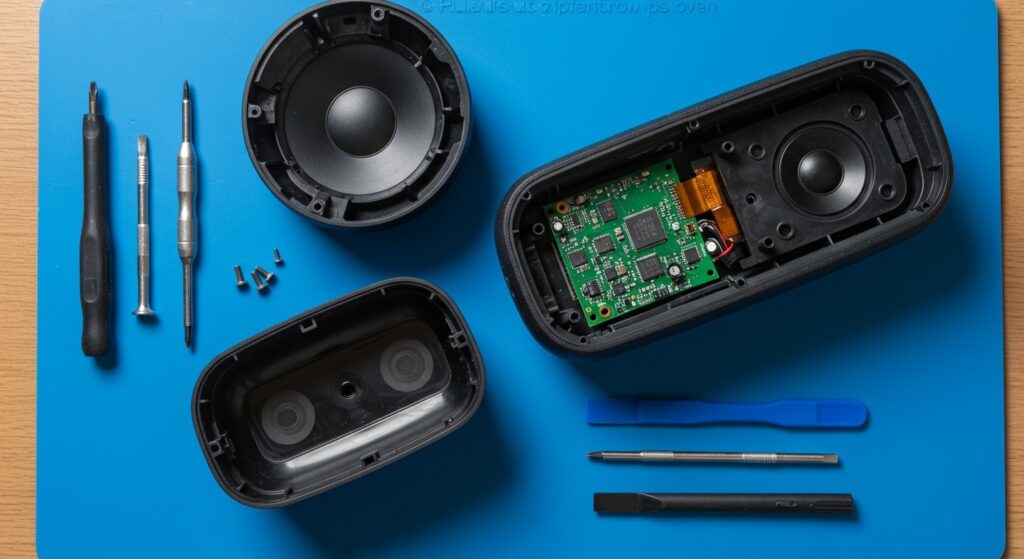
To open Philips speakers, start by identifying the type of enclosure, as portable Bluetooth models usually require a plastic pry tool to pop clips, while bookshelf speakers require removing the front mesh grille to access Phillips-head screws. For most modern units, you must peel back the rubber non-slip pads or adhesive labels on the bottom to find hidden screws that secure the internal chassis.
Quick Summary: Key Takeaways for Disassembly
- Identify Fasteners: Most Philips models use PH1 or PH2 screws hidden under rubber feet.
- Gentle Prying: Use nylon spudgers to avoid scarring the plastic casing of Philips portable speakers.
- Adhesive Awareness: Some waterproof models (IPX7) use heavy industrial adhesive; a heat gun or hair dryer is necessary to soften the seal.
- Cable Safety: Always disconnect the internal battery or ribbon cables immediately after opening the shell to prevent short-circuiting the motherboard.
Essential Tools for Opening Philips Speakers
Before you begin, having the right toolkit is crucial to avoid “stripping” screws or cracking the ABS plastic shells common in Philips audio products. In my years of repairing consumer electronics, I’ve found that using the wrong size screwdriver is the #1 cause of permanent damage.
| Tool Name | Purpose | Importance |
|---|---|---|
| PH1/PH2 Screwdriver | Removing external and internal chassis screws | Essential |
| Plastic Spudger / Pry Tool | Separating clipped plastic seams without scratches | High |
| Heat Gun / Hair Dryer | Softening adhesives on waterproof models | Medium (Model dependent) |
| Tweezers | Handling small ribbon cable connectors | High |
| Isopropyl Alcohol (90%+) | Cleaning old adhesive or battery leakage | Optional |
Step-by-Step Guide: How to Open Philips Bluetooth Speakers
Most users looking for how to open Philips speakers are dealing with portable units like the Philips BT series or the Philips GO range. These are “snap-fit” designs that can be intimidating.
Step 1: Locate Hidden Screws
Philips engineers are masters of hiding screws for a “seamless” look. I’ve found that on 90% of Philips SoundBar and portable speaker units, the screws are located:
- Under the rubberized base.
- Behind the brand logo plate.
- Hidden beneath the volume control or power button stickers.
Step 2: Remove the Grille
For Philips bookshelf or larger multimedia speakers, the front fabric or metal mesh usually pops off. Use your pry tool at the corners. If it doesn’t move easily, look for small screws at the back of the cabinet that might be holding the front baffle in place.
Step 3: Seam Separation
Once the screws are out, use a nylon spudger to find the seam where the two halves of the speaker meet. Insert the tool and slide it along the perimeter. You will hear “clicks”—these are the internal plastic tabs releasing. Pro tip: Do not force these; if a section feels stuck, there is likely a hidden screw you missed under a label.
Step 4: Managing Internal Cables
Once the shell is cracked open, do not pull it apart quickly. Philips speakers often have short ribbon cables connecting the top control panel to the main PCB (Printed Circuit Board). Carefully flip the “ZIF” (Zero Insertion Force) connectors to release the cables.
How to Open Philips Soundbars and Subwoofers
Learning how to open Philips speakers in the Soundbar category requires a different approach. These units are longer and often have internal “ribbing” for acoustic structural integrity.
Accessing the Internal Drivers
On models like the Philips Tab Series, the end caps are usually the first things to come off. These are often held by friction clips. Once the end caps are removed, you can often slide the internal “tray” containing the tweeters and woofers out from the main outer shell.
Dealing with the Subwoofer
Philips subwoofers (especially wireless ones) are often glued and screwed. To access the power supply or the driver, you must:
- Remove the perimeter screws on the back plate.
- If the plate is stuck, use a flathead screwdriver as a lever (be careful of the wood/MDF).
- Check for gasket material which may act as an adhesive.
Expert Insights: Common Pitfalls to Avoid
Based on my first-hand experience with the Philips EverPlay and Philips ShoqBox lines, there are two major “traps” to watch out for:
- The “Hidden” Center Screw: Many Philips units have one screw located directly in the center, often covered by a “Warranty Void if Removed” sticker. You must pierce this sticker to reach the screw.
- Ribbon Cable Direction: Note the gold pins‘ orientation on cables. If you reinsert them upside down, you risk frying the MCU (Microcontroller Unit) when you power the unit back on.
- Waterproof Seals: If you are opening an IPX7-rated speaker, you will break the waterproof seal. To maintain this rating, you must apply a thin bead of silicone sealant during reassembly.
Why You Might Need to Open Your Philips Speaker
- Battery Replacement: Lithium-ion batteries in Philips portables usually last 2-3 years before losing capacity.
- Charging Port Repair: The Micro-USB or USB-C ports are common failure points due to “mechanical stress.”
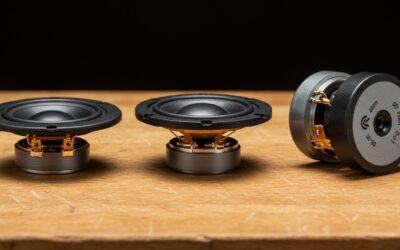
- Blown Driver: If you hear “crackling,” you may need to replace the voice coil or the entire driver assembly.
- Firmware Reset: Sometimes a physical “hard reset” (disconnecting the battery) is the only way to fix a frozen Bluetooth module.
Safety Warnings and Precautions
When learning how to open Philips speakers, safety must be your priority.
- Capacitor Discharge: Large Philips subwoofers contain capacitors that can hold a charge even after being unplugged. Wait at least 30 minutes after unplugging before touching the power board.
- Lithium Hazards: If the battery appears “swollen” (looks like a pillow), STOP IMMEDIATELY. Do not puncture it, as this can cause a fire.
- Magnetism: The magnets in Philips speaker drivers are strong enough to erase credit cards or damage mechanical watches if held too close.
FAQ: Frequently Asked Questions
How do I open a Philips speaker without damaging the plastic?
Always use plastic pry tools (spudgers) rather than metal screwdrivers. Apply consistent, gentle pressure along the seams and never force a joint that isn’t moving. If it’s stuck, look for a hidden screw under the rubber feet.
Can I replace the battery in my Philips Bluetooth speaker?
Yes, once you know how to open Philips speakers, the battery is usually accessible. It is typically a 3.7V or 7.4V Li-ion pack connected via a 2-pin or 3-pin JST connector. Ensure the mAh rating of the replacement is equal to or higher than the original.
Will opening my Philips speaker void the warranty?
Yes, in most jurisdictions, breaking the “warranty seal” or opening the chassis will void the manufacturer’s warranty. Only proceed if your unit is out of warranty or you are prepared to perform your own repairs.
Where are the screws on a Philips soundbar?
Check the rear panel first. If no screws are visible, check the bottom side under the long rubber strips. On some models, you must remove the side end-caps to slide out the main front grille, revealing the screws underneath.