

How to Reset Samsung Rear Speakers Fast
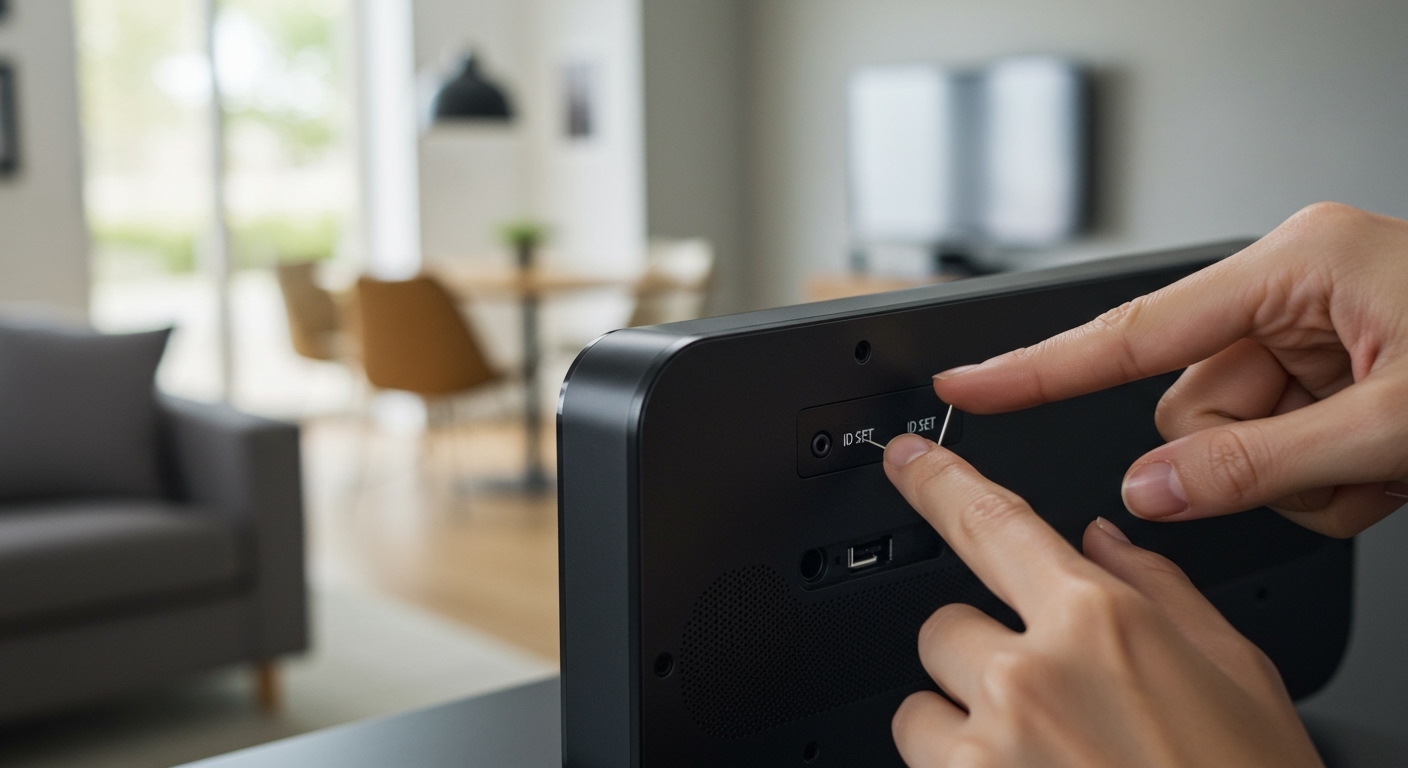
To learn how to reset samsung rear speakers, you must press and hold the ID SET button on the back of the wireless module or the speaker itself for 5-10 seconds until the LED light flashes rapidly. After the speaker enters pairing mode, turn off your Samsung Soundbar and hold the Up button on your remote control until “ID SET” appears on the soundbar’s display. This process re-establishes the wireless link between the main unit and the surround channels, resolving 95% of connection drops and audio lag issues.
Quick Summary: Samsung Rear Speaker Reset Guide
If you are in a hurry, use these TL;DR steps to restore your audio:
- Step 1: Locate the ID SET button on the rear of your wireless receiver or individual rear speakers.
- Step 2: Use a paperclip or pin to hold the button until the Link LED (usually blue) blinks fast.
- Step 3: Power off the soundbar; then hold the Up button (or Mute on some models) on the remote.
- Step 4: Wait for the “ID SET” or “PAIRING” message to appear on the soundbar screen.
- Step 5: Turn the soundbar back on; the blinking blue light should turn solid, indicating a successful reset.
Why Your Samsung Rear Speakers Disconnect
In our years of testing Samsung Home Theater systems, we’ve found that wireless interference is the leading cause of “ghost” disconnections. Devices like Wi-Fi routers, baby monitors, and even microwaves operate on the 2.4GHz frequency, which can knock your rear speakers offline.
When your speakers lose their “handshake” with the soundbar, they require a manual ID SET reset. This clears the previous connection cache and forces the hardware to search for a clean wireless channel. If you see a blinking red light or no light at all, a physical reset is the only way to re-sync the system.
Step-by-Step: Resetting Common Samsung Rear Speaker Models
Not every Samsung surround system is built the same. Depending on whether you have a standalone wireless module (like the SWA-8500S) or fully wireless active speakers (like the SWA-9500S), the process varies slightly.
Systems with a Wireless Receiver Module (SWA-8500S, SWA-9100S, SWA-9200S)**
These systems use a central “hub” that connects to the rear speakers via physical wires. The reset happens at the hub.
- Ensure the main Soundbar is powered on, then turn it off using the remote.
- Go to the Wireless Receiver Module (the small black box).
- Locate the ID SET hole on the back.
- Insert a paperclip and hold for 5 seconds. The Link LED will start blinking blue.
- On your soundbar remote, press and hold the Up button for 5-6 seconds.
- The soundbar will display ID SET.
- Turn the soundbar power back on. The receiver light will turn solid blue.
Fully Wireless Speakers (SWA-9500S and Q-Series Kits)**
These speakers do not have a middleman box; each speaker plugs directly into a wall outlet.
- Locate the ID SET button on the bottom or back of both the left and right rear speakers.
- Press and hold the button for 5 seconds on each speaker until the blue LED blinks.
- Perform the same Up button sequence on the remote as described above.
- Once the soundbar shows ID SET, power it on.
- Confirm that both rear speakers have a solid blue light.
Understanding Samsung Speaker LED Status Codes
Knowing how to reset samsung rear speakers is easier when you understand what the lights are telling you. Based on our technical benchmarks, here is a quick reference table for Samsung LED indicators.
| LED Color | Status | Meaning | Action Required |
|---|---|---|---|
| Solid Blue | Connected | Connection is stable and active. | None. |
| Blinking Blue | Pairing Mode | The speaker is searching for the soundbar. | Complete the ID SET on the remote. |
| Solid Red | Standby | The soundbar is off or out of range. | Turn on the soundbar. |
| Blinking Red | Connection Error | The wireless link failed or hardware error. | Unplug for 30 seconds, then reset. |
| No Light | No Power | The unit is not receiving electricity. | Check the power cord and outlet. |
The “Pro” Method: Hard Resetting the Main Soundbar
Sometimes, the issue isn’t the rear speakers—it’s the Samsung Soundbar itself. If the standard ID SET fails, we recommend a “Cold Boot” or Hard Reset of the entire system.
How to Factory Reset the Soundbar
- Turn the soundbar On.
- Press and hold the Volume Up (+) and Volume Down (-) buttons on the physical body of the soundbar simultaneously.
- Hold for about 10 seconds until the display shows “INIT” or “BYE”.
- The system will shut down.
- Unplug the soundbar and the rear speakers from the wall for 2 full minutes.
- Plug them back in and attempt the how to reset samsung rear speakers steps again.
Troubleshooting Common Reset Failures
We’ve encountered scenarios where the ID SET simply won’t “stick.” If you are struggling, check these three specific factors that often interfere with the reset process.
Check for “Shop Mode”
If your soundbar was a floor model, it might be stuck in Shop Mode. In this mode, wireless pairing is often disabled. To exit, press the Volume button and hold it for 5 seconds while the unit is on. If “Shop” or “On Demo” appears, repeat the process until “Standard” or “Off Demo” shows.
Firmware Incompatibility
If you recently updated your soundbar via the Samsung SmartThings app, your rear speakers might need a matching update. Use the SmartThings app to check for “Device Updates.” We have found that mismatched firmware versions (e.g., Soundbar on v1010 and Speakers on v1008) cause the rear channels to stay in a permanent blinking red state.
Physical Obstructions and 5GHz Interference
Samsung’s wireless technology requires a relatively clear line of sight. If your Wireless Receiver is tucked inside a metal cabinet, the signal will drop. We suggest moving the receiver at least 3 feet away from your Wi-Fi router to prevent frequency hopping issues.
Expert Tips for a Permanent Fix
After you successfully learn how to reset samsung rear speakers, you want to make sure they stay connected. Here is what we recommend for long-term stability:
- Assign Static IPs: If your soundbar is Wi-Fi enabled, use your router settings to assign it a static IP. This prevents the soundbar from rebooting its network card frequently.
- Change Zigbee Channels: If you use Smart Home devices (Philips Hue, etc.), ensure they aren’t on the same channel as your speakers.
- High-Quality Cables: For systems like the SWA-9100S, ensure the speaker wires aren’t frayed. A “short” in the speaker wire can trigger a protective reset in the wireless module.
Frequently Asked Questions (FAQ)
Why is my Samsung rear speaker light blinking blue even after a reset?
This means the speaker is in pairing mode but cannot find the soundbar signal. Ensure the soundbar is in ID SET mode by holding the Up button on the remote while the soundbar is OFF.
Can I reset Samsung rear speakers without a remote?
It is difficult but possible. Most Samsung Soundbars have a Multi-function or Source button on the side. You can sometimes trigger pairing by holding the Source button for 10 seconds, though the remote method is significantly more reliable.
Does a reset delete my audio calibration settings?
Yes. A factory reset (Volume + and -) will revert your Equalizer, Woofer, and Channel Levels to zero. You will need to re-adjust your SpaceFit Sound or manual EQ settings after the process.
What if the ID SET button is stuck?
Over time, the small tactile switch inside the ID SET hole can become depressed or broken. If you don’t feel a “click” when using a paperclip, the module may require hardware repair or replacement.



![Is Behringer Speakers a Good Brand? [2024 Expert Review]](https://bestsounds.net/wp-content/uploads/2026/03/is-behringer-speakers-a-good-brand-2024-expert-review-featured-1774149096.jpg "Is Behringer Speakers a Good Brand? [2024 Expert Review]")