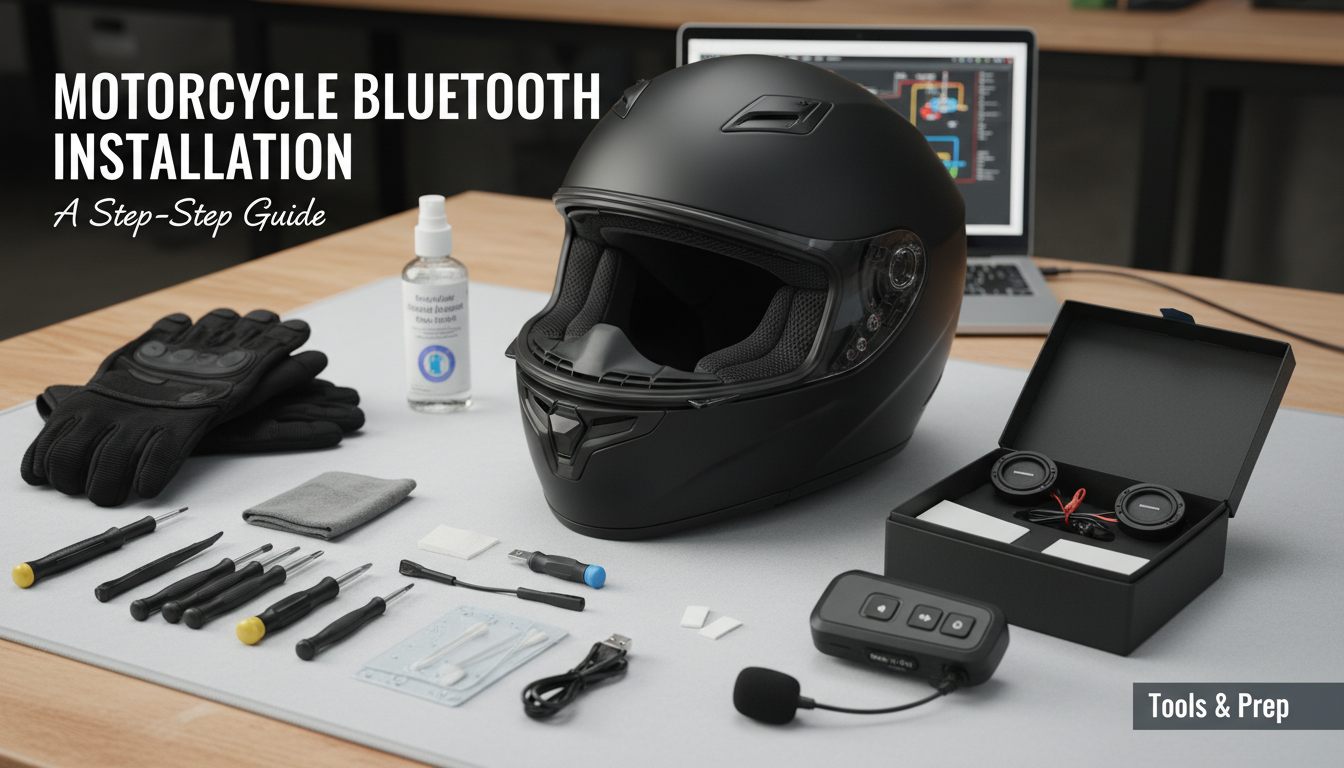
Getting Started: Tools and Prep for Your Bluetooth Install
Before we dive into the installation, a little preparation goes a long way. Having the right tools and a clean helmet makes the process smoother and ensures your new audio system performs its best. From my experience, rushing this stage is the number one cause of frustration later on.
Choosing the Right Bluetooth System
Not all Bluetooth communicators are created equal. They generally fall into two categories:
- Clamp-On / Stick-On Units: These are the most common. Brands like Sena and Cardo are leaders here. They attach to the outside of your helmet and are transferable between helmets.
- Integrated Units: Some helmets, particularly from brands like Shoei and Schuberth, are designed for specific, integrated systems (often made by Sena). These offer a sleeker look but lack transferability.
For this guide, we’ll focus on the more common clamp-on style, but the principles for speakers and mics are nearly identical for integrated systems.
Essential Tools You’ll Need
You don’t need a full mechanic’s toolbox. Most kits are designed for user installation.
- Your Bluetooth Communicator Kit: Should include the main unit, speakers, microphone(s), mounting hardware, and charging cable.
- Isopropyl Alcohol Wipes: Crucial for cleaning the helmet shell if you use the adhesive mount.
- A Plastic Pry Tool (Optional): A guitar pick or old credit card works too. This helps gently pry open the helmet liner without causing damage.
- Patience: Seriously. Rushing can lead to pinched wires or improperly placed speakers. Take your time.
Preparing Your Helmet for Installation
Start with a clean slate. A clean helmet is easier to work on, and the adhesives will stick much better.
- Clean the Exterior: Wipe down the side of the helmet where you plan to mount the main unit. Use an alcohol wipe to remove any wax, oil, or residue.
- Remove the Interior Padding: Carefully unsnap the cheek pads and the main comfort liner. Most modern helmets are designed for this. Pay attention to how they come out so you can put them back in easily.
- Identify the Speaker Pockets: Look inside the helmet in the ear area. You should see circular indentations in the EPS foam liner. These are the dedicated speaker pockets, and they are your target.
Getting Started: Tools and Prep for Your Bluetooth Install
Before we dive into the installation, a little preparation goes a long way. Having the right tools and a clean helmet makes the process smoother and ensures your new audio system performs its best. From my experience, rushing this stage is the number one cause of frustration later on.
Choosing the Right Bluetooth System
Not all Bluetooth communicators are created equal. They generally fall into two categories:
- Clamp-On / Stick-On Units: These are the most common. Brands like Sena and Cardo are leaders here. They attach to the outside of your helmet and are transferable between helmets.
- Integrated Units: Some helmets, particularly from brands like Shoei and Schuberth, are designed for specific, integrated systems (often made by Sena). These offer a sleeker look but lack transferability.
For this guide, we’ll focus on the more common clamp-on style, but the principles for speakers and mics are nearly identical for integrated systems.
Essential Tools You’ll Need
You don’t need a full mechanic’s toolbox. Most kits are designed for user installation.
- Your Bluetooth Communicator Kit: Should include the main unit, speakers, microphone(s), mounting hardware, and charging cable.
- Isopropyl Alcohol Wipes: Crucial for cleaning the helmet shell if you use the adhesive mount.
- A Plastic Pry Tool (Optional): A guitar pick or old credit card works too. This helps gently pry open the helmet liner without causing damage.
- Patience: Seriously. Rushing can lead to pinched wires or improperly placed speakers. Take your time.
Preparing Your Helmet for Installation
Start with a clean slate. A clean helmet is easier to work on, and the adhesives will stick much better.
- Clean the Exterior: Wipe down the side of the helmet where you plan to mount the main unit. Use an alcohol wipe to remove any wax, oil, or residue.
- Remove the Interior Padding: Carefully unsnap the cheek pads and the main comfort liner. Most modern helmets are designed for this. Pay attention to how they come out so you can put them back in easily.
- Identify the Speaker Pockets: Look inside the helmet in the ear area. You should see circular indentations in the EPS foam liner. These are the dedicated speaker pockets, and they are your target.
How to Install Bluetooth Speakers in Your Motorcycle Helmet: A Step-by-Step Guide
Installing a Bluetooth system is a rite of passage for many riders. I’ve done this on over a dozen helmets, from my daily Shoei RF-1400 to my partner’s HJC i70. Follow these steps, and you’ll be enjoying wireless audio in no time.
Step 1: Position and Mount the Speakers
The single most important factor for audio quality is speaker placement. If they’re even a half-inch off, the volume and bass will suffer dramatically.
- Apply Velcro: Your kit will come with adhesive Velcro rings. Stick one inside each of the helmet’s speaker pockets. Press firmly for 30 seconds to ensure a strong bond.
- Attach the Speakers: The speakers will have the corresponding Velcro on their back. Attach them to the pads you just installed.
- Center the Speakers: This is the pro tip. The speakers should be centered directly over your ear canals. Put the helmet on and use your finger to feel where your ear canal is in relation to the speaker. Adjust as needed. Most kits include foam shims to bring the speakers closer to your ears if needed—use them!
Step 2: Install the Microphone
Your kit likely came with two mics: a boom mic for modular or open-face helmets and a smaller wired button mic for full-face helmets.
- For Full-Face Helmets: Find a spot on the inside of the chin bar directly in front of your mouth. Clean the area and stick the wired mic’s Velcro pad in place. Attach the mic.
- For Modular/Open-Face Helmets: The boom mic is your choice. You’ll typically slide its base between the helmet shell and the EPS foam liner. Position the flexible boom so the microphone head sits right in front of your lips, with the small white dot or arrow facing your mouth.
From my testing, having the mic almost touching your lips but slightly off to the side gives the best voice clarity while minimizing breathing sounds.
Step 3: Mount the Main Bluetooth Unit
You have two options here: the clamp mount or the adhesive mount.
- Clamp Mount: This is my preferred method as it’s more secure and removable. Slide the clamp between the helmet’s outer shell and inner EPS liner. It should be a snug fit. Tighten the set screws (usually with an included Allen key) until it’s firmly in place.
- Adhesive Mount: This is a good option for helmets with a unique shell shape where a clamp won’t fit. Thoroughly clean the area with an alcohol wipe. Peel the backing from the 3M adhesive on the mount, position it carefully, and press down firmly for at least 60 seconds. Crucially, let the adhesive cure for 24 hours before riding.
Step 4: Route and Conceal the Wires
This is the step that separates a clean, professional install from a messy, uncomfortable one. The goal is to hide every wire.
- Connect Wires to the Main Unit: Plug the speaker and microphone jacks into the corresponding ports on the mounting plate.
- Tuck the Wires: Gently use your plastic pry tool or fingers to tuck the wires into the gap between the shell and the EPS liner. Run the wire for the farther speaker around the back of the helmet’s interior.
- Hide Wires Under Padding: Route the wires underneath the comfort liner and behind the cheek pad snaps. The goal is to have no wires touching your head or neck. A pinched wire can create a painful pressure point on a long ride.
Step 5: Reassemble and Test
With everything in place, it’s time to put it all back together.
- Re-install the Liner: Carefully snap the comfort liner and cheek pads back into place. Make sure you don’t pinch any of the wires you just neatly tucked away. Give the padding a gentle tug to ensure it’s secure.
- Power On and Pair: Attach your Bluetooth unit to the mount. Power it on and follow the manufacturer’s instructions to pair it with your smartphone.
- Final Test: Put the helmet on. Play some music and make a test phone call. Check the volume, clarity, and microphone performance. Ensure the buttons on the unit are easy to press with gloves on.
Congratulations! You’ve successfully completed your motorcycle Bluetooth installation.
Pro Tips for a Perfect Installation
After years of riding with comms, I’ve picked up a few tricks that make a huge difference in performance and comfort.
Optimizing Audio and Wind Noise
| Problem | Pro Solution | Why It Works |
|---|---|---|
| Low Volume / Tinny Sound | Use the included foam spacer pads to move the speakers closer to your ears. | The closer the speaker is to your ear canal, the better the perceived volume and bass response. |
| Muffled Microphone | Ensure the mic is directly in front of your mouth, not off to the side or inside the chin vent. | Voice clarity drops significantly if the mic isn’t in the direct path of your voice. |
| Wind Noise on Calls | Use the larger, fuzzy mic sock (if included) and ensure the mic is shielded from direct wind blasts. | The foam/fuzzy cover acts as a mini-windscreen, filtering out low-frequency wind rumble. |
Installation Notes for Different Helmet Types
The process to install bluetooth motorcycle speakers varies slightly depending on your helmet style.
- Full-Face: Generally the easiest. They have well-defined speaker pockets and the chin bar provides a perfect, wind-protected spot for a wired mic.
- Modular: Requires a boom mic to accommodate the moving chin bar. You must be extra careful when routing the mic wire so it doesn’t get pinched in the hinge mechanism.
- Open-Face / ¾: The most challenging. You must use a boom mic, which is more exposed to wind. Speaker pockets may also be shallower, requiring more adjustment for good audio.
Frequently Asked Questions (FAQ)
Can you install Bluetooth in any motorcycle helmet?
Yes, virtually any modern motorcycle helmet can be fitted with a universal Bluetooth system like those from Cardo or Sena. Most helmets made in the last decade have built-in speaker pockets, making the process to install motorcycle speakers much easier.
How long does it take to install a motorcycle Bluetooth headset?
For a first-timer, I’d set aside about 45-60 minutes to take your time and do it right. An experienced installer can typically complete the job in 20-30 minutes.
Is it better to use the clamp or the adhesive mount?
The clamp mount is generally considered more secure and has the benefit of being removable without leaving residue. However, the 3M adhesive mounts are extremely strong if the surface is properly prepped and allowed to cure for 24 hours. Choose the one that fits your helmet shell best.
How do I hide the wires in my motorcycle helmet?
The key is to