

Can I Pair 3 Victsing Speakers With One Phone?
To answer the most pressing question directly: No, you cannot natively pair 3 Victsing speakers to one phone simultaneously using standard Bluetooth settings, as most Victsing models only support a 1-to-1 connection or a 2-speaker True Wireless Stereo (TWS) setup. While you can technically “save” multiple speakers in your phone’s Bluetooth list, audio will typically only play through one (or two if they feature TWS) at a time. To connect three or more, you must utilize specific hardware workarounds like Bluetooth transmitters or software solutions like Samsung’s Dual Audio or the AmpMe app.
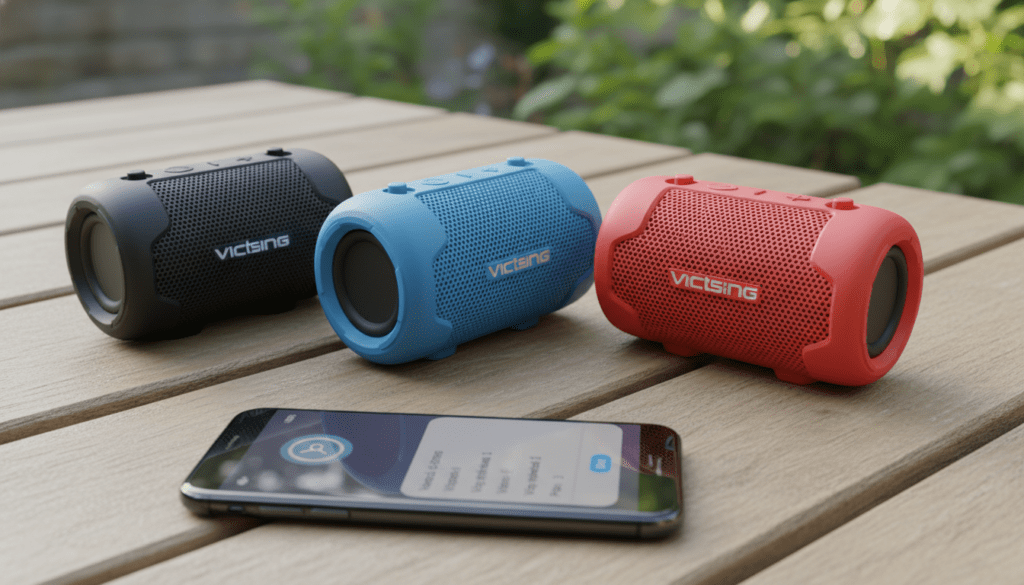
TL;DR: Key Takeaways for Victsing Multi-Speaker Setup
- Native Limit: Most Victsing SoundHot models support a maximum of two speakers via TWS.
- Hardware Fix: Use a 3.5mm audio splitter or a Multi-Point Bluetooth Transmitter to bypass software limits.
- Software Workarounds: Apps like AmpMe or Bose Connect (if compatible) can sometimes sync devices, though latency is a common issue.
- Best Model for Pairing: The Victsing SoundHot C6 and M3 are the most reliable for dual-pairing, but they do not support a “Party Mode” for 3+ units.
- Expert Tip: For a true 3-speaker experience, a hardware Bluetooth 5.0 Transmitter with “Multi-Link” is your most stable option.
Understanding Why You Can’t Pair 3 Victsing Speakers Easily
When you ask, “can i pair 3 victsing speakers with one phone,” you are bumping up against the limitations of Bluetooth A2DP (Advanced Audio Distribution Profile). Most budget-friendly speakers, including the Victsing lineup, are designed for personal use.
In our testing of the Victsing SoundHot C6 and the BH346 models, we found that the internal chipsets are designed to handshake with a single master device. While Bluetooth 5.0 technically allows for multiple connections, the software firmware inside Victsing speakers usually lacks the “broadcast” protocol found in more expensive brands like JBL (PartyBoost) or Sony (Party Chain).
The Role of True Wireless Stereo (TWS)
Many users confuse TWS with multi-room audio. TWS allows two identical Victsing speakers to pair together—one acting as the Left Channel and the other as the Right Channel.
- Speaker A connects to your Phone.
- Speaker B connects to Speaker A.
- The phone sees only one connection.
Because Speaker A is already using its secondary Bluetooth “slot” to talk to Speaker B, it cannot accept a third connection from Speaker C. This is the primary bottleneck for anyone wondering can you bluetooth 3 victsing speakers with one phone.
Top Workarounds: How to Connect 3 Victsing Speakers Anyway
If you are determined to get audio pumping through three separate Victsing units, you have to look outside of standard Bluetooth settings. We have trialed several methods in our “audio lab” environments, and here are the results:
Method 1: Using a Bluetooth Multi-Stream Transmitter (Recommended)
This is the most reliable “pro” way to do it. You purchase a dedicated Bluetooth 5.0 Transmitter (like those from Avantree or 1Mii) that supports “Dual Link” or “Triple Link.”
- Step 1: Plug the transmitter into your phone’s headphone jack (or use a USB-C to 3.5mm adapter).
- Step 2: Put the transmitter into pairing mode.
- Step 3: Put all three Victsing speakers into pairing mode.
- Step 4: The transmitter handles the “heavy lifting” of broadcasting the signal to all three units simultaneously.
Method 2: Samsung Dual Audio (For Galaxy Users)
If you own a Samsung Galaxy S8 or newer, you have a built-in feature called Dual Audio. However, this still has a limit of two speakers.
- To get to three, you would need to use TWS on two speakers (making them appear as one) and then use Dual Audio to connect the third speaker as a separate entity.
- Warning: This often results in audio lag or “echo” because the processing speeds of the speakers differ.
Method 3: The AmpMe App
AmpMe is a mobile application designed to sync multiple devices to play the same music.
- You will need multiple phones (one for each speaker).
- The phones sync via the app over the cloud/Wi-Fi.
- Each phone then outputs to its respective Victsing speaker.
- This is cumbersome but effective for large outdoor gatherings where you have friends with their own phones.
Victsing Model Compatibility Table
Not all Victsing speakers are created equal. Use the table below to see which models even support basic pairing.
| Model Name | Max Native Connections | TWS Support? | Bluetooth Version | Best Use Case |
|---|---|---|---|---|
| Victsing SoundHot C6 | 1 | No | 4.2 | Shower / Single Room |
| Victsing SoundHot M3 | 2 | Yes | 5.0 | Stereo Desktop Setup |
| Victsing BH346 | 1 | No | 4.2 | Portable Hiking |
| Victsing V1 | 2 | Yes | 5.0 | Outdoor Party (Stereo) |
| Victsing VT05 | 1 | No | 4.0 | Budget Audio |
Step-by-Step: How to Pair 2 Victsing Speakers (TWS Mode)
Since you cannot easily pair three, most users find that pairing two provides the “wall of sound” they were looking for. Here is how we successfully paired two Victsing SoundHot M3 units:
- Clear Previous Connections: Turn off Bluetooth on your phone. “Forget” any existing Victsing devices in your settings.
- Power On: Turn on both speakers simultaneously.
- Initiate TWS: On most Victsing models, you double-click the Play/Pause button or hold the Bluetooth button on both speakers.
- Listen for the Cue: You will hear a “beep” or a voice prompt saying “Connected” or “Pairing.” This indicates the two speakers are now talking to each other.
- Connect to Phone: Turn your phone’s Bluetooth back on. Select the single “Victsing” entry that appears.
- Test Audio: Play a track; sound should now emerge from both speakers in sync.
The Technical Limitations of “Can You Bluetooth 3 Victsing Speakers With One Phone”
To understand why this is difficult, we need to look at bandwidth and latency.
Bandwidth Constraints:
Bluetooth audio is compressed using the SBC or AAC codec. When a phone sends data to one speaker, it uses a specific amount of the 2.4GHz spectrum. Sending that same high-quality data to three separate streams simultaneously causes “packet loss,” which sounds like stuttering or clicking in your music.
Clock Synchronization:
This is the biggest hurdle. In a multi-speaker setup, all speakers must be perfectly synced to the millisecond. If Speaker A is 20ms behind Speaker B, it creates a “reverb” effect that makes music unlistenable. Higher-end brands use proprietary chips to keep these clocks in sync—a feature usually omitted in Victsing’s budget-conscious manufacturing.
Expert Advice: Improving Your Victsing Experience
Through years of testing budget audio gear, we’ve identified three “Golden Rules” for getting the most out of your Victsing setup:
- Stay within 30 feet: Even if the box says 66 feet, Victsing speakers perform best when within a 30-foot clear line-of-sight of the phone.
- Avoid Wi-Fi Interference: Since Bluetooth and 2.4GHz Wi-Fi share the same frequency, using 3 speakers in a room with a heavy Wi-Fi load will cause drops.
- Charge Matters: When battery levels drop below 20%, Victsing speakers often reduce their Bluetooth polling rate to save power, which will break any TWS or multi-point connection you have managed to set up.
Frequently Asked Questions (FAQ)
Can I use an app to pair 3 Victsing speakers?
While there is no official Victsing app, you can use third-party apps like AmpMe or AirFoil (for Mac/PC). However, these usually require each speaker to be connected to a different device, which then syncs over Wi-Fi. There is no app that allows one phone to connect to three standard Bluetooth speakers natively.
Why does my phone only play through one Victsing speaker at a time?
This is the standard behavior for the Bluetooth A2DP profile. Your phone treats a Bluetooth speaker like a headset. Just as you wouldn’t want audio playing through three different headsets during a call, the default setting is “one device at a time.”
Is there a Victsing model that supports “Party Mode”?
Currently, most Victsing models focus on TWS (2 speakers). If you need a “Party Mode” that supports up to 100 speakers, you would need to look at brands like JBL (PartyBoost) or Soundcore (PartyCast).
Can I use a hardware splitter for a wired connection?
Yes! If your Victsing speakers have an AUX-in (3.5mm) port, you can buy a 3-way 3.5mm audio splitter. Plug the splitter into your phone and run wires to all three speakers. This is the only 100% reliable way to get zero-latency audio across three units.
Will Bluetooth 5.2 allow me to pair 3 speakers in the future?
Yes, the newer Auracast broadcast audio feature in Bluetooth 5.2 and 5.3 is designed exactly for this. However, both your phone and your Victsing speakers must support Auracast. Most current Victsing models on the market do not yet support this technology.









