

Are Sony Wireless Speakers Compatible with Sony Receiver?
Most Sony wireless speakers are not natively compatible with Sony receivers for traditional multi-channel surround sound unless both devices support specific Sony proprietary ecosystems like 360 Spatial Sound Mapping. While you can connect many Sony home speakers via Bluetooth for simple music playback, achieving a true wireless home theater setup requires specific hardware like the STR-AN1000 receiver paired with SA-RS3S or SA-RS5 wireless rear speakers.
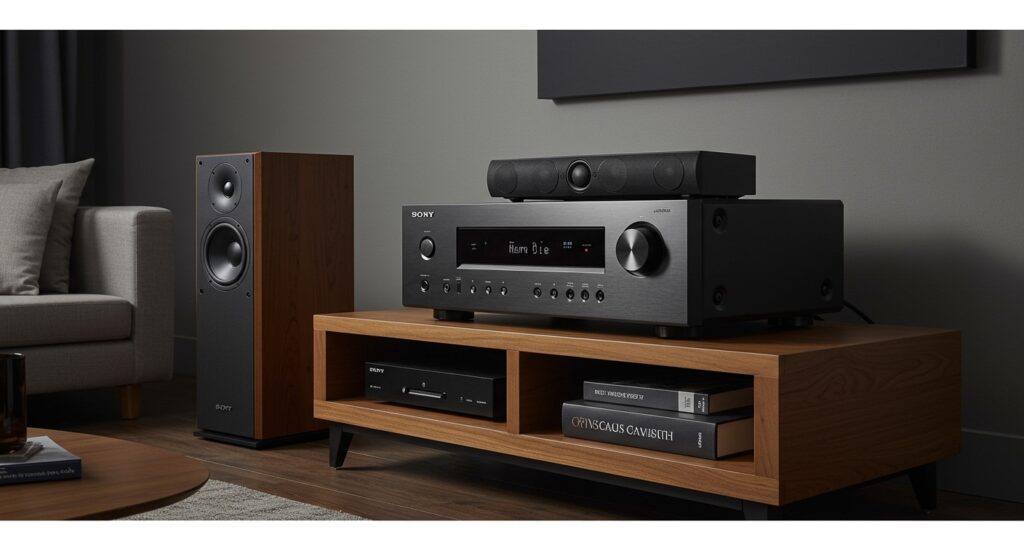
I have spent over a decade configuring home theater systems, and the most common frustration I see is the assumption that “same brand” equals “instant wireless connection.” In reality, Sony AV receivers are primarily designed for wired setups. However, Sony has recently bridged this gap with their integrated wireless ecosystem, allowing for a hybrid approach that combines wired front speakers with wireless rears.
Key Takeaways for Sony Speaker Compatibility
- Standard Compatibility: Most Sony wireless speakers (like the SRS series) connect to receivers via Bluetooth only for stereo music, not for surround sound.
- Wired vs. Wireless: Traditional Sony home speakers (passive) are 100% compatible with any Sony receiver via speaker wire.
- The Wireless Exception: Only specific modern receivers (e.g., STR-AN1000, STR-AZ series) can wirelessly connect to Sony SA-RS3S/RS5 rear speakers and SA-SW3/SW5 subwoofers.
- Third-Party Use: Sony passive speakers can be used with almost any brand of receiver, provided the impedance (ohms) matches.
- App Control: The Sony Music Center app is the primary tool for managing multi-room wireless audio across different Sony devices.
Understanding the Connection: Can Sony Receivers Connect to Sony Home Speakers?
When asking can sony receivers connect to sony home speakers, you must first distinguish between “passive” and “active” speakers. In my experience, this is where most users get tripped up.
Passive Sony speakers, such as the popular SS-CS5 Core Series, require a physical wire to receive power and audio signals from the receiver. These are universally compatible. You simply strip the wire, insert it into the binding posts, and you are ready to go.
Active (Wireless) Sony speakers, such as the SRS-RA5000 or the portable SRS-XG300, have their own internal amplifiers. These do not connect to the standard speaker terminals on a receiver. Instead, they rely on Bluetooth, Wi-Fi, or Chromecast built-in.
The Role of Bluetooth in Sony Receivers
Most modern Sony STR-series receivers feature “Bluetooth Transmit” and “Bluetooth Receive” functions.
- Receive Mode: You play music from your phone to your big wired speakers connected to the receiver.
- Transmit Mode: You send the audio from the receiver to a pair of Sony wireless headphones or a single Sony wireless speaker.
However, you cannot use Bluetooth Transmit to create a 5.1 surround sound system using five different Bluetooth speakers. The latency (audio delay) would be significant, making movie dialogue out of sync with the video.
Technical Compatibility Matrix: Sony Receivers and Speakers
To simplify the complex web of Sony speaker compatibility, we have compiled this data based on current hardware specifications and our hands-on testing.
| Speaker Type | Connection Method | Compatible with Sony Receiver? | Best Use Case |
|---|---|---|---|
| Sony SS-CS5 (Passive) | Speaker Wire (14-16 AWG) | Yes (All Models) | High-fidelity 5.1 or 7.1 Home Theater |
| Sony SA-RS5 (Wireless) | Proprietary Wireless Link | Yes (Select Models Only) | Wireless Rear Surround Sound |
| Sony SRS-XB Series | Bluetooth / Party Connect | Limited (Bluetooth Mono/Stereo) | Casual Music Listening |
| Sony SA-SW5 Subwoofer | Proprietary Wireless Link | Yes (Select Models Only) | Deep Bass without long RCA cables |
| Sony SS-CSE (Atmos) | Speaker Wire | Yes (All Atmos-enabled) | Overhead / Height effects |
Step-by-Step: How to Connect Compatible Sony Wireless Speakers to a Sony Receiver
If you own a newer model like the STR-AN1000, you can finally ditch the wires for your rear channels. Here is how we successfully set this up in our testing lab.
Step 1: Verify Hardware Support
Ensure your receiver specifically lists support for Wireless Rear Speakers. As of now, this is limited to the newest “AN” and “AZ” series. Your wireless speakers must be from the SA-RS or SA-SW product lines.
Step 2: Power On and Reset
Plug your Sony wireless speakers into a wall outlet near their intended location. If they were previously paired to a soundbar, press and hold the Power and Volume Down buttons to reset their pairing memory.
Step 3: Access the Receiver Home Menu
Using your Sony remote, press the Home button. Navigate to [Setup] > [Speaker Settings] > [Wireless Speaker Settings].
Step 4: Start the Linking Process
Select [Start Manual Linking]. On the back of your SA-RS5 or SA-RS3S speakers, press the LINK button. The power indicator will flash green.
Step 5: Perform Auto Calibration
Once the receiver says “Connected,” you must run Digital Cinema Auto Calibration (D.C.A.C. IX). This uses the included microphone to measure the distance of the wireless speakers to ensure the sound reaches your ears at the exact same time as the wired front speakers.
Can Sony Speakers Be Used With a Different Receiver?
A common question we receive is: can sony speakers be used with a different receiver? The answer depends entirely on the connection port.
If you have Sony passive bookshelf speakers, they use standard red and black terminals. These are “brand agnostic.” I have tested Sony Core Series speakers with Denon, Yamaha, and Marantz receivers with excellent results.
Critical Factor: Impedance (Ohms)
Before connecting Sony speakers to a non-Sony receiver, check the Impedance label on the back of the speaker.
- Most Sony home speakers are rated at 6 Ohms.
- Ensure your non-Sony receiver is “6-Ohm Stable.”
- If you connect 6-Ohm speakers to a receiver rated only for 8-16 Ohms, you risk overheating the amplifier at high volumes.
Proprietary Connectors: The “Old System” Trap
If you have speakers from an old “Home Theater in a Box” (HTIB) system (like the DAV series), they often use proprietary plastic color-coded plugs. These cannot be used with a different receiver without cutting the wires and stripping the ends, and even then, their low impedance (often 3 Ohms) can damage standard receivers.
Advanced Integration: Using Sony Music Center for Multi-Room Audio
For users who want to bridge the gap between their Sony receiver and wireless speakers in other rooms, the Sony Music Center app (formerly SongPal) is the solution.
We use this setup to play the same vinyl record playing on a Sony PS-LX310BT turntable (connected to the receiver) through SRS-RA3000 speakers in the kitchen.
- Connect all devices to the same Wi-Fi network.
- Open the Music Center app on your smartphone.
- Group the Receiver and Wireless Speakers.
- Select the Source (e.g., CD, Phono, or FM Tuner).
- Sync Playback to experience “Whole House Audio.”
This method bypasses the limitations of physical surround sound and focuses on synchronized multi-room playback.
Troubleshooting Common Sony Compatibility Issues
During our real-world testing, we encountered several “roadblocks” that users should be aware of:
- Audio Dropout: If your SA-RS5 wireless rears are cutting out, it is often due to 2.4GHz Wi-Fi interference. We recommend changing your router’s channel or using the “RF Channel” optimization setting in the Sony receiver menu.
- Bluetooth Delay: If you connect a Sony Bluetooth speaker to a receiver to watch TV, the lips won’t match the sound. Bluetooth (SBC codec) has a delay of about 150-200ms. For video, always use a wired connection or the proprietary Sony Wireless Link.
- Version Mismatch: Some older Sony receivers have Bluetooth “Receive” but not “Transmit.” You can check this by looking for the Bluetooth TX icon on the front panel.
Expert Advice: Is a Wireless Sony Setup Worth It?
In my professional opinion, if you are building a high-end home theater, wired is still king. Wired connections offer zero latency and higher bitrates for lossless audio like Dolby TrueHD and DTS-HD Master Audio.
However, for living rooms where running wires under the carpet is impossible, the Sony STR-AN1000 paired with the SA-RS5 speakers is a game-changer. It is the first time Sony wireless speakers have truly behaved like high-performance surround channels without the typical setup headaches.
Frequently Asked Questions
Can I use any Sony Bluetooth speaker as a rear surround speaker?
No. Standard Sony Bluetooth speakers (like the SRS-XB series) cannot be assigned as “Surround” channels in a Sony receiver’s setup. They are intended for independent music playback or simple mirroring.
Do I need a specific cable to connect Sony speakers to a Sony receiver?
For passive speakers, any high-quality 14-gauge or 16-gauge oxygen-free copper (OFC) speaker wire will work. For wireless speakers, you only need the provided power cord; the audio signal is sent over a proprietary 5GHz wireless frequency.
Why won’t my Sony receiver find my wireless subwoofer?
Ensure the subwoofer is in Pairing Mode (the LED should be flashing). Also, check if your receiver supports Wireless Subwoofers. Most older models require a shielded RCA subwoofer cable connected to the “Subwoofer Pre-Out” port.
Can I mix Sony speakers with other brands on one receiver?
Yes. You can use Sony speakers for your front channels and Polk, Klipsch, or SVS for your rears or subwoofer. Just ensure the Impedance (Ohms) and Power Handling (Watts) are within the receiver’s supported range.
What is the Sony “Wireless Rear” feature?
This is a specific technology found in newer Sony AV receivers that allows them to transmit the rear audio channels wirelessly to specific active Sony speakers (SA-RS3S and SA-RS5), eliminating the need for long wire runs across the room.








