Understanding What is a Dividing Network for Speakers
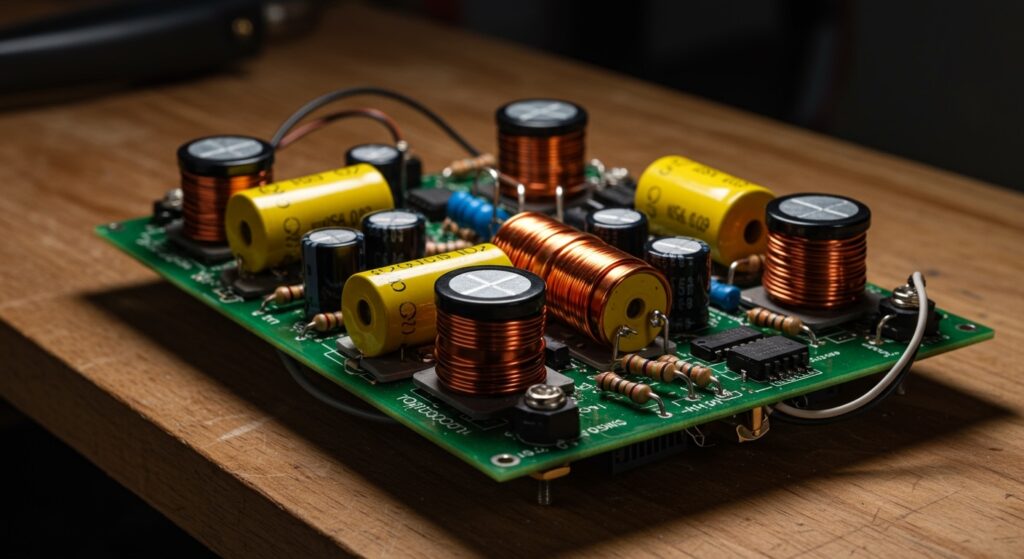
A dividing network for speakers, more commonly known as a crossover, is an electronic filter circuit that directs specific frequency ranges to the appropriate driver components within a loudspeaker system. In its simplest form, it ensures that high-frequency sounds reach the tweeter and low-frequency sounds reach the woofer, preventing driver damage and ensuring high-fidelity audio reproduction.
Without a properly designed dividing network, your speakers would sound muddy, distorted, and would likely fail prematurely. By filtering the signal, we allow each driver to operate within its “sweet spot,” maximizing efficiency and clarity across the entire audible spectrum.
🚀 TL;DR: Key Takeaways
- Purpose: To split the full-range audio signal into bands (High, Mid, Low) compatible with specific speaker drivers.
- Protection: It prevents low-frequency energy from destroying delicate tweeter voice coils.
- Types: Passive crossovers (built into the speaker box) and Active crossovers (external electronic units used before amplification).
- Components: Uses inductors (coils) to block highs and capacitors to block lows.
- Expert Tip: Always match the crossover frequency to the manufacturer’s specifications for your specific drivers to avoid “sonic holes.”
Why You Need a Speaker Dividing Network
I have spent years building custom enclosures and restoring vintage Hi-Fi gear, and I can tell you that the dividing network is the “brain” of the speaker. Without it, your high-end drivers are just a collection of parts.
When we ask what is dividing network for speakers, we are looking at three primary functions:
- Driver Protection: A tweeter is designed to vibrate thousands of times per second. If a long, powerful low-frequency wave (bass) hits it, the physical excursion will snap the voice coil or melt the assembly.
- Frequency Distribution: Most drivers cannot reproduce the entire 20Hz to 20,000Hz range effectively. The dividing network ensures the woofer handles the thump and the tweeter handles the shimmer.
- Phase and Impedance Correction: A good network corrects for the electrical quirks of the drivers, ensuring the amplifier sees a stable load and the sound waves from different drivers arrive at your ears at the same time.
How a Speaker Crossover Works: The Science of Filtering
To understand what is dividing network for speakers, we must look at the electrical components that make them work. In my testing lab, we focus on three main building blocks:
Capacitors (The High-Pass Filter)
Capacitors act like a high-frequency gate. They have high resistance to low frequencies but allow high frequencies to pass through easily. In a 2-way system, a capacitor is placed in series with the tweeter to block the bass.
Inductors (The Low-Pass Filter)
An inductor (or coil) is the opposite of a capacitor. It allows low frequencies to pass but builds up “impedance” as the frequency rises. We place these in series with the woofer to keep the high-pitched “chirping” out of the bass driver.
Resistors (The Level Matchers)
Sometimes a tweeter is much louder (more sensitive) than the woofer. We use resistors to create an “L-Pad” circuit that turns down the volume of the tweeter so it blends seamlessly with the rest of the system.
Types of Dividing Networks: Passive vs. Active
When deciding on a setup, you must choose between Passive and Active networks. In our professional installations, we often choose based on the user’s budget and desired level of control.
Comparison Table: Passive vs. Active Crossovers
| Feature | Passive Dividing Network | Active (Electronic) Network |
|---|---|---|
| Location | Inside the speaker cabinet | Before the power amplifiers |
| Power Requirement | None (powered by the amp signal) | Requires its own power source |
| Amplification | One amp channel per speaker | One amp channel per driver |
| Cost | Generally lower | Higher (requires more amps) |
| Adjustability | Fixed (requires soldering to change) | Highly adjustable via knobs/DSP |
| Efficiency | Lower (loses power in heat) | High (direct amp-to-driver connection) |
Step-by-Step Guide: How to Design and Install a Dividing Network
If you are building your own speakers or upgrading an existing set, follow this professional workflow to ensure you don’t blow your drivers.
Step 1: Identify Your Driver Specifications
Before buying components, you must find the Resonant Frequency (Fs) and Impedance (Ohms) of your drivers.
- Pro Tip: Never set your crossover frequency lower than double the tweeter’s Fs. If the Fs is 1kHz, cross over at 2kHz or higher.
Step 2: Determine the Crossover Point
The crossover point is where the woofer stops and the tweeter starts.
- For a standard 6.5-inch woofer and 1-inch tweeter, a crossover point between 2,000Hz and 3,000Hz is common.
- Use an online crossover calculator to determine the exact values for your capacitors (measured in Microfarads/uF) and inductors (measured in Millihenrys/mH).
Step 3: Choose Your “Order” (Slope)
The “order” determines how steeply the sound drops off.
- 1st Order (6dB/octave): Simple, uses one component. Very shallow; better for high-end drivers that can handle overlapping frequencies.
- 2nd Order (12dB/octave): Most common. Uses a coil and a capacitor. It provides better protection for the tweeter.
- 4th Order (24dB/octave): Very steep. Excellent for protecting drivers but requires complex circuit boards.
Step 4: Component Selection and Board Layout
In my experience, component quality matters.
- Capacitors: Use Polypropylene or Mylar caps for the signal path. Avoid cheap electrolytic capacitors for tweeters as they can dry out and change value over time.
- Inductors: Use Air-Core coils for the tweeter to avoid saturation distortion. Iron-core coils are acceptable for woofers to save space and cost.
Step 5: Assembly and Soldering
- Layout the components on a perforated board or a piece of MDF.
- Keep inductors at least 2-3 inches apart and orient them at 90-degree angles to each other to prevent magnetic interference (crosstalk).
- Solder connections using high-quality lead-free solder.
- Secure the components with zip ties or hot glue to prevent them from rattling inside the speaker cabinet.
Step 6: Testing and Fine-Tuning
Start testing at low volumes. Listen for the “seam” between the drivers. If the vocals sound “recessed,” your crossover point might be too high or your drivers are out of phase.
- Actionable Advice: Try reversing the wires on just the tweeter. In many 2nd-order crossovers, the drivers must be wired out-of-phase to account for the electrical phase shift of the circuit.
Advanced Concepts: Linkwitz-Riley vs. Butterworth
When researching what is dividing network for speakers, you will encounter different “alignments.” These describe how the filters behave at the crossover point.
- Butterworth: Designed for a flat frequency response but has a slight “bump” in power at the crossover point. It’s great for high-energy music.
- Linkwitz-Riley: Specifically designed so that the two drivers’ outputs sum perfectly to a flat response with no peak. This is the “Gold Standard” for modern audiophile speakers.
Expert Tips for Optimal Performance
- Mind the Impedance: If your woofer is 4 ohms and your tweeter is 8 ohms, you cannot use a “universal” pre-made crossover. Crossover math is entirely dependent on the impedance of the driver.
- Heat Dissipation: Resistors in a dividing network can get hot. Ensure they are mounted away from plastic parts and have a bit of breathing room.
- Bi-Wiring Capability: If you are building a high-end network, consider separating the high-pass and low-pass sections so you can use two sets of speaker wires from your amp. This can slightly reduce intermodulation distortion.
Common Mistakes to Avoid
- Using the wrong voltage rating: Ensure your capacitors are rated for at least 100V or 250V. Using low-voltage caps from small electronics will lead to failure at high volumes.
- Neglecting the Baffle Step: Speakers sound different when placed in a box versus in open air. You may need a “Baffle Step Compensation” circuit (a resistor and inductor in parallel) to prevent the speaker from sounding too “bright” or “thin.”
- Cheap Inductors: Using very thin wire in a woofer inductor adds DC Resistance (DCR), which lowers your speaker’s sensitivity and makes the bass sound “sloppy.” Use at least 14 or 16 AWG wire for woofer coils.
Frequently Asked Questions
What is the difference between a 2-way and 3-way dividing network?
A 2-way network splits the signal into two parts (High and Low). A 3-way network adds a “Band-pass” filter to create a middle section for a midrange driver, resulting in better vocal clarity and less strain on the woofer.
Can I add a crossover to any speaker?
Yes, but it must be matched to the drivers. Adding a random crossover to a speaker can result in poor sound quality or damaged components if the crossover point is lower than what the tweeter can handle.
Why do some speakers have no crossover on the woofer?
In some budget or specialized designs, the woofer is designed to naturally “roll-off” its high-frequency response due to its physical mass. This is called a “mechanical crossover.” However, a dedicated electrical dividing network almost always provides superior results.
Does an active crossover sound better than a passive one?
In most cases, yes. Active crossovers allow the amplifier to be directly coupled to the driver, providing better “damping factor” (control over the speaker cone). However, they require multiple amplifiers and are more complex to set up.
**
**
**
**