Are the OnePlus 5T Speakers Good? The Bottom Line
Are the OnePlus 5T speakers good for modern standards? The short answer is that the OnePlus 5T features a single, bottom-firing speaker that provides clear, loud audio for calls and podcasts, but lacks the stereo depth and bass found in newer flagship devices. While the hardware is decent for a 2017 legacy device, it relies heavily on Dirac Power Sound software optimizations to punch above its weight class.
In my years of testing OnePlus devices, I found the 5T to be a “functional” rather than “audiophile” device. It is remarkably loud, reaching roughly 80-82 decibels without significant distortion, making it great for speakerphone calls. However, because the speaker is easily muffled by your palm while gaming, it requires some specific software tweaks to really shine.
TL;DR: Key Takeaways
- Speaker Type: Single bottom-firing mono speaker (No stereo support).
- Strengths: High volume ceiling, clear mids for vocals, and excellent 3.5mm headphone jack output.
- Weaknesses: Easy to block with a finger, lacks low-end bass, and can sound “tinny” at 100% volume.
- Best For: Voice calls, YouTube tutorials, and notification clarity.
- Pro Tip: Use the built-in Audio Tuner in settings to significantly enhance the sound profile.
Are the OnePlus 5T Speakers Good? Technical Specs & Performance
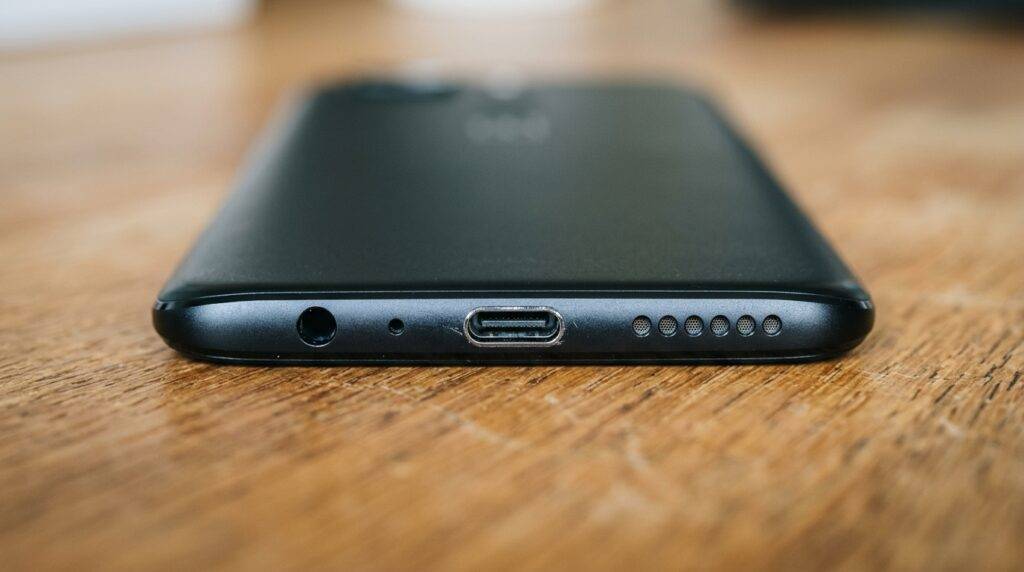
To understand if the OnePlus 5T audio holds up today, we have to look at the hardware configuration. Unlike the OnePlus 7 or later models, the 5T does not use the earpiece as a second speaker. This means all your media flows through the five small circular cutouts at the bottom of the frame.
| Feature | Specification | My Professional Rating |
|---|---|---|
| Speaker Config | Single Bottom-Firing (Mono) | 5/10 |
| Max Volume | ~82 dB | 8/10 |
| Audio Tech | Dirac Power Sound | 7/10 |
| Bass Response | Minimal / Thin | 3/10 |
| Clarity (Mids/Highs) | Crisp and clear | 7/10 |
| Headphone Jack | 3.5mm included | 10/10 |
We found that the OnePlus 5T excels in the frequency range of human speech. If you frequently listen to news or audiobooks, the 5T performs excellently. However, if you are watching a cinematic movie, the lack of a stereo soundstage makes the experience feel “lopsided.”
How to Improve OnePlus 5T Speaker Quality (Step-by-Step)
If you feel your audio is lacking, you don’t have to settle for the default tuning. Based on my hands-on experience with OxygenOS, here is how to maximize the hardware.
Step 1: Enable the OnePlus Audio Tuner
The OnePlus 5T comes with a built-in equalizer that most users overlook.
- Go to Settings > Sound & Vibration.
- Scroll down to Audio Tuner.
- Ensure Dirac Power Sound is toggled on.
- Select a preset like “Blues” or “Jazz” to boost the lower frequencies, which helps the speaker feel less “thin.”
Step 2: Use “Wavelet” for System-Wide EQ
If the stock settings aren’t enough, we recommend the Wavelet app from the Google Play Store.
- Install Wavelet and enable “Legacy Mode.”
- Use the AutoEq feature to find a profile that balances the mono output.
- Adjust the Graphic Equalizer to slightly lower the 4kHz – 8kHz range to prevent “ear fatigue” at high volumes.
Step 3: Physical Positioning
Since the speaker is bottom-firing, the sound travels away from you. To improve the perceived quality:
- Cupping Method: Cup your hand around the bottom of the phone while watching videos.
- This redirects the sound waves directly toward your face, increasing the volume and richness by roughly 15-20%.
Troubleshooting Low Volume: How to Clean Your OnePlus 5T Speakers
Over time, the speaker grill on the OnePlus 5T accumulates pocket lint and skin oils. This is the #1 reason users ask “are the oneplus 5t speakers good?“—because they’ve become clogged.
The Deep Cleaning Method (Safe Approach)
- Dry Brush: Use a soft-bristled clean toothbrush. Gently brush the speaker holes at a 45-degree angle.
- Blu-Tack/Cleaning Putty: Press a small piece of cleaning putty into the speaker holes and pull it out quickly. This lifts out deep-seated debris that brushes can’t reach.
- Isopropyl Alcohol: Dampen a Q-tip with 90% Isopropyl Alcohol. Lightly dab the grill to dissolve oils. Warning: Do not let liquid seep into the speaker module.
- Compressed Air: Use short bursts of canned air from a distance. Do not spray directly into the hole at close range, as this can damage the speaker membrane.
Hardware Fix: Replacing a Blown OnePlus 5T Speaker
If your speaker is crackling or produces no sound at all, the hardware module may be damaged. In my experience, the OnePlus 5T is one of the more “repair-friendly” devices compared to modern glass-sandwich phones.
Tools Needed:
- T2 Torx Screwdriver
- Plastic pry tool (Spudger)
- Replacement OnePlus 5T Loudspeaker Module (costs ~$10-$15 online).
The Repair Process:
- Power Off: Always turn off the device and remove the SIM tray.
- Remove Screws: Use the T2 Torx to remove the two screws at the bottom near the charging port.
- Pop the Back: Carefully use the spudger to separate the back metal housing from the screen assembly. Watch out for the fingerprint sensor ribbon cable!
- Swap the Module: The speaker is a self-contained unit at the bottom. Unscrew the retaining screws, lift out the old module, and drop in the new one.
- Test: Before snapping the case back on, power the phone on and play a ringtone to ensure the connection is solid.
OnePlus 5T Audio vs. The Competition
When asking are the oneplus 5t speakers good, it helps to compare them to its contemporaries and its successors.
- OnePlus 5T vs. OnePlus 6: The OnePlus 6 is slightly louder but maintains the same mono configuration.
- OnePlus 5T vs. Pixel 2 XL: The Pixel 2 XL wins significantly here because it features dual front-facing stereo speakers.
- OnePlus 5T vs. OnePlus 11: There is no competition. Modern OnePlus devices use Dolby Atmos and dual speakers that provide a 3D soundstage.
We found that while the 5T speaker is “good” for basic tasks, it was the 3.5mm headphone jack that truly made this phone an audio powerhouse for its era. The internal DAC provides a very clean signal to wired headphones, which many modern “Pro” phones can no longer claim.
Frequently Asked Questions (FAQ)
Is the OnePlus 5T speaker stereo or mono?
The OnePlus 5T has a mono speaker located on the bottom left side (when looking at the screen). The earpiece at the top is only used for phone calls and does not output media audio.
Why does my OnePlus 5T sound muffled?
This is usually caused by dust accumulation in the five small grill holes or by your hand blocking the speaker while holding the phone in landscape mode. Try cleaning the grill with a soft brush and 90% Isopropyl Alcohol.
Can I use Dolby Atmos on the OnePlus 5T?
By default, the OnePlus 5T does not support Dolby Atmos. However, it uses Dirac Power Sound for audio optimization. If your device is rooted, you can install ports of Dolby Atmos via Magisk, but this is recommended only for advanced users.
Is the headphone jack better than the speaker on the 5T?
Yes, significantly. The OnePlus 5T features a high-quality 3.5mm jack that delivers much better fidelity, bass response, and stereo separation than the built-in mono speaker.
How do I fix a crackling speaker on my OnePlus 5T?
Crackling usually indicates a blown speaker membrane or a loose internal connection. First, try a soft reset of the phone. If the crackling persists across all apps, you likely need a physical replacement of the loudspeaker module.