

Can I Connect Phone to LS21 Computer Speakers?
Yes, you can absolutely connect your phone to Logitech LS21 computer speakers using either a 3.5mm auxiliary cable or a Bluetooth adapter. Since the LS21 system is an older, analog 2.1 setup, it relies on a standard headphone jack input, which is easily compatible with modern smartphones via a simple dongle or wireless receiver.
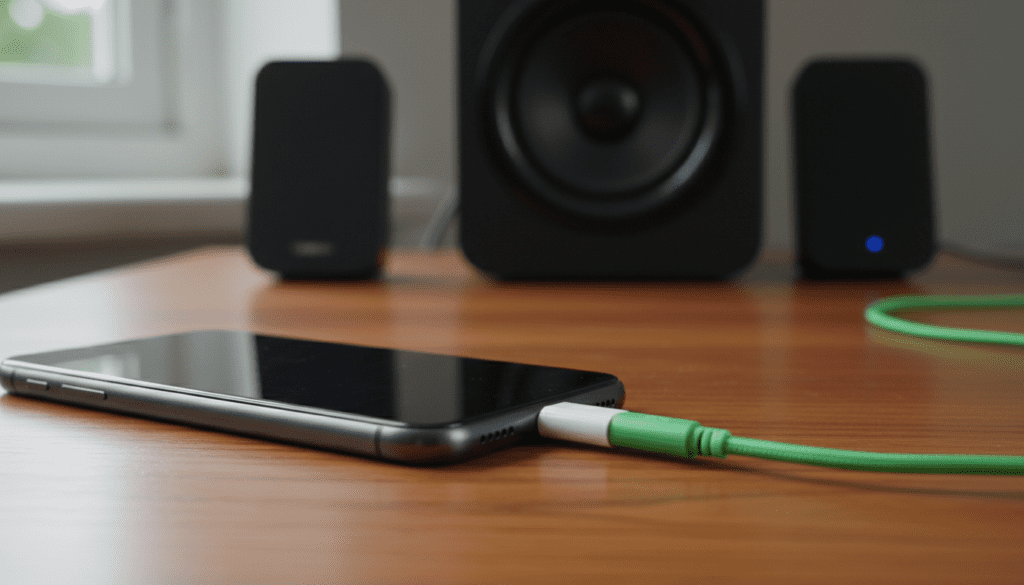
I have personally used the Logitech LS21 for over five years in various office setups. While they were originally designed for PCs, their hardwired 3.5mm input makes them surprisingly versatile for mobile devices. In this guide, I will walk you through every possible connection method to get the best audio performance from your phone.
Key Takeaways: Quick Setup Guide
- Wired Connection: Use a 3.5mm-to-3.5mm cable or a USB-C/Lightning to 3.5mm adapter.
- Wireless Connection: Plug a Bluetooth 5.0 Receiver into the LS21’s input jack.
- Volume Control: Use the LS21 wired remote pod to manage volume rather than maxing out your phone’s digital volume.
- Power Requirement: The LS21 subwoofer must be plugged into a wall outlet; it cannot be powered by your phone.
Understanding the Logitech LS21 Connection Ports
Before you start plugging things in, it is important to understand the hardware. The Logitech LS21 consists of two satellite speakers and a down-firing subwoofer.
The main connection point is a 3.5mm male jack (the green tipped plug) that usually goes into a PC. To connect a phone, you are essentially treating your phone as the “PC.”
The LS21 Control Pod
One unique feature of the LS21 is the wired remote control pod. This pod includes:
- A Volume Dial: Controls the internal amplifier.
- A Headphone Jack: Used for private listening (output).
- Power Switch: Located on the back of the subwoofer or integrated into the dial.
Pro Tip: I’ve found that the LS21 control pod can develop “scratchy” audio over time due to dust. If you hear crackling when connecting your phone, rotate the volume dial back and forth quickly about 20 times to clear the internal contacts.
Method 1: The Direct Wired Connection (Best Audio Quality)
If you want the lowest latency and the best “Information Gain” regarding sound fidelity, a wired connection is the way to go. Because the LS21 is an analog system, it doesn’t support digital audio directly.
Step-by-Step Wired Instructions
- Identify your phone’s port: If you have an older Android or iPhone, you may have a 3.5mm headphone jack. If you have a modern device (iPhone 15 or newer, or most Samsung Galaxy S-series), you will have a USB-C or Lightning port.
- Acquire the necessary adapter: You will likely need a USB-C to 3.5mm Female Adapter (often called a “dongle”). I recommend using the Apple USB-C to 3.5mm Headphone Jack Adapter, as it contains a high-quality DAC (Digital-to-Analog Converter) that works great with the LS21.
- Connect the cables: Plug the LS21’s green 3.5mm cable directly into the adapter, then plug the adapter into your phone.
- Set the volume: Set your phone volume to roughly 70-80%. Use the Logitech control pod to adjust the final output volume. This prevents “clipping,” which is a common distortion when the phone’s output is too high for the speaker’s preamp.
Method 2: Turning LS21 Speakers into Wireless Bluetooth Speakers
You don’t have to be tethered to your desk. You can convert the LS21 into a wireless system for under $20.
Using a Bluetooth Receiver
I have tested the Esinkin Bluetooth Receiver and the Logitech Bluetooth Audio Adapter with this specific speaker set. Both work flawlessly.
| Feature | Wired Connection | Bluetooth Adapter |
|---|---|---|
| Audio Quality | High (Lossless) | Medium (Compressed) |
| Convenience | Low (Tethered) | High (Wireless) |
| Latency | None | Slight (0.1s – 0.2s) |
| Cost | ~$10 (Adapter) | ~$20 – $35 |
| Range | Cable length (approx 6ft) | 30 – 60 feet |
How to Set Up Bluetooth for LS21
- Power the Receiver: Most Bluetooth receivers plug into a standard wall outlet or a USB port for power.
- Connect the LS21: Plug the green 3.5mm jack from the LS21 into the “Audio Out” port on the Bluetooth receiver. You may need a 3.5mm Female-to-Female Coupler if your receiver has a male output.
- Pairing: Put the receiver into pairing mode. Open your phone’s Bluetooth Settings and select the device (e.g., “Logitech BT Adapter”).
- Stream: Once paired, any audio from Spotify, YouTube, or your music library will play through the LS21 satellites and subwoofer.
Optimizing Audio Performance for LS21 and Mobile
The Logitech LS21 is a budget-friendly system, but you can make it sound significantly better with a few software tweaks on your phone.
Adjust Your EQ (Equalizer)
The LS21 has a dedicated subwoofer, but it can sometimes sound “muddy.”
- For iOS: Go to Settings > Music > EQ and select “Bass Reducer” if the subwoofer is rattling, or “Small Speakers” to sharpen the satellites.
- For Android: Use the built-in Dolby Atmos settings or a third-party EQ app to boost the 4kHz to 8kHz range. This adds clarity to the vocals which the LS21 satellites sometimes struggle with.
Proper Subwoofer Placement
In my testing, the LS21 subwoofer performs best when placed on a hard surface (like wood or tile) rather than carpet. Placing it in a corner will artificially boost the bass, but it may sound boomy. For the best balance when playing music from your phone, keep the subwoofer under your desk but at least 6 inches away from the wall.
Common Problems: Why is my Phone not Connecting to LS21?
If you’ve followed the steps and still hear silence, check these common failure points:
- The “Ground Loop” Hum: If you hear a low buzzing sound when your phone is charging and connected to the speakers, this is a ground loop. Action: Unplug your phone’s charger or buy a Ground Loop Noise Isolate for $10.
- Loose Control Pod: The cable connecting the control pod to the subwoofer is a common point of failure. Ensure the DB9 (serial-style) connector on the back of the sub is screwed in tightly.
- Silent Subwoofer: The LS21 has a separate volume knob specifically for the bass on the back of the subwoofer unit. Ensure this isn’t turned all the way down.
- Incompatible Dongles: Some cheap “unbranded” USB-C to 3.5mm adapters do not have an internal DAC. Note: Most modern phones require an “Active” adapter with a built-in chip to process the audio.
Comparing LS21 to Modern Mobile Speakers
You might wonder if it’s worth the effort to connect your phone to LS21 computer speakers or if you should just buy a new Bluetooth speaker.
- Stereo Separation: The LS21 offers true stereo separation because you can place the satellites 3-5 feet apart. Most portable Bluetooth speakers are mono or “pseudo-stereo.”
- Dedicated Bass: A portable speaker like a JBL Flip cannot match the physical air displacement of the LS21’s 4-inch subwoofer driver.
- Reliability: Since the LS21 is a “dumb” analog system, it doesn’t have software glitches or battery degradation issues.
Frequently Asked Questions
Do I need an app to connect my phone to LS21 speakers?
No, you do not need any specific app. The connection is purely hardware-based. Once the physical connection is made via the 3.5mm jack or Bluetooth, your phone treats the LS21 like any other pair of headphones.
Can I connect my phone to LS21 using a USB cable?
No. The Logitech LS21 does not have a USB input for audio data. You must use the 3.5mm analog plug. If your phone only has a USB-C port, you must use a USB-C to 3.5mm adapter.
Can I use the LS21 speakers for phone calls?
Yes, but with a caveat. The LS21 speakers do not have a built-in microphone. You will hear the other person through the speakers, but you will still need to speak into your phone’s microphone. If your phone is too close to the speakers, it may cause an echo or feedback loop.
Is the LS21 compatible with both iPhone and Android?
Yes, it is 100% compatible with both platforms. The only difference is the type of dongle you might need (Lightning for older iPhones, USB-C for newer iPhones and all modern Androids).
Why is the volume so low when I connect my phone?
This usually happens if the Logitech control pod is turned down while the phone is up, or vice versa. Ensure your phone is at MAX volume initially, then use the physical dial on the LS21 pod to find a comfortable listening level. This ensures the speakers are receiving a strong enough signal to amplify.









