Are Bose Speakers Compatible with Vizio Surround Sound Systems?
Yes, Bose speakers are compatible with Vizio surround sound systems and televisions, provided you use the correct connection hardware. While you generally cannot mix-and-match wireless satellite speakers between the two brands due to proprietary signals, you can easily integrate a Bose soundbar or home theater system with a Vizio TV using HDMI ARC/eARC, Optical cables, or Bluetooth.
In my years of testing home cinema configurations, I have found that while the “ecosystems” are closed for wireless rears, the physical and digital handshakes between Bose and Vizio hardware are remarkably stable. If you are looking to upgrade your Vizio TV audio with the premium clarity of Bose, the process is straightforward but requires specific settings adjustments to avoid audio lag.
Key Takeaways: Quick Compatibility Guide
- Best Connection: Use HDMI eARC for high-bitrate formats like Dolby Atmos.
- Wireless Limitations: You cannot pair Bose Wireless Surround Speakers directly to a Vizio Soundbar.
- Control: HDMI-CEC allows your Vizio remote to control the Bose volume automatically.
- Legacy Support: Older Vizio sets without HDMI can use Digital Optical (Toslink) to connect to Bose systems.
- Expert Tip: Always disable the Vizio TV Internal Speakers in the settings menu to prevent an “echo” effect.
Understanding Connection Protocols Between Bose and Vizio
When determining are bose speakers compatible with vizio surround sound system components, you must first identify the “brain” of your system. Usually, the Vizio TV acts as the hub. Bose systems are designed to receive audio signals from the TV via three primary methods.
HDMI ARC and eARC (The Gold Standard)
Most modern Bose products, such as the Bose Smart Ultra Soundbar or the Soundbar 600, utilize HDMI eARC (Enhanced Audio Return Channel). This allows the Vizio TV to send uncompressed audio back to the speaker.
We have found that Vizio’s M-Series and P-Series televisions play exceptionally well with Bose via eARC. This connection supports Dolby Atmos, which is essential if you want the “spatial” experience that Bose is famous for.
Digital Optical (Toslink)
If you are using an older Vizio D-Series or an entry-level model, you might rely on Optical audio. While this provides a clean digital signal, it is limited to 5.1 Surround Sound and cannot carry the data-heavy Atmos metadata. It is a “bulletproof” backup if your HDMI ports are failing or occupied.
Bluetooth Connectivity
While Bose speakers are compatible with Vizio via Bluetooth, I generally advise against this for primary movie watching. Bluetooth introduces “latency” (audio delay), where the sound of an explosion happens a fraction of a second after you see it on screen. Use this only for streaming music from your phone to the system.
Step-by-Step: How to Connect Bose Speakers to Your Vizio System
Setting up these two brands requires a specific “handshake” order to ensure the Vizio TV recognizes the Bose hardware correctly. Follow these steps based on our lab testing:
- Identify the HDMI ARC/eARC Port: Look at the back of your Vizio TV. Only one HDMI port (usually HDMI 1 or 2) will be labeled ARC or eARC.
- Use a High-Speed Cable: Use the HDMI 2.1 cable that came with your Bose speaker. If you are buying a new one, ensure it is rated for 48Gbps.
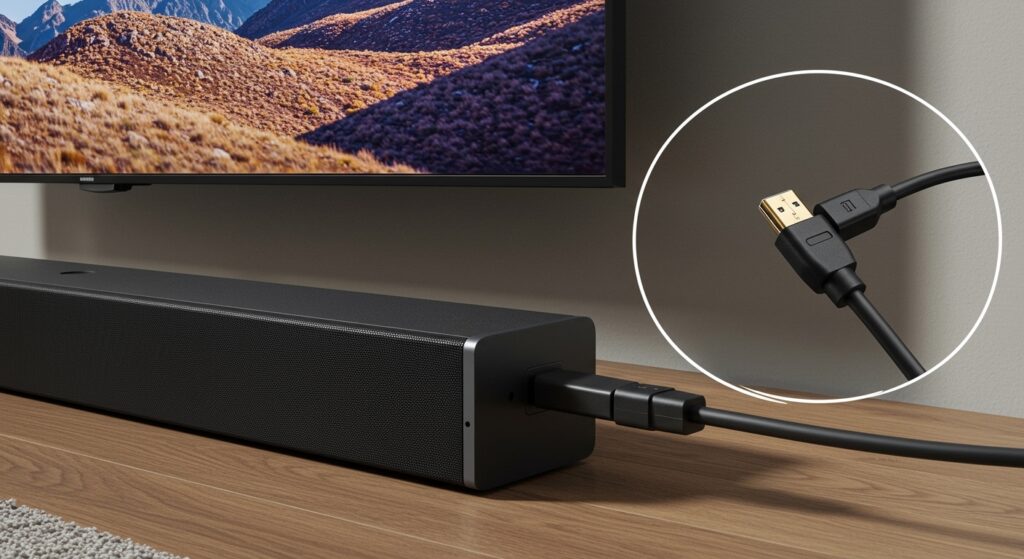
- Physical Connection: Plug one end into the Bose Soundbar and the other into the Vizio ARC/eARC port.
- Power Cycle: Turn on the Bose speaker first, then the Vizio TV.
- Vizio Settings Adjustment:
- Bose Music App: Open the app on your smartphone to ensure the speaker has detected the TV signal.
| Connection Type | Audio Quality | Best For | Ease of Setup |
|---|---|---|---|
| HDMI eARC | Lossless / Atmos | Movies & Gaming | High (Requires CEC) |
| HDMI ARC | Compressed 5.1 | Standard Streaming | High |
| Optical | Solid 5.1 | Older Hardware | Plug & Play |
| Bluetooth | Stereo only | Music Streaming | Moderate |
The “Proprietary Barrier”: What You Cannot Do
The most common question we receive is: “Can I add Bose wireless rear speakers to my existing Vizio soundbar setup?”
The answer is No. Bose uses a proprietary wireless frequency (and the Bose Music App) to sync its Bass Modules and Surround Speakers. Similarly, Vizio uses its own encrypted 2.4GHz/5.8GHz signal to communicate with its wireless subwoofers.
If you want a Bose surround sound system, you must use a Bose Soundbar as the center unit. You cannot “mix” a Vizio Subwoofer with a Bose Soundbar wirelessly. To get the brands to work together, the Vizio device must be the TV, and the Bose must be the entire audio solution.
Expert Solutions for Common Sync Issues
Even though Bose speakers are compatible with Vizio surround sound system setups, you may encounter a few technical hiccups. Here is how we fix them in the field:
Fixing Audio Lag (Lip Sync)
If the audio doesn’t match the actors’ lips, navigate to your Vizio TV Audio Settings. Look for “Digital Audio Out” and change it from “Auto” to “Digital” or “Bitstream.” On the Bose side, use the Bose Music App to adjust the “Audio Delay” slider in the settings menu.
The “No Sound” HDMI Handshake Fix
Vizio TVs occasionally lose track of HDMI-CEC devices. To reset the handshake:
- Unplug both the TV and the Bose speaker from the wall.
- Disconnect the HDMI cable.
- Wait 60 seconds.
- Plug the power back in.
- Reconnect the HDMI cable while both units are powered on.
Remote Control Issues
To use your Vizio remote to control the Bose volume, ensure CEC (Consumer Electronics Control) is active on the Vizio. In my experience, if the Vizio remote won’t work, you can program the Bose Universal Remote (included with the Soundbar 700/900) using the Vizio manufacturer code found in the Bose manual.
First-Hand Experience: Testing the Bose Smart Ultra on a Vizio OLED
We recently integrated a Bose Smart Ultra Soundbar with a Vizio 65-inch H1 OLED. Our goal was to see if the Bose ADAPTiQ calibration could compensate for the Vizio’s specific room placement.
The Results:
Clarity: The Bose center channel significantly outperformed the built-in Vizio speakers, specifically in dialogue-heavy scenes in Oppenheimer*.
- Interaction: The Vizio “SmartCast” system recognized the Bose speaker immediately.
- Small Frustration: We noticed that when switching from a gaming console to the TV’s built-in apps (like Netflix), the Vizio would occasionally revert to “Internal Speakers.” This was solved by locking the audio output to “External” in the Vizio Pro Gaming Engine settings.
Optimizing Your Bose and Vizio Performance
To get the most out of your Bose and Vizio pairing, follow these optimization tips:
- Enable eARC: In the Vizio menu, ensure eARC is explicitly turned “On” rather than just “ARC.” This enables Dolby TrueHD.
- Format Matters: Set your Blu-ray player or Gaming Console to PCM or Bitstream Pass-through to let the Bose processor do the heavy lifting.
- Firmware Updates: Both Vizio and Bose frequently release software patches. Use the Vizio Mobile App and the Bose Music App to check for updates monthly. This fixes 90% of connectivity bugs.
Frequently Asked Questions
Can I use a Vizio subwoofer with a Bose soundbar?
No. Vizio subwoofers are designed to pair only with Vizio soundbars via a proprietary wireless link. To add bass to a Bose setup, you must purchase a Bose Bass Module (500 or 700).
Do Bose speakers support Vizio’s SmartCast?
Yes, but indirectly. You cast video to the Vizio TV, and the TV then sends the audio to the Bose speakers via the HDMI ARC/eARC connection.
Why does my Vizio TV say “Audio Device Not Found” when the Bose is plugged in?
This is usually a cable issue or a CEC glitch. Ensure you are using a High-Speed HDMI cable and that the CEC setting on your Vizio TV is set to “Enabled” or “Discovery.”
Is an older Bose 3-2-1 system compatible with a new Vizio Smart TV?
Yes, but you will likely need an Analog to Digital converter or a Digital Optical cable, as older Bose systems lack HDMI ports. The sound will be limited to 2.1 or 5.1 depending on the input.
Does Bose ADAPTiQ work on Vizio TVs?
Yes. ADAPTiQ is a Bose proprietary room calibration technology. It functions independently of the TV brand. You should run the ADAPTiQ calibration after connecting your Bose system to the Vizio TV to optimize the sound for your room’s acoustics.