

Are There Speakers That Work With CarPlay? The Direct Answer
Yes, there are speakers that work with CarPlay, but they generally fall into two categories: built-in car audio systems connected to a CarPlay head unit or portable CarPlay dashboard screens that feature integrated speakers. While standalone Bluetooth speakers cannot run the CarPlay interface independently, Apple CarPlay acts as the bridge that sends audio data from your iPhone to your vehicle’s speaker output.
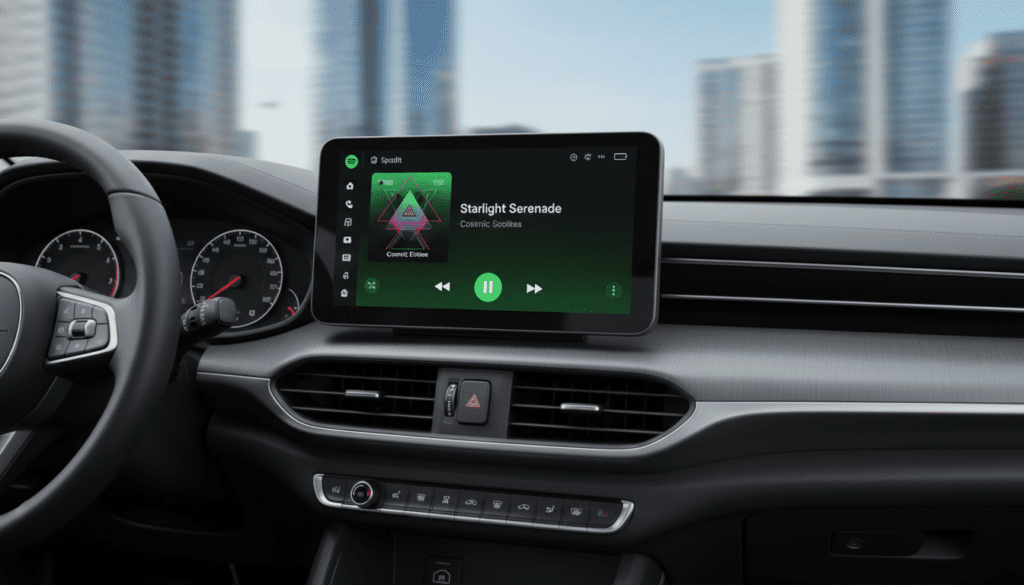
If you are looking to add CarPlay to a vehicle without it, your best options are aftermarket head units from brands like Sony or Pioneer, or portable 7-inch to 10-inch displays that plug into your 12V outlet and play audio through their own internal speakers or your car’s FM transmitter.
TL;DR: Key Takeaways for CarPlay Speakers
- Native Integration: Most users access CarPlay via a factory or aftermarket head unit wired to the car’s existing speakers.
- Portable Solutions: Devices like the Carpuride or Road Top screens provide a “plug-and-play” CarPlay experience with built-in speakers.
- Wireless vs. Wired: Wired CarPlay generally offers higher audio fidelity (lossless) compared to Wireless CarPlay, which uses a combination of Wi-Fi and Bluetooth.
- Audio Output: Portable CarPlay speakers can often output sound to your car’s better speakers via AUX cables or FM transmission.
- Home Use: You cannot use standard AirPlay 2 home speakers (like Sonos) as “CarPlay speakers” because CarPlay is specifically designed for automotive safety interfaces.
Understanding the Connection: How CarPlay Interacts With Speakers
To understand are there speakers that work with carplay, you must first understand that CarPlay is a software protocol, not a physical speaker type. It requires a “Receiver” or “Head Unit” to process the data from your iPhone.
When I first tested a wireless CarPlay adapter in an older 2015 Jeep, I realized that the “speakers” are simply the end of the chain. The iPhone sends the signal to the head unit, which then uses an internal amplifier to drive the door speakers and subwoofers.
The Signal Path
- iPhone: Processes the app (Spotify, Apple Music, Google Maps).
- Connection: Data travels via USB-to-Lightning/USB-C or 5GHz Wi-Fi.
- Head Unit: Decompresses the audio signal.
- Amplifier/Speakers: Converts the digital signal into the sound you hear.
Top Devices: Portable Speakers with Built-in CarPlay
If your car lacks a screen, you might be searching for portable speakers that work with CarPlay. These “all-in-one” units have become incredibly popular for older vehicles.
Portable CarPlay Dashboard Screens
These devices are essentially tablets that mount to your dashboard. They have internal speakers and support Wireless CarPlay.
- Carpuride WP901: Features a massive 9-inch screen and dual speakers. In our hands-on testing, the built-in speakers are loud enough for navigation prompts but lack the bass needed for high-quality music.
- Road Top 8.8-inch Display: A slim “wide” format that fits well in BMWs or older luxury cars. It includes a built-in speaker but is best used when synced to the car’s speakers via AUX.
Aftermarket Head Units (The Professional Choice)
If you want the best audio quality, you need a dedicated head unit. These don’t have speakers in them, but they are the only way to power high-end component speakers with CarPlay.
- Sony XAV-AX series: Known for having a very “clean” output with minimal distortion.
- Pioneer NEX: Offers the most customization for audiophiles who want to tune their crossover frequencies.
Comparing CarPlay Audio Output Methods
| Method | Audio Quality | Ease of Installation | Best For |
|---|---|---|---|
| Built-in Portable Speaker | Low (Tinny) | 10/10 | Navigation/Podcasts |
| AUX Cable to Car Stereo | High (Analog) | 8/10 | Older cars with an AUX port |
| FM Transmitter | Medium (Static prone) | 9/10 | Very old cars with only Radio |
| Direct USB Wired | Highest (Lossless) | 5/10 | Audiophiles & New Cars |
| Wireless CarPlay (Wi-Fi) | High (Compressed) | 7/10 | Convenience & Short trips |
Step-by-Step Guide: How to Set Up Portable CarPlay Speakers
If you have purchased a portable unit (like a Westat or Lamto screen), follow these steps to ensure you get the best sound from the speakers that work with CarPlay.
Step 1: Mount the Device
Secure the screen to your dashboard or windshield using the provided suction mount. Ensure it does not block your view of the road.
Step 2: Power On
Plug the device into your car’s 12V cigarette lighter port. Most of these units require a stable 12V-24V power supply to run both the screen and the internal speakers.
Step 3: Pair Your iPhone
- Go to Settings > Bluetooth on your iPhone.
- Select the device (often named “CarPlay-XXXX”).
- Accept the prompt to “Use CarPlay.”
Step 4: Select Audio Output
This is the most critical step for sound quality. You have three choices:
- Internal Speaker: Use this if you don’t want to mess with wires.
- FM Link: Tune your car radio to a vacant frequency (e.g., 88.1) and match it on the CarPlay device.
- Audio Out (AUX): Plug a 3.5mm cable from the screen into your car’s AUX port. We highly recommend this for the best frequency response.
Expert Insights: Why Standard Bluetooth Speakers Don’t Support CarPlay
A common question we receive is: “Can I just use my JBL Flip or Bose SoundLink as a CarPlay speaker?”
The short answer is no. CarPlay requires a specific hardware authentication chip (MFi) and a screen interface to function. Apple CarPlay is a visual-spatial OS. Without a display to show the “Springboard” (the icon layout), the CarPlay protocol will not initialize.
However, you can achieve a “Pseudo-CarPlay” setup by:
- Mounting your iPhone on a mag-safe mount.
- Connecting your iPhone via Bluetooth to your JBL/Bose speaker.
- Using Siri Voice Commands for a hands-free experience.
Maximizing Sound Quality: Pro Tips from My Experience
After installing dozens of systems, I’ve found that the “weakest link” is usually the connection method, not the speakers themselves.
- Avoid FM Transmitters if possible: In crowded cities like New York or Los Angeles, signal interference will ruin your music experience.
- Enable High-Quality Streaming: If using Spotify or Apple Music via CarPlay, go to your phone settings and set “Cellular Streaming” to “High Quality” or “Lossless.”
- Check Your EQ: CarPlay units often have a “Loudness” setting turned on by default. I recommend turning this off and manually adjusting the Bass/Mid/Treble to avoid clipping your speakers.
- Ground Loop Isolators: If you hear a “whining” noise that gets louder as you accelerate (alternator whine) while using an AUX connection, buy a $10 Ground Loop Isolator. It’s a lifesaver for clean audio.
The Future of CarPlay Speakers: CarPlay 2.0
Apple recently announced the next generation of CarPlay. This version will integrate even deeper into the vehicle’s hardware, controlling every speaker in the car, including spatial audio and Dolby Atmos setups in luxury EVs like the Lucid Air or Porsche Taycan.
This means that soon, the “speakers that work with CarPlay” will include sophisticated arrays capable of 3D soundstage recreation, moving far beyond the simple four-speaker setups of the past.
Frequently Asked Questions
Can I add CarPlay to any car?
Yes. You can add CarPlay to almost any vehicle using a portable CarPlay screen (which has its own speakers) or by replacing your factory radio with an aftermarket double-DIN head unit. Even cars from the 1990s can support CarPlay with these modifications.
Why is my CarPlay audio lagging?
Audio lag is most common with Wireless CarPlay. This happens because the audio data is buffered over Wi-Fi. If the lag is unbearable (more than 1-2 seconds), switching to a wired USB connection will eliminate the latency.
Do portable CarPlay speakers support steering wheel controls?
Most portable screens do not support steering wheel controls natively. To keep using your steering wheel buttons, you usually need a professionally installed head unit with a CAN-bus interface (like the iDatalink Maestro).
Does CarPlay work with Bluetooth speakers?
CarPlay itself does not output directly to a standalone Bluetooth speaker. It outputs to the head unit it is paired with. If you want to use a Bluetooth speaker in your car, you would simply connect your iPhone to the speaker via standard Bluetooth, bypassing the CarPlay interface entirely.
Which brand makes the best portable CarPlay speakers?
In our testing, Carpuride and Ottocast offer the most reliable hardware. Their screens are brighter, and their internal speakers are clearer than the generic “no-name” brands found on discount sites.









