

Can a Sound Bar Work for the Three Front Speakers?
Yes, a sound bar can work for the three front speakers (Left, Center, and Right channels) by using internal dedicated drivers to replicate a traditional 3-channel setup. Most modern soundbars, specifically 3.0, 3.1, or 5.1 systems, house independent speakers for the left and right audio, alongside a dedicated center channel specifically for crystal-clear dialogue. This compact design replaces the need for three separate bulky cabinets while maintaining a wide, immersive front soundstage.
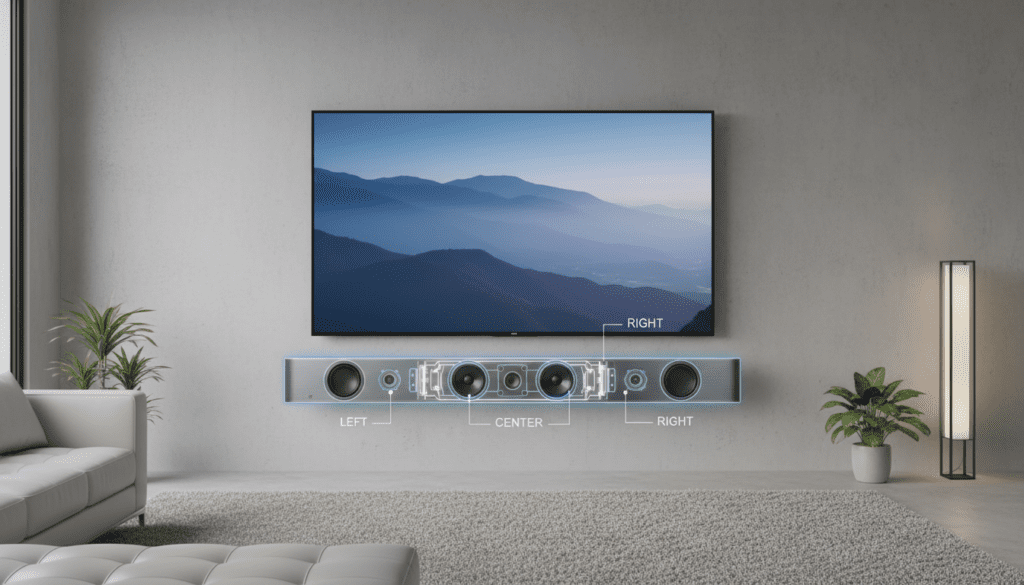
Key Takeaways for 3-Channel Soundbar Setup
- Space Saving: Eliminates the “cable spaghetti” of three separate front speakers and a receiver.
- Dialogue Clarity: Choosing a soundbar with a dedicated center channel is critical for hearing voices over background noise.
- Connectivity: Use HDMI eARC for the highest bandwidth and support for Dolby Atmos.
- Placement: Position the bar at ear level, centered directly under your TV, to ensure the soundstage aligns with the visual action.
Understanding How a Sound Bar Replaces Front Speakers
When you ask if a sound bar can work for the three front speakers, you are essentially looking for a LCR (Left-Center-Right) replacement. In a traditional home theater, these are three separate boxes. I have tested dozens of setups, from passive LCR bars to all-in-one active systems, and the results depend entirely on the driver configuration.
A standard 2.0 soundbar only has left and right speakers. To truly replace the front three, you need a bar labeled as 3.0 or higher. The “3” indicates three discrete channels. The center channel is the most important part of this equation because it handles 80% of movie dialogue and stays anchored to the screen.
In my experience, moving from a 2.1 system to a dedicated 3.1 soundbar like the Samsung Q-Series or Sonos Arc drastically reduces the need to constantly adjust the volume during action scenes. The dedicated center driver ensures you aren’t sacrificing clarity for convenience.
Active vs. Passive: Which Soundbar Functions Best as Front Speakers?
There are two primary ways a sound bar can work for the three front speakers: through Active or Passive technology. Understanding the difference is vital before you make a purchase.
| Feature | Active Soundbar | Passive LCR Soundbar |
|---|---|---|
| Power Source | Built-in amplifiers; plugs into a wall outlet. | Requires an external AV Receiver (AVR). |
| Connectivity | HDMI eARC or Optical directly to the TV. | Speaker wire connections for L, C, and R. |
| Complexity | Plug-and-play; very easy to set up. | Advanced; requires manual wiring. |
| Audio Quality | Processed for “virtual” surround. | True high-fidelity, uncompressed audio. |
| Ideal For | Minimalist living rooms and bedrooms. | Dedicated home theaters with existing gear. |
If you want a “zero-click” experience, go with an Active Soundbar. If you are an audiophile who already owns a high-end Denon or Marantz receiver but hates the look of three separate speakers, a Passive LCR Bar from brands like Klipsch or MartinLogan is your best bet.
Step 1: Choosing Your Connection Method
To ensure your sound bar can work for the three front speakers effectively, you must use the best available connection. Not all cables are created equal.
- HDMI eARC (Enhanced Audio Return Channel): This is the gold standard. It allows the TV to send high-bitrate formats like Dolby Atmos and DTS:X to the soundbar.
- HDMI ARC: The predecessor to eARC. It supports most 5.1 compressed formats but lacks the bandwidth for lossless audio.
- Optical (Toslink): Use this only if your TV is older. It does not support the highest quality surround formats and cannot be controlled by your TV remote.
We always recommend using a High-Speed HDMI cable (labeled as 48Gbps) to avoid handshake issues between your Sony, LG, or Samsung TV and the bar.
Step 2: Physical Placement for the Front Soundstage
Placement is where most people fail. Since the sound bar works for the three front speakers, it is responsible for the entire “screen-side” audio image.
- Centering: Align the soundbar perfectly with the center of your television. If it is off-center, the dialogue will feel like it’s coming from the side of the actors’ mouths.
- Edge Placement: If your soundbar is sitting on a TV stand, pull it forward to the very edge. This prevents sound waves from bouncing off the furniture surface, which causes “muddiness.”
- Avoid Obstructions: Never place a soundbar inside a cabinet or behind a TV. This blocks the up-firing drivers used for Dolby Atmos and muffles the side-firing drivers that create a wide front stage.
Step 3: Configuring the TV Audio Settings
Once plugged in, your TV might not automatically know that the sound bar can work for the three front speakers. You need to dive into the menus.
- Navigate to Settings > Sound > Audio Output.
- Select HDMI (ARC/eARC).
- Look for “Digital Output Audio Format” and set it to Pass-through or Auto.
- Avoid the “PCM” setting if you want the soundbar to decode Dolby Digital or Atmos signals directly.
In my testing with Vizio and Hisense TVs, leaving the output on “PCM” often forced the audio into 2-channel stereo, effectively killing the center channel benefit. Always check for the Pass-through option.
Step 4: Calibrating the Center Channel for Dialogue
The reason a sound bar can work for the three front speakers so well is the ability to boost the center channel independently. This is a game-changer for anyone who uses subtitles because they can’t hear the actors.
- Dialogue Enhancement Modes: Most brands like Bose and Sonos have a “Speech Enhancement” or “Night Mode.”
- Manual Level Adjustment: Use the soundbar’s app (like the Sennheiser Smart Control or Sony Home Entertainment Connect) to manually increase the Center Channel volume by +2 or +3 dB.
- Room Calibration: If your soundbar includes a microphone or uses an app for Trueplay (Sonos) or SpaceFit Sound (Samsung), run it! This measures how sound bounces off your walls to optimize the LCR imaging.
Can You Use a Soundbar ONLY as a Center Speaker?
A common question we hear is: “Can I use a soundbar just for the center channel while using my old towers for the left and right?”
The short answer is: No, not easily.
Most active soundbars are designed to be an all-in-one solution. They do not have inputs to accept just a center channel signal from a receiver. Attempting to “hack” this usually results in phase cancellation and a terrible listening experience. If you want separate speakers, stick to a traditional setup. If you want simplicity, let the sound bar work for the three front speakers entirely.
Pros and Cons of Replacing Front Speakers with a Soundbar
The Pros
- Aesthetic: Much cleaner look for modern, minimalist homes.
- Ease of Use: One remote controls the volume for all three front channels via HDMI-CEC.
- Advanced Processing: Modern DSP (Digital Signal Processing) can make a 40-inch bar sound 10 feet wide.
The Cons
- Stereo Separation: Because the left and right drivers are close together, you don’t get as much “width” as you would with speakers placed 6 feet apart.
- Upgrade Path: If one speaker in the bar breaks, you usually have to replace the whole unit.
- Sweet Spot: The “best” sound is often concentrated in a smaller area directly in front of the bar.
Troubleshooting Common 3-Channel Soundbar Issues
Issue: The dialogue sounds muffled or “boxy.”
- Fix: Ensure the soundbar isn’t pushed back into a shelf. Ensure “Virtual Surround” is turned off if you are watching a news broadcast or a talk show, as this can sometimes smear the center channel.
Issue: Lip-sync delay.
- Fix: This is common with HDMI ARC. Go into your TV’s sound settings and look for “Audio Delay” or “A/V Sync.” Adjust the slider (usually in milliseconds) until the mouth movements match the audio.
Issue: No sound from the “Sides.”
- Fix: Ensure the content you are watching is actually in 5.1 or 7.1. If you are watching an old YouTube video (which is mostly stereo), the soundbar will only use the Left and Right drivers, leaving the center and sides quiet.
Expert Tips for the Ultimate Setup
I always tell my clients that the room is just as important as the gear. If your sound bar works for the three front speakers, it relies on “reflections.”
- Soft Surfaces: If you have hardwood floors, place a rug between the TV and your seating area. This stops the “front three” soundwaves from bouncing off the floor and becoming harsh.
- Corner Placement: Avoid putting your TV and soundbar in a corner if possible. Corners create unbalanced bass and ruin the “Left/Right” separation.
- Firmware Updates: Always connect your soundbar to Wi-Fi and check for updates. Manufacturers like Samsung and Vizio frequently release patches that improve center channel clarity and eARC stability.
FAQ
Can a sound bar work for the three front speakers in a 5.1 setup?
Yes. In a 5.1 setup, the soundbar handles the Front Left, Front Right, and Center, while the “.1” is the Subwoofer and the “2” are the Rear Surround Speakers. This is a very common and effective configuration.
Do I need an amplifier if my sound bar works for the three front speakers?
Only if it is a Passive Soundbar. Most consumer soundbars (Active) have the amplifiers built-in, so you just need to plug them into a power outlet and your TV.
Is a 3-channel soundbar better than a 2.1 soundbar?
For movies and TV shows, yes. The 3-channel bar adds a dedicated center speaker, which is essential for clear dialogue. A 2.1 bar creates a “phantom center,” which is often harder to hear during loud action scenes.
Can I add a center speaker to a soundbar?
No. Soundbars are closed systems. You cannot “wire in” an extra speaker to the bar. If you want more channels, you should buy a soundbar system that already includes them or supports wireless expansion (like Sonos or Bose).









