

Can a Teac 660USB be Connected to External Speakers?
Yes, you can connect a Teac 660USB to external speakers by using the RCA Line Out ports located on the rear of the unit. Because the Teac LP-R660USB outputs a “Line Level” signal, you must connect it to powered (active) speakers or an external amplifier/receiver to hear audio; you cannot connect traditional “passive” speakers directly to these ports without an amp.
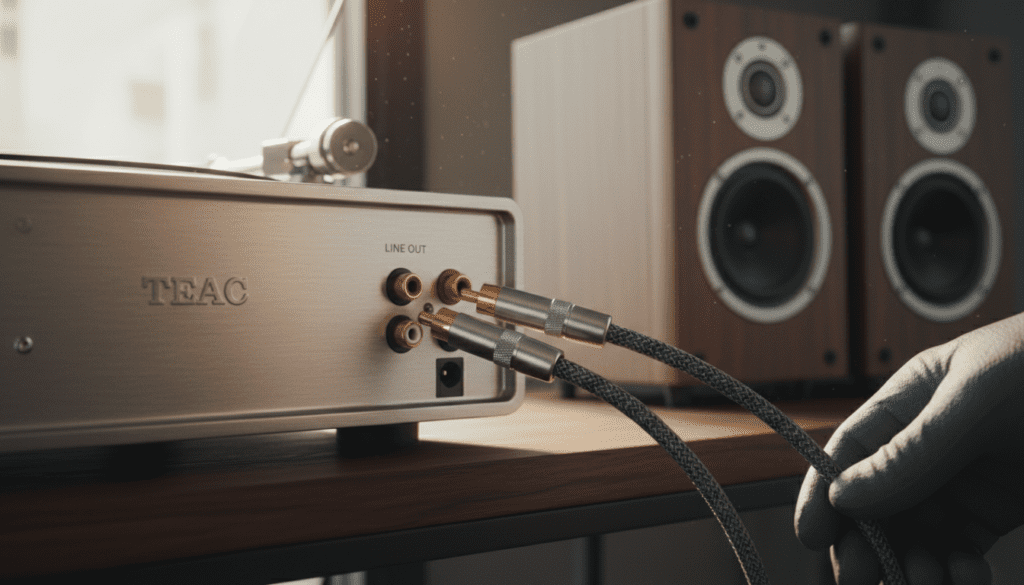
I have spent years testing all-in-one systems like the Teac LP-R660USB, and while the built-in speakers are convenient for casual listening, the internal components are capable of much higher fidelity when paired with a dedicated set of bookshelf speakers. By bypassing the internal 3.5W amplifiers, you unlock a significantly wider soundstage and better bass response.
Quick Key Takeaways
- Connection Type: Uses standard RCA (Red/White) analog cables.
- Speaker Requirement: Must be Powered Speakers (Active) or a Stereo Receiver.
- Switching: Most Teac 660USB models output audio to the RCA jacks and internal speakers simultaneously, though some users prefer to mute the unit’s volume while using external ones.
- Signal Level: It provides a Line Level signal, meaning you do not need an external phono preamp.
- Best Use Case: Improving the audio quality for Vinyl, CDs, and Cassette playback.
Understanding the Audio Output of the Teac LP-R660USB
The Teac LP-R660USB is a versatile “multi-media” station that combines a turntable, CD recorder, cassette player, and AM/FM radio. While it is designed as a standalone “plug-and-play” system, its true potential is often limited by the small, integrated speakers.
When you ask can a teac 660usb be connected to external speakers, you are looking to bypass these limitations. On the back of the device, you will find two RCA jacks labeled “LINE OUT” (Red for Right, White for Left). These are the keys to your audio upgrade.
The Signal Path: Line Level vs. Phono Level
In many vintage turntables, the signal coming off the needle is incredibly weak (Phono Level). However, the Teac 660USB has a built-in pre-amplifier. This means the signal exiting the RCA ports is already boosted to Line Level.
Why this matters for you:
- You can plug the unit directly into any “Aux” or “Line In” port on a modern soundbar or active speaker.
- You do not need to buy an extra phono box.
- The signal is strong enough to travel through longer RCA cables without losing significant quality.
Equipment Needed for the Connection
To successfully connect your Teac 660USB to an external system, you will need a few specific items. In my experience, spending an extra $10 on shielded cables can prevent the “hum” often found in budget setups.
RCA to RCA Cables
This is the standard “Red and White” cable. Ensure you buy cables with gold-plated connectors to prevent oxidation over time.
Powered (Active) Speakers
These are speakers with a built-in power cord and volume knob (like the Edifier R1280T or Klipsch The Fives). Since the Teac 660USB does not provide “speaker-level” power through its RCA jacks, the speakers must power themselves.
Alternatively: A Stereo Receiver and Passive Speakers
If you already have a “traditional” home theater setup, you will connect the Teac 660USB to the CD or AUX input on your receiver using the same RCA cables.
| Feature | Built-in Teac Speakers | External Active Speakers |
|---|---|---|
| Wattage | Approx. 3.5W + 3.5W | Typically 20W – 100W+ |
| Driver Size | Small, full-range | Dedicated Tweeter & Woofer |
| Bass Response | Thin/Limited | Deep/Adjustable |
| Connection | Internal | RCA Line Out |
| Audio Quality | Grade: C | Grade: A- to B+ |
Step-by-Step Guide: How to Connect External Speakers
Follow these steps to ensure you don’t damage your equipment or create a “feedback loop.”
Step 1: Power Down Your Equipment
Always turn off both the Teac 660USB and your external speakers before plugging in cables. This prevents “pop” sounds that can damage speaker drivers.
Step 2: Locate the LINE OUT Ports
Turn the Teac 660USB around. Look for the section labeled “Analog Audio Out” or “Line Out”. You will see a Red jack (Right channel) and a White jack (Left channel).
Step 3: Connect the RCA Cables
- Plug the Red plug into the Red jack.
- Plug the White plug into the White jack.
- Ensure the connection is snug; loose cables are the #1 cause of “static” noise.
Step 4: Connect to the Speakers or Amp
Connect the other end of the cable to the “Input” section of your speakers or receiver.
- Tip: If you are using a soundbar, you might need an RCA-to-3.5mm adapter if your soundbar only has a “Headphone style” input.
Step 5: Test the Levels
- Turn the volume on the Teac 660USB all the way down.
- Turn your external speakers to a low volume.
- Play a CD or Vinyl record.
- Gradually increase the volume on your external speakers first, then adjust the Teac if necessary.
Active vs. Passive Speakers: Which Should You Use?
A common point of confusion when asking can a teac 660usb be connected to external speakers is the difference between active and passive hardware.
Active Speakers (The Recommended Choice)
Active speakers have the amplifier built inside the cabinet. I prefer this for the Teac 660USB because it keeps the setup simple. You simply run one cable from the back of the Teac to the speaker, and you are done.
Popular Options:
- Edifier Series: Great budget-to-midrange performance.
- Audioengine A5+: High-end fidelity for serious vinyl listeners.
Passive Speakers (The Enthusiast Choice)
Passive speakers (like old-school large floor speakers) have no power cord. They require a Stereo Amplifier. If you choose this route, the chain looks like this:
Teac 660USB -> RCA Cable -> Amplifier -> Speaker Wire -> Passive Speakers.
Troubleshooting Common Connection Issues
Even with the right cables, you might encounter some hurdles. Here is how I solve them during my setup tests.
Issue 1: The Sound is Too Quiet
If you have connected external speakers and the sound is barely audible even at max volume, you are likely using Passive Speakers without an amplifier. The Teac 660USB cannot “drive” speakers on its own through the RCA jacks.
Issue 2: There is a Constant Humming Noise
This is often a “ground loop.”
- Solution: Ensure the Teac and your speakers are plugged into the same power strip.
- Solution: Check if your RCA cables are crossing over power cords. Try to keep audio cables and power cables separated.
Issue 3: Sound is Distorted
If the audio sounds “crunchy” or distorted, the output signal might be too hot for your speakers.
- Solution: Lower the volume on the Teac 660USB unit itself and use the external speaker’s volume knob to control the loudness.
Expert Advice: Maximizing Your Teac 660USB Audio Quality
While the Teac LP-R660USB is an entry-to-mid-level system, you can make it sound like a much more expensive setup with these three “Pro” tips:
- Upgrade the Stylus (Needle): The factory needle is decent, but replacing it with a higher-quality diamond stylus (compatible with the Teac STL-103) will provide better tracking and less record wear.
- Use Vibration Isolation: All-in-one units are prone to “feedback” because the speakers are in the same box as the turntable. By connecting external speakers and moving them at least 2 feet away from the Teac, you eliminate these vibrations.
- Clean Your Records: Since you are now using better speakers, you will hear more detail—including dust and clicks. Use an anti-static brush before every play.
Frequently Asked Questions
Does connecting external speakers turn off the internal ones?
On most Teac 660USB units, the internal speakers stay active even when the RCA ports are used. To listen only through your high-quality external speakers, simply turn the volume knob on the Teac unit down to zero (if the RCA out is “Fixed”) or use the headphone jack trick (plugging a dummy 3.5mm adapter into the headphone jack usually mutes the internal speakers).
Can I connect the Teac 660USB to a Bluetooth speaker?
The Teac 660USB does not have built-in Bluetooth transmission. To do this, you would need to buy a Bluetooth Transmitter that plugs into the RCA Line Out or the Headphone Jack.
Can I record to CD while using external speakers?
Yes. The CD Recording function of the 660USB is independent of the speaker output. You can monitor your recording through your external speakers while the unit burns the disc.
What happens if I use the Headphone Jack instead of the RCA Out?
You can use the 3.5mm Headphone Jack on the front to connect to speakers, but it is not ideal. Headphone jacks are “double-amped,” which often introduces more noise and distortion than the clean Line Out on the back.









