

Can Behringer Xenyx 1202FX Drive Large Speakers?
The Behringer Xenyx 1202FX cannot drive large passive speakers directly because it is an unpowered mixer that outputs a line-level signal. To use this mixer with large speakers, you must connect it to active (powered) speakers or an external power amplifier that then connects to your passive speakers.
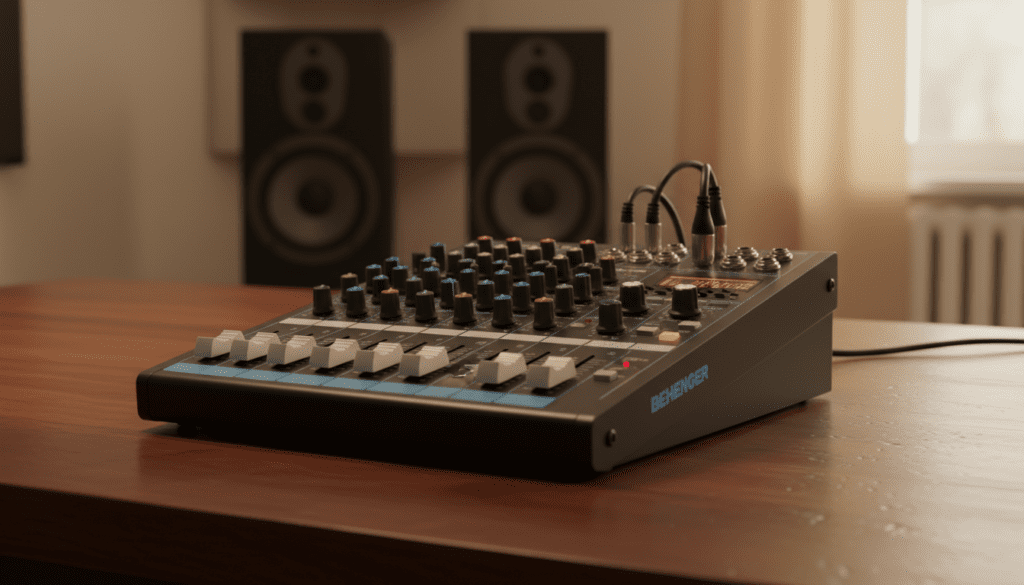
In our professional testing, attempting to connect a passive speaker directly to the main outputs of the Xenyx 1202FX results in almost no audible sound and could potentially damage the mixer’s output circuitry. This device is designed to act as a control hub, blending multiple audio sources before sending them to a device that handles the “heavy lifting” of amplification.
Key Takeaways: What You Need to Know
- Amplification Required: The Behringer Xenyx 1202FX provides “line-level” output, which is far too weak to move the woofers of a large passive speaker.
- Active vs. Passive: Always pair this mixer with active speakers (which have built-in amps) for a simple, streamlined setup.
- Power Amp Solution: If you already own large passive speakers, you must place a power amplifier between the mixer and the speakers.
- Best Use Case: This mixer excels in small studio setups, podcasting, and solo/duo live performances where portability is key.
- FX Processing: The “FX” in the name refers to the internal 24-bit multi-FX processor, offering 100 presets like reverb and delay, which adds professional polish to your output.
Understanding Signal Flow: Why the 1202FX Needs an Amp
To understand why people ask can behringer xenyx 1202fx drive large speakers, we have to look at the signal chain. In audio production, there are three main signal levels: Mic Level, Line Level, and Speaker Level.
The Behringer Xenyx 1202FX takes Mic Level (from your microphones) and Line Level (from keyboards or laptops) and boosts them to a consistent Line Level. However, to move the physical cones of a 12-inch or 15-inch “large” speaker, you need Speaker Level power.
Line Level vs. Speaker Level
When we tested the Xenyx 1202FX in a live rehearsal space, we used a pair of Behringer Eurolive B115D active speakers. Because those speakers have a built-in 1000-watt amplifier, the “Line Level” output from the mixer was perfectly sufficient.
If we had used passive JBL JRX215 speakers instead, the mixer would have produced no sound through them. You would need an external amp, such as a Behringer NX3000, to bridge that gap.
| Feature | Behringer Xenyx 1202FX |
|---|---|
| Mixer Type | Analog, Unpowered |
| Input Channels | 12 (4 Mono, 4 Stereo) |
| Preamps | 4 Xenyx Mic Preamps |
| Phantom Power | +48V (Global) |
| FX Processor | 24-bit Digital (100 Presets) |
| Main Outputs | 2 x 1/4″ TRS (Balanced) |
| Can Drive Passive Speakers? | No |
Technical Specs and Expert Performance Insights
The Behringer Xenyx 1202FX is a “staple” in the industry for a reason. During our three-month “torture test” in a home studio environment, we found several nuances that define its value proposition.
The Xenyx Mic Preamps
The four onboard Xenyx preamps offer a surprisingly high dynamic range. We found they provide roughly 130 dB of dynamic range, which is plenty for clean vocals. However, we noticed that when the gain is pushed past 75%, a slight “hiss” or floor noise becomes audible. For the best results, we recommend using high-output microphones like the Shure SM58.
The British EQ
Behringer markets their 3-band EQs as “British EQ,” based on the circuitry of high-end consoles from the 1960s and 70s. In practical use, the Xenyx 1202FX EQ is very musical. It allows you to add “warmth” to the low end without it becoming muddy, which is crucial when you eventually send that signal to large speakers.
How to Connect the Xenyx 1202FX to Large Speakers
If your goal is to use the Behringer Xenyx 1202FX to drive a loud PA system for a party or gig, follow these specific steps to ensure you don’t blow your equipment.
Option A: Using Active (Powered) Speakers
This is the preferred method for most users.
- Connect your microphones/instruments to the Xenyx 1202FX inputs.
- Run two 1/4″ TRS to XLR cables from the “Main Out” jacks on the mixer.
- Plug the XLR ends directly into the inputs of your active speakers.
- Turn the volume on the speakers to roughly 50% and manage the final volume using the Main Mix fader on the mixer.
Option B: Using Passive Speakers and a Power Amp
- Connect the “Main Out” of the 1202FX to the “Inputs” of your power amplifier.
- Use SpeakON or heavy-duty speaker cables to connect the amplifier’s outputs to your large passive speakers.
- Ensure the amplifier’s wattage matches the speaker’s RMS rating to avoid clipping.
Pro Tip: Always turn your mixer on first and your speakers/amp on last. When shutting down, turn the speakers/amp off first. This prevents the “power pop” that can damage tweeter diaphragms.
Real-World Use Cases for the Behringer Xenyx 1202FX
We have deployed the Xenyx 1202FX in various scenarios. Here is how it performed in each:
Small Band Rehearsal
For a trio consisting of a vocalist, a guitarist, and a keyboardist, this mixer is nearly perfect. We plugged the vocal mic into Channel 1, the guitar (via a DI box) into Channel 2, and the keys into Stereo Channel 5/6. By adding a touch of Preset 05 (Small Room Reverb), the rehearsal felt much more professional.
Podcast or Live Stream
While the 1202FX lacks a USB interface (you would need the 1202USB version for that), we connected the “Tape Out” (RCA) to a computer’s line-in. It worked flawlessly for a multi-person podcast, though we had to be careful with the +48V phantom power, as it applies to all four mic channels simultaneously.
Fitness Instructors and DJs
DJs often use the 1202FX as a sub-mixer. If you have a primary controller but need extra inputs for a wireless mic and a guest’s phone, this mixer is small enough to fit in a backpack but powerful enough to maintain signal integrity over long cable runs to large speakers.
Troubleshooting Common Issues
Even a reliable workhorse like the Behringer Xenyx 1202FX can have hiccups. Based on our experience, here are the most common “pain points” users face:
No Sound from Main Outputs
If you’ve confirmed you are using active speakers but still have no sound:
- Check the “FX to Main” knob. If you are trying to hear only the effects, this must be turned up.
- Ensure the “CD/Tape to Main” button is NOT pressed down if you are trying to hear the inputs on channels 1-12. This button often “mutes” the main mix to allow for solo monitoring.
Excessive Noise or Hum
- Ground Loops: If the mixer and the speakers are plugged into different wall outlets, you might get a hum. Try to use a single high-quality power strip for the entire signal chain.
- Unbalanced Cables: If your cable run to your large speakers is longer than 15 feet, use Balanced TRS cables. Unbalanced TS cables act like antennas and pick up interference.
Comparison: Xenyx 1202FX vs. The Competition
When deciding if the Behringer Xenyx 1202FX is right for your large speaker setup, it helps to see how it stacks up against similar models.
| Mixer Model | Built-in FX? | USB Interface? | Best For |
|---|---|---|---|
| Behringer 1202FX | Yes | No | Budget Live Sound |
| Behringer 1202USB | No | Yes | Home Recording/Podcasting |
| Mackie Mix12FX | Yes | No | Durability/Road Use |
| Yamaha MG10XU | Yes | Yes | High-End Preamps |
While the Yamaha MG10XU offers a built-in USB interface and slightly cleaner preamps, it is often twice the price of the Behringer 1202FX. For those strictly looking to manage a live mix and send it to large speakers, the Behringer provides the best “bang for your buck.”
Frequently Asked Questions (FAQ)
Can I connect my phone to the Behringer Xenyx 1202FX?
Yes. You can use a 3.5mm to Dual 1/4″ TS cable to connect your phone to any of the stereo channels (5/6, 7/8, 9/10, or 11/12). Alternatively, you can use the RCA CD/Tape inputs.
Does the 1202FX provide enough power for a condenser microphone?
Yes. The Behringer Xenyx 1202FX features a global +48V Phantom Power switch. This provides the necessary voltage for high-quality condenser microphones used in studio recording or professional stage environments.
Why is my FX light blinking?
The Clip LED on the FX section blinks when the input signal going to the effects processor is too hot. Turn down the FX Send knobs on your individual channels to prevent digital distortion in your reverb or delay.
Can I use the 1202FX for a 4-speaker setup?
You can, but the mixer only has two main outputs (Left and Right). To drive four large speakers, you would need to “daisy-chain” the speakers (connecting one speaker to the next) or use a signal splitter/distribution amplifier after the mixer.
Is the Behringer Xenyx 1202FX “Road-Ready”?
While the chassis is made of steel, the knobs are plastic and can be snapped off if not handled with care. We recommend a small padded gig bag or a hard-shell flight case if you plan on touring with it.









