Can DJ Mixer to Run Powered Speakers: The Direct Answer
Yes, you can dj mixer to run powerd speakers directly, and it is actually the preferred method for most modern DJ setups. Since powered speakers (also known as active speakers) have built-in amplifiers, you only need to connect the Master Output of your mixer to the input of your speakers using the correct cables.
Why Using a DJ Mixer with Powered Speakers is the Industry Standard
In our years of testing various sound reinforcements, we have found that connecting a DJ mixer to powered speakers offers the most reliable “plug-and-play” experience. You eliminate the need for heavy external power amplifiers and complex rack wiring.
Most professional powered speakers, like the QSC K12.2 or Electro-Voice ZLX series, are designed to accept the Line Level signal coming directly from your mixer. This setup provides a cleaner signal path and allows the speaker’s internal DSP (Digital Signal Processing) to protect the drivers from peaking or thermal damage.
Key Takeaways for Fast Setup
- Direct Connection: You do not need an external amplifier; the speaker has one inside.
- Cable Types: Use XLR or TRS (1/4 inch) balanced cables for the best noise-free audio.
- Power Sequence: Always turn your DJ mixer on first and your powered speakers on last to avoid loud “pops.”
- Volume Control: Control the main volume from your mixer’s Master Level knob while keeping the speaker gain at the “Line” or “12 o’clock” position.
Technical Compatibility: How the Signal Works
To understand how you can dj mixer to run powerd speakers, you must understand signal levels. Most DJ mixers, such as the Pioneer DJM-900NXS2 or the Allen & Heath Xone:92, output a Line Level signal.
Powered speakers are built to amplify this specific voltage. If you were to connect a mixer to a Passive Speaker without an amp, you would hear almost nothing. Conversely, connecting a mixer to a speaker’s Mic Input without adjusting the gain will result in heavy distortion and potential hardware failure.
Comparing Connection Types
| Cable Type | Signal Quality | Best For… | Max Distance |
|---|---|---|---|
| XLR (Balanced) | High (Shielded) | Professional Gigs / Long Runs | 100+ Feet |
| TRS 1/4″ (Balanced) | High | Studio / Short Stage Runs | 25-50 Feet |
| RCA (Unbalanced) | Moderate | Home Use / Small Rooms | <15 Feet |
| TS 1/4″ (Unbalanced) | Low | Basic Practice Setups | <10 Feet |
Step-by-Step Guide: How to Connect Your DJ Mixer to Powered Speakers
Following a specific sequence ensures you don’t blow a fuse or damage your speaker’s high-frequency drivers. We follow this exact checklist during every live sound check.
Position Your Gear
Place your powered speakers on stands to ensure the sound reaches the back of the room. Ensure your DJ mixer is on a stable surface with easy access to the rear input/output (I/O) panel.
Check the Power Off Status
Ensure both the mixer and the speakers are turned OFF before plugging anything in. This prevents accidental short circuits or loud electrical surges during the connection process.
Identify the Master Outputs
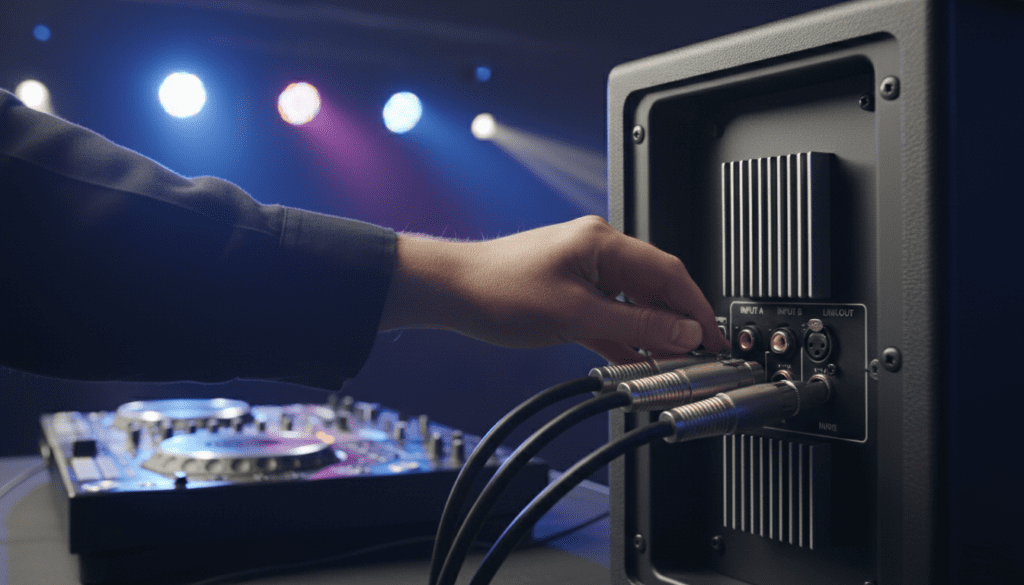
Look at the back of your DJ mixer. You are looking for the section labeled Master Out 1 (usually XLR) or Master Out 2 (usually RCA or TRS).
Connect the Cables
Plug the Left (L) output of your mixer into the Left speaker and the Right (R) output into the Right speaker. If you are using a single speaker, look for a “Mono” setting on your mixer or use the Left output as the default.
Set the Speaker Gain
On the back of your powered speakers, there is usually a gain or volume knob. Set this to the unity gain position (often marked as 0dB or 12 o’clock). Make sure the input selector is set to Line, not Mic.
The Power-On Sequence
- Turn on your DJ mixer and playback source (Laptop, CDJs, or Turntables).
- Set your mixer’s Master Level to the minimum.
- Turn on your powered speakers.
- Slowly raise the Master Level until you hear audio.
Essential Cables for Your DJ Setup
When you can dj mixer to run powerd speakers, the cable is the only thing standing between you and a great performance. We highly recommend investing in Balanced Cables to eliminate hum and radio interference.
XLR Cables: The Professional Choice
XLR cables feature three pins and a locking mechanism. They are the gold standard because they carry a balanced signal that cancels out noise. Brands like Mogami or Canare are excellent, but even mid-range Hosa Pro cables work well for mobile DJs.
TRS vs. TS 1/4″ Jacks
Not all 1/4″ cables are created equal. A TRS (Tip-Ring-Sleeve) cable is balanced and looks like it has two black rings on the tip. A TS (Tip-Sleeve) cable is unbalanced and has only one ring. Always use TRS if your mixer and speakers support it.
RCA to XLR Adapters
If you are using a controller like the Pioneer DDJ-400 which only has RCA outputs, you may need an RCA to XLR cable. Be aware that this signal remains unbalanced, so keep these cable runs as short as possible to avoid picking up “buzz” from lights or power cables.
Pro Tips for Perfect Gain Staging
Gain staging is the process of managing levels at every step of the audio chain. Even if you can dj mixer to run powerd speakers easily, poor gain staging will make a $2,000 speaker sound like a $50 radio.
Watch the Red Lights
Never “redline” your mixer. Most modern digital mixers have a “sweet spot” where the LEDs stay in the green and occasionally hit the amber/yellow. If your mixer’s master output is in the red, the signal is clipping before it even reaches the speaker.
Speaker Limiting
Most high-end powered speakers have an internal Limiter light. If this light stays solid, you are pushing the internal amplifier too hard. Turn down the Master Out on your mixer and let the speaker’s amplifier do the work efficiently.
Using a Subwoofer
If you add a powered subwoofer to the chain, you usually run the mixer output to the subwoofer first. The subwoofer then filters out the low frequencies and sends the rest to your top speakers via a High-Pass Filter (HPF). This allows your main speakers to play louder and clearer.
Common Mistakes to Avoid
In our experience, most equipment failure occurs due to these three common errors.
Plugging into the Mic Input
Many powered speakers have combo jacks that accept both Mic and Line signals. Mic inputs have a much higher gain. If you plug a mixer (Line level) into a Mic input, the sound will be extremely distorted and could damage the speaker’s preamp.
Using “Daisy Chaining” Incorrectly
You can run a cable from one powered speaker to another (daisy-chaining). However, if you do this, ensure you aren’t accidentally sending a mono signal to the whole room if you want a stereo image. Most DJs prefer running separate lines for Left and Right.
Neglecting Power Conditioning
Powered speakers are sensitive to “dirty power.” Using a Power Conditioner like those from Furman can protect the internal amplifiers of your speakers from voltage spikes often found in bars or older venues.
Frequently Asked Questions
Do I need an amplifier if I use a DJ mixer with powered speakers?
No, you do not need an external amplifier. Powered speakers have the amplifier built directly into the cabinet. You simply connect the mixer’s output to the speaker’s input.
What happens if I use unbalanced cables for a long distance?
If you use unbalanced RCA cables for distances over 15-20 feet, you will likely hear a low-frequency hum or high-frequency “hiss.” This is caused by electromagnetic interference from nearby electronics. For long runs, always use balanced XLR cables.
Can I connect my DJ controller directly to powered speakers?
Yes, most DJ controllers function as a mixer and audio interface. You can connect them directly to powered speakers using the Master Output (RCA, TRS, or XLR) located on the back of the controller.
Should I turn the volume all the way up on the back of the speaker?
Generally, no. We recommend setting the speaker gain to “Unity” (usually 12 o’clock). This provides enough headroom for the mixer to control the volume without introducing floor noise or hiss.
Can I damage my speakers if the mixer is too loud?
Yes. If your mixer is sending a “clipped” or “square wave” signal (solid red lights), it can cause the speaker’s voice coil to overheat. Always monitor your levels and ensure the Limiter light on the speaker isn’t constantly active.