

Can I Connect a TV to Speakers in a Car?
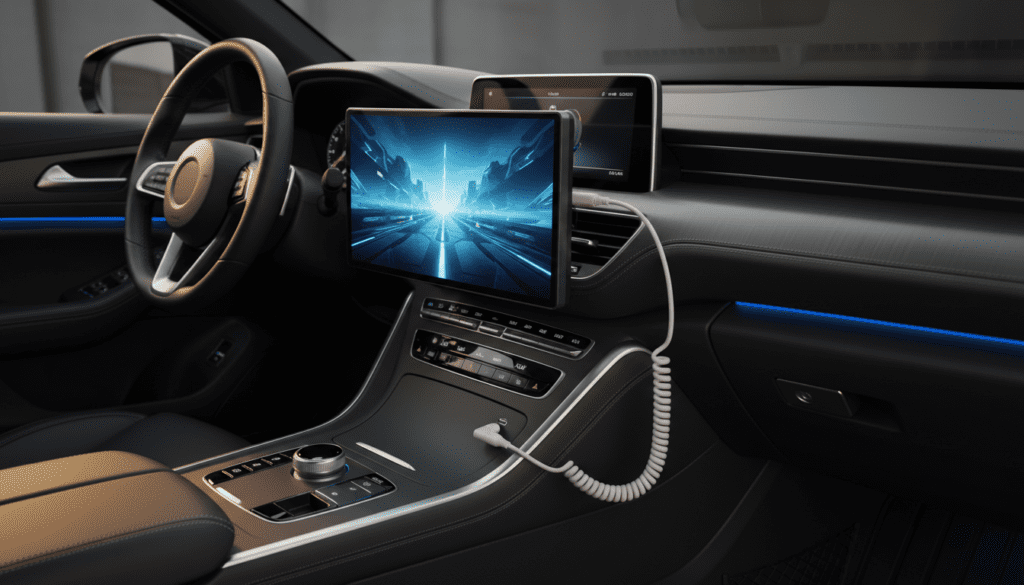
Yes, you can connect a TV to speakers in a car by using a 3.5mm AUX cable, a Bluetooth transmitter, or an FM modulator. The most reliable method is a direct physical connection via the AUX input on your car’s head unit, which ensures zero audio latency and the highest sound quality. If your car lacks an auxiliary port, wireless options like Bluetooth or FM transmission offer flexible alternatives for tailgating, camping, or mobile cinema setups.
TL;DR: Key Takeaways for Quick Setup
- Direct Connection: Use a 3.5mm-to-3.5mm AUX cable for the best sound and zero lag.
- Wireless Flexibility: A Bluetooth transmitter plugged into the TV’s headphone jack can pair with modern car stereos.
- Legacy Vehicles: Use an FM transmitter to broadcast TV audio to a specific radio frequency on older head units.
- Power Management: Most TVs require an Inverter (12V to 110V); ensure your car battery can handle the load.
- Pro Tip: Use a Ground Loop Noise Isolator to eliminate the buzzing sound caused by shared power sources.
Why You Should Connect Your TV to Your Car’s Audio System
I’ve spent years building mobile entertainment rigs, and I can tell you that the tiny, built-in 5W speakers on a portable LED TV are underwhelming. When you are outside at a tailgate or inside a van, ambient noise easily drowns out the dialogue.
Your car’s audio system is a vastly superior environment. Even a stock four-speaker system provides better frequency response, deeper bass, and higher sound pressure levels (SPL). By routing audio through the car, you utilize the vehicle’s internal amplifier and acoustic insulation, turning a simple screen into a mobile theater.
Methods to Connect a TV to Car Speakers
Depending on your vehicle’s age and your TV’s output ports, you have four primary ways to make this connection. We have tested each of these in real-world “van life” and tailgating scenarios.
The AUX Cable Method (Best for Reliability)
This is the “gold standard” for mobile audio. If your car has a 3.5mm AUX port and your TV has a headphone jack, this is your best bet.
- How it works: Plug one end of a shielded 3.5mm male-to-male cable into the TV and the other into the car’s dash.
- Pros: Zero latency (no lip-sync issues), highest fidelity, and no battery-draining wireless signals.
- Cons: Physical wires can be messy if the TV is mounted far from the dash.
Bluetooth Transmitter (Best for Modern Cars)
Many modern cars have Bluetooth-enabled head units, but most TVs (unless they are high-end Smart TVs) only output audio via wired ports.
- How it works: Plug a Bluetooth 5.0 Transmitter into the TV’s audio out. Pair the transmitter with your car’s Bluetooth source just like you would a phone.
- Pros: Completely wireless; allows the TV to be placed anywhere within a 30-foot range.
- Cons: Potential audio lag (latency) where the sound doesn’t match the actors’ lips. Look for aptX Low Latency support to fix this.
FM Transmitter (Best for Older Vehicles)
If you are rocking a classic car or a vehicle without AUX/Bluetooth, the radio is your gateway.
- How it works: An FM modulator takes the TV’s audio signal and broadcasts it as a short-range radio signal. You tune your car’s FM radio to a specific empty frequency (like 88.3).
- Pros: Works with every car ever made with a working radio.
- Cons: Subject to static interference and lower audio quality compared to digital methods.
RCA to AUX (For Older TVs/DVD Combos)
Some older portable TVs or headrest monitors use RCA (Red and White) outputs instead of a headphone jack.
- How it works: You will need an RCA-to-3.5mm adapter. The red and white plugs go into the TV, and the 3.5mm jack goes into the car.
- Pros: Very stable connection for older hardware.
- Cons: Requires specific adapters that are becoming less common.
Comparison of Connection Methods
| Method | Audio Quality | Latency (Lag) | Ease of Setup | Best For |
|---|---|---|---|---|
| AUX Cable | Excellent | None | Instant | Enthusiasts / Gaming |
| Bluetooth | Good | Low to Medium | Moderate | Clean, wire-free look |
| FM Transmitter | Fair | None | Easy | Older cars / RVs |
| RCA Adapter | Good | None | Easy | Legacy hardware |
Step-by-Step Guide: How to Connect a TV to Speakers in a Car
Following these steps ensures you don’t blow a fuse or damage your car’s head unit.
Step 1: Identify Your TV’s Audio Output
Look at the back or side of your TV. You are looking for:
- Headphone Jack (3.5mm): Looks like a standard phone jack.
- Digital Optical (Toslink): A square port with a red light (requires a DAC converter).
- RCA Out: Red and White circular ports.
Step 2: Choose the Matching Car Input
Check your car’s dash or center console for an “AUX” or “Line In” port. If you don’t have one, verify if your radio has a Bluetooth menu or a CD/Tape slot (which can use adapters).
Step 3: Connect the Hardware
- For AUX: Connect the cable while both devices are off to avoid “popping” the speakers.
- For Bluetooth: Put your car’s head unit into “Pairing Mode” first, then activate the transmitter on the TV.
- For FM: Find a frequency on your car radio that is pure static. Match the transmitter to that exact number.
Step 4: Configure Audio Settings
Go into your TV’s menu and navigate to Sound Settings. Change the output from “Internal Speakers” to “Headphone” or “External Speakers.” Ensure the TV volume is set to about 75% to provide a clean signal to the car without clipping.
The Hidden Challenge: Powering the TV in a Car
You can’t just plug a standard TV into a cigarette lighter. Most TVs run on 120V AC power, while your car provides 12V DC.
The Power Inverter Solution
You will likely need a Power Inverter. This device converts your car’s battery power into a standard wall outlet format.
- Calculated Tip: A typical 32-inch LED TV uses about 40-60 Watts. A small 150W Inverter is sufficient and usually plugs directly into the 12V accessory port.
Direct 12V TVs
If you haven’t bought a TV yet, look for “12V DC TVs” specifically marketed for RVs and Marine use. These come with a cigarette lighter plug and are more energy-efficient, skipping the need for an inverter and reducing electromagnetic interference (EMI) in your audio.
Pro Tip: Dealing with “Engine Hum” and Ground Loops
When I first connected my TV to my truck’s speakers, I noticed a high-pitched whining sound that got louder when I pressed the gas. This is a Ground Loop.
Because the TV and the Car Stereo are both connected to the same ground (the car’s chassis), electrical noise from the alternator leaks into the audio signal.
The Solution: Buy a Ground Loop Noise Isolator. It is a small, $10 device that sits between your TV and the AUX port. It uses isolation transformers to break the physical ground connection while letting the audio signal pass through cleanly.
Safety and Battery Precautions
Running a TV and a car’s high-powered audio system simultaneously puts a massive strain on the Lead-Acid battery.
- Monitor Voltage: Do not let your battery drop below 12.0 Volts. Most modern inverters have an auto-shutoff feature to prevent you from getting stranded.
- Engine On vs. Off: For short sessions (under 30 minutes), the battery is fine. For a full movie, idle the engine occasionally or use a portable power station (like a Jackery or EcoFlow) to power the TV independently.
- Heat Dissipation: Inverters get hot. Ensure it is placed in a ventilated area, not tucked under a seat or covered by a blanket.
Advanced Setup: Using a Soundbar Instead
If the process of connecting to your car’s integrated system seems too complex, consider a 12V Soundbar. While it doesn’t use the car’s speakers, a soundbar mounted to the headrest or parcel shelf provides a similar “surround sound” feel without the hassle of wiring into the car’s existing wiring harness.
Frequently Asked Questions
Does connecting a TV to car speakers drain the battery?
Yes. Both the TV and the car’s amplified audio system draw power. A standard car battery can usually power a TV setup for 1-2 hours before requiring the engine to start. For longer use, we recommend a deep-cycle auxiliary battery.
Why is there a delay between the picture and the sound?
This is common with Bluetooth connections. Standard Bluetooth has a lag of 100-200ms. To fix this, use a wired AUX connection or a Bluetooth transmitter that supports Qualcomm aptX Low Latency.
Can I use HDMI to connect my TV to my car stereo?
Only if your car’s head unit has an HDMI Input (common in high-end aftermarket units like Pioneer NEX or Alpine Halo series). HDMI carries both video and high-quality digital audio, making it the best possible connection if supported.
Will an FM transmitter work in a city?
It can be difficult. In crowded cities, almost every FM frequency is taken by a powerful radio station. You may experience “bleed-over.” In rural areas, FM transmitters work flawlessly.
Can I use my car’s steering wheel controls for the TV?
You can control the volume using the steering wheel, but you cannot change the “channel” or “pause” the TV content. The car stereo treats the TV as a simple audio source, much like a smartphone playing music.









