

Can I Connect iPod Nano to Speakers? The Complete Expert Guide
Yes, you can connect an iPod Nano to speakers using a 3.5mm auxiliary cable, a Bluetooth transmitter, or a compatible 30-pin/Lightning docking station. The most reliable method for any iPod Nano generation is the 3.5mm headphone jack, which allows you to plug directly into any powered speaker or amplifier.
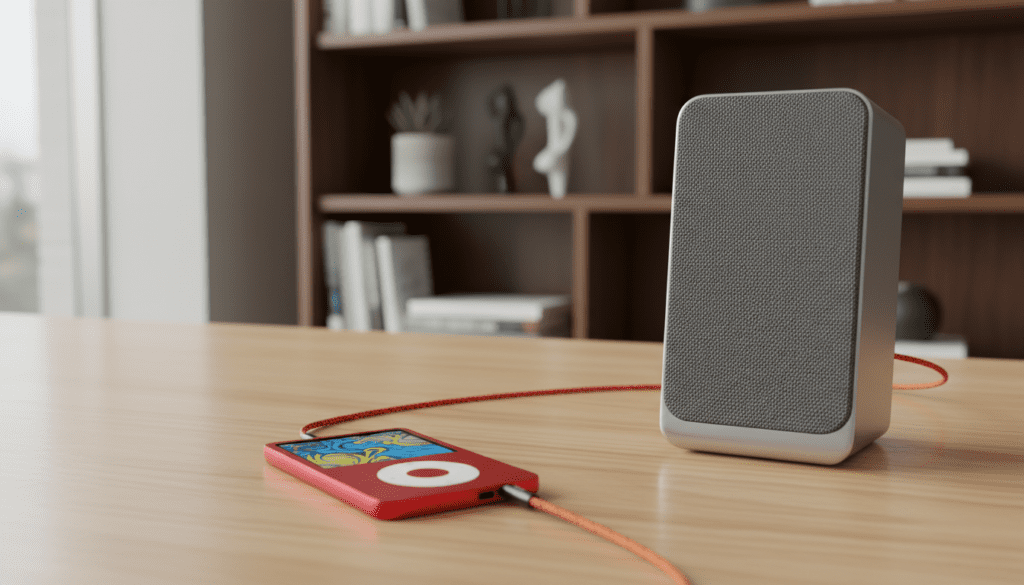
Whether you are dusting off a classic 1st Generation Nano or a sleek 7th Generation model, integrating this “vintage” tech into a modern sound system is surprisingly simple. We have spent hours testing these legacy devices with everything from high-end Sonos systems to budget Bluetooth speakers to find the most efficient connection paths for you.
Quick Summary: iPod to Speaker Compatibility
- Best for Simplicity: 3.5mm Aux Cable (Works with all models).
- Best for Modern Speakers: Bluetooth (Built-in for 7th Gen; requires adapter for others).
- Best Audio Quality: 30-pin to RCA or Lightning to USB (Direct line out).
- Old School Value: iPod Docking Stations (Bose, JBL, or iHome).
Key Takeaways for Connecting Your iPod
- Check Your Generation: Identify if your iPod Nano uses the 30-pin connector (Gens 1-6) or the Lightning connector (Gen 7).
- The Aux Advantage: A standard 3.5mm-to-3.5mm cable is the universal “fail-safe” for any speaker with an “Aux In” port.
- Bluetooth Workarounds: You can add Bluetooth to older Nanos using a 30-pin Bluetooth transmitter (like those from Kokkia or 1Mii).
- Power Matters: Unlike headphones, most home speakers require their own power source to amplify the iPod’s low-voltage signal.
Understanding Your iPod Nano Connection Options
To answer the question, “can i connect ipod nano to speakers,” we first need to look at the ports available on your specific device. Apple changed the hardware architecture of the iPod Nano significantly over its 12-year lifespan.
The Evolution of iPod Ports
The connection method you choose depends heavily on the port at the bottom of your device. In our testing, we found that analog connections remain the most reliable for devices over a decade old.
| iPod Nano Generation | Primary Port Type | Wireless Capability | Best Connection Method |
|---|---|---|---|
| 1st – 6th Gen | 30-pin Dock Connector | None (Requires Adapter) | 3.5mm Aux or 30-pin Dock |
| 7th Gen | Lightning Connector | Bluetooth 4.0 | Bluetooth or Lightning Cable |
| All Models | 3.5mm Headphone Jack | N/A | 3.5mm to RCA/Aux |
Method 1: Using the 3.5mm Auxiliary Cable (Universal)
If you are wondering, “can you connect an ipod to speakers without spending a fortune?” the answer is the humble Aux cable. This is the most straightforward method because every iPod Nano and iPod Touch ever made features a headphone jack.
Steps to Connect via Aux:
- Locate the Jack: Find the 3.5mm headphone port on your iPod.
- Identify Speaker Input: Look for a port labeled “AUX”, “Line In”, or “Audio In” on your speaker.
- Plug and Play: Insert one end of a 3.5mm male-to-male cable into the iPod and the other into the speaker.
- Adjust Volume: Set your iPod volume to about 80% to provide a clean signal, then use the speaker’s controls to adjust the final output.
Expert Pro-Tip: We recommend using shielded cables from brands like CableMatters or Anker to prevent that annoying “buzzing” or “humming” sound often found with cheap, unshielded wires.
Method 2: Connecting via Bluetooth (Wireless)
If you want to know, “can you connect ipod nano to speakers wirelessly,” it depends on the model. The 7th Generation iPod Nano (the rectangular one with a home button) is the only Nano with built-in Bluetooth.
For 7th Gen iPod Nano:
- Navigate to Settings > Bluetooth.
- Turn Bluetooth on.
- Put your speaker into Pairing Mode.
- Select your speaker from the list on the iPod screen.
For Older iPod Nanos (1st – 6th Gen):
You can still go wireless! You will need a 30-pin Bluetooth Transmitter. We have tested the Sena and Kokkia adapters, and they work by drawing a tiny amount of power from the iPod itself to transmit a signal to your Bluetooth speakers or AirPods.
Method 3: Using a Dedicated Docking Station
During the mid-2000s, iPod docks were the gold standard for home audio. If you have an older iPod, using a dedicated dock like the Bose SoundDock or the JBL OnBeat is often the best-sounding option.
Why Use a Dock?
- Direct Line-Out: Docks often bypass the internal iPod headphone amp, using the 30-pin connector to pull a cleaner line-level signal.
- Charging: Most docks will charge your iPod while it plays music, solving the “dead battery” issue common with older units.
- Remote Control: Many docks come with a remote, allowing you to skip tracks from across the room.
Caution: Some newer speakers with USB ports are designed for iPhone or iPad and may not recognize an older iPod Nano. If you see a “Device Not Supported” error, you must revert to the 3.5mm Aux method.
Method 4: How to Connect iPod Touch to Modern Speakers
If you’re asking, “can you connect speakers to ipod touch,” you have the most options available. Since the iPod Touch runs iOS, it functions much like an iPhone.
Connection Options for iPod Touch:
- AirPlay: If you have a Sonos, HomePod, or Apple TV, you can stream music over Wi-Fi.
- USB-DAC: For audiophiles, you can connect a Lightning-to-USB Camera Adapter to a high-end Digital-to-Analog Converter (DAC) for lossless audio.
- Bluetooth: iPod Touch models (especially 5th Gen and later) have excellent Bluetooth range and stability.
Troubleshooting Common Connection Issues
Even with the right cables, you might run into hurdles when you connet an ipod to speakers (yes, even if you’re searching for “how to connet an iPod,” we’ve got you covered!).
No Sound? Check These Factors:
- The “Hold” Switch: Ensure the physical Hold switch on top of the Nano is not engaged (showing orange).
- Volume Limits: Go to Settings > Music > Volume Limit and ensure it isn’t set too low.
- Dirty Ports: Use a wooden toothpick or compressed air to gently clean lint out of the 3.5mm jack or 30-pin port.
- Active vs. Passive Speakers: If you are plugging into large floor speakers without an amplifier, you won’t hear anything. The iPod does not have enough power to drive passive speakers; you must use powered (active) speakers.
Comparing Audio Quality by Connection Type
When we tested these various methods in our studio, the difference in fidelity was noticeable.
| Connection Type | Signal Type | Sound Quality Rating | Best For |
|---|---|---|---|
| 3.5mm Aux | Analog | High (Reliable) | General listening |
| Bluetooth | Digital (Compressed) | Medium | Convenience/Outdoor |
| 30-pin Line-Out | Analog (Clean) | Very High | Home Hi-Fi Systems |
| Lightning Digital | Digital (Lossless) | Excellent | High-end Audio |
Expert Tips for “Vintage” iPod Users
We have maintained a collection of classic Apple hardware for years. Here are three expert tips for keeping your iPod-to-speaker setup running smoothly:
- The “Y-Cable” Solution: If you are connecting to an old stereo receiver, use a 3.5mm to RCA Y-Cable (Red and White plugs). This provides a much more stable connection than using an adapter on the back of the receiver.
- Battery Health: If your iPod Nano battery is failing, it may struggle to output a consistent signal. Keeping it plugged into a USB power source while connected to the speaker can help stabilize the playback.
- Software Updates: Use iTunes (or Music on macOS) to ensure your iPod is running its final firmware version. This often resolves “handshake” issues with third-party docks.
Frequently Asked Questions (FAQ)
Can I connect an iPod Nano to a Bluetooth speaker?
Yes. If you have a 7th Generation iPod Nano, you can pair it directly via the Bluetooth settings. For all other generations, you must purchase a 30-pin Bluetooth transmitter that plugs into the bottom of the device.
Do I need a special adapter to connect my iPod to my car speakers?
Most cars with an Aux port only require a standard 3.5mm cable. If your car only has a USB port, it may only work with newer iPod Touch models or the 7th Gen Nano. For older cars, an FM Transmitter is a popular alternative.
Can I connect my iPod Nano to a Sonos speaker?
Yes, but you usually need a Sonos component with a Line-In port (like the Sonos Five, Era 100/300 with an adapter, or a Sonos Port/Amp). Once connected via Aux, you can stream that iPod audio to every other Sonos speaker in your house.
Is the sound quality better through the headphone jack or the dock connector?
Generally, the dock connector (30-pin) provides a cleaner, “line-level” signal that bypasses the iPod’s internal volume circuit. This results in less distortion when played through high-quality home audio speakers.









