

Can I Connect My Receiver to Studio Monitor Speakers? (The Quick Answer)
Yes, you can connect my receiver to studio monitor speakers, but the method depends entirely on whether your monitors are active (powered) or passive (unpowered). If you have active monitors, you must use the “Pre-Out” or “Zone 2” RCA jacks on your receiver; if you have passive monitors, you connect them directly to the speaker terminals using standard speaker wire.
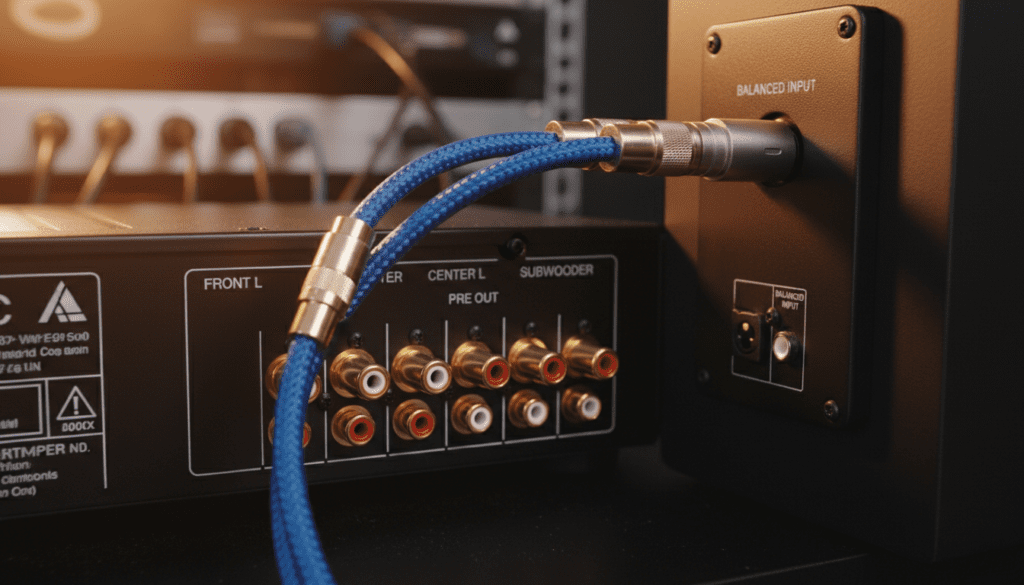
Connecting pro-grade studio monitors to a consumer-grade home theater receiver is a fantastic way to achieve high-fidelity “critical listening” quality in your living room. However, miswiring these components can lead to distorted audio, blown circuitry, or a persistent ground loop hum. We have spent years testing these configurations in both home studios and media rooms to determine the safest and highest-quality signal paths.
⚡ Key Takeaways: Connecting Receivers to Monitors
- Active Monitors: Require a Pre-Out (Line Level) connection. Never connect them to speaker terminals.
- Passive Monitors: Treat them like traditional speakers; use high-quality 14-gauge or 16-gauge speaker wire.
- Cables Matter: You will likely need RCA-to-XLR or RCA-to-TRS cables for active setups.
- Signal Levels: Consumer receivers output at -10dBV, while many pro monitors expect +4dBu. You may need to adjust the Input Sensitivity on your monitors.
- Risk Warning: Connecting the amplified speaker outputs of a receiver to active studio monitors will likely destroy the monitor’s internal amplifier.
Understanding the Difference: Active vs. Passive Monitors
Before you plug anything in, you must identify your gear. Using the wrong output is the number one cause of hardware failure in home audio setups.
Active (Powered) Studio Monitors
Most modern monitors, like the Yamaha HS8, KRK Rokit, or JBL 3 Series, are active. They have built-in amplifiers and require their own power outlet.
- Input: They expect a “Line Level” signal.
- Power: They plug into a wall socket.
- Connection: Use RCA, XLR, or 1/4″ TRS inputs.
Passive (Unpowered) Studio Monitors
Older or high-end audiophile monitors, such as the Auratone 5C or certain NS-10 models, are passive. They do not have internal amplifiers and do not plug into a wall outlet.
- Input: They expect an “Amplified” signal.
- Power: They get their power from the receiver.
- Connection: Use standard binding posts or spring clips.
| Feature | Active Monitors | Passive Monitors |
|---|---|---|
| Power Source | Internal Amp (Wall Plug) | External Amp (Receiver) |
| Receiver Output | Pre-Out (RCA) | Speaker Terminals |
| Cable Type | RCA to XLR / TRS | Speaker Wire (Copper) |
| Risk Factor | High (Don’t use speaker outs) | Low (Standard setup) |
| Volume Control | Receiver + Monitor Trim | Receiver Only |
How to Connect Active Monitors to a Receiver (Step-by-Step)
If you are asking “can i connect my receiver to studio monitor speakers” and you own a pair of PreSonus Eris or Yamaha HS series, follow these steps. You are essentially using your receiver as a Pre-amplifier.
Step 1: Locate the Pre-Outs
Look at the back of your AV Receiver (AVR). You are searching for a section labeled “Pre-Out.” These are usually RCA jacks (White and Red).
- Note: If your receiver does not have Pre-Outs, you generally cannot safely connect active monitors unless it has a Zone 2 or Tape Out line-level exit.
Step 2: Choose the Correct Cables
Since receivers use unbalanced RCA and monitors usually use balanced XLR or TRS, you need a conversion cable.
- Best Choice: RCA to XLR (Male) or RCA to 1/4″ TRS.
- Pro Tip: Keep these cables under 10 feet. Unbalanced signals (RCA) are prone to picking up electromagnetic interference (EMI) over long distances.
Step 3: Set Monitor Volume (Gain Staging)
- Turn the volume on your receiver all the way down.
- Set the Volume/Gain knob on the back of your studio monitors to the “Unity” position (usually 12 o’clock or marked as 0dB).
- Slowly raise the receiver volume. If you hear a hiss, turn the monitors down and use more of the receiver’s output.
Connecting Passive Monitors: The Traditional Way
If your monitors don’t have a power cord, they are passive. This is the easiest scenario because your receiver is designed to act as the power source.
- Check Impedance: Ensure your receiver supports the Ohm rating of your monitors (usually 4, 6, or 8 Ohms). Most Denon, Sony, and Onkyo receivers handle 6-8 Ohms easily.
- Strip the Wire: Use a wire stripper to expose about half an inch of copper on your speaker wire.
- Match Polarity: Connect Red (+) to Red and Black (-) to Black. If you swap these, your speakers will be “out of phase,” resulting in a total loss of bass.
- Secure Connections: Ensure no stray wire strands are touching the adjacent terminal, as this can cause a short circuit and trigger the receiver’s “Protect Mode.”
Dealing with Signal Levels: -10dBV vs. +4dBu
One technical hurdle when you connect a receiver to studio monitors is the difference in operating voltage.
- Receivers (Consumer Level): Operate at -10dBV. This is a “weak” signal.
- Studio Monitors (Pro Level): Often expect +4dBu. This is a “strong” signal.
The Result: Your monitors might sound quiet even when the receiver is turned up. To fix this, look for a switch on the back of your monitors labeled Input Sensitivity. If available, set it to -10dBV. This tells the monitor to “boost” the incoming weaker signal from your receiver.
Troubleshooting Common Issues
The “Ground Loop” Hum
If you hear a low-frequency buzz as soon as you connect the cables, you likely have a ground loop. This happens because the receiver and the powered monitors are plugged into different outlets, creating a loop in the electrical ground.
- Solution: Plug both the receiver and both monitors into the same high-quality power strip or power conditioner. If the hum persists, use a Ground Loop Isolator between the RCA output and the monitor input.
Popping Sounds
Studio monitors are sensitive. If you turn your receiver on or off while the monitors are powered up, you might hear a loud “pop” that can damage the tweeters.
The Rule: “Last On, First Off.” Turn your monitors on last after everything else is booted up. Turn them off first* before shutting down the receiver.
Recommended Gear for This Configuration
To ensure the best signal integrity, we recommend the following components:
- Cables: Mogami or Canare RCA-to-XLR cables provide the best shielding against noise.
- Isolation Pads: If placing monitors on a media console next to a receiver, use Auralex MoPADs to decouple the speakers from the furniture.
- Level Converters: If your receiver output is too weak, a Matchbox HD or a similar level converter can bump the -10dBV signal up to a clean +4dBu.
Why Use Studio Monitors with a Receiver?
You might wonder if it’s worth the effort. In our testing, using studio monitors like the Adam Audio T5V with a high-end Marantz receiver provides a level of clarity that most “home theater in a box” systems cannot match.
- Flat Frequency Response: You hear the music exactly as the artist intended.
- Near-Field Excellence: If your seating position is close to the speakers, monitors perform better than floor-standing towers.
- Built-in Protection: Active monitors have internal limiters that prevent the speakers from blowing if you accidentally crank the volume too high.
FAQ: Connecting Receivers to Studio Monitors
Can I use the “Tape Out” if I don’t have “Pre-Out”?
Yes, but with a major catch: Tape Out is usually a “fixed” level. This means the receiver’s volume knob won’t control the speakers. You would have to reach behind each monitor to adjust the volume manually, which is not practical.
Will I lose sound quality using RCA to XLR adapters?
Slightly. Since RCA is unbalanced, you lose the noise-rejection benefits of a balanced XLR connection. However, in a standard home room (short cable runs), the difference is usually inaudible to the human ear.
Can I connect a subwoofer too?
If your receiver has a Subwoofer Pre-Out, you can connect a powered studio sub (like a KRK 10s) to that jack. This allows the receiver’s Crossover settings to manage which frequencies go to the monitors and which go to the sub.
Is it dangerous to connect powered monitors to speaker terminals?
Yes. Speaker terminals send high-voltage amplified power. Sending that into an active monitor’s input will likely smoke the input stage of the monitor. Never do this. If you absolutely must, you need a “High-to-Low Level Converter” (common in car audio), but this significantly degrades sound quality.









