

Can I Play a Bass Over Computer Speakers? (The Short Answer)
Yes, you can play a bass over computer speakers, but you should never plug your bass directly into your computer’s 3.5mm microphone or line-in jack. To do this safely and get a usable sound, you must use an Audio Interface or a Preamp to convert the high-impedance signal of your bass into a digital format your computer and speakers can handle. Failing to use the right hardware can lead to permanent damage to your speaker drivers or your computer’s sound card.
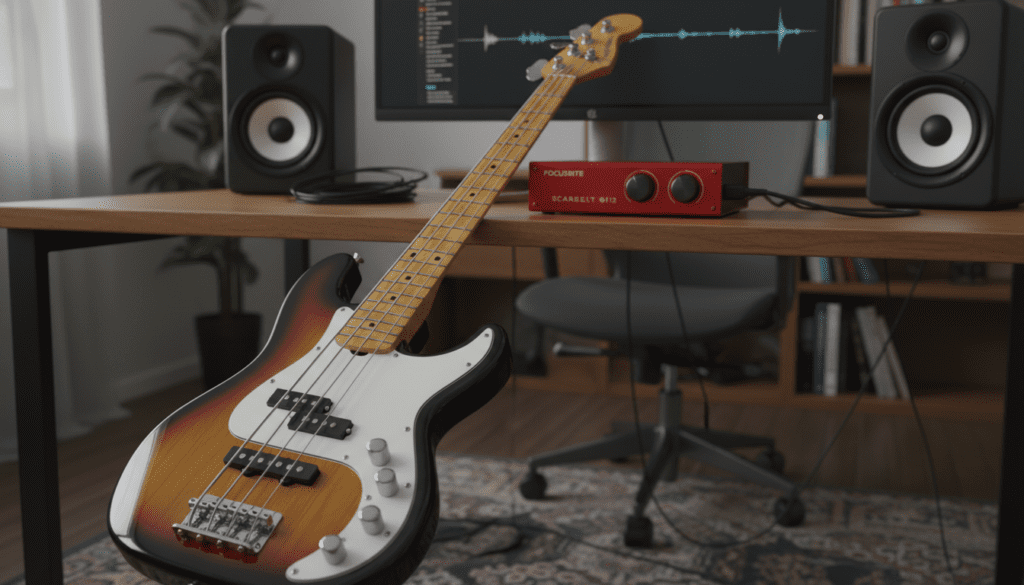
In my years of home recording and session work, I’ve found that while desktop speakers are convenient, they aren’t designed to handle the massive low-end excursions of a Fender Precision or an active 5-string bass. If you follow the correct signal chain, you can enjoy a great practice tone without the bulk of a traditional amplifier.
TL;DR: Key Takeaways for Bass Playback
- Don’t Plug Direct: Never use a 1/4″ to 1/8″ adapter to plug directly into a PC mic port; it risks blowing your sound card.
- Use an Interface: A dedicated Audio Interface (like a Focusrite Scarlett) is the industry standard for high-quality, low-latency sound.
- Watch the Volume: Computer speakers have small drivers; keep volumes moderate to avoid “bottoming out” the cones.
- Software Matters: Use a DAW (Digital Audio Workstation) and a Bass Amp Sim plugin for a professional tone.
- High-Pass Filter: Always use a High-Pass Filter (HPF) at around 40-50Hz to protect small speakers from sub-bass frequencies they can’t reproduce.
Why You Need More Than Just a Cable
When beginners ask, “can i play a bass over computer speakers,” they often assume a simple adapter cable is enough. I’ve seen many hobbyists fry their integrated motherboard audio by sending a hot, high-impedance signal directly into a port designed for a tiny plastic microphone.
The Impedance (Hi-Z) Challenge
Bass guitars output a High-Impedance (Hi-Z) signal. Computer line-in ports expect a much lower, consumer-level signal. When these don’t match, you get a “thin,” “weak,” and “clipping” sound that lacks all the punch of a real bass guitar.
Frequency Response vs. Driver Size
Most Logitech or Creative computer speakers feature 2-inch to 4-inch drivers. A bass guitar’s low E-string vibrates at 41.2 Hz. To move enough air at that frequency, a speaker needs “throw” (excursion). Standard PC speakers can easily “over-excursion,” meaning the voice coil hits the back of the magnet, causing permanent physical damage.
Hardware Comparison: Ways to Connect Your Bass
| Method | Safety Level | Sound Quality | Equipment Needed |
|---|---|---|---|
| Direct to Mic Jack | Dangerous | Terrible | 1/4″ to 1/8″ Adapter |
| Audio Interface | Safest/Best | Professional | USB Interface (e.g., Focusrite) |
| Multi-FX Pedal | Safe | Very Good | Pedal with USB Out (e.g., Line 6 Helix) |
| Bass Amp DI Out | Safe | Excellent | Amp with XLR/USB Out |
Step-by-Step: How to Play a Bass Over Computer Speakers Safely
If you are ready to set up your home practice rig, follow these steps to ensure you don’t damage your gear.
Step 1: Choose Your Audio Interface
I recommend the Focusrite Scarlett Solo or the PreSonus AudioBox. These devices act as an external sound card. They have a specific “Inst” (Instrument) button that adjusts the input to handle the high impedance of your bass pickups.
Step 2: Connect the Hardware
- Plug your Bass Guitar into the 1/4″ input on the interface.
- Connect the Audio Interface to your computer via USB.
- Connect your Computer Speakers to the “Monitor Outputs” on the back of the interface. If your speakers use a 3.5mm jack, you may need a Dual 1/4″ to 3.5mm Female adapter.
Step 3: Configure Your Computer Settings
On Windows, go to Sound Settings and ensure your interface is selected as the Primary Output Device. On macOS, this is found in System Settings > Sound.
Expert Tip: Always set your computer’s system volume to 100% and use the physical “Monitor” knob on your interface to control the actual loudness. This prevents digital clipping.
Step 4: Load a DAW or Standalone Plugin
To get a “real” amp sound, you need software. I personally use Neural DSP Cory Wong or Amplitube 5.
- Open your software.
- Select ASIO (on Windows) as your driver type to reduce Latency (the delay between hitting a string and hearing the sound).
- Set your Buffer Size to 128 or 256 samples. This provides a balance between low delay and smooth performance.
Protecting Your Speakers: The “Golden Rules” of Bass Monitoring
We have established that you can play a bass over computer speakers, but you must act as your own sound engineer to keep the speakers alive.
Use a High-Pass Filter (HPF)
In your software, find an EQ (Equalizer). Set a High-Pass Filter at 40Hz to 60Hz. Most computer speakers cannot produce sound below 60Hz anyway. By cutting these frequencies, you stop the speaker from trying to move air it can’t handle, which saves the hardware and actually makes your bass sound “tighter.”
Watch for “Farting Out”
If you hear a crackling or “farting” sound during low notes, your speaker cones are hitting their physical limit. Turn down the volume immediately. In my experience, high-quality studio monitors like the KRK Rokit series or Yamaha HS5s are much better suited for this than standard office speakers.
Compression is Your Friend
Bass guitars have high dynamic ranges. A single hard pluck can send a massive spike of energy to your speakers. Use a Compressor Plugin in your signal chain. Set the ratio to 4:1. This “squashes” the loudest peaks, protecting your speakers and making your playing sound more consistent.
Recommended Software for Better Bass Tone
Don’t settle for the dry, “clicky” sound of a raw bass signal. Here is the software we use in the studio to make computer speakers sound like a 8×10 fridge cabinet:
- IK Multimedia Amplitube 5 (Free Version): Includes basic bass amp models that sound realistic.
- TSE BOD v3 (Free): A digital recreation of the famous SansAmp Bass Driver DI. It adds grit and character.
- Audacity (Free): Good for simple recording, though it lacks real-time monitoring features found in professional DAWs.
- Reaper (Free Trial): A full-featured DAW that is incredibly lightweight and perfect for bassists on a budget.
Troubleshooting Common Issues
“There is a delay when I play a string.”
This is Latency. It happens because the computer takes time to process the sound. To fix this, install the official ASIO drivers for your interface. Lower the “Buffer Size” in your software settings until the delay disappears, but not so low that the audio starts crackling.
“I hear a constant buzzing or humming.”
This is likely a Ground Loop or interference from your computer monitor.
- Try moving your bass away from the PC screen.
- Ensure your bass’s electronics are shielded.
- If using a laptop, try unplugging the power cable and running on battery to see if the noise stops.
“The sound is only coming out of one speaker.”
Bass guitars are Mono instruments. Your software might be trying to play it as a Stereo signal. In your DAW, ensure your input track is set to “Mono” (Input 1 or Input 2), rather than “Stereo 1/2.”
Frequently Asked Questions
Can I use a guitar amp as a computer speaker?
While you can, guitar amps are designed for mid-range frequencies and often sound “muffled” or “dark” when playing music or bass through them. They also lack the stereo separation needed for a good listening experience.
Will playing bass at low volumes still damage my speakers?
Generally, no. Damage occurs when the Voice Coil overheats or the Cone exceeds its physical travel limit. At “bedroom volumes,” most modern computer speakers can handle the signal, provided you aren’t boosting the 20Hz-40Hz range.
Do I need a DI Box to play through my computer?
If you already have an Audio Interface with an “Instrument” or “Hi-Z” input, you do not need a DI box. However, if you are trying to run into a mixer first, a Radial J48 or similar DI box is highly recommended to maintain signal integrity.
Is it better to just use headphones?
For bass, yes. A pair of Sennheiser HD600s or Audio-Technica ATH-M50x headphones will reproduce low-end frequencies far more accurately than a $50 pair of computer speakers. It also keeps your neighbors happy!









