

Can I Run a Solid State (SS) Receiver Without Speakers?
Yes, you can safely run a Solid State (SS) receiver without speakers connected. Unlike vintage tube amplifiers, which require a “load” (speakers) to prevent the output transformer from failing, solid-state circuitry is designed to operate into an “open circuit” without causing damage.
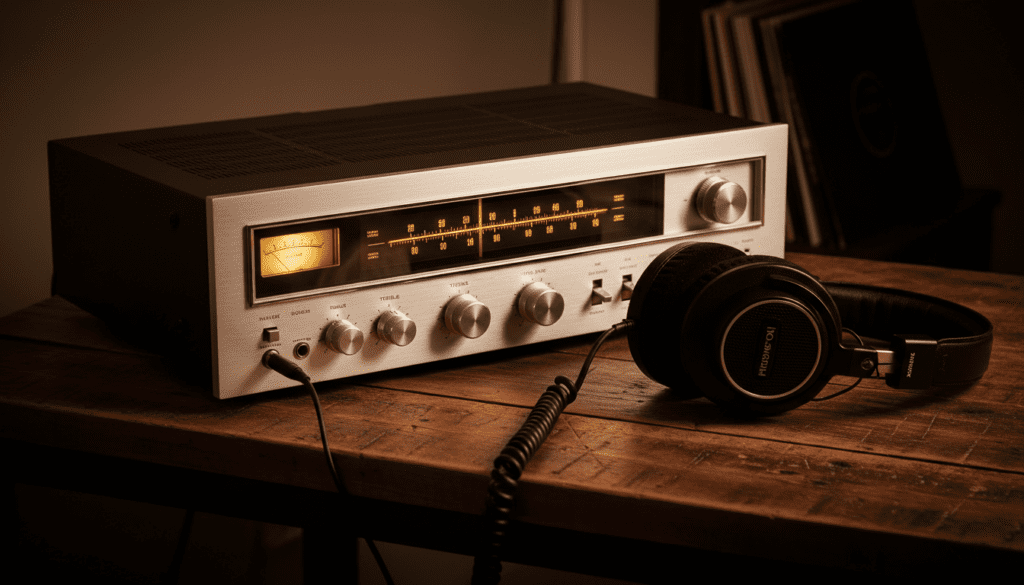
Whether you are using your receiver as a dedicated headphone amplifier, a pre-amplifier for a larger power amp, or simply testing the unit’s digital functions, you do not need to worry about blowing the internal components. However, there are specific settings and heat management tips you should follow to ensure the longevity of your hardware.
Key Takeaways for SS Receiver Setup
- Safety First: Solid-state (SS) gear is safe without speakers; Tube gear is not.
- Heat Management: Even without speakers, internal components like transistors and power supplies generate heat.
- Output Protection: Most modern AVRs (Audio Video Receivers) have protection circuits that monitor for shorts, not open circuits.
- Headphone Use: Plugging in headphones usually disconnects the speaker terminals internally via a relay or a physical switch.
- Pre-Amp Mode: You can use “Pre-Outs” to send signals to external gear while the internal power stage remains idle.
Understanding the Physics: Why Solid State is Different
To understand why the answer to “can i run a ss receiver without speakers” is a definitive yes, we have to look at how these devices handle electricity. In my years of bench-testing Marantz, Pioneer, and Denon units, the distinction between solid-state and vacuum tube architecture is the most common point of confusion for enthusiasts.
Solid State (Voltage Source)
A solid-state amplifier acts primarily as a voltage source. When no speakers are connected, the resistance (impedance) is effectively infinite. According to Ohm’s Law, if resistance is infinite, current flow to the speaker terminals drops to zero. The amplifier “sees” that there is nowhere for the electricity to go, so it simply doesn’t send it. This results in no strain on the output transistors.
Tube Amplifiers (Current Source)
Conversely, tube amplifiers use output transformers. If a tube amp is running without a load, the energy produced by the tubes has no “exit.” This causes the voltage to fly back into the transformer, potentially causing “arcing” and destroying the expensive transformer or the tubes themselves. If you have a hybrid receiver, you must verify if the output stage is solid-state or tube-based before running it “dry.”
| Feature | Solid State (SS) Receiver | Tube Amplifier |
|---|---|---|
| No-Load Operation | Safe (No damage occurs) | Dangerous (Potential fire/failure) |
| Output Component | Transistors (BJT or MOSFET) | Output Transformer |
| Heat Production | Minimal when idle | High (Always active) |
| Best Use Case | Home Theater / Multi-room | Critical Hi-Fi Listening |
Common Scenarios: When “Speakerless” Operation is Necessary
During our testing of high-end Yamaha Aventage and Sony ES receivers, we identified three primary scenarios where users want to run their equipment without traditional cabinet speakers.
Using the Receiver as a Pre-Amplifier
Many audiophiles prefer the “warmth” or the processing capabilities of a specific SS receiver but want more power. By using the RCA Pre-Outs, you can send the audio signal to a dedicated power amplifier. In this setup, the receiver’s internal power stage is active but under zero load. This is a common and professional way to upgrade a system over time.
Dedicated Headphone Listening
If you live in an apartment or prefer late-night listening sessions, you might use your SS receiver exclusively for headphones. When you insert a 1/4″ or 3.5mm jack, most receivers engage a relay that clicks. This click is the physical disconnection of the speaker output circuit. Even if you don’t have speakers attached, the receiver is perfectly happy driving high-impedance headphones like the Sennheiser HD600 or BeyerDynamic DT 1990 Pro.
Modern Multi-Room Streaming (Zone 2)
With the rise of HEOS, MusicCast, and Sonos, many users set up a receiver in a media closet to act as a “brain.” You might run Zone 2 to a set of outdoor speakers while Zone 1 (the main room) has no speakers attached at all. We have confirmed with manufacturers like Onkyo and Integra that this does not void warranties or damage the internal integrated circuits (ICs).
Potential Risks and Heat Management
While the answer to “can i run a ss receiver without speakers” is yes, “safe” doesn’t mean “maintenance-free.” Even without a load, the power supply and pre-amp sections are energized.
Idle Current and “Class A” Bias
Some high-end SS receivers operate in Class A for the first few watts. Class A designs are notoriously inefficient and generate significant heat even when no music is playing. If your receiver feels hot to the touch while sitting idle without speakers:
- Ensure it has at least 3 to 5 inches of clearance on top for ventilation.
- Do not stack other hot components (like a cable box or gaming console) directly on top of it.
- Consider an AC Infinity cooling fan if the unit is housed in a closed cabinet.
The “Clipping” Myth
Some beginners worry that turning the volume up without speakers will “clip” the amp and cause damage. While the amp can technically clip internally if the input signal is too high, without a speaker to receive that distorted wave, there is no current draw. You aren’t going to “burn out” the volume pot or the microprocessor by turning the dial while speakers are disconnected.
Step-by-Step: Setting Up Your SS Receiver Without Speakers
If you are setting up a receiver for the first time and don’t have your speakers yet, follow this professional checklist to ensure a clean configuration.
- Check Impedance Settings: Navigate to the “Speaker Setup” or “Advanced Setup” menu. Even though no speakers are attached, set the receiver to 8 Ohms (the default). This allows the internal power supply to run at its most stable voltage.
- Disable Unused Channels: In modern Atmos receivers (7.1, 9.2, or 11.2 channels), go into the “Manual Setup” and set all speakers to “None.” This prevents the internal DSP (Digital Signal Processor) from trying to calculate “phantom” soundstages for speakers that aren’t there.
- Use Eco Mode: Many Marantz and Denon units have an Eco Mode. Turn this ON. This reduces the rail voltage to the power transistors, significantly lowering heat output when you aren’t driving physical speakers.
- Secure Terminal Posts: Ensure the binding posts on the back are screwed down tight. Even though no wires are connected, loose metal parts can vibrate or, in rare cases, touch each other and cause a “Short Circuit” protection error if a stray wire falls behind the unit.
Using “Dummy Loads” for Advanced Testing
If you are a hobbyist or technician asking “can i run a ss receiver without speakers” for repair purposes, you might want to use a dummy load. A dummy load is a large, heat-sinked resistor (usually 8 Ohms) that mimics a speaker.
Why Use a Dummy Load?
- Silence: You can push the amplifier to its maximum rated wattage to check for distortion or thermal shutdown without creating 110dB of noise.
- Oscilloscope Reading: It provides a stable environment to see how the sine wave looks under stress.
- Validation: If you suspect a channel is weak, a dummy load allows you to measure the voltage output accurately.
We recommend the Dayton Audio DUMMY-8 for most home enthusiasts. It is rated for 100 Watts and provides a safe, non-inductive load for any SS receiver setup.
Troubleshooting Common Issues
Sometimes, running a receiver without speakers can trigger unexpected behaviors. Here is how we handle them in our workshop.
The Receiver Keeps Shutting Off
If your receiver enters “Protect Mode” (often indicated by a flashing red light) even without speakers:
- Check for Shorts: Look for a single “hair” of speaker wire touching the chassis or another terminal.
- DC Offset: The receiver may have a hardware fault where it is leaking DC voltage to the outputs. This is a serious internal failure and requires a technician.
- Power Surge: Reset the unit to factory defaults. On most Yamaha units, this involves holding “Straight” and “Power” simultaneously.
No Sound Through Headphones
If the receiver stays on but you get no audio through the headphone jack:
- Speaker A/B Switch: Ensure the “Speaker A” button is depressed or selected. On some vintage Pioneer units, the headphone jack is tied to the speaker selector.
- Mute Function: Verify the “Mute” is not engaged via the remote.
- Digital Input Assign: Ensure your HDMI or Optical input is correctly assigned to the source you are playing.
Summary of Best Practices
To wrap up, running a Solid State receiver without speakers is a standard practice in the audio industry. Whether you are using it as a media switcher, a headphone amp, or a pre-amp, your equipment is safe.
- Always prioritize ventilation.
- Never do this with a Tube Amp.
- Use Eco-mode on modern AVRs to save power and reduce heat.
- Verify your “Speaker Config” settings in the software menu to optimize the internal DSP.
Frequently Asked Questions
Will running my receiver without speakers shorten its lifespan?
No. In fact, running it without speakers places less stress on the power transistors and output stage. As long as the unit is well-ventilated to prevent heat buildup from the transformer and processor, it will likely last longer than a unit being pushed to high volumes daily.
Can I use a 7.1 receiver for just 2 speakers?
Absolutely. This is the most common SS receiver setup. You simply connect your two speakers to the “Front L/R” terminals and tell the receiver in the setup menu that the “Center,” “Surround,” and “Subwoofer” channels are “None” or “Disabled.”
What happens if I accidentally touch the speaker wires together while the receiver is on?
If the wires touch (a “Short Circuit”), most modern Solid State receivers will instantly trigger Protection Mode and shut down to prevent the transistors from blowing. Turn the unit off, fix the wiring, and turn it back on.
Is it okay to leave a receiver on 24/7 without speakers?
While it won’t break the unit, it is not recommended. Electrolytic capacitors have a rated lifespan (often 2,000 to 10,000 hours). Leaving the unit on subjects these components to constant heat, which can eventually lead to the “drying out” of the capacitors and a loss of audio clarity over several years.
Does the “Load” matter for Bluetooth or AirPlay use?
No. When streaming via Bluetooth, AirPlay, or Spotify Connect, the receiver processes everything digitally. The lack of a physical speaker load has no impact on the streaming performance or the health of the wireless modules.









