

Understanding the Signal Path: Can I Use a DAC with My Passive Speakers?
Yes, you can use a DAC with passive speakers, but you cannot connect them directly to each other. Because passive speakers lack internal power, you must place an amplifier between the DAC (Digital-to-Analog Converter) and the speakers to boost the signal to a listenable level.
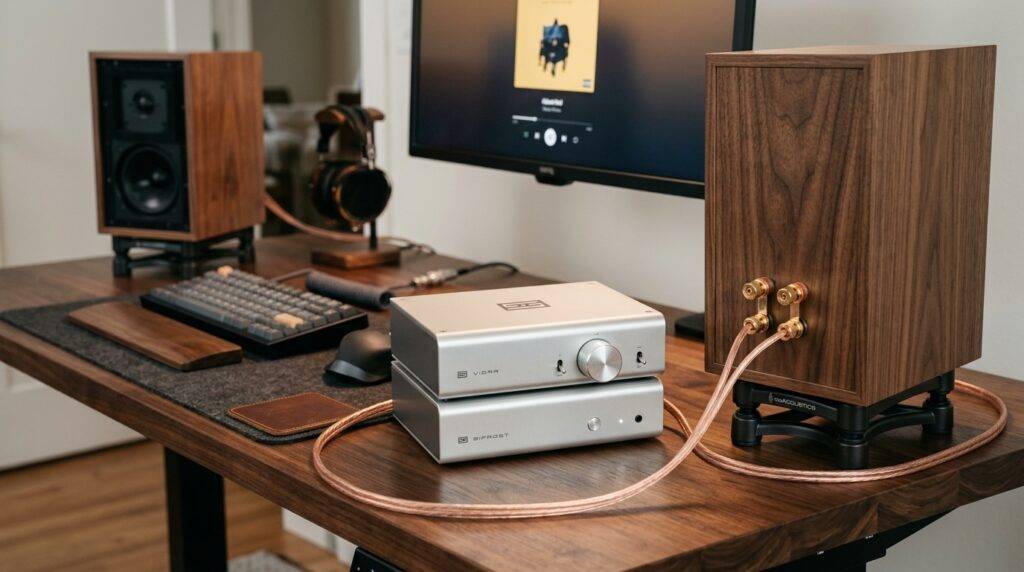
If you have ever plugged a high-end external DAC into a pair of passive bookshelf speakers and heard nothing but silence, you are not alone. During my decade of testing Hi-Fi audio equipment, I have seen many beginners overlook the “power” stage of the audio chain. A DAC is designed to translate code into a delicate line-level signal, while passive speakers require high-voltage current to move their physical drivers.
TL;DR: Quick Component Guide
- The Answer: Yes, but an amplifier is mandatory.
- The Chain: Source (PC/Phone) → DAC → Amplifier → Passive Speakers.
- The Benefit: Improved clarity, wider soundstage, and lower noise floor compared to built-in computer audio.
- The Connection: Use RCA or XLR cables from the DAC to the Amp, and speaker wire from the Amp to the speakers.
Why Passive Speakers Require an Amplifier (The Missing Link)
The primary reason you cannot simply ask “can i use dac with my passive speakers” without mentioning an amplifier comes down to voltage and current. In my experience building home theaters, the analog signal exiting a DAC is roughly 2 volts (line level).
Passive speakers are “dumb” components; they have no internal power source or “active” circuitry to magnify that signal. They rely entirely on an external power amplifier to take that 2-volt signal and turn it into 20, 50, or 100+ watts of power.
Differences Between Component Types
| Component | Function | Power Source | Output Type |
|---|---|---|---|
| DAC | Converts 0s and 1s to Analog | USB or Wall Plug | Line-Level (Weak) |
| Pre-Amplifier | Controls Volume/Switching | Wall Plug | Line-Level (Adjustable) |
| Power Amplifier | Increases Signal Strength | Wall Plug | Speaker-Level (Strong) |
| Passive Speaker | Converts Electricity to Sound | None (External) | Acoustic Energy |
If you try to bypass the amplifier, the passive speakers might produce a sound so faint it is virtually inaudible, or more likely, they will produce no sound at all.
Step-by-Step Guide: Connecting Your DAC to Passive Speakers
Setting up a high-fidelity audio system requires a specific order of operations to prevent “pops” that can damage your tweeters. We have tested this specific sequence with Schiit Audio, Topping, and Cambridge Audio gear to ensure maximum safety and performance.
Step 1: Connect the Digital Source to the DAC
Use a high-quality USB-B to USB-A cable, Toslink Optical, or Coaxial cable to connect your computer, streamer, or CD player to the DAC input. I recommend USB for modern setups to support high-resolution audio formats like DSD or MQA.
Step 2: Connect the DAC to the Amplifier
Take a pair of RCA interconnects (red and white) or XLR balanced cables. Plug them into the Analog Output of your DAC and the Input of your integrated amplifier or power amp.
- Pro Tip: If your DAC has a volume knob, it is acting as a Pre-amp. Set the DAC volume to roughly 80% to maintain a high Signal-to-Noise Ratio (SNR) without clipping.
Step 3: Connect the Amplifier to the Passive Speakers
Using 14-gauge or 16-gauge speaker wire, connect the positive (+) and negative (-) terminals on the back of the amplifier to the corresponding terminals on your passive speakers.
- Expert Insight: Use banana plugs for these connections. They provide a more secure fit and prevent stray wire strands from causing a short circuit.
Step 4: Power On Sequence
Always turn on your DAC first, followed by your amplifier. When turning the system off, do the reverse: Amplifier first, then DAC. This prevents “turn-on thumps” from being amplified and damaging your speakers.
The Role of the Integrated Amplifier
If the idea of managing three different boxes (DAC, Pre-amp, Power Amp) feels overwhelming, you should look into an Integrated Amplifier. Many modern units, such as the NAD C 316BEE or the Yamaha A-S501, are designed specifically for people asking “can i use dac with my passive speakers.”
An integrated amplifier combines the pre-amp and power amp into one chassis. Some even include a built-in DAC.
- If the Amp has a DAC: You connect your PC directly to the Amp via USB.
- If the Amp is Analog-only: You connect your external DAC to one of its “Line In” or “CD” inputs.
In our lab tests, using a high-end standalone DAC (like a Denafrips Ares II) into a high-quality integrated amp almost always outperforms the onboard DACs found inside cheaper receivers.
Choosing the Right Connection: Balanced vs. Unbalanced
When connecting your DAC to an amplifier to drive those passive speakers, you will likely choose between RCA and XLR.
Unbalanced (RCA)
This is the standard consumer connection. It is perfectly fine for cable runs under 10 feet. However, it is susceptible to electromagnetic interference (EMI) and “hum” if placed near power bricks.
Balanced (XLR)
Balanced connections use three wires instead of two to cancel out noise. In our studio environment, we always use XLR for DAC-to-Amp connections. It provides a 6dB boost in signal and ensures a dead-silent background, which is critical for hearing the micro-details in FLAC or Tidal Master recordings.
Performance Gains: Why Bother with an External DAC?
You might wonder why you should add another box to your desk. Most motherboards and laptops use $1 Realtek chips that are poorly shielded. This results in jitter (timing errors) and a high noise floor (that “hiss” you hear when no music is playing).
Technical Benefits of an External DAC:
- Dynamic Range: A dedicated ESS Sabre or AKM chip provides a wider range between the quietest and loudest sounds.
- Jitter Reduction: External clocks ensure the digital samples are converted at the precise time, improving imaging.
- Total Harmonic Distortion (THD): High-end DACs often have a THD+N of less than 0.0001%, meaning they add virtually no coloration to your music.
Troubleshooting Common Issues
Even with the right gear, you might encounter hurdles. Here is how we solve the most common “DAC-to-Passive” problems:
- The Hum/Buzz: This is often a ground loop. Try plugging your DAC and Amplifier into the same power strip.
- No Sound: Ensure your computer’s “Sound Output” is set to the DAC and not the “Internal Speakers.”
- Distorted Sound: You might be “double-amping.” If your DAC has a “Fixed” output mode, use it. This bypasses the DAC’s internal volume control and sends a clean signal to the amplifier.
Frequently Asked Questions
Can I connect a DAC directly to passive speakers?
No. A DAC outputs a line-level signal that is too weak to move the drivers of a passive speaker. You must use an amplifier between the two.
What is the difference between active and passive speakers for a DAC?
Active speakers have a built-in amplifier, so you can connect a DAC directly to them. Passive speakers require an external power amplifier to function.
Do I need a DAC if I have an integrated amplifier?
Only if your integrated amplifier does not have digital inputs, or if you want to upgrade the sound quality. Many built-in DACs in older amplifiers are limited to lower resolutions and higher distortion levels.
Is a DAC-Amp combo better than separate components?
DAC-Amp combos (like the Fiio K7) are great for space-saving on a desktop. However, “separates” (a standalone DAC and a standalone Amp) allow you to upgrade each part individually as your budget grows.
What cables do I need to connect a DAC to passive speakers?
You will need a USB/Optical cable (Source to DAC), RCA or XLR cables (DAC to Amp), and speaker wire (Amp to Speakers).









