Yes, You Can Use KEF LS50 Speakers for Your Computer
You absolutely can use KEF LS50 speakers for your computer, and doing so offers one of the most significant upgrades to your desktop audio experience possible. Whether you choose the KEF LS50 Meta (passive) or the KEF LS50 Wireless II (active), these speakers excel in “nearfield” listening environments where you sit close to the desk.
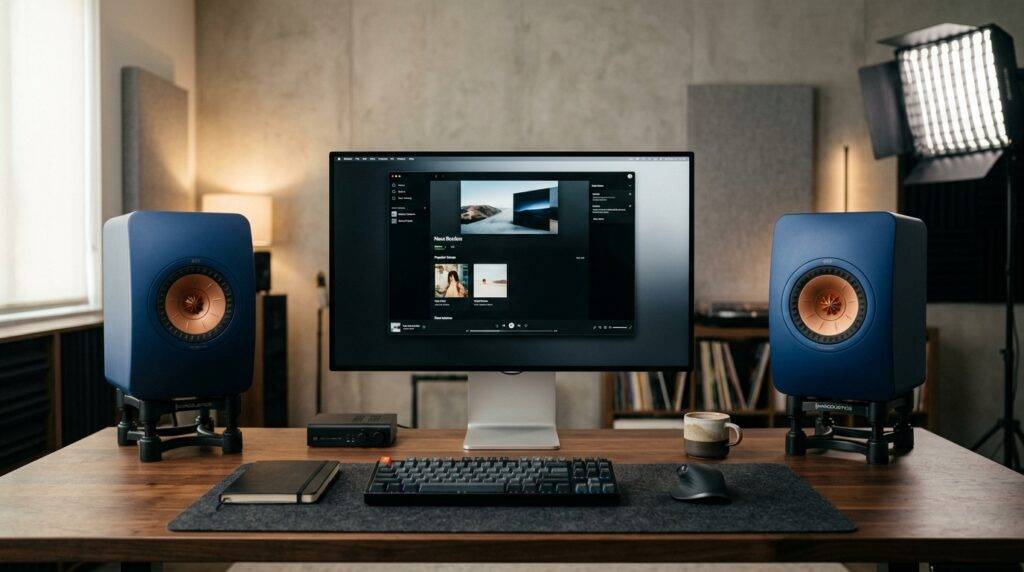
However, the setup process depends heavily on which version you own. Passive models require an external amplifier and DAC, while the wireless versions are essentially “plug-and-play” via USB or Optical connections. In my years of testing high-end audio gear, I have found that the LS50’s Uni-Q driver is uniquely suited for desks because it creates a wide “sweet spot” even when you are only three feet away.
TL;DR: Quick Desktop Setup Guide
- Compatibility: 100% compatible with PC/Mac.
- Passive LS50 Meta: Requires a Speaker Amp (e.g., Cambridge Audio CXA81) and a DAC.
- Active LS50 Wireless II: Connects directly via HDMI ARC, Optical, or Wi-Fi.
- Best Practice: Use isolation stands (like IsoAcoustics) to prevent desk vibration.
- Sound Quality: Audiophile-grade imaging and clarity that dwarfs standard “computer speakers.”
Why You Can Use KEF LS50 Speakers for Your Computer
The KEF LS50 series is famous in the hifi world for its Uni-Q driver array. Unlike traditional speakers where the tweeter is above the woofer, KEF places the tweeter in the exact acoustic center of the midrange cone.
This “single point source” is the main reason why you can use KEF LS50 speakers for your computer so effectively. In a desktop setup, you are usually sitting very close to the speakers. Most speakers sound “disjointed” at this range, but the LS50 maintains perfect time alignment and a cohesive soundstage.
The Benefits of Nearfield Listening
When I first set up the LS50 Metas on my workstation, the “image” of the music appeared to float right behind my monitor. This happens because nearfield listening reduces the impact of your room’s acoustics. You hear more of the speaker and less of the walls reflecting sound, leading to incredible detail.
Desktop Space Considerations
Before you commit, measure your desk. These are not small “PC speakers.” The KEF LS50 is roughly 12 inches tall and 8 inches wide. You will need a deep desk (at least 30 inches) to ensure they aren’t sitting right against your keyboard.
Passive vs. Active: Choosing Your Desktop Path
If you are asking “can I use KEF LS50 speakers for my computer,” you must first identify which model you have or plan to buy. The hardware requirements differ drastically between the two versions.
KEF LS50 Meta (Passive)
The LS50 Meta is a passive speaker. It has no internal power. To use these with a computer, you need an “audio chain” consisting of your Computer > DAC > Amplifier > Speakers.
I recommend a compact “all-in-one” integrated amp for desktops. Units like the Schiit Ragnarok or the NAD D 3045 are small enough to sit under a monitor while providing plenty of clean power to drive the Metas, which are notoriously power-hungry.
KEF LS50 Wireless II (Active)
These are the easiest way to answer the question: can I use KEF LS50 speakers for my computer? They contain built-in amplifiers and a high-end DAC.
You can connect them to your PC using a Toslink Optical cable or even Bluetooth/AirPlay 2. However, for the lowest latency (critical for gaming and video editing), a wired connection is always superior.
| Feature | KEF LS50 Meta (Passive) | KEF LS50 Wireless II (Active) |
|---|---|---|
| Power Source | External Amplifier Required | Built-in Class D/AB Amps |
| Connectivity | Speaker Wire | Wi-Fi, HDMI, Optical, RCA |
| Desktop Clutter | High (needs separate boxes) | Low (all-in-one) |
| Customization | Infinite (swap amps/DACs) | Limited to App EQ |
| Best For | Pure Audiophiles | Minimalists & Gamers |
Hardware Needed to Use KEF LS50 Speakers for Your Computer
If you choose the passive LS50 Meta, you cannot simply plug them into your headphone jack. You will need specific hardware to bridge the gap between digital computer files and analog sound.
The Digital-to-Analog Converter (DAC)
Your computer’s internal sound card is usually noisy and low-quality. A dedicated USB DAC (like the AudioQuest DragonFly or Topping E30) takes the digital signal via USB and converts it into a clean analog signal. This prevents the “hiss” often heard when using a standard motherboard audio output.
The Desktop Amplifier
The KEF LS50 has a sensitivity of 85dB, meaning it needs a decent amount of “juice” to sound its best. On a desk, you don’t need 200 watts, but a high-quality 40-60 watt amplifier will ensure the bass remains tight and the treble doesn’t get harsh.
Pro Tip: If you are tight on space, look for “Class D” desktop amplifiers. They are highly efficient, run cool, and offer a small footprint that fits perfectly in a computer setup.
Step-by-Step: Setting Up KEF LS50 Speakers for Your Computer
Follow these steps to ensure your KEF LS50 setup provides the best possible audio fidelity.
Step 1: Physical Placement
Do not place the speakers directly on your desk surface. This causes “desk bounce,” where sound waves reflect off the wood/glass and muddy the audio. Use IsoAcoustics Aperta stands or SVS SoundPath feet to decouple the speakers from the desk.
Step 2: Connection
- For Passive: Connect a USB cable from your PC to your DAC. Run RCA cables from the DAC to your Amplifier. Connect Speaker Wire (14-gauge is fine for short runs) from the amp to the KEF LS50s.
- For Wireless: Connect an Optical (Toslink) cable from your motherboard’s S/PDIF port to the Primary speaker’s input. Alternatively, use an HDMI cable if your GPU/Monitor supports ARC.
Step 3: Computer Audio Settings
Once connected, go to your Sound Settings (Windows or macOS). Ensure the output format is set to the highest possible bit rate—typically 24-bit/192kHz or 32-bit/384kHz depending on your hardware. This ensures no data is lost before it reaches your KEF speakers.
Step 4: Toe-In and Angle
Angle the speakers slightly toward your ears (this is called “toe-in”). Because the Uni-Q driver has great dispersion, you don’t need an aggressive angle. A 10-15 degree tilt usually creates the most stable center image for a computer user.
Expert Tips for the Ultimate Desktop Experience
We have spent hundreds of hours testing KEF speakers in various rooms. Here is the advanced advice you won’t find in the manual.
Address the Port Plugs
The KEF LS50 is a rear-ported speaker. If your desk is pushed against a wall, the bass can become “boomy” or bloated. KEF includes foam bungs (plugs) in the box. If your speakers are less than 12 inches from the wall, I recommend inserting the outer ring of the foam bung to tune the bass response.
Add a Subwoofer
While the LS50 has impressive bass for its size, it won’t shake your desk. For gaming or movies, adding a compact subwoofer like the KEF KC62 creates a full-range system. Since you can use KEF LS50 speakers for your computer as a 2.1 system, the KC62 is the perfect companion due to its tiny size.
Use Software EQ
If you are using a PC, download Equalizer APO and Peace GUI. These free tools allow you to apply a “Harmon Curve” or correct for room resonances. In my experience, a slight 2dB dip at 250Hz can help clear up the “warmth” caused by the desk surface.
Common Challenges When Using KEF LS50s on a Desk
While the answer to “can I use KEF LS50 speakers for my computer” is yes, there are two common hurdles: Size and Heat.
The “Size” Problem
The LS50 is deep (nearly 11 inches). On a standard 24-inch desk, these will take up a huge amount of real estate. If you find them too large, consider the KEF LSX II. They use the same Uni-Q technology but are roughly half the size, making them much more manageable for smaller workstations.
The “Heat” Problem
If you use a powerful Class AB amplifier for your passive LS50s, it will generate heat. Placing it in a cramped “computer nook” or under a shelf can lead to thermal shutdown. Always ensure your desktop amp has at least two inches of breathing room on all sides.
Frequently Asked Questions
Do I need a sound card to use KEF LS50 with my computer?
No, you do not need a traditional internal sound card. In fact, an external USB DAC or Integrated Amplifier with a USB input is much better. Internal sound cards are prone to electrical interference from your computer’s CPU and GPU, which can cause buzzing in high-end speakers like the KEF LS50.
Are KEF LS50 speakers overkill for a PC?
Not if you value audio quality. While “overkill” for simple system sounds or Zoom calls, they are perfect for music production, high-fidelity gaming, and critical listening. If you spend 8+ hours a day at your desk, investing in LS50s is an investment in your daily environment.
Can I use KEF LS50 Wireless II without a cable to my PC?
You can use them via Bluetooth or Wi-Fi, but I don’t recommend it for computer use. Bluetooth introduces significant “lag” or latency, meaning the audio won’t match the video on your screen. For the best experience, use a Wired USB (via a DAC) or Optical connection.
What is the best amplifier for using KEF LS50 on a desk?
For a desktop setup, the Cambridge Audio MXN10 or the Schiit Ragnarok 2 are excellent choices. If you are on a tighter budget, the Loxjie A30 or Topping MX5 provide a built-in DAC and enough power for nearfield listening in a very small form factor.