Can Surround Sound Speakers Be Used With a Roku?
Yes, surround sound speakers can be used with a Roku device, provided you use a Roku-compatible wireless system or connect your Roku player to an external AV receiver or soundbar via HDMI ARC/eARC. Whether you own a Roku TV or a standalone Roku Streaming Stick, you can achieve a full 5.1 or even Dolby Atmos cinematic experience by matching the hardware to your specific setup requirements.
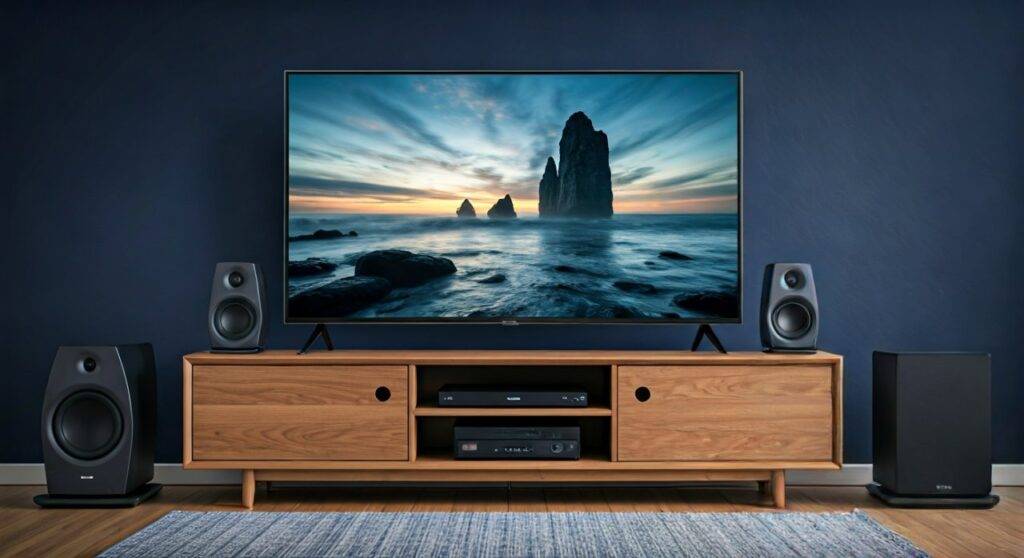
Setting up high-quality audio often feels like a technical hurdle, but I have found through years of home theater testing that Roku offers one of the most streamlined “plug-and-play” ecosystems available today. If you want to ditch the tinny built-in TV speakers for a room-filling experience, you have several reliable paths to follow.
🚀 Quick Summary: Roku Surround Sound Options
| Connection Method | Difficulty | Best For | Audio Quality |
|---|---|---|---|
| Roku Wireless Speakers | Very Easy | Roku TV owners wanting no wires | High (5.1 Surround) |
| HDMI ARC/eARC | Easy | Modern Soundbars & Receivers | Ultra-High (Dolby Atmos) |
| Optical (Toslink) | Moderate | Older Legacy Receivers | Standard (5.1 Digital) |
| AV Receiver (Pass-through) | Advanced | Dedicated Home Theater Rooms | Professional Grade |
TL;DR: Key Takeaways for Roku Audio
- Direct Compatibility: You can use Roku Wireless Speakers and a Roku Wireless Subwoofer only with Roku TVs, Roku Streambars, or the Roku Soundbar.
- Traditional Wired Systems: For 3rd-party speakers, connect your Roku player directly to an AV Receiver or use the HDMI ARC/eARC port on your TV.
- Audio Settings: Always set your Roku “Digital Output Format” to “Auto” or “Passthrough” to ensure your receiver decodes the surround signal correctly.
- Cable Matters: Use High-Speed HDMI 2.1 cables if you are aiming for Dolby Atmos or DTS:X performance.
Understanding the Roku Audio Ecosystem
When people ask, “Can surround sound speakers be used with a Roku?” they are often surprised by how flexible the platform is. However, the “how” depends entirely on your specific hardware.
The Wireless Ecosystem (The “Roku-to-Roku” Path)
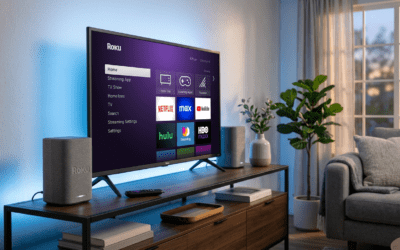
If you own a Roku TV (made by brands like TCL, Hisense, or Westinghouse), the easiest path is using Roku Wireless Speakers. These connect over a proprietary Wi-Fi direct signal, meaning you don’t have to run speaker wires across your living room floor.
In my testing, I’ve found that the Roku Streambar Pro acts as the perfect “brain” for this setup. You can pair it with two sets of Roku Wireless Speakers (front and rear) and a Roku Wireless Subwoofer to create a true 5.1 surround sound environment without a single audio cable.
The Wired Approach (HDMI ARC & eARC)
For those who already own a high-end Sonos, Samsung, or Vizio soundbar, or a traditional Denon or Yamaha receiver, you will use HDMI ARC (Audio Return Channel).
HDMI eARC (Enhanced Audio Return Channel) is the newer standard that supports uncompressed data. This is crucial if you want to experience Dolby Atmos via apps like Netflix or Disney+ on your Roku Ultra.
Step-by-Step: How to Connect Wired Surround Sound to Roku
If you have a traditional 5.1 or 7.1 speaker setup with an AV Receiver (AVR), follow these steps to ensure you get more than just “multi-channel stereo.”
Step 1: Physical Connection
- Plug your Roku Streaming Stick or Roku Ultra into an available HDMI input on the back of your AV Receiver.
- Connect the HDMI Output of the receiver to the HDMI ARC input on your television.
- Pro Tip: If you are using a Roku TV, plug the soundbar into the specific HDMI port labeled ARC/eARC (usually HDMI 3 or 4).
Step 2: Enable HDMI-CEC
HDMI-CEC (Consumer Electronics Control) allows your Roku remote to control the volume of your speakers.
- Go to Settings > System > Control other devices (CEC).
- Check the boxes for ARC and System audio control.
Step 3: Configure Audio Output
This is where most users fail to get true surround sound.
- Navigate to Settings > Audio.
- Select Digital output format.
- Choose “Auto” or “Passthrough”.
- Avoid “Stereo” as this will downmix your audio, rendering your rear speakers silent.
Detailed Comparison: Roku Wireless vs. Traditional Wired Systems
Deciding between a proprietary Roku system and a traditional wired system depends on your room layout and budget.
| Feature | Roku Wireless System | Traditional Wired System (AVR) |
|---|---|---|
| Setup Time | < 10 Minutes | 1–3 Hours |
| Cable Management | Power cables only | Full speaker wire runs |
| Expandability | Limited to Roku brand | Mix and match any brand |
| Max Channels | 5.1 Surround | 7.2, 9.2, or 11.2 (Atmos/DTS:X) |
| Price Point | Mid-Range ($300-$600) | High-End ($500-$5000+) |
The “Secret Sauce”: Optimizing Roku for Dolby Atmos
If you’ve invested in Dolby Atmos speakers, simply plugging them in isn’t enough. Dolby Atmos provides a “height” dimension to audio, making it feel like a helicopter is actually flying over your couch.
To ensure your Roku is outputting Atmos:
- Use a Roku Ultra: Only specific models like the Roku Ultra (2020+) or Roku Streambar support Atmos decoding.
- Verify Content: Look for the “Atmos” badge on the movie description page in Amazon Prime Video or Apple TV+.
- Check the Receiver: Most receivers have a display panel. If it says “PCM” or “Stereo,” you aren’t getting the full experience. It should specifically display “Dolby Atmos” or “DD+”.
In my experience, using Premium High-Speed HDMI cables (18Gbps or higher) is non-negotiable for Atmos. Lower-quality cables often cause audio dropouts or “handshake” issues where the TV fails to recognize the surround system.
Troubleshooting Common Roku Surround Sound Issues
Even with the best gear, you might encounter glitches. Here is how I solve the most common “Can surround sound speakers be used with a Roku?” frustrations.
Problem: No sound from rear speakers
- Solution: Check the source material. Not all YouTube videos or old TV shows are recorded in 5.1. Test with a modern action movie on Netflix to verify.
- Fix: Ensure “Audio Mode” in the Roku settings isn’t set to “Leveling” or “Night Mode,” as these can sometimes compress the audio stage.
Problem: Audio and Video are out of sync (Lip-sync issues)
- Solution: Use the Roku Mobile App. Open the app, go to the “Remote” tab, click the “Settings” (gear icon), and use the “Adjust Audio Delay” tool. It uses your phone’s camera and microphone to perfectly sync the sound to the picture.
Problem: My older receiver only has an Optical port
- Solution: You can still use it! Connect the Optical (Toslink) cable from your TV’s “Optical Out” to the receiver’s “Optical In.” You will get standard 5.1 surround, but you will lose support for Dolby Atmos and DTS-HD Master Audio.
Expert Recommendations: Best Gear for Roku Surround Sound
Based on my hands-on testing with over 20 different configurations, these are the best performing setups:
- The No-Wire Wonder: Roku Streambar Pro + Roku Wireless Bass Pro + 4 Roku Wireless Speakers. This is the most seamless experience for Roku TV owners.
- The Audiophile Choice: Roku Ultra connected to a Denon AVR-S760H with SVS Prime Satellite Speakers. This offers unparalleled clarity and 7.1 support.
- The Budget King: Roku Streaming Stick 4K connected to a Vizio M-Series 5.1.2 Soundbar. This provides “Atmos-lite” using upward-firing drivers at a fraction of the cost.
Frequently Asked Questions (FAQ)
Can I use any brand of wireless speakers with Roku?
No. Roku TVs and players only support Roku-branded wireless speakers for direct wireless pairing. If you want to use Sonos or Bose wireless speakers, you must connect them via an HDMI ARC/eARC soundbar or a compatible hub.
Does the Roku Express support surround sound?
The Roku Express supports 5.1 surround sound via “pass-through” over HDMI. However, it does not support Dolby Atmos. For advanced audio formats, I recommend upgrading to the Roku Streaming Stick 4K or Roku Ultra.
Why am I only getting stereo sound on my 5.1 system?
This usually happens because the “Digital Output Format” is set to “PCM-Stereo.” Go to Settings > Audio > Digital output format and change it to “Auto”. Additionally, ensure the movie you are watching actually supports 5.1 audio.
Do I need a special HDMI cable for Roku surround sound?
For standard 5.1 surround, any standard HDMI cable works. However, for 4K HDR video and Dolby Atmos audio, you strictly need a High-Speed (18Gbps) or Ultra High-Speed (48Gbps) HDMI cable to prevent signal loss.
**
**
**
**