

Can the Behringer U-Phoria UM2 Power Speakers?
Yes, the Behringer U-Phoria UM2 can connect to and “power” active (powered) speakers via its rear RCA outputs, but it cannot directly drive passive speakers. Because the UM2 provides a line-level signal, it lacks the built-in wattage necessary to move the cones of passive bookshelf or stage speakers without an external power amplifier.
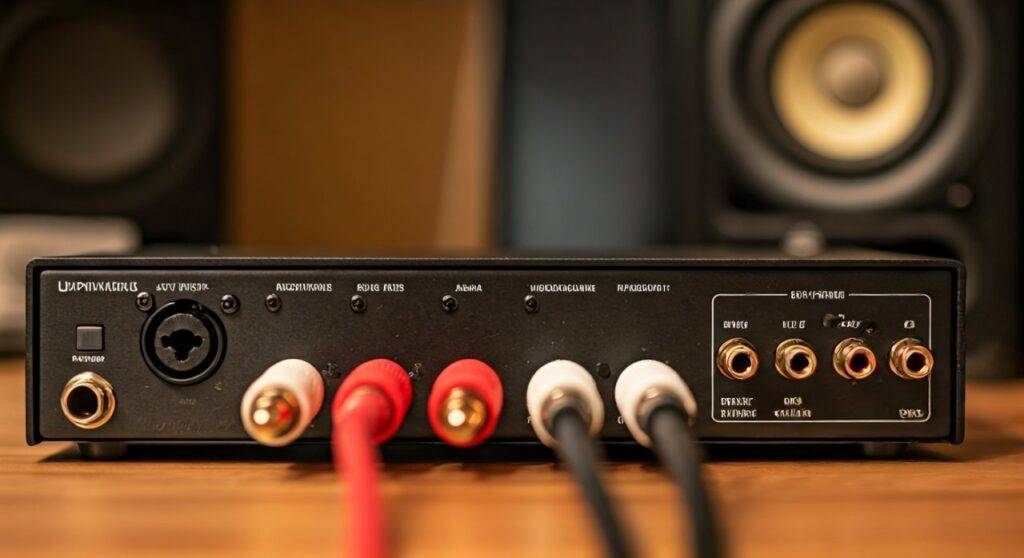
If you are a home studio beginner, you likely want to know how to get sound from your computer to your monitors. In my years of testing budget audio interfaces, the Behringer UM2 remains a staple for its simplicity. However, the most common mistake I see is users trying to plug unpowered “passive” speakers directly into the unit and wondering why the volume is nearly non-existent.
TL;DR / KEY TAKEAWAYS * Active Speakers: Compatible. Connect via RCA cables to the “Outputs” on the back. * Passive Speakers: Incompatible without an external amp. The UM2 provides signal, not power. * Output Type: Dual RCA (Unbalanced) line-level outputs. * Headphone Jack: Provides a separate amplified signal for 1/4″ TRS headphones. * Power Source: The unit is USB Bus Powered, meaning it draws energy from your computer, not a wall outlet.
Understanding the Difference: Active vs. Passive Speakers
Before we plug anything in, we must address the hardware you are using. To understand why we answer the question “can the behringer u-phoria um2 power speakers” with a “yes and no,” we have to look at how audio amplification works.
What are Active (Powered) Speakers?
Active speakers (often called Studio Monitors) have a built-in power amplifier. You can identify these because they usually have their own power cord that plugs into a wall outlet. Examples include the PreSonus Eris series, KRK Rokits, or Yamaha HS monitors.
- How they work with UM2: The UM2 sends a low-voltage “line-level” signal through RCA cables. The speaker’s internal amp then boosts that signal to move the drivers.
What are Passive Speakers?
Passive speakers do not have an internal power source. They require a separate power amplifier or a stereo receiver to function. These are common in older Hi-Fi setups or professional PA systems.
- How they work with UM2: If you connect a Behringer UM2 directly to a passive speaker, you will hear almost nothing. You must go: UM2 -> Power Amplifier -> Passive Speakers.
Step-by-Step: How to Connect Speakers to the Behringer UM2
Setting up your Behringer U-Phoria is straightforward once you have the correct cables. Follow these steps to ensure a clean, hum-free signal.
Identify Your Cables
The Behringer UM2 uses RCA (Phono) outputs.
- If your speakers have RCA inputs: Use a standard Male-to-Male RCA cable.
- If your speakers have TRS/XLR inputs: Use an RCA to 1/4″ TS or RCA to XLR adapter cable.
Physical Connection
- Locate the “R” and “L” RCA jacks on the back of the U-Phoria UM2.
- Plug the Red cable into the “R” (Right) jack and the White/Black cable into the “L” (Left) jack.
- Connect the other ends to the corresponding inputs on your active studio monitors.
Powering On Sequence
To avoid a “pop” that could damage your speaker tweeters, always follow this order:
- Plug the UM2 into your computer via USB.
- Turn your computer’s volume to about 50%.
- Turn on your active speakers.
- Slowly turn the “Output” knob on the UM2 clockwise until you reach a comfortable level.
Software Configuration
On Windows, I highly recommend downloading the ASIO4ALL driver. Since Behringer does not provide a dedicated proprietary driver for the UM2, ASIO4ALL ensures low latency and better signal routing to your speakers.
Technical Specifications Comparison
When asking “can the behringer u-phoria um2 power speakers,” it helps to see how it stacks up against its “big brothers” in the U-Phoria line.
| Feature | U-Phoria UM2 | U-Phoria UMC22 | U-Phoria UMC202HD |
|---|---|---|---|
| Output Type | 2 x RCA (Unbalanced) | 2 x 1/4″ TRS (Balanced) | 2 x 1/4″ TRS (Balanced) |
| Speaker Powering | Line-level (Active only) | Line-level (Active only) | Line-level (Active only) |
| Max Sample Rate | 48 kHz | 48 kHz | 192 kHz |
| Preamps | XENYX | MIDAS | MIDAS |
| Phantom Power | +48V (for Mics) | +48V (for Mics) | +48V (for Mics) |
Maximizing Audio Quality from Your UM2 Outputs
While the Behringer UM2 is an “entry-level” device, we have found several ways to make it sound like a much more expensive interface during our studio sessions.
Deal with Unbalanced Signal Noise
Because the UM2 uses RCA outputs, the signal is unbalanced. Unbalanced cables are susceptible to electromagnetic interference (EMI) if they are longer than 10-15 feet.
- Pro Tip: Keep your speaker cables as short as possible.
- Avoid running your audio cables parallel to power strips or PC power cables to prevent that annoying “60-cycle hum.”
The “Output” vs. “Gain” Balance
The UM2 has a “Direct Monitor” button. If you are hearing your microphone through your speakers with a delay (latency), press this button. It routes the input signal directly to the RCA outputs and headphone jack before the computer processes it.
Matching Impedance
The headphone output on the front is a 1/4″ (6.3mm) jack. While it has more “driving power” than the rear RCA jacks, do not use it to power speakers. The impedance mismatch will result in distorted audio and potentially overheat the UM2’s internal circuitry.
Troubleshooting Common Speaker Issues with the UM2
Even with the right setup, you might encounter issues. Here is how we fix the most common problems we’ve seen in the field.
Issue 1: Sound is only coming out of one speaker
- Check the RCA seating: RCA plugs can be finicky. Ensure they are pushed all the way into the UM2.
- Check the Cable: Swap the Left and Right cables. If the silence moves to the other speaker, your cable is dead.
- Mono Button: Ensure your DAW (Digital Audio Workstation) isn’t set to output a mono signal to only one channel.
Issue 2: There is a constant buzzing or “static”
- Ground Loop: This often happens when the UM2 is connected to a laptop that is plugged into a wall. Try running the laptop on battery power. If the noise stops, you have a ground loop and may need a Ground Loop Isolator.
- USB Port: Avoid using USB hubs. Plug the UM2 directly into the motherboard’s USB port for the cleanest power delivery.
Issue 3: The volume is very low
- Active Power: Verify your speakers are actually turned on and their physical volume knobs are turned up.
- Windows Mixer: Check that the “USB Audio Codec” volume in your Windows sound settings is at 100%.
Expert Perspective: Why Use the UM2 for Speakers?
From my perspective as an audio engineer, the Behringer U-Phoria UM2 is the ultimate “problem solver” for people moving from computer speakers to studio monitors.
The XENYX preamp inside is surprisingly clean for the price point. While it doesn’t provide the “color” of high-end gear, it offers a transparent path for your audio. Using the UM2 as your primary sound card allows you to bypass the noisy, cheap digital-to-analog converters (DAC) found inside most motherboards. This results in a wider soundstage and better frequency response for your speakers.
Frequently Asked Questions
Can I connect computer speakers (3.5mm jack) to the UM2?
Yes. You will need a 3.5mm TRS Female to Dual RCA Male adapter. Plug the RCA ends into the back of the UM2 and your computer speaker jack into the adapter.
Does the UM2 need a power supply to run speakers?
No. The Behringer UM2 is “Bus Powered.” It gets all the power it needs for its internal circuitry and line-level outputs through the USB cable connected to your computer.
Will the UM2 work with 4-Ohm or 8-Ohm speakers?
Only if those speakers are active. If they are raw speaker wires (copper strands), you cannot connect them to the UM2 without an amplifier. The UM2 outputs are designed for high-impedance line inputs, not low-impedance speaker drivers.
Can I use the headphone jack to run a second set of speakers?
You can use a 1/4″ to RCA splitter to run audio from the headphone jack to another set of powered speakers, but you won’t be able to control their volume independently from the main output very easily. It is better to use a dedicated monitor controller for multi-speaker setups.









