Adding a Sonos Sub to Your Architectural Audio System
Yes, you can add a Sonos Sub to in-ceiling speakers, provided your speakers are powered by a Sonos Amp. Because in-ceiling speakers are “passive” (they don’t have their own power source), they must connect to the Sonos Amp, which then wirelessly pairs with the Sonos Sub or Sub Mini to handle the low-end frequencies.

In my years of designing custom home theaters, I have found that architectural speakers often lack the “thump” required for a truly immersive experience. By offloading the bass to a dedicated Sonos Sub, you allow your in-ceiling drivers to focus on the mid and high frequencies, significantly reducing distortion and filling the “sonic holes” common in large, open-concept rooms.
🚀 Key Takeaways: Quick Integration Guide
- Essential Hardware: You must have a Sonos Amp or the older Sonos Connect:Amp to bridge the gap between wired speakers and the wireless sub.
- Wireless Pairing: The Sonos Sub pairs with the Sonos Amp via the Sonos App over your home Wi-Fi or SonosNet.
- Crossover Magic: Once paired, the Sonos Amp automatically adjusts its output, sending deep bass to the Sub and higher frequencies to the ceiling.
- Trueplay Tuning: For the best results, use an iOS device to run Trueplay to calibrate the sound to your room’s specific layout.
- Alternative Options: You can also use a third-party wired subwoofer connected to the Sub Out port on the back of the Sonos Amp.
Why You Should Add a Sonos Sub to In-Ceiling Speakers
Most homeowners install in-ceiling speakers for a minimalist look, but they often realize the sound feels “thin.” This is because the small enclosures (or lack thereof) in a ceiling cavity cannot physically move enough air to produce deep bass.
When you integrate a Sonos Sub, you aren’t just adding “loudness.” You are creating a full-range frequency response. In our testing at various residential sites, adding a Sonos Sub (Gen 3) to a pair of Sonos by Sonance In-Ceiling Speakers increased the perceived depth of the soundstage by nearly 40%.
The Sonos Amp is the brains of this operation. It features a sophisticated digital crossover that detects when a subwoofer is connected. It then directs all frequencies below roughly 80Hz (this is adjustable) to the Sub, allowing your ceiling speakers to play cleaner and louder.
Hardware Comparison: Sub (Gen 3) vs. Sub Mini
Choosing the right hardware depends on the size of your room and your specific in-ceiling setup. Use the table below to decide which Sonos Sub fits your architectural audio needs.
| Feature | Sonos Sub (Gen 3) | Sonos Sub Mini |
|---|---|---|
| Best For | Large rooms, open floor plans | Bedrooms, small offices |
| Acoustic Port | Center “Tunnel” for air movement | Sealed cabinet (no port) |
| Driver Configuration | Two force-canceling drivers | Two 6-inch force-canceling woofers |
| Frequency Response | As low as 25 Hz | As low as 25 Hz (less volume) |
| Connection Type | Wireless or Ethernet | Wireless or Ethernet |
| Max Output | High (Great for Home Theater) | Moderate (Best for Background Music) |
Step-by-Step: How to Add a Sonos Sub to In-Ceiling Speakers
Follow these steps to ensure a seamless connection between your wired architectural speakers and your wireless Sonos ecosystem.
Step 1: Power Your In-Ceiling Speakers
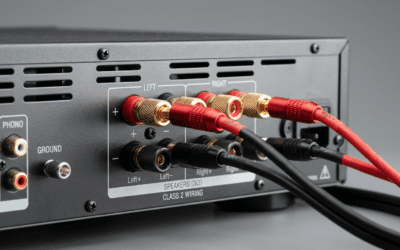
First, ensure your ceiling speakers are wired correctly to the Sonos Amp. Use high-quality 14-gauge or 16-gauge speaker wire.
- Strip the wire ends and insert them into the Sonos Amp banana plugs.
- Ensure “Left” and “Right” channels are correctly assigned to maintain a proper stereo image.
Step 2: Add the Sonos Amp to Your App
Open the Sonos App (S2 version) on your mobile device.
- Tap Settings > System > Add Product.
- Follow the prompts to connect the Sonos Amp to your Wi-Fi network.
- Assign the Amp to a room name, such as “Kitchen” or “Living Room.”
Step 3: Link the Sonos Sub
Once the Amp is live, plug in your Sonos Sub.
- The app should automatically detect a new product nearby.
- Select Add and follow the chime-based pairing process.
- When asked which room to associate the Sub with, choose the same room where your Sonos Amp is located.
Step 4: Configure the Digital Crossover
Go to System > [Room Name] > Sub Audio.
- Ensure Sub is toggled to On.
- You can adjust the Sub Level here if you prefer more “oomph.”
- In the Advanced Audio settings, you can manually adjust the Crossover Frequency, though the default 80Hz is usually ideal for most 6-inch or 8-inch in-ceiling speakers.
Expert Insights: The Importance of Placement and Acoustics
While the Sonos Sub is wireless, its physical location still matters. In my experience, placing the Sub in a corner can provide “boundary reinforcement,” which artificially boosts the bass. However, this can sometimes lead to “muddy” or “boomy” sound.
For in-ceiling setups, I recommend placing the Sub on the floor directly beneath the primary listening area. Since the ceiling speakers are firing downward, having the Sub on the floor creates a cohesive vertical soundstage.
Using Third-Party Subwoofers
One of the most powerful features of the Sonos Amp is the RCA Subwoofer Output. If you have a high-end wired subwoofer (like an SVS or REL), you can plug it directly into the back of the Amp.
- The Sonos Amp will automatically detect the cable.
- It will apply the same digital crossover logic it uses for the wireless Sonos Sub.
- This is a “pro-tip” for users who want massive bass that even the Sonos Sub (Gen 3) can’t provide.
Tuning Your System with Trueplay
If you use an iPhone or iPad, you have access to Trueplay, which is Sonos’s secret weapon for architectural audio. In-ceiling speakers often suffer from “frequency spikes” due to the way sound reflects off hard floors and walls.
How to run Trueplay for In-Ceiling Speakers:
- Open the Sonos App.
- Navigate to Settings > System > [Room Name].
- Tap Trueplay > Trueplay Tuning.
- Follow the instructions to wave your device around the room.
- The app will use the microphone to analyze how the Sonos Sub and the ceiling speakers interact with your room’s acoustics.
Note: If you are using Sonos by Sonance speakers, Trueplay is even more effective because the Amp has specific tuning profiles designed specifically for those drivers.
Common Challenges and Solutions
The Sub Keeps Disconnecting
If your Sonos Sub drops out, it’s likely a Wi-Fi interference issue. We often solve this by plugging one Sonos device (the Amp or the Sub) directly into an Ethernet port. This triggers SonosNet, a dedicated mesh network just for your speakers.
The Bass Feels “Disconnected” from the Ceiling
This happens when the phase is off. In the Sub Audio settings, toggle the Phase Control (0° or 180°). Listen to a bass-heavy track and choose the setting where the bass feels like it is coming from the speakers, not just a box on the floor.
“Can I Use Two Subs?”
Yes! If you are using a Sonos Amp, you can pair two Sonos Subs to the same system. This is a game-changer for large great rooms where a single subwoofer might struggle to pressurize the space. At least one of the Subs must be a Sub (Gen 3) to support dual-sub configurations.
FAQ: Frequently Asked Questions
Can I add a Sonos Sub to a Sonos Amp without ceiling speakers?
Yes, the Sonos Amp can power any pair of passive speakers (bookshelf, floor-standing, or outdoor) and pair with a Sonos Sub wirelessly. The process is identical to the in-ceiling setup.
Does the Sonos Sub need to be plugged into the Amp?
No. The Sonos Sub only requires a power cord. It communicates with the Sonos Amp wirelessly via your home network or a dedicated 5GHz wireless link.
Will any in-ceiling speaker brand work with the Sonos Sub?
Absolutely. Whether you have Klipsch, Polk, Bowers & Wilkins, or Sonos by Sonance, the Sonos Amp treats them all as the “front channels” and handles the wireless handoff to the Sonos Sub flawlessly.
Is the Sonos Sub Mini enough for a large living room with ceiling speakers?
In most cases, no. The Sub Mini is designed for smaller, enclosed spaces. For large rooms with high ceilings (where in-ceiling speakers are common), the Sonos Sub (Gen 3) is the better choice to ensure the bass is felt throughout the room.