Can You Add a Powered Subwoofer to Bluetooth Speakers?
Yes, you can add a powered subwoofer to Bluetooth speakers, but it is not as simple as “plug and play” because Bluetooth usually only supports one connection at a time. To make this work, you typically need a Bluetooth transmitter with dual-output, an audio splitter, or specialized software like Voicemeeter on a PC to route audio to two devices simultaneously.
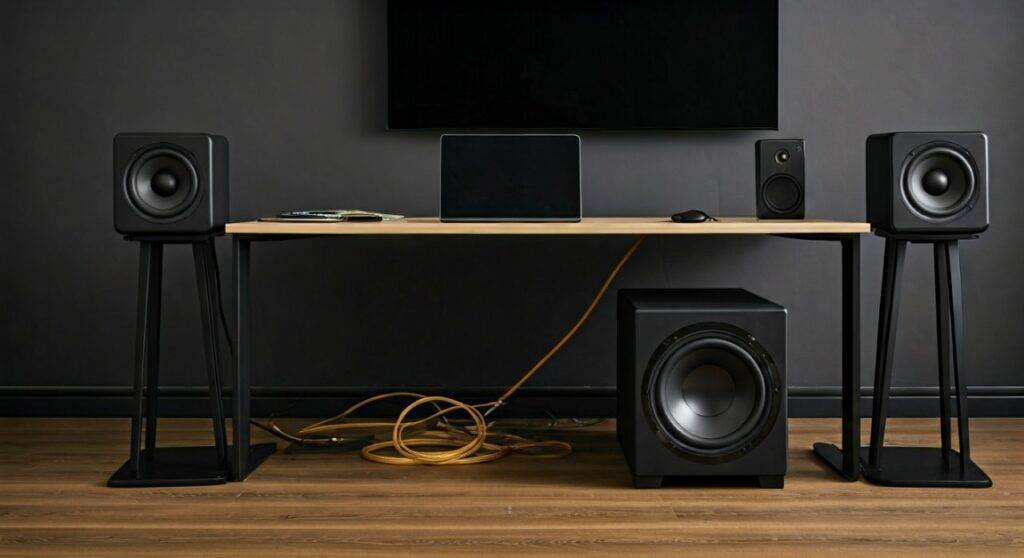
If your speakers lack a physical Sub-Out port, you will need to intercept the signal at the source or use a stereo receiver that bridges the gap between your wireless signal and your wired subwoofer.
TL;DR: Quick Guide to Connecting Your Subwoofer
- The Hardware Fix: Use a 3.5mm Y-Splitter from your audio source (phone/PC) to send one signal to the Bluetooth transmitter and the other to your powered subwoofer.
- The Software Fix: On Windows, use Voicemeeter Banana to output audio to your Bluetooth speakers and your subwoofer’s interface at the same time.
- The USB Route: If you are asking can you add a powered subwoofer to bluetooth speakers usb, the answer is yes via a USB Audio Interface or a USB-to-RCA DAC.
- The Latency Warning: Bluetooth has inherent delay; always look for aptX Low Latency devices to prevent your bass from trailing behind the vocals.
Understanding the Bluetooth Audio Limitation
In my years of testing home theater setups, the biggest hurdle I see is the Bluetooth A2DP profile. Standard Bluetooth is designed for a 1-to-1 relationship—one source, one sink. When you try to add a powered subwoofer to a set of Bluetooth speakers, the source (like your iPhone) doesn’t naturally know how to “split” the frequencies.
Unlike a traditional 5.1 Surround Sound receiver that handles the crossover (sending highs to speakers and lows to the sub), a Bluetooth connection sends the full frequency range to the speakers. To integrate a sub, we have to manually create a “crossover” or a parallel signal path.
Methods to Connect a Powered Subwoofer to Bluetooth Speakers
The Analog Splitter Method (Most Reliable)
This is the most effective way to ensure zero-latency sync between your components. You bypass the Bluetooth connection of the speaker and use an external transmitter.
- Plug a 3.5mm Y-Splitter into your PC or TV headphone jack.
- Connect a Bluetooth Transmitter to one end of the splitter.
- Connect an RCA-to-3.5mm cable from the other end of the splitter to the Line-In on your powered subwoofer.
- Pair your Bluetooth speakers to the transmitter.
Using a Bluetooth Transmitter with Multiple Outputs
Some high-end transmitters, such as those from 1Mii or Avantree, allow “Dual Link” capabilities. However, be careful: most dual-link transmitters are designed for two pairs of headphones, not a speaker and a sub. I recommend using a transmitter that has both an Optical Out and a Bluetooth signal active simultaneously.
The PC Software Route (Voicemeeter)
If your source is a computer, you don’t need extra cables. Voicemeeter Banana is a free “Virtual Audio Mixer.”
- Set your Bluetooth Speakers as Hardware Out A1.
- Set your Powered Subwoofer (connected via the PC’s 3.5mm jack or USB) as Hardware Out A2.
- Adjust the Internal Latency settings in the software to ensure the Bluetooth lag matches the wired sub.
Can You Add a Powered Subwoofer to Bluetooth Speakers via USB?
Many users specifically ask: can you add a powered subwoofer to bluetooth speakers usb? This is a clever workaround for modern setups that lack analog jacks.
To do this, you use a USB Audio Interface (like a Focusrite Scarlett or a cheaper Creative Sound Blaster). The USB interface acts as your primary sound card. You then take the Monitor Outputs from the USB interface and send them to your subwoofer, while your PC handles the Bluetooth transmission to your speakers.
Pro Tip: I have found that using a USB DAC specifically for the subwoofer often results in cleaner bass because it isolates the low-end signal from the electrical noise inside your computer.
| Connection Method | Difficulty | Latency Risk | Required Hardware |
|---|---|---|---|
| 3.5mm Y-Splitter | Easy | Low | Splitter, Aux Cables |
| Bluetooth Transmitter | Medium | High | Dual-Link Transmitter |
| USB Audio Interface | Medium | Low | USB DAC, RCA Cables |
| Software Routing | Hard | Variable | Voicemeeter, PC |
Solving the Latency Issue (Lip-Sync Errors)
The “elephant in the room” when you add a powered subwoofer to bluetooth speakers is latency. Bluetooth audio can lag anywhere from 40ms to 200ms. If your subwoofer is wired and your speakers are wireless, your bass will hit before the sound comes out of the speakers.
How to fix it:
- Use aptX Low Latency (LL): Ensure both your transmitter and speakers support aptX LL. This reduces lag to under 40ms, which is imperceptible.
- Adjust Delay in VLC/MPC: If you are watching movies, use the “Audio Sync” feature to delay the wired subwoofer signal by a few milliseconds to match the Bluetooth speakers.
- Receiver Calibration: If using a modern AV Receiver, use the built-in calibration microphone to let the system automatically calculate the distance and delay.
Step-by-Step Guide: Setting Up Your Bluetooth Subwoofer System
Step 1: Check your Subwoofer Inputs
Most powered subwoofers (like the Polk Audio PSW10 or SVS SB-1000) have RCA inputs. You will likely need a 3.5mm to Dual RCA Male cable.
Step 2: Establish the Primary Connection
Connect your Bluetooth speakers to your phone or PC as you normally would. Test the sound to ensure they are the default output.
Step 3: Integrate the Subwoofer
If using the splitter method, plug the splitter into your source. In my experience, using a powered 3.5mm amplifier/splitter is better than a passive one, as it prevents signal loss when the audio is “split” between two devices.
Step 4: Phase Adjustment
Check the back of your subwoofer for a Phase Switch (0° – 180°). Because Bluetooth creates a slight delay, your speakers and sub might be “out of phase,” meaning they cancel each other’s sound out. Toggle this switch; whichever setting sounds “meatier” or louder is the correct one.
Step 5: Set the Crossover
Since your Bluetooth speakers are likely playing the full range, set your subwoofer crossover dial to approximately 80Hz to 100Hz. This ensures the sub only handles the deep thumps while the speakers handle the vocals and melodies.
Expert Recommendations for Hardware
When I build these hybrid setups, I prefer specific “workhorse” gear that I know can handle the sync requirements:
- Transmitter: Avantree Oasis Plus. It supports aptX Low Latency and allows for bypass mode, meaning you can run optical to a sub and Bluetooth to speakers simultaneously.
- Cables: Use shielded RCA cables. Cheap cables pick up 60Hz hum, especially when placed near power strips or Wi-Fi routers.
- Subwoofer: Look for a powered subwoofer with a “High-Level Input” if you eventually plan to upgrade to a wired amp setup.
Frequently Asked Questions
Can I connect a subwoofer directly to my Bluetooth speaker?
Only if your Bluetooth speaker has a “Sub-Out” or “Aux-Out” port. Most portable speakers (like JBL or Bose) do not have this. You must split the signal at the source instead.
Does adding a subwoofer over Bluetooth affect sound quality?
The subwoofer itself usually won’t lose quality because bass frequencies are less sensitive to Bluetooth compression. However, the sync is the bigger concern. Always prioritize a wired connection for the subwoofer if possible.
Can I use two Bluetooth devices at once on iPhone?
Yes, via Dual Audio (on iPhone 8 and later). You can send audio to two different Bluetooth receivers. You could technically plug a Bluetooth Receiver into your sub and pair both at once, but volume control becomes very difficult to manage independently.