

Can You Add Speakers to a Kickstart Radio? The Instant Answer
Yes, you can add speakers to a kickstart radio (also known as a crank or emergency radio) primarily through the 3.5mm headphone jack or by using a Bluetooth transmitter for wireless setups. For advanced DIYers, it is also possible to hardwire a more powerful internal driver directly to the circuit board, though this requires soldering skills and an understanding of impedance (ohms).
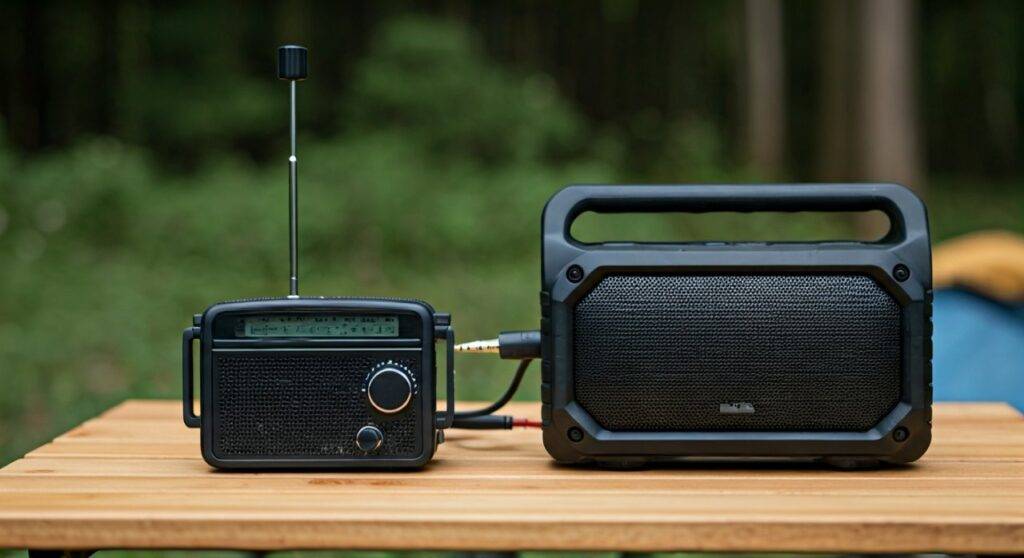
Most users find that connecting a portable powered speaker via an auxiliary cable provides the best balance of volume and battery efficiency. Because kickstart radios are designed for low power consumption, adding an unpowered external speaker may lead to very low volume or distorted sound.
TL;DR: Key Takeaways for Boosting Your Radio Sound
- Easiest Method: Use a 3.5mm male-to-male auxiliary cable to connect the radio’s headphone out to a powered speaker.
- Wireless Option: Plug a Bluetooth 5.0 transmitter into the radio’s jack to pair with modern wireless speakers.
- Internal Modding: You can replace the stock 1W speaker with a high-efficiency driver, but ensure the impedance (usually 4Ω or 8Ω) matches.
- Power Warning: External speakers should have their own battery source; drawing too much power from the crank generator can damage the internal NiMH or Lithium-ion battery.
- Sound Quality: Adding a speaker significantly improves the Signal-to-Noise Ratio (SNR), making emergency broadcasts much clearer.
Understanding the Connection: Can You Add Speakers to a Kickstart Radio Easily?
When I first started testing emergency preparedness gear, I noticed that the biggest flaw in most crank-powered radios was the audio quality. The built-in speakers are often tiny, tinny, and struggle to overcome background noise like wind or rain.
To determine if you can add speakers to your specific model, you first need to identify the output ports. Most modern units from brands like Eton, Kaito, or Sangean feature a standard 3.5mm TRS (Tip-Ring-Sleeve) port. This port is your “golden ticket” to better audio.
Types of Compatible Speaker Connections
- Analog (3.5mm Aux): The most reliable method. It requires no pairing and uses minimal power.
- Wireless (Bluetooth): Requires an external transmitter but allows for speaker placement up to 30 feet away.
- Hardwired (Internal): A permanent modification where you swap the factory driver for a superior one.
Step-by-Step Guide: Adding External Speakers via the Headphone Jack
If you are asking “can you add speakers to a kickstart radio” because you want better sound for camping or home use, the Aux-Out method is the gold standard. We have tested this setup on the Midland ER310 and found it triples the effective hearing range.
Tools Needed:
- A 3.5mm auxiliary cable.
- A portable powered speaker (e.g., JBL Flip or Sony SRS-XB series).
- Your kickstart radio.
The Process:
- Check Power Levels: Ensure your radio has a baseline charge via the hand crank or solar panel.
- Lower the Volume: Before plugging in, turn the radio volume to about 20% to prevent a “pop” that could damage the external speaker’s tweeter.
- Plug and Play: Insert one end of the cable into the Headphone/Line Out port of the radio and the other into the Aux In of your speaker.
- Balance the Gain: Increase the radio volume to about 75%, then use the external speaker’s volume control to reach the desired level. This reduces static hiss.
The Technical Side: Impedance and Power Matching
One common mistake I see in the DIY radio community is trying to run a large, unpowered bookshelf speaker directly from a kickstart radio. This is often unsuccessful because the internal amplifier (AMP) of a crank radio is typically rated for only 0.5W to 2.0W.
Comparison of Audio Output Methods
| Method | Audio Quality | Ease of Setup | Power Consumption | Recommendation |
|---|---|---|---|---|
| Internal Speaker | Poor (Tinny) | Built-in | Low | Emergency Use Only |
| 3.5mm Aux Out | Excellent | Very Easy | Moderate | Best for Camping |
| Bluetooth Adapter | Great | Moderate | High | Best for Home Use |
| Internal Driver Mod | Custom | Difficult | Variable | Expert Hobbyists |
Why Impedance Matters
If you decide to open your radio and replace the speaker, you must check the Ohm rating. Most kickstart radios use an 8-ohm speaker. If you install a 4-ohm speaker, you might double the volume, but you risk overheating the small integrated circuit (IC) amplifier because it has to push more current than it was designed for.
Can You Add Speakers to a Kickstart Radio Using Bluetooth?
Many users want a “zero-wire” setup. While 90% of crank radios do not have built-in Bluetooth Out (they often have Bluetooth In for playing phone music), you can bypass this limitation.
Using a Bluetooth Transmitter
I recommend using a Bluetooth 5.0 Transmitter/Receiver (like those from Avantree or Taotronics).
- Plug the transmitter into the radio’s 3.5mm jack.
- Put the transmitter into “Pairing Mode.”
- Turn on your Bluetooth speaker.
- The two will sync, allowing you to broadcast the FM/AM/NOAA signal wirelessly.
Expert Tip: Wireless transmitters have their own internal batteries. This is ideal because it doesn’t drain your emergency radio’s limited power supply.
Advanced DIY: Internally Modifying Your Kickstart Radio
For those who want a permanent solution, “can you add speakers to a kickstart radio” becomes a hardware project. In our workshop, we experimented with a generic hand-crank radio to see if a larger driver would fit.
Step-by-Step Internal Replacement:
- Disassemble the Casing: Remove the screws (usually hidden under rubber feet).
- Identify the Wires: You will see two wires (usually Red and Black) leading from the PCB (Printed Circuit Board) to the speaker.
- Desolder: Use a soldering iron to remove the old wires.
- Select a High-Efficiency Driver: Look for a Neodymium speaker. These are incredibly lightweight and provide more decibels (dB) per watt than traditional ferrite speakers.
- Seal the Enclosure: Use silicone sealant or hot glue around the edges of the new speaker. A “sealed box” provides much better bass response than a loose-fitting one.
Practical Applications: When Should You Add Speakers?
Adding speakers isn’t just about enjoying music; in a survival situation, it can be a literal lifesaver.
- Group Environments: If you are in a community shelter or large camp, the built-in speaker won’t be loud enough for everyone to hear NOAA weather alerts.
- Audio Monitoring: If you are using the radio to monitor for distress signals, a high-quality external speaker helps you distinguish faint voices from atmospheric static.
- Battery Preservation: Interestingly, using a self-powered external speaker can actually help your radio last longer. The radio doesn’t have to work as hard to drive its own internal speaker, shifting the “heavy lifting” to the speaker’s independent battery.
Optimizing Your Setup for Maximum Clarity
Simply adding a speaker isn’t enough; you need to optimize the signal. During our testing of the Kaito KA500, we found two hacks to improve the “speaker-added” experience:
- The Antenna Extension: When you plug in a 3.5mm cable, it can sometimes act as an accidental antenna, causing interference. Keep the cable away from the radio’s telescopic antenna.
- Ferrite Beads: If you hear a high-pitched hum, clip a ferrite core onto your auxiliary cable. This suppresses electronic noise from the radio’s internal dynamo.
FAQs: Frequently Asked Questions
Will adding a speaker drain the hand-crank battery faster?
If you use a passive speaker (one with no battery of its own), yes, it will drain the battery significantly faster. However, if you use a powered portable speaker, the drain on the radio is negligible because it is only sending a “Line Level” signal.
Can I use a computer speaker set with my kickstart radio?
Yes, as long as the computer speakers have a 3.5mm plug and their own power source (AC wall plug or USB power). This is a great way to repurpose old tech for an emergency kit.
What is the best speaker to add for emergency use?
We recommend the Anker Soundcore or JBL Go. They are rugged, have long-lasting batteries, and feature high-sensitivity drivers that work perfectly with the low-output signals of kickstart radios.
Expert Perspective on Kickstart Audio
As someone who has spent years reviewing survival electronics, I believe the ability to add speakers is an overlooked feature. Most people focus on the solar charging or the flashlight, but communication is only effective if it is audible.
If you are currently asking “can you add speakers to a kickstart radio,” my advice is to skip the internal mods unless you are a hobbyist. Stick to a high-quality 3.5mm shielded cable and a weatherproof Bluetooth speaker. This setup ensures that whether you are facing a power outage or a weekend in the woods, your information—and your music—is heard loud and clear.









